
- Local time
- 4:53 AM
- Messages
- 63
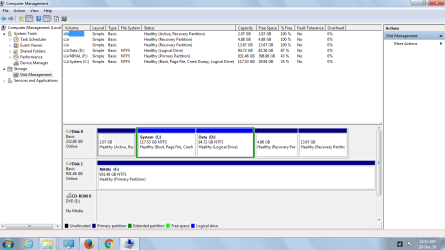
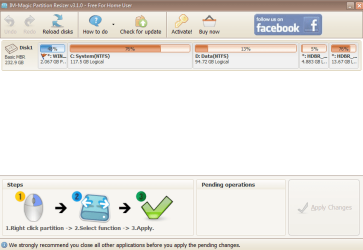
My laptop is having 3 partitions named recovery partition.It showed 100 percent free in disk management .So I used a partition resizer program.Now its displaying all the 3 partitions in it along with my 2 primary partitions.one of them is WINRE partition (2GB),the other one HBDR partition for drivers (4gb),and the other one is HBDR partition for OS(13gb).Now, is there anyway I can view the contents of the recovery partitions??Can i copy it to another drive ?
Attachments
My Computer
At a glance
Windows 7 home basics x64intel core i5 2430M @2.40GHz4gb samsung/hynixintel integrated hd graphics 3000
- Computer type
- PC/Desktop
- Computer Manufacturer/Model Number
- Fujitsu
- OS
- Windows 7 home basics x64
- CPU
- intel core i5 2430M @2.40GHz
- Motherboard
- fujitsu
- Memory
- 4gb samsung/hynix
- Graphics Card(s)
- intel integrated hd graphics 3000
- Sound Card
- realtek HD audio
- Monitor(s) Displays
- lcd
- Hard Drives
- seagate momentus thin 250gb @5400rpm
- Cooling
- air cooling
- Keyboard
- QWERTY
- Mouse
- synaptic touchpad and wireless LOGITECH mouse
- Internet Speed
- upto 2MBps
- Antivirus
- kaspersky
- Browser
- mozilla


