How do you view the contents/folder of the CD in 7

billy7777

New member
Local time
11:32 AM
Messages
3
Quick question...

(FYI.... I do NOT have windows 7 - thats why I am asking this question)

In "Vista" you could click on START then MYCOMPUTER then RIGHT-click on the CD Drive and a menu would come up with the option to "Explore" so you can "browse" the folders and files on the cd.

But in Windows 7... when you Right-click there is no longer the option to "Explore" - what is the equivalent to "browse" the folders and directories on the CD.

Is it just "Open" ?

(I know in Vista if you just try to double click on the CD Drive it trys to to the auto-play)


Thank you.
 

My Computer My Computer

At a glance

vista
OS
vista
Hello billy7777, welcome to Seven Forums!


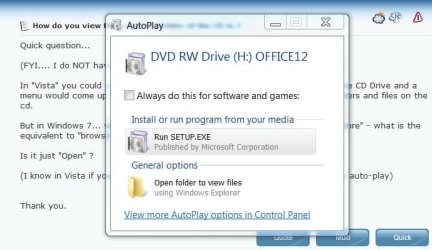
Insert the disk and click "open folder to view ... " in the box that opens.

Capture.JPG
 

My Computer My Computer

At a glance

W 7 64-bit UltimateIntel Q9550 Yorkfield8GB Dominator 8500C5DATI : XFX 5870
Computer Manufacturer/Model Number
* BFK Customs *
OS
W 7 64-bit Ultimate
CPU
Intel Q9550 Yorkfield
Motherboard
ASUS P5Q Pro
Memory
8GB Dominator 8500C5D
Graphics Card(s)
ATI : XFX 5870
Sound Card
Realtek HD Audio 7-1
Monitor(s) Displays
1x 47" LCD HDMI & 3x 26" LCD HDMI
Screen Resolution
1920x1080P & 1920x1200
Hard Drives
1x 80GB Intel X25-M G2 SSD : 1x 500GB & 1x 640GB WD Caviar Black(s)
PSU
Corsair 620HX
Case
Cooler Master RC-690
Cooling
Tuniq Tower 120, 2x 140mm and 3x 120mm case fans
Keyboard
Microsoft 500
Mouse
Razer Diamondback 3G
Internet Speed
14 Mb/s
Other Info
1x Koutech 3Gb/s SATA HDD Hot Swap Rack
But in Windows 7... when you Right-click there is no longer the option to "Explore" - what is the equivalent to "browse" the folders and directories on the CD.

Is it just "Open" ?

It is just "Open", in Windows Vista "Explore" and "Open" where one in the same. The "Explore" option was a relic from the Windows XP days. In Windows XP, if you used "Explore" you would get the file tree, versus "Open" you would have the default task pane. This distinction was dissolved in Windows Vista.
 

My Computer My Computer

At a glance

Windows 10 Pro (x64)Intel Core i7-3930K (3.2GHz - 4.5GHz)4x Samsung 4GB PC3-12800 DDR3 (16GB 1600MHz)Nvidia Geforce GTX 690
Computer type
PC/Desktop
Computer Manufacturer/Model Number
Alienware Aurora ALX R4
OS
Windows 10 Pro (x64)
CPU
Intel Core i7-3930K (3.2GHz - 4.5GHz)
Motherboard
Alienware Aurora-R4 x79
Memory
4x Samsung 4GB PC3-12800 DDR3 (16GB 1600MHz)
Graphics Card(s)
Nvidia Geforce GTX 690
Sound Card
SteelSeries Siberia Elite
Monitor(s) Displays
Dell UltraSharp U3011
Screen Resolution
2560x1600
Hard Drives
Samsung 850 Pro 256 GB, Seagate 1TB Desktop Hybrid HDD, 2x Western Digital 4TB Green HDD
PSU
875W Some Dell PSU <.<
Case
Alienware Aurora ALX
Cooling
Custom Liquid Cooling (EK CPU & GPU blocks) dual EK 480RAD
Keyboard
Logitech G710+ Mechanical
Mouse
Logitech G700s
Internet Speed
Verizon Fios (50 mbps average)
Other Info
Server: Intel NUC D54250WYK: i5-4250U, 16GB, 256 GB mSATA, Windows Server 2012 R2
Thank you for your quick response...

I suggested that too (to a customer using windows 7 with my product- trying to show her how to browse the cd for bonus materials)... but she mentioned that didnt work - perhaps her autoplay is off?

can you right click on the cd and simply select OPEN - will that open the file/folder browser window so you can browse all the files on the cd?
 

My Computer My Computer

At a glance

vista
OS
vista
just noticed your post... logicearth.... thanks!
 

My Computer My Computer

At a glance

vista
OS
vista
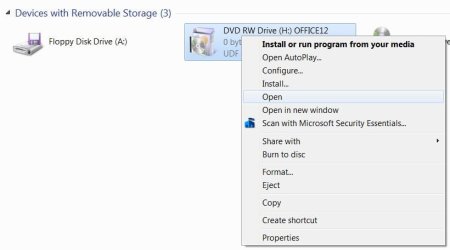
Here's what you get when you right click the drive.

Capture.JPG
 

My Computer My Computer

At a glance

W 7 64-bit UltimateIntel Q9550 Yorkfield8GB Dominator 8500C5DATI : XFX 5870
Computer Manufacturer/Model Number
* BFK Customs *
OS
W 7 64-bit Ultimate
CPU
Intel Q9550 Yorkfield
Motherboard
ASUS P5Q Pro
Memory
8GB Dominator 8500C5D
Graphics Card(s)
ATI : XFX 5870
Sound Card
Realtek HD Audio 7-1
Monitor(s) Displays
1x 47" LCD HDMI & 3x 26" LCD HDMI
Screen Resolution
1920x1080P & 1920x1200
Hard Drives
1x 80GB Intel X25-M G2 SSD : 1x 500GB & 1x 640GB WD Caviar Black(s)
PSU
Corsair 620HX
Case
Cooler Master RC-690
Cooling
Tuniq Tower 120, 2x 140mm and 3x 120mm case fans
Keyboard
Microsoft 500
Mouse
Razer Diamondback 3G
Internet Speed
14 Mb/s
Other Info
1x Koutech 3Gb/s SATA HDD Hot Swap Rack
Try right click -open in new window
 

My Computer My Computer

At a glance

windows 7 Ultimate 64 BitIntel Pentium 4 531, 3000 MHz (15 x 200)3 Gigs DDREVGA e-GeForce 9500 GT
Computer Manufacturer/Model Number
HP Compaq dc7100
OS
windows 7 Ultimate 64 Bit
CPU
Intel Pentium 4 531, 3000 MHz (15 x 200)
Motherboard
HP Compaq dc7100
Memory
3 Gigs DDR
Graphics Card(s)
EVGA e-GeForce 9500 GT
Sound Card
AD1981B(L) @ Intel 82801FB ICH6
Monitor(s) Displays
Acer AL1912 19.5"
Hard Drives
Drive #1 - WDC WD1200BEVS-22LAT0 (111 GB)
Drive #2 - HDT722525DLA380 (232 GB)
Drive #3 - WDC (Model Unknown) (320GB)
PSU
HP 340W Max
Case
HP Slim-Line
Cooling
Standard PSU dual fan,HP CPU side mount cooling,2.5 Case fan
Back
Top