How to view WAB files?

oss279

New member
Local time
8:25 AM
Messages
20
Location
KSA
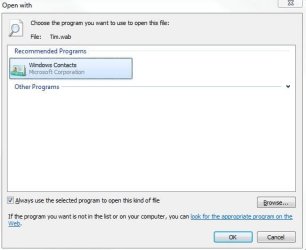
I am unable to view WindowsAddressBook .wab files in Windows7. When i double click it imports it in the Contact folder where as i only want to view the content like in WinXP, we can access the content via Address Book,

Looking forward to replies :) Thnx
 

My Computer

Computer Manufacturer/Model Number
Samsung R480
OS
Windows 7 Ultimate Edition x32
CPU
Core i5 520M @ 2.4Ghz
Motherboard
Intel
Memory
4GB DDR 3
Graphics Card(s)
Nvidia Geforce GT 330M
Monitor(s) Displays
WideScreen 1366*768
Hard Drives
500GB Hitachi @5200RPM
This may be what you need:

WabMail

Not sure will work on 7, but worth a look. A Guy
 

My Computer

Computer type
PC/Desktop
OS
Windows 10 Home x64
CPU
INTEL Core i5-750 Quad-Core 3.37GHz
Motherboard
ASUS P7P55D
Memory
HyperX Fury Black Series 8GB (2 x 4GB) 1866Mhz
Graphics Card(s)
EVGA GeForce GTX 750 Superclocked 1GB 128-Bit GDDR5
Monitor(s) Displays
LG 32MA68HY 32" IPS
Screen Resolution
1920 x 1080
Hard Drives
Samsung 840 Evo 120GB, SEAGATE 500GB Barracuda® 7200.12, SATA 3 Gb/s, 7200 RPM, 16MB cache
PSU
ANTEC TruePower New TP-550, 80 PLUS, 550W
Case
ANTEC Three Hundred Illusion
Cooling
COOLER MASTER Hyper 212 Plus, 4 x 120mm 1 x 140mm Noctua's
Internet Speed
85 + Mbps
Antivirus
Avast
Browser
Vivaldi
You can use windows mail by installing it and double clicking on the *.wab file.

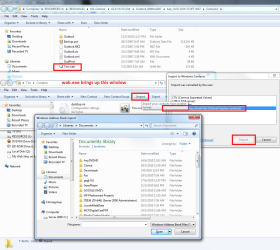
Alternatively you can import it with the wab.exe. Type wab.exe into search or run and press enter. use the IMPORT function to import a previous wab.
 

Attachments

  • wab.JPG
    wab.JPG
    29.2 KB · Views: 405
  • wab2.png
    wab2.png
    103 KB · Views: 798

My Computer

Computer Manufacturer/Model Number
Custom Hack job
OS
Windows 7 Ultimate 64 bit
CPU
Intel(R) Core(TM)2 Quad CPU Q8200 @ 2.33GHz
Motherboard
GigaByte EP45-UD3
Memory
8 GB Kingston
Graphics Card(s)
Nvidia GeForce 9600GT
Sound Card
Soundblaster Audigy
Monitor(s) Displays
AOC x2 22"
Hard Drives
2 x Samsung 500GB (RAID)
2 x Samsung 2TB
1 x WD Green 2TB
1 x Seagate 1TB
1 x Samsung 500GB
PSU
Thermaltake QFan 750W
Case
CM Scout Gaming
Cooling
Coolermaster V10
Keyboard
Microsoft Wireless Keyboard 1000
Mouse
Microsoft Wireless Optical 2000
Internet Speed
320
Other Info
Winfast PVR2000CP
LG DVD-RAM DVD/RW/DL Super Multi
Linksys WMP300Nx2 Wireless Adapter
Thanks Tim for your reply,

Now after following your instructions, it seems that i do not have any import/Export button in My windows7 /Contacts folder.

Do you know any settings/methods in order to bring it?
Btw i am logged in as an admin on Win 7 Ultimate edition
Regards
 

My Computer

Computer Manufacturer/Model Number
Samsung R480
OS
Windows 7 Ultimate Edition x32
CPU
Core i5 520M @ 2.4Ghz
Motherboard
Intel
Memory
4GB DDR 3
Graphics Card(s)
Nvidia Geforce GT 330M
Monitor(s) Displays
WideScreen 1366*768
Hard Drives
500GB Hitachi @5200RPM
Hi oss279,

That's weird that you don't have those buttons as I can't see see a way to disable them (although I'm yet to rule out secpol, gpedit, or regedit; but we'll look at these if all else fails).

Could you post a screen print please?
 

My Computer

Computer Manufacturer/Model Number
Custom Hack job
OS
Windows 7 Ultimate 64 bit
CPU
Intel(R) Core(TM)2 Quad CPU Q8200 @ 2.33GHz
Motherboard
GigaByte EP45-UD3
Memory
8 GB Kingston
Graphics Card(s)
Nvidia GeForce 9600GT
Sound Card
Soundblaster Audigy
Monitor(s) Displays
AOC x2 22"
Hard Drives
2 x Samsung 500GB (RAID)
2 x Samsung 2TB
1 x WD Green 2TB
1 x Seagate 1TB
1 x Samsung 500GB
PSU
Thermaltake QFan 750W
Case
CM Scout Gaming
Cooling
Coolermaster V10
Keyboard
Microsoft Wireless Keyboard 1000
Mouse
Microsoft Wireless Optical 2000
Internet Speed
320
Other Info
Winfast PVR2000CP
LG DVD-RAM DVD/RW/DL Super Multi
Linksys WMP300Nx2 Wireless Adapter
You can find my screen shot b/m. Thanks for the help :)
Untitled.png
 

My Computer

Computer Manufacturer/Model Number
Samsung R480
OS
Windows 7 Ultimate Edition x32
CPU
Core i5 520M @ 2.4Ghz
Motherboard
Intel
Memory
4GB DDR 3
Graphics Card(s)
Nvidia Geforce GT 330M
Monitor(s) Displays
WideScreen 1366*768
Hard Drives
500GB Hitachi @5200RPM
Ok, I'm looking into it now. In the meantime, please check that you have the latest Windows Live essentials (including live mail) installed. I'm now wondering if it might be an enhancement that comes with Office 2010 as I have that installed on my Win7 Ultimate Box.

Anyway, I'll let you know if I discover more.

EDIT - Lets also restore the folder defaults. From the TOOLS menu, select OPTIONS. on teh GENERAL tab click the RESTORE DEFAULTS button.
 
Last edited:

My Computer

Computer Manufacturer/Model Number
Custom Hack job
OS
Windows 7 Ultimate 64 bit
CPU
Intel(R) Core(TM)2 Quad CPU Q8200 @ 2.33GHz
Motherboard
GigaByte EP45-UD3
Memory
8 GB Kingston
Graphics Card(s)
Nvidia GeForce 9600GT
Sound Card
Soundblaster Audigy
Monitor(s) Displays
AOC x2 22"
Hard Drives
2 x Samsung 500GB (RAID)
2 x Samsung 2TB
1 x WD Green 2TB
1 x Seagate 1TB
1 x Samsung 500GB
PSU
Thermaltake QFan 750W
Case
CM Scout Gaming
Cooling
Coolermaster V10
Keyboard
Microsoft Wireless Keyboard 1000
Mouse
Microsoft Wireless Optical 2000
Internet Speed
320
Other Info
Winfast PVR2000CP
LG DVD-RAM DVD/RW/DL Super Multi
Linksys WMP300Nx2 Wireless Adapter
WAB.exe opens the default CONTACTS folder, but maybe it doesn't think that it's the default contacts folder. See if dropping this desktop.ini file inside the contacts folder will help (you need to extract it from the ZIP file first)

you may need to log on and off again first.

You also might want to try to open the contacts from the CMD shell.
  1. Search for CMD
  2. Right Click and select Run as Administrator
  3. A black screen will open, on this screen type CD %programfiles%\windows mail
  4. Then Type wab /contact %userprofile%\Contacts\YOUR_WAB_FILE.wab

On a second look, even if we get the other buttons to display, I think it's going to import them anyway, in all of my windows 7 testing this is what happens.

If you decide to import, a not so well known easy way is with the WABMIG.EXE utility. Try it from the Search or Run. Is there a problem with importing and then having two contact lists in your mail client?
 

Attachments

Last edited:

My Computer

Computer Manufacturer/Model Number
Custom Hack job
OS
Windows 7 Ultimate 64 bit
CPU
Intel(R) Core(TM)2 Quad CPU Q8200 @ 2.33GHz
Motherboard
GigaByte EP45-UD3
Memory
8 GB Kingston
Graphics Card(s)
Nvidia GeForce 9600GT
Sound Card
Soundblaster Audigy
Monitor(s) Displays
AOC x2 22"
Hard Drives
2 x Samsung 500GB (RAID)
2 x Samsung 2TB
1 x WD Green 2TB
1 x Seagate 1TB
1 x Samsung 500GB
PSU
Thermaltake QFan 750W
Case
CM Scout Gaming
Cooling
Coolermaster V10
Keyboard
Microsoft Wireless Keyboard 1000
Mouse
Microsoft Wireless Optical 2000
Internet Speed
320
Other Info
Winfast PVR2000CP
LG DVD-RAM DVD/RW/DL Super Multi
Linksys WMP300Nx2 Wireless Adapter
Back
Top