How to wipe out everything on computer for reinstallation of Windows 7

Did you install the two drivers from Dell, Atheros and Broadcom?

Atheros is the wireless driver if you have wireless.

Broadcom is the Ethernet driver.

Extract the files to Downloads, rightclick on Setup (.exe) file to Run as Administrator, watch the connection icon in bottom-right System Tray. You may need to Connect to Network.
 
Okay the internet works now after installing those 2 devices. But don't i still need to install drivers for the other stuff? I basically just want what is necessary and don't want any useless bloatware. How do i know which drivers to install?
 

My Computer My Computer

At a glance

Windows 7
OS
Windows 7
Generally, don't worry about drivers if everything works OK.

What doesn't work correctly?? Sound? Monitor? Printer?

Windows automatically installed a bunch of drivers when you did the installation.

If all of your stuff works OK, don't worry about any more drivers.

Do you see any exclamation points in Device Manager?

I'd concentrate on going to Windows Update and getting all of the updates marked "important" or "critical".

Make sure your anti-virus is running and updated.
 

My Computer My Computer

At a glance

Windows 7 Home Premium SP1, 64-bitIntel Skylake i5-6600K, not overclocked8 GB HyperX DDR4-2666 (2 x 4 GB)none; graphics are integrated on CPU
Computer type
PC/Desktop
Computer Manufacturer/Model Number
Ignatz Special; 4 speed manual gearbox; factory air conditioning; one of one
OS
Windows 7 Home Premium SP1, 64-bit
CPU
Intel Skylake i5-6600K, not overclocked
Motherboard
AsRock Z170M Extreme 4, micro ATX
Memory
8 GB HyperX DDR4-2666 (2 x 4 GB)
Graphics Card(s)
none; graphics are integrated on CPU
Sound Card
onboard: Realtek ALC1150; external: USB Behringer UF0-202
Monitor(s) Displays
Dell S2340M 23 inch IPS
Screen Resolution
1600 x 900
Hard Drives
System: Crucial MX100 series SSD, 128 GB;
Data: Samsung Spinpoint 103SJ, 1 TB;
Backup: WD Caviar Green WD30EZRX-00D8PB0, 3 TB
PSU
Rosewill SilentNight 500 watt fanless, semi-modular
Case
Antec Solo II
Cooling
Noctua NH-U12S; Noctua F12 intake, Noctua S12A exhaust
Keyboard
Microsoft 200 6JH-00001 USB
Mouse
Dell or Microsoft optical wired; USB
Antivirus
Microsoft Security Essentials and Malwarebytes Premium
Browser
Pale Moon
Other Info
All fans PWM; speeds at idle: CPU circa 500 rpm; intake circa 600 rpm; exhaust circa 600 rpm; CPU temps 27 idle and 47 C load in a warm room (27 C/81 F) when running Intel Extreme Tuning Utility stress test.
You want to get online so that you can download and install all of the Windows Updates, especially including optional Updates which will have the latest drivers for your system.

Once you have installed all of the Updates (which you'll know because no more will be offered when you check again) look in Device manager for any missing drivers those import them from the Support Downloads webpage for your tag number.

If you don't want bloatware then I will also repeat again to not install any applications that you don't rely upon.

Now are you going to ask again about the drivers and applications?
 
Last edited:
At the moment, no i dont have anymore exclamation marks on device manager. There was one which was intel management engine interface but i just searched for update and it has no more exclamation mark now.

So does that mean i'm done and don't have to create the partition anymore?

Only thing i see now is an X which tells me to download an antivirus program. I always used avast antivirus the freeone. But i was reading and it says just download microsoft essentials b/c its lightweight and better?
 

My Computer My Computer

At a glance

Windows 7
OS
Windows 7
At the moment, no i dont have anymore exclamation marks on device manager. There was one which was intel management engine interface but i just searched for update and it has no more exclamation mark now.

So does that mean i'm done?

Have you gone to Windows Update as Greg asked you to do?

Do you have Windows SP 1 installed?

You aren't nearly done if you haven't done that.

Get Microsoft Security Essentials. That is the FIRST thing you should do.

Quit worrying about partitions. You are done with partitions. Period. Full stop.
 

My Computer My Computer

At a glance

Windows 7 Home Premium SP1, 64-bitIntel Skylake i5-6600K, not overclocked8 GB HyperX DDR4-2666 (2 x 4 GB)none; graphics are integrated on CPU
Computer type
PC/Desktop
Computer Manufacturer/Model Number
Ignatz Special; 4 speed manual gearbox; factory air conditioning; one of one
OS
Windows 7 Home Premium SP1, 64-bit
CPU
Intel Skylake i5-6600K, not overclocked
Motherboard
AsRock Z170M Extreme 4, micro ATX
Memory
8 GB HyperX DDR4-2666 (2 x 4 GB)
Graphics Card(s)
none; graphics are integrated on CPU
Sound Card
onboard: Realtek ALC1150; external: USB Behringer UF0-202
Monitor(s) Displays
Dell S2340M 23 inch IPS
Screen Resolution
1600 x 900
Hard Drives
System: Crucial MX100 series SSD, 128 GB;
Data: Samsung Spinpoint 103SJ, 1 TB;
Backup: WD Caviar Green WD30EZRX-00D8PB0, 3 TB
PSU
Rosewill SilentNight 500 watt fanless, semi-modular
Case
Antec Solo II
Cooling
Noctua NH-U12S; Noctua F12 intake, Noctua S12A exhaust
Keyboard
Microsoft 200 6JH-00001 USB
Mouse
Dell or Microsoft optical wired; USB
Antivirus
Microsoft Security Essentials and Malwarebytes Premium
Browser
Pale Moon
Other Info
All fans PWM; speeds at idle: CPU circa 500 rpm; intake circa 600 rpm; exhaust circa 600 rpm; CPU temps 27 idle and 47 C load in a warm room (27 C/81 F) when running Intel Extreme Tuning Utility stress test.
I don't see the Words..... Windows SP 1 on that page. Can you tell me where this is at specifically?


I also clicked on windows update and i see there are 96 important updates are available, 2 are optional.

93 important updates selected, 280-284.7mb.
 

My Computer My Computer

At a glance

Windows 7
OS
Windows 7
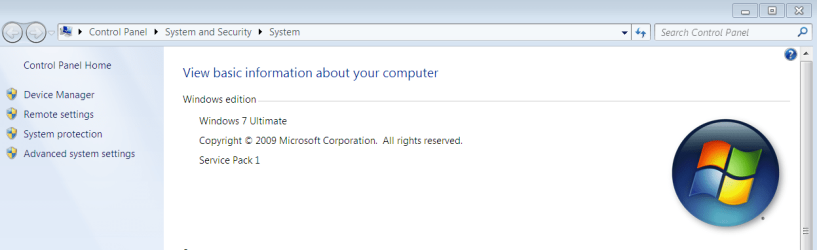
Does it say Service Pack 1 at Computer>properties?
props.PNG click image to enlarge

How many rounds of Windows updates (Important and Optional) have you completed? Did you notice if drivers were included in optional Updates? Sounds like they were.

Download and install: Microsoft Security Essentials
 
Greg, I don't see service pack 1 after i click properties.

All i see are

Windows 7 home premium
2009

4.9 WEI
My processor statistics on this page

And windows is activated with the product id.


I'm going to do the windows update now with the 93 updates selected. Previously i had done just a few updates when i restarted my desktop.
 

My Computer My Computer

At a glance

Windows 7
OS
Windows 7
There are going to be many updates both Important and Optional which should all be selected and installed. You can do other things while they are installing, but when each set completes you'll need to do the reboot and then check again.

Eventually it will offer SP1 and then even more updates.

This could have been avoided by using an installer with SP1 as others were trying to tell you before: Win7 Home Premium x64 w/SP1 English Official ISO download.
You can burn this to DVD using Windows 7 USB-DVD Download Tool to use if you need it for Repairs, especially a Repair Install
 
Also downloading the microsoft essential now and installing it.
 

My Computer My Computer

At a glance

Windows 7
OS
Windows 7
okay i downloaded all those windows update. I click computer, right click properties, i still don't see the windows sp 1. I don't see that labeled anywhere.
 

My Computer My Computer

At a glance

Windows 7
OS
Windows 7
Windows Updates will deliver it when ready - sometimes it waits a day or two.

Are you going back to Check for Updates after reboots?

How is overall performance when browsing the internet or through files, installing Programs?

Did you follow any of the steps which were offered to install and set up a perfect clean reinstall? Reinstalling Windows 7
 
Windows Update will not even offer the SP 1 to you until you have installed a bunch of updates.

Reboot and go back to Windows Update and see what else it offers you. Keep going back until it eventually offers SP 1.

Get Microsoft Security Essentials running and updating.
 

My Computer My Computer

At a glance

Windows 7 Home Premium SP1, 64-bitIntel Skylake i5-6600K, not overclocked8 GB HyperX DDR4-2666 (2 x 4 GB)none; graphics are integrated on CPU
Computer type
PC/Desktop
Computer Manufacturer/Model Number
Ignatz Special; 4 speed manual gearbox; factory air conditioning; one of one
OS
Windows 7 Home Premium SP1, 64-bit
CPU
Intel Skylake i5-6600K, not overclocked
Motherboard
AsRock Z170M Extreme 4, micro ATX
Memory
8 GB HyperX DDR4-2666 (2 x 4 GB)
Graphics Card(s)
none; graphics are integrated on CPU
Sound Card
onboard: Realtek ALC1150; external: USB Behringer UF0-202
Monitor(s) Displays
Dell S2340M 23 inch IPS
Screen Resolution
1600 x 900
Hard Drives
System: Crucial MX100 series SSD, 128 GB;
Data: Samsung Spinpoint 103SJ, 1 TB;
Backup: WD Caviar Green WD30EZRX-00D8PB0, 3 TB
PSU
Rosewill SilentNight 500 watt fanless, semi-modular
Case
Antec Solo II
Cooling
Noctua NH-U12S; Noctua F12 intake, Noctua S12A exhaust
Keyboard
Microsoft 200 6JH-00001 USB
Mouse
Dell or Microsoft optical wired; USB
Antivirus
Microsoft Security Essentials and Malwarebytes Premium
Browser
Pale Moon
Other Info
All fans PWM; speeds at idle: CPU circa 500 rpm; intake circa 600 rpm; exhaust circa 600 rpm; CPU temps 27 idle and 47 C load in a warm room (27 C/81 F) when running Intel Extreme Tuning Utility stress test.
okay so i updated all those updates. When it was updating... i saw that windows sp1 and something to that effect when it was installing. Is that what you guys mean?
 

My Computer My Computer

At a glance

Windows 7
OS
Windows 7
I just checked my update files... like theres a whole bunch that is my history and i do see a few with the sp1. Is that what you guys meant?

Because if not, i don't see sp1 when i click on properties after computer.
 

My Computer My Computer

At a glance

Windows 7
OS
Windows 7
Again: It may wait a day before offering SP1. Just keep opening Updates and Checking for Updates.

Copy your files in and install a few programs, run though some of your computer routine to see how performance feels. Watch for all of the functions you are accustomed to from your computer to make sure you don't need any additional software from the Dell site.
 
Greg, when i click my programs all i have are these 5 at the moment.

Broadcom Nextextreme-I Netlink driver and management
Microsoft.net framework 4 cliente prfile
microsft security essentials
nvidia graphics driver 275.33
nvidia update 1.3.5


I remembered when i always install it, i would have a ton of other stuff here. Are all 5 of these necessary programs?

And i don't have to bother downloading any drivers on the dell site right since i don't need useless programs? I really want my cpu to not lag.
 

My Computer My Computer

At a glance

Windows 7
OS
Windows 7
You only need the programs that you rely upon yet you continue to ask us which programs to install. What programs are missing that you use? Install those.

You said earlier there are no missing Drivers in Device Manager. So why do you keep asking about drivers?

Do you use Works or another word processor? You may want to install Works from your Apps disk if you rely on it, along with any other programs on there that you rely upon.
 
Last edited:
Greg, there are no missing drivers on device manager. But i just thought because there were so many things i downloaded from previous reinstalls... as in the utility disk... i thought there had to be more stuff needed for my desktop.

I have the wordperfect cd with me already.
 

My Computer My Computer

At a glance

Windows 7
OS
Windows 7
Back
Top