How to zoom a specific application's window ???

darkman088

New member
Local time
6:54 AM
Messages
4
Hello,

I have an application, that has fairly small fonts and no option to increase the font size.
So I thought, that maybe there is a way to zoom the window of that application on the
screen!!
I quickly found several apps, promising to aid in doing that, but soon my disappointment
was quite big, as they were zooming the entire screen (and I couldn't see the entire window
of a maximized application, which I have open in parallel) or just an area around the mouse
or I had to specify which coordinates on the screen to zoom (how annoying can that be ?!?).
And I wasn't able to find an app, which would just say - click on the window you want me to
zoom in to and that's all...
Please kindly help me !! Thanks!
 

My Computer My Computer

Computer type
PC/Desktop
OS
Windows 7 Ultimate 64-bit
Welcome darkman088 to the forum.
Try this.

Start Orb and type in magnifier. You will get Windows built in magnifier.

I use it a lot. I use a selected button on my mouse to activate it when needed.
You can adjust the magnification from 100% to over 1000% but not much else.

It magnifies the whole page.
 

My Computer My Computer

Computer type
PC/Desktop
Computer Manufacturer/Model Number
Home made Desktop
OS
Windows 10 Pro. 64/ version 1709 Windows 7 Pro/64
CPU
Intel i7-6800K @ 4.3
Motherboard
ASUS X-99 Deluxe II
Memory
Corsair Platinum 16 gig @2400
Graphics Card(s)
EVGA GTX 1070 OC
Monitor(s) Displays
Asus 27" LED LCD/VE278Q
Screen Resolution
1920-1080 or 1280-720 HDMI
Hard Drives
INTEL SSD 730-240 Gb Sata 3.0/
PSU
EVGA Platium 1200W
Case
Phanteks Luxe Tempered Glass 8 fans/ one radiator
Cooling
XSPC/ Water Cooled CPU
Keyboard
Das 4 Professional
Mouse
Logitech M705/MX Anywhere 2-S
Internet Speed
100 mbits
Antivirus
Microsoft Security Essentials/ Malwarebytes Premium 3.0/ SAS
Browser
I.E. 11 default/Firefox/ ISP Time Warner Cable/Spectrum
Other Info
LG BluRay Burner/
Sound system-KLipsch-THX/
Icy Dock ssd Hot Swap bays.
Thank you for replying, but I have been playing a bit with that, and it is exactly what I do NOT want.
Once zoomed in, the entire desktop gets screwed up! And I need to zoom only that very specific window
of that very specific application...
 

My Computer My Computer

Computer type
PC/Desktop
OS
Windows 7 Ultimate 64-bit
Welcome to Seven Forums darkman088. Layback Bear gave you good advice, but you need a bit more info. A keyboard shortcut

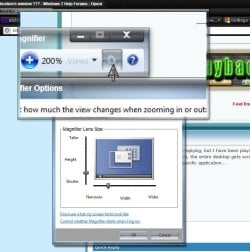
CTRL + ALT + L Will bring up a lens display view, this is what you'd want. Click on the gear icon to adjust the lens size.

Mag.jpg

You might also have a play with Zoomit by Sysinternals

ZoomIt

A Guy
 

My Computer My Computer

Computer type
PC/Desktop
OS
Windows 10 Home x64
CPU
INTEL Core i5-750 Quad-Core 3.37GHz
Motherboard
ASUS P7P55D
Memory
HyperX Fury Black Series 8GB (2 x 4GB) 1866Mhz
Graphics Card(s)
EVGA GeForce GTX 750 Superclocked 1GB 128-Bit GDDR5
Monitor(s) Displays
LG 32MA68HY 32" IPS
Screen Resolution
1920 x 1080
Hard Drives
Samsung 840 Evo 120GB, SEAGATE 500GB Barracuda® 7200.12, SATA 3 Gb/s, 7200 RPM, 16MB cache
PSU
ANTEC TruePower New TP-550, 80 PLUS, 550W
Case
ANTEC Three Hundred Illusion
Cooling
COOLER MASTER Hyper 212 Plus, 4 x 120mm 1 x 140mm Noctua's
Internet Speed
85 + Mbps
Antivirus
Avast
Browser
Vivaldi
Hello and thanks for your replies !!
I have been playing with the lens of Magnifier and it is very cumbersome. It behaves like a real lens, meaning, that when you reach the edge of the window with the edge of the lens, the lens is showing a different area of the window, it is extremely unprecise and unhandy - typically microsoft... It looks nice, but it is not useful !!
I have also played with Sysinternals. I didn't like it, I don't remember exactly, as it is already a week ago, but I think that it crashed, once I tried to set it to zoom only an area of the screen.
What I expect, instead, is just to point a window, and that the program would automatically find the corners of that window and zoom it let's say by 25%. I am not a developer, only have studied it for a while at the university, but it can't be THAT difficult to get the coordinates of the corners of a window !!! And nobody ever thought of that... Bearing in mind today's billions of existing apps, I can't believe it !!!
 

My Computer My Computer

Computer type
PC/Desktop
OS
Windows 7 Ultimate 64-bit
WindowWatcher

Possibly you could take a look at this: WindowWatcher | Airesoft

It gets a clean bill of health on VirusTotal.

Warning: I've not tried it or tested it so I've got no idea if it actually works. Instructions state that Aero and DWM must be enabled.
 
Last edited:

My Computer My Computer

Computer type
Laptop
Computer Manufacturer/Model Number
ASUS
OS
Microsoft Windows 7 Home Premium 64-bit 7601 Multiprocessor Free Service Pack 1
CPU
AMD C-60 APU with Radeon(tm) HD Graphics
Motherboard
ASUSTeK COMPUTER INC. X501U
Memory
4.00 GB
Graphics Card(s)
AMD Radeon HD 6290 Graphics
Sound Card
(1) AMD High Definition Audio Device (2) Realtek High Defi
Screen Resolution
1366 x 768 x 32 bits (4294967296 colors) @ 60 Hz
Hard Drives
Hitachi HTS545050A7E380 SATA Disk Device
Antivirus
Comodo CIS & FW, SecureAplus App Whitelisting, Threatfire
Browser
Cyberfox 64bit, Opera 64bit, Airfox
Other Info
Spy-The-Spy, HitmanPro.Alert, Norton Connect Safe, MJRegWatcher, BitDefender TrafficLight, Voodoo Shield, Zemana AntiMalware
Try Resize Enable

http://www.digitallis.co.uk/pc/downloads.html

Portable, just extract it to a folder somewhere, click on the ResizeEnableRunner.exe. It sits in the system tray until you right click to exit. Allows most windows to be resized. If the program is well written, it should expand to fill the extra space. Worked on CPU-Z which is normally not resizeable. If it doesn't appear to be working, click on the icon in the system tray, and give it a moment.

A Guy
 

My Computer My Computer

Computer type
PC/Desktop
OS
Windows 10 Home x64
CPU
INTEL Core i5-750 Quad-Core 3.37GHz
Motherboard
ASUS P7P55D
Memory
HyperX Fury Black Series 8GB (2 x 4GB) 1866Mhz
Graphics Card(s)
EVGA GeForce GTX 750 Superclocked 1GB 128-Bit GDDR5
Monitor(s) Displays
LG 32MA68HY 32" IPS
Screen Resolution
1920 x 1080
Hard Drives
Samsung 840 Evo 120GB, SEAGATE 500GB Barracuda® 7200.12, SATA 3 Gb/s, 7200 RPM, 16MB cache
PSU
ANTEC TruePower New TP-550, 80 PLUS, 550W
Case
ANTEC Three Hundred Illusion
Cooling
COOLER MASTER Hyper 212 Plus, 4 x 120mm 1 x 140mm Noctua's
Internet Speed
85 + Mbps
Antivirus
Avast
Browser
Vivaldi
Back
Top