how to

vikrantsjs

New member
Local time
3:54 AM
Messages
69
Location
Kasganj
can you answer some questions.
1. can u tell from where i can run windows vista and linux in VMWARE.

2. HOW CAN i increase RAM ON MY XP MODE [WHICH IS CURRENTLY 256 MB]
if VMWARE is not running , can i use that amount of ram in windows 7 or it is reserved for xp mode.

3. how can i increase
no. of core virtual window run

4. when i open my computer in xp mode
then it shows only 1 drive.
can i see data on my other drive
 

My Computer

Computer Manufacturer/Model Number
compaq cq62
OS
windows 7
CPU
2.3
Memory
2 GB DDR3
Monitor(s) Displays
15.6"
Screen Resolution
1366*768
Hard Drives
320 GB
Internet Speed
BROADBAND
Other Info
PROCESSOR - I5, 320 GB HDD
can you answer some questions.
1. can u tell from where i can run windows vista and linux in VMWARE.

2. HOW CAN i increase RAM ON MY XP MODE [WHICH IS CURRENTLY 256 MB]
if VMWARE is not running , can i use that amount of ram in windows 7 or it is reserved for xp mode.

3. how can i increase
no. of core virtual window run

4. when i open my computer in xp mode
then it shows only 1 drive.
can i see data on my other drive

Hallo ha,

Unsure about the first question but...

2. Go into Windows Virtual PC in the start menu, choose virtual machines. In the new window, make sure that XP mode is in a 'shut down' status, right click on XP mode and choose settings. Under memory, change the amount desired (make sure its no more 2GB as it will give warning message (Think its 2 GB or 2.5Gb).

I would say as well, yes it should be fine to set this amount of ram under virtual machines and it should'nt affect VMWare, just make sure you shut down XP mode properly just incase

3. I believe this would be an affinity setting in task manager as you cannot set this in virtual machines settings. May be try MSCONFIG whilst in XP mode and see if that helps. If not use this tutorial to set the affinty - http://www.sevenforums.com/tutorials/83632-processor-affinity-set-applications.html

Sorry i cant be of anymore help, but if someone else could jump in help please.

Lucky
 

My Computer

Computer Manufacturer/Model Number
The HAFmeister (Custom)
OS
Windows 7 Ultimate x64 RTM + SP1
CPU
Intel Core i7 950 3.06GHZ (OC'd to 3.99Ghz)
Motherboard
Asus Rampage III Extreme x58 SATA 6GB & USB 3.0
Memory
6GB OCZ Reaper HPC Edition PC3-16000 (set 1606Mhz 8-8-8-26)
Graphics Card(s)
EVGA Nvidia Geforce GTX 570
Sound Card
Creative SB X-Fi Titanium Fatal1ty Professional Series
Monitor(s) Displays
Samsung SM2433BW 24" Widescreen Monitor
Screen Resolution
1920x1200
Hard Drives
Western Digital Caviar Black 500GB 32Mb Buffer SATA II
Western Digital Caviar Black 750GB 32Mb Buffer SATA II
Western Digital Caviar Blue 500GB 16Mb Buffer SATA II
Western Digital My Book Essential Edition 750GB USB
Samsung Spinpoint 2TB SATA II
PSU
Thermaltake Toughpower 1200w (Modular)
Case
CoolerMaster HAF-932
Cooling
Zalman Reserator XT and ZM-WB5 Plus - GPU uses Stock coolers
Keyboard
Logitech G510
Mouse
Logitech G9 Gaming Mouse
Internet Speed
3MB Profile - 350-400kbs (Real-Speed)
Other Info
IcyBox Hot-Swap Bay,
Logitech G27 Steering Wheel,
Xbox 360 Wirless Elite Controller with Microsoft Reciever and
Play & Charge Kit,
Belkin USB Wireless Adaptor,
GAME Generic Controller (Playstation Looky-Likey),
Epson SX125 All-in-One.
can you answer some questions.
1. can u tell from where i can run windows vista and linux in VMWARE.

2. HOW CAN i increase RAM ON MY XP MODE [WHICH IS CURRENTLY 256 MB]
if VMWARE is not running , can i use that amount of ram in windows 7 or it is reserved for xp mode.

3. how can i increase no. of core virtual window run

4. when i open my computer in xp mode
then it shows only 1 drive.
can i see data on my other drive
1. In regard to Windows Vista, you can obtain this either via Retail (if there are any copies left) or via MSDN. There are also other places that sell it or if you already have a copy, this is a non-issue. As far as Linux, depending on the distro (verison of Linux), you can generally obtain it from their website.

2. (Already answered above)

3. In VMware, when setting up the VM, it will allow you to choose the number of CPUs you want to use for it. As for Windows Virtual PC, I'm not sure if it supports more than one CPU but if it does, you would see it in the settings where you adjust the RAM.

4. Other drive. What other drive? Is this a flash drive or are you referring to one of the drives on your physical PC?
 

My Computer

OS
Windows 7 Ultimate x64 SP1
CPU
Intel Core i3 530 2.93 Ghz Clarkdale
Motherboard
ASRock P55 PRO/USB3 LGA 1156
Memory
4 GB OCZ DDR3 1600 (PC12800) Low Voltage Desktop Memory
Graphics Card(s)
Nvidia GeForce GTX 550 Ti with 1 GB of RAM
Sound Card
Realtek HD ALC892
Monitor(s) Displays
20'' eMachines E202HDbmd Glare Panel Widescreen
Screen Resolution
1600 x 900
Hard Drives
Western Digital 1 TB Caviar Black Edition (7200 RPM) SATA
Hitachi Deskstar 500 GB (7200 RPM) SATA
Samsung SpinPoint 400 GB (7200 RPM) SATA
PSU
Rosewill Xtreme Series RX750-D-B ATX12V v2.2 & EPS12V (750W)
Case
Cooler Master Centurion 534 RC-534-KKN2-GP Mid-Tower
Cooling
Standard Case Fans and Stock CPU Heatsink
Keyboard
Microsoft Wireless Optical Desktop Elite
Mouse
Microsoft Wireless Optical Desktop Elite
Internet Speed
7.1 Mbps Verizon DSL
Mai samjha nahi.

If you have the ISO image for the operating system, you can install your virtual pc from there. Otherwise, you can prepare the virtual pc and load the OS from the optical drive. Very easy to do.

The configuration is where you specify the amount of memory you are going to allocate, drive space, etc.
 

My Computer

Computer Manufacturer/Model Number
Dell and Custom
OS
Systems 1 and 2: Windows 7 Enterprise x64, Win 8 Developer
CPU
System 1: i7 [email protected], System 2: AMD FX-4100 Zambezi 3.6G
Motherboard
System 1:Dell 06NWYK System 2: ASUS M5A97 AM3+
Memory
System 1: 8GB System 2: 8GB
Graphics Card(s)
System 1: ATI FirePro V4800 System 2: Radeon HD 6850
Sound Card
System 1: onboard System 2: onboard
Monitor(s) Displays
System1: Viewsonic HDMI 24"
Screen Resolution
System 1: 1920x1080 System 2: 1920x1080
Hard Drives
System 1: Mirrored .5B drives System 2: Seagate Barracuda ST1000DM003 1TB 7200 RPM 64MB Cache SATA 6.0Gb/s
Case
System 1: Dell System 2: Cooler Master
Internet Speed
10 MBPS
can you answer some questions.
1. can u tell from where i can run windows vista and linux in VMWARE.

2. HOW CAN i increase RAM ON MY XP MODE [WHICH IS CURRENTLY 256 MB]
if VMWARE is not running , can i use that amount of ram in windows 7 or it is reserved for xp mode.

3. how can i increase no. of core virtual window run

4. when i open my computer in xp mode
then it shows only 1 drive.
can i see data on my other drive
1. In regard to Windows Vista, you can obtain this either via Retail (if there are any copies left) or via MSDN. There are also other places that sell it or if you already have a copy, this is a non-issue. As far as Linux, depending on the distro (verison of Linux), you can generally obtain it from their website.

2. (Already answered above)

3. In VMware, when setting up the VM, it will allow you to choose the number of CPUs you want to use for it. As for Windows Virtual PC, I'm not sure if it supports more than one CPU but if it does, you would see it in the settings where you adjust the RAM.

4. Other drive. What other drive? Is this a flash drive or are you referring to one of the drives on your physical PC?

i reffered to physical drive on my PC
 

My Computer

Computer Manufacturer/Model Number
compaq cq62
OS
windows 7
CPU
2.3
Memory
2 GB DDR3
Monitor(s) Displays
15.6"
Screen Resolution
1366*768
Hard Drives
320 GB
Internet Speed
BROADBAND
Other Info
PROCESSOR - I5, 320 GB HDD
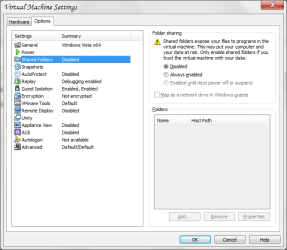
In XP Mode, the drives should automatically show up. If not, go to the settings and under the Integration Features, ensure the drives you need to have access to are checked off. In VMware, you can do this by going to the Virtual Machine's options and enabling "Shared Folders". You can then have them mapped as network drives for Windows guests by hitting the checkbox in that window and choosing the folders you need. I've attached a screenshot of the option in VMware Workstation; it's identical in VMware Player.

Additionally, I checked and apparently, in XP Mode, there is no way to increase the number of CPUs as the program doesn't seem to support this functionality.
 

Attachments

  • VMware Shared Folders.png
    VMware Shared Folders.png
    20.9 KB · Views: 8

My Computer

OS
Windows 7 Ultimate x64 SP1
CPU
Intel Core i3 530 2.93 Ghz Clarkdale
Motherboard
ASRock P55 PRO/USB3 LGA 1156
Memory
4 GB OCZ DDR3 1600 (PC12800) Low Voltage Desktop Memory
Graphics Card(s)
Nvidia GeForce GTX 550 Ti with 1 GB of RAM
Sound Card
Realtek HD ALC892
Monitor(s) Displays
20'' eMachines E202HDbmd Glare Panel Widescreen
Screen Resolution
1600 x 900
Hard Drives
Western Digital 1 TB Caviar Black Edition (7200 RPM) SATA
Hitachi Deskstar 500 GB (7200 RPM) SATA
Samsung SpinPoint 400 GB (7200 RPM) SATA
PSU
Rosewill Xtreme Series RX750-D-B ATX12V v2.2 & EPS12V (750W)
Case
Cooler Master Centurion 534 RC-534-KKN2-GP Mid-Tower
Cooling
Standard Case Fans and Stock CPU Heatsink
Keyboard
Microsoft Wireless Optical Desktop Elite
Mouse
Microsoft Wireless Optical Desktop Elite
Internet Speed
7.1 Mbps Verizon DSL
Back
Top