How2 hide a folder without using the Windows "hidden" attribute and...

pintree3

Mich
Member
VIP
Local time
9:49 PM
Messages
394
Location
Canada
How2 hide a folder without using the Windows "hidden" attribute and...

A search for how to hide a folder (and subfolders and content) shows 3d party software, or using the hidden attribute in Windows itself. Putting aside 3d party stuff for now what I came upon was this method:
From cmd. Type “CD C:abcd” (replace “abcd” with the name of the folder you want to hide.)2. Now type “attrib file +s +h” and replace “file” with the name of the actual file name you would like to hide.

I tried this method which seemed ideal to me and nothing happened at all I could still see my folder. I assumed using “attrib file +s +h" without the quotes but with spaces shown

Here's what's important: what happens to the hidden folder when i delete a visible folder above it in the folder tree? Will the hidden folder be backed up? Will it be scanned by my AV program? Can the files in the folder be recovered in an emergency such as a system crash?

Also: The hidden file attribute can not be used everything must be visible and accessible except for the hidden folder.
And here's something which I would like but which may not be possible. The folder in question (with other folders within it) is huge about 700GB. Assuming that on the drive where this 700GB folder sits are other folders totaling 50GB. In a 1TB drive this means there is now about 250GB free space. Would it be possible, once hidden, for the drive to show it actually has 950GB free space. In other words if the folder is hidden but one sees that there is only 250GB of free space left then this could raise suspicion.
 

My Computer

Computer type
PC/Desktop
Computer Manufacturer/Model Number
OEM Designed by me :-)
OS
Windows 7 Home Premium 64
CPU
Intel Core i5 760 @ 2800MHz
Motherboard
Asus P7P55D-E LX
Memory
12288MB
Graphics Card(s)
AMD Radeon HD 7800 Series
Sound Card
ASUS Xonar DG
Monitor(s) Displays
ViewSonic VX2453 Series, HDMI 1080p Full HD
Screen Resolution
1920X1080
Hard Drives
Samsung SSD 840 EVO 250GB& two others
PSU
Tagan BZ Series, TG800-BZ 800W
Keyboard
Logitech MK250
Mouse
Logitech M310
Internet Speed
toppest, mostest :-) <-- bad, but fun English
Browser
Firefox, Crrome, IE
Hi,

Just to be clear, the attrib MyFile +s +h command will flag the file MyFile as a Hidden (+h) and System (+s) file.

what happens to the hidden folder when i delete a visible folder above it in the folder tree?
A hidden folder will be treated like any other ordinary folder and will be deleted similarly. However, attempting to delete a System flagged file/folder will result in Explorer prompting confirmation before deletion of that file/folder.

Will the hidden folder be backed up?
Usually that is the case. It depends on what backup software you use. I know SyncToy does backup hidden/system files and folders.

Will it be scanned by my AV program?
Definitely. For obvious reasons.

Can the files in the folder be recovered in an emergency such as a system crash?
If you can recover ordinary, non-hidden files/folders you sure can recover hidden/system files and folders.


Think of file attributes as indicators that Explorer uses to modify how it shows or treats items.
 

My Computer

Computer type
PC/Desktop
OS
Windows 10, Windows 8.1 Pro, Windows 7 Professional, OS X El Capitan
Wow Pyprohly I'm impressed. Thank you. I love this forum. Overall people have been great (only 1 exception--a 1st for me whereby one question posed recently received 0 replies).

Now that I'm clear on everything then why has the command I wrote not work? The “attrib file +s +h”
I assumed, based on what I had, that folders are not set to hide while doing so, or else it defeats the purpose but this exact command did nothing as I had said. I place a folder on my D: drive. I named this folder ''00mm00'' just for fun. I placed in it some photos. Did another folder in it. placed more photos within this second folder and then went to my cmd and did this:
from the C: prompt which first shows up
D: enter
CD 00mm00 enter
attrib 00mm00 +s +h enter
and nothing. I could still see my folder
 

My Computer

Computer type
PC/Desktop
Computer Manufacturer/Model Number
OEM Designed by me :-)
OS
Windows 7 Home Premium 64
CPU
Intel Core i5 760 @ 2800MHz
Motherboard
Asus P7P55D-E LX
Memory
12288MB
Graphics Card(s)
AMD Radeon HD 7800 Series
Sound Card
ASUS Xonar DG
Monitor(s) Displays
ViewSonic VX2453 Series, HDMI 1080p Full HD
Screen Resolution
1920X1080
Hard Drives
Samsung SSD 840 EVO 250GB& two others
PSU
Tagan BZ Series, TG800-BZ 800W
Keyboard
Logitech MK250
Mouse
Logitech M310
Internet Speed
toppest, mostest :-) <-- bad, but fun English
Browser
Firefox, Crrome, IE
Are you attempting to hide the folder D:\00mm00? It's important, Pintree, that when something isn't working, you should state the error messages you receive, if any.

Allow me to re-enact the Command Prompt session you describe:
Code:
[COLOR="Silver"]C:\Windows\System32>[/COLOR]D:

[COLOR="Silver"]D:\>[/COLOR]CD 00mm00

[COLOR="Silver"]D:\00mm00>[/COLOR]attrib 00mm00 +s +h
[COLOR="Gray"]File not found - 00mm00[/COLOR]
Referring to the last command, when you ran Attrib it was looking for a file/folder named "00mm00" in the directory of D:\00mm00. The Attrib command should have instead been executed when D:\ was the current directory.

A suggestion, rather than Cd-ing your way to the directory containing the item you want to hide, you may simply just specify the fullpath to Attrib.
E.g.
Code:
[FONT="Lucida Console"][COLOR="Silver"]C:\Windows\System32>[/COLOR][/FONT]attrib "D:\00mm00" +s +h
Will hide 00mm00 regardless of what the current directory is. Do note that the use of double quotes around a path are only mandatory when there's a space in the path.


Here's a small tip, a shortcut from having to type paths out: you may drag and drop items into the Command Prompt as a substitute to typing the item's fullpath. Try typing the command attrib D:\00mm00 +s +h from left to right, drop a folder when the red is reached, and continue with the rest of the command.
 

My Computer

Computer type
PC/Desktop
OS
Windows 10, Windows 8.1 Pro, Windows 7 Professional, OS X El Capitan
Thanks again buddy. I feel like an idiot and you'll see why. I had misspelled my folder name. ''my'' and not 'mm'. Anyhow, I did it and the folder is now faded--which means, I would guess, that If I now go to the Windows Folder options and check "Hide sytem files and folders" or what-have-you this folder will disappear. But as you know this is not at all what I wanted. So I guess all the trouble in learning this command (well-explained btw, thanks) was to no avail. So what now?
Oh my command was:
D:\>attrib 00my00 +h +s
Exactly as seen above and after Enter
I saw
D:\>
 
Last edited:

My Computer

Computer type
PC/Desktop
Computer Manufacturer/Model Number
OEM Designed by me :-)
OS
Windows 7 Home Premium 64
CPU
Intel Core i5 760 @ 2800MHz
Motherboard
Asus P7P55D-E LX
Memory
12288MB
Graphics Card(s)
AMD Radeon HD 7800 Series
Sound Card
ASUS Xonar DG
Monitor(s) Displays
ViewSonic VX2453 Series, HDMI 1080p Full HD
Screen Resolution
1920X1080
Hard Drives
Samsung SSD 840 EVO 250GB& two others
PSU
Tagan BZ Series, TG800-BZ 800W
Keyboard
Logitech MK250
Mouse
Logitech M310
Internet Speed
toppest, mostest :-) <-- bad, but fun English
Browser
Firefox, Crrome, IE
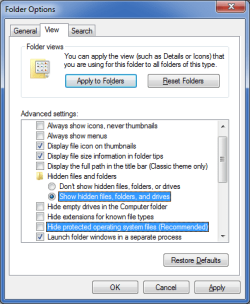
Folder Options

Also take into account that if you have set your "Folder Options" the same way as in the picture below, you will still be able to see the folder.
Folder Options - Show Hidden & System Files.png
A suggestion, rather than Cd-ing your way to the directory containing the item you want to hide, you may simply just specify the fullpath to Attrib.
E.g.
Code:
[FONT=Lucida Console][COLOR=Silver]C:\Windows\System32>[/COLOR][/FONT]attrib "D:\00mm00" +s +h
Will hide 00mm00 regardless of what the current directory is. Do note that the use of double quotes around a path are only mandatory when there's a space in the path.
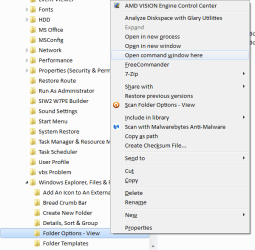
You can also use "Shift + Right click" to enable the "Open command window here" option in the Context menu.
Context Menu - Open Command Prompt Here.png
Here's a small tip, a shortcut from having to type paths out: you may drag and drop items into the Command Prompt as a substitute to typing the item's fullpath. Try typing the command attrib D:\00mm00 +s +h from left to right, drop a folder when the red is reached, and continue with the rest of the command.
Nice.
I didn't know about that trick (or I'd forgotten it).

W10 has added standard "Copy and Paste" commands to the Command Prompt (i.e. "Ctrl + C" and "Ctrl + V").
 
Last edited:

My Computer

Computer type
PC/Desktop
Computer Manufacturer/Model Number
n/a
OS
W7 Ultimate SP1, LM19.2 MATE, W10 Home 1703, W10 Pro 1703 VM, #All 64 bit
CPU
AMD Phenom II x6 1100T, 3.3 GHz
Motherboard
ASUS M4A88T-M/USB3 (AM3)
Memory
12GB DDR3 1333 G-Skill (4GB x 2), G-Skill (2GB x 2)
Graphics Card(s)
NVIDIA GeForce GTX 660
Sound Card
Realtek?
Monitor(s) Displays
Samsung S23B350
Screen Resolution
1920x1080
Hard Drives
WD Green 2TB (SATA), WD Green 3TB (SATA), WD Blue 4TB (SATA), WD Blue 6TB (SATA)
PSU
Cooler Master
Case
Antec GX300 Tower
Cooling
3x Antec TRICOOL 120mm Fans
Mouse
Wired Optical
Internet Speed
DSL
Antivirus
Avast
Browser
Pale Moon (64 bit)
Other Info
2018-12-27 Upgraded HDDs
2015-12-10 Upgraded case, graphics card, storage
2015-08-15 Upgraded motherboard & RAM
2015-07-15 Upgraded LM17.1 to LM17.2
Yes lehnerus2000 that is exactly how I have my folder options. I mentioned this in my initial question that this needs to stay as such. The command above, which I thought would hide my folder, does not hide a folder, it makes a folder hideable (under given circumstances), which is not the same thing. Most of what I have read relates to having such folder options, which to me is weird because, how on earth can this be enough? The purpose of hiding a folder is to hide it from anyone who shouldn't. This may include the one sitting next to you or the IT department from knowing it's there. Do you want the IT dept to know what emails your manager may have sent you. See photos your daughter sent you? Your payment details? etc. Password protecting such a folder is a given--but it can attract attention if this is all you do.
 

My Computer

Computer type
PC/Desktop
Computer Manufacturer/Model Number
OEM Designed by me :-)
OS
Windows 7 Home Premium 64
CPU
Intel Core i5 760 @ 2800MHz
Motherboard
Asus P7P55D-E LX
Memory
12288MB
Graphics Card(s)
AMD Radeon HD 7800 Series
Sound Card
ASUS Xonar DG
Monitor(s) Displays
ViewSonic VX2453 Series, HDMI 1080p Full HD
Screen Resolution
1920X1080
Hard Drives
Samsung SSD 840 EVO 250GB& two others
PSU
Tagan BZ Series, TG800-BZ 800W
Keyboard
Logitech MK250
Mouse
Logitech M310
Internet Speed
toppest, mostest :-) <-- bad, but fun English
Browser
Firefox, Crrome, IE
The purpose of hiding a folder is to hide it from anyone who shouldn't. This may include the one sitting next to you or the IT department from knowing it's there.

This is a strong assumption on your part, but it's actually wrong. After reading all the thread I came to the conclusion that you've got the meaning of the "hidden" attribute wrong.

The hidden and system attributes are just ticks attached to each file for use by file managers and system utilities, such as the option in Explorer, for making it easier to the user to focus on its files and prevent messing with the system. It has been always that way, since the DOS days. Any program is free to ignore those at all and there is no enforcement that these attributes must do something in particular. All of those in the properties page of the file are just "eye candy" and should be treated as such.
They're by no means meant to provide any kind of security. They're NOT meant to conceal private data or to hide things from people, which is the reason that you cannot do what you want using them. Treat the as what they are: a way to shorten file listing in explorer, at the user choice. Just eye candy, no privacy or security at all.

Now on the real question............

Do you want the IT dept to know what emails your manager may have sent you. See photos your daughter sent you? Your payment details?

Certainly not, totally agree.
Windows provides means to do exactly that since long ago, and you should use those instead of the lame hidden attributes. Out of box Windows provides file permissions and separate user profiles which precisely do what you intent, to prevent unauthorized people from seeing what you don't want them to. By default your entire user profile folder is visible only to you (and administrators of course) and anyone else will only get a nice "access denied" when trying to see it.
Putting anything under there (like your desktop or documents folder) are specifically considered private by the system and the system itself will prevent anything, including other people and third party programs, to see those. But to get the system to do so, you must make proper use of user accounts. That means, set a strong password on your account and closing session when you're out. People trying to read your emails will have to know your password then and will obviously have no permissions to even see what's there.


Password protecting such a folder is a given--but it can attract attention if this is all you do.

What kind of "attraction"? The purpose of the user profile is precisely to contain your private data, everyone knows that. If I were to try to steal anything that's the very first place I would look for. But you don't protect folders, you protect the whole user account and everything under your profile. No one can even know what's in there.
 

My Computer

Computer type
Laptop
Computer Manufacturer/Model Number
Toshiba Sattelite A665-S6092
OS
Windows 7 Ultimate x64
CPU
Intel Core i7-740QM
Memory
8 GB DDR3
Graphics Card(s)
NVIDIA GeForce 330GT
Screen Resolution
1366x768
Hard Drives
Samsung 840 SSD 500GB
1TB USB3 external HD
Cooling
Coolermaster Notepal U3 notebook cooling pad
Internet Speed
3mbps ASDL
Antivirus
ClamWin 0.98.7
Browser
Opera 12.17 x86 (main), Firefox 38 (sec), IE11 (last resort)
Sometimes it's good to be paranoid, to not take any chances at all. Especially when it comes to big brother. So now i'll risk it. though i have no criminal record whatsoever and never even hurt a fly (really) i will be heading to a country (u can guess which) whereby many things are restricted like movies and books, which the government may not consider suitable. I've tried as I may to find what could be considered not acceptable but no such list exists--Will X-men be considered too pro-american? Who knows? So yes, I would like to hide the folder where my movies and books are. Now you know (It's not the IT dpt nor the person sitting next to me that I was actually worried about). It's me arriving at the airport, being told to turn on my PC and then a simple search for 'mkv', 'avi', 'pdf'' etc. will show all.
 

My Computer

Computer type
PC/Desktop
Computer Manufacturer/Model Number
OEM Designed by me :-)
OS
Windows 7 Home Premium 64
CPU
Intel Core i5 760 @ 2800MHz
Motherboard
Asus P7P55D-E LX
Memory
12288MB
Graphics Card(s)
AMD Radeon HD 7800 Series
Sound Card
ASUS Xonar DG
Monitor(s) Displays
ViewSonic VX2453 Series, HDMI 1080p Full HD
Screen Resolution
1920X1080
Hard Drives
Samsung SSD 840 EVO 250GB& two others
PSU
Tagan BZ Series, TG800-BZ 800W
Keyboard
Logitech MK250
Mouse
Logitech M310
Internet Speed
toppest, mostest :-) <-- bad, but fun English
Browser
Firefox, Crrome, IE
This may include the one sitting next to you or the IT department from knowing it's there. Do you want the IT dept to know what emails your manager may have sent you. See photos your daughter sent you? Your payment details? etc. Password protecting such a folder is a given--but it can attract attention if this is all you do.
Why are you trying to hide folders from your IT department?

If your company's IT policy states they can read your emails, then hiding them is a breach of policy.
In fact, knowing who sent emails to whom and when they were sent is one of the jobs of the IT department.

It seems to be a de facto rule here, that members don't provide assistance to people trying to get around corporate IT policies.
 

My Computer

Computer type
PC/Desktop
Computer Manufacturer/Model Number
n/a
OS
W7 Ultimate SP1, LM19.2 MATE, W10 Home 1703, W10 Pro 1703 VM, #All 64 bit
CPU
AMD Phenom II x6 1100T, 3.3 GHz
Motherboard
ASUS M4A88T-M/USB3 (AM3)
Memory
12GB DDR3 1333 G-Skill (4GB x 2), G-Skill (2GB x 2)
Graphics Card(s)
NVIDIA GeForce GTX 660
Sound Card
Realtek?
Monitor(s) Displays
Samsung S23B350
Screen Resolution
1920x1080
Hard Drives
WD Green 2TB (SATA), WD Green 3TB (SATA), WD Blue 4TB (SATA), WD Blue 6TB (SATA)
PSU
Cooler Master
Case
Antec GX300 Tower
Cooling
3x Antec TRICOOL 120mm Fans
Mouse
Wired Optical
Internet Speed
DSL
Antivirus
Avast
Browser
Pale Moon (64 bit)
Other Info
2018-12-27 Upgraded HDDs
2015-12-10 Upgraded case, graphics card, storage
2015-08-15 Upgraded motherboard & RAM
2015-07-15 Upgraded LM17.1 to LM17.2
lehnerus2000 read what I just wrote (above you) and you'll see that, in actuality, it has nothing to do with IT
 

My Computer

Computer type
PC/Desktop
Computer Manufacturer/Model Number
OEM Designed by me :-)
OS
Windows 7 Home Premium 64
CPU
Intel Core i5 760 @ 2800MHz
Motherboard
Asus P7P55D-E LX
Memory
12288MB
Graphics Card(s)
AMD Radeon HD 7800 Series
Sound Card
ASUS Xonar DG
Monitor(s) Displays
ViewSonic VX2453 Series, HDMI 1080p Full HD
Screen Resolution
1920X1080
Hard Drives
Samsung SSD 840 EVO 250GB& two others
PSU
Tagan BZ Series, TG800-BZ 800W
Keyboard
Logitech MK250
Mouse
Logitech M310
Internet Speed
toppest, mostest :-) <-- bad, but fun English
Browser
Firefox, Crrome, IE
lehnerus2000 read what I just wrote (above you) and you'll see that, in actuality, it has nothing to do with IT
Whilst I was typing my comment, you posted yours. :D

Telling you how to thwart the NSA, FBI, etc. is even riskier. :eek:

The thing is, if they think you have something worth seeing, they'll just confiscate your laptop.
If you are lucky, they might just remove the HDD/SSD and return the rest to you.
 

My Computer

Computer type
PC/Desktop
Computer Manufacturer/Model Number
n/a
OS
W7 Ultimate SP1, LM19.2 MATE, W10 Home 1703, W10 Pro 1703 VM, #All 64 bit
CPU
AMD Phenom II x6 1100T, 3.3 GHz
Motherboard
ASUS M4A88T-M/USB3 (AM3)
Memory
12GB DDR3 1333 G-Skill (4GB x 2), G-Skill (2GB x 2)
Graphics Card(s)
NVIDIA GeForce GTX 660
Sound Card
Realtek?
Monitor(s) Displays
Samsung S23B350
Screen Resolution
1920x1080
Hard Drives
WD Green 2TB (SATA), WD Green 3TB (SATA), WD Blue 4TB (SATA), WD Blue 6TB (SATA)
PSU
Cooler Master
Case
Antec GX300 Tower
Cooling
3x Antec TRICOOL 120mm Fans
Mouse
Wired Optical
Internet Speed
DSL
Antivirus
Avast
Browser
Pale Moon (64 bit)
Other Info
2018-12-27 Upgraded HDDs
2015-12-10 Upgraded case, graphics card, storage
2015-08-15 Upgraded motherboard & RAM
2015-07-15 Upgraded LM17.1 to LM17.2
Nah I have nothing to hide from anybody in north America. Actually from most countries and quite possibly even nothing to hide where I'm going. I'm just being cautious just in case, I don't know, "Bambi" just happens to be illegal and the only person who may think so is that one particular individual at that point in time, so because of this 1 individual and one movie I lose everything. Some films are quite old (50's, 60's) since movies were slower then and therefore for someone who has English as a 2nd language, this movie is easier to follow.
 

My Computer

Computer type
PC/Desktop
Computer Manufacturer/Model Number
OEM Designed by me :-)
OS
Windows 7 Home Premium 64
CPU
Intel Core i5 760 @ 2800MHz
Motherboard
Asus P7P55D-E LX
Memory
12288MB
Graphics Card(s)
AMD Radeon HD 7800 Series
Sound Card
ASUS Xonar DG
Monitor(s) Displays
ViewSonic VX2453 Series, HDMI 1080p Full HD
Screen Resolution
1920X1080
Hard Drives
Samsung SSD 840 EVO 250GB& two others
PSU
Tagan BZ Series, TG800-BZ 800W
Keyboard
Logitech MK250
Mouse
Logitech M310
Internet Speed
toppest, mostest :-) <-- bad, but fun English
Browser
Firefox, Crrome, IE
Hiding files from an IT department or not, your privacy should always be your prerogative.


I do see what's being asked in the title of this thread. I backed off from trying to answer it only because I wasn't sure whether your purpose, Pintree, was to gain a little knowledge about hidden files and how they worked (as your questions from the "Here's what's important:" section of your OP seemed to suggest), or if your purpose is to find a method of hiding files from others. It appears that latter is the actual question being asked here.


Taking advantage of the Hidden file attribute clearly isn't an effective method in keeping prying eyes away from data.
The hidden and system attributes are just ticks attached to each file for use by file managers and system utilities
File attributes aren't meant to be used against people. If I were to recruit a single member on this forum, tell them that there is hidden data on my desktop, "go find it". The first thing they'll think about is the Hidden file attribute... "I'll just turn on View Hidden files and System files in Folder Options", and they'll be into my data in no time.

Okay, so if the Hidden file attribute isn't effective at hiding things, what are other methods of hiding files then? I can tell you there aren't very many. So why not hide folders in plain sight then...

A bit about Desktop.ini files
So, I haven't had the opportunity to make tutorials yet, but one of the topics I plan to eventually cover, actually, is how to hide files in Windows 7 by taking advantage of the rather mysterious Desktop.ini feature of Windows. Desktop.ini files are essentially hidden text files that reside in certain directories throughout the system that exist to change how a folder is displayed or treated. Things like a folder's icon and name can be altered using these Desktop.inis.

An old school trick I've seen some people use to hide folders is to assign a folder a blank icon and empty name using a Desktop.ini. A pretty lame way of hiding a folder seeing as Explorer can still see and easily read it. But that's just one example of hiding a folder in plain sight.

Using Recycle Bins to hide files
Desktop.inis can also be used to create Recycle Bins. Write out the appropriate Desktop.ini, place it into a folder, do a bit of tinkering to the folder, and bam, you've transformed the folder into a fully functioning Recycle Bin, complete with the Recycle Bin icon and resource name.

So what have these Recycle Bins have to do with hiding things? Well let's say that you first placed valuable files, files you want to conceal from all eyes, into a folder before turning that folder into a Recycle Bin. Does that work -- will your files survive the transformation? Sure does. Now, instead of opening up the folder to reveal the valuable items you've previously placed in it, the Recycle Bin-ned folder will instead open up to show you the items you've previously deleted (you wouldn't have guessed). Though this Recycle Bin will still hold the valuable files you've placed in it before. They'll be kinna trapped within it.

If I were to show every member on this forum my secret, artificial Recycle Bin and tell them that there is hidden data in it -- and tell them to "go get it" -- I reckon only 3% of the members here would know how. This trick will sure fool your average power user or administrator working in the IT department.

Proof of concept
I've attracted to this post a batch file that will convert any folder of your linking into to a Recycle Bin. Simply create a new folder, place some junk/test files to be hidden into it, and run the batch file in it.

I'll leave it to you guys to tell me how to retrieve those files that are hidden... in a Recycle Bin... in plain sight. ;)
 

Attachments

My Computer

Computer type
PC/Desktop
OS
Windows 10, Windows 8.1 Pro, Windows 7 Professional, OS X El Capitan
Pyprohly I have waited and waited and waited, as you can see, over a month now and it seems no one bit. And yet I believe what you came up with is brilliant. I myself did not try your ''ConvertToRecycleBin.bat'' only because I know I would not know how to retrieve such hidden files from the recycle bin--unless a simple search within it with the name of the hidden folder would do the trick--this is based on my logic but if it requires anything techie then I would have no clue. [BTW the other reason for not having tried it is that I was not sure exactly as to where to place it and how to use it]
 

My Computer

Computer type
PC/Desktop
Computer Manufacturer/Model Number
OEM Designed by me :-)
OS
Windows 7 Home Premium 64
CPU
Intel Core i5 760 @ 2800MHz
Motherboard
Asus P7P55D-E LX
Memory
12288MB
Graphics Card(s)
AMD Radeon HD 7800 Series
Sound Card
ASUS Xonar DG
Monitor(s) Displays
ViewSonic VX2453 Series, HDMI 1080p Full HD
Screen Resolution
1920X1080
Hard Drives
Samsung SSD 840 EVO 250GB& two others
PSU
Tagan BZ Series, TG800-BZ 800W
Keyboard
Logitech MK250
Mouse
Logitech M310
Internet Speed
toppest, mostest :-) <-- bad, but fun English
Browser
Firefox, Crrome, IE
Back
Top