Solved How2 install IE8 on a Windows 7 x64 PC? Can't seem to do it.

Watoh

New member
Local time
2:29 AM
Messages
16
Hi folks.

I'm a little stuck, I need to install Internet Explorer 8 on my Windows 7 (x64) PC but am unable to find a compatible version. It appears MS have made IE8 and Win7 incompatible. Whatever version i try i get a error message informing em my OS is not compatible with IE8. :mad:

It need it to test web site compatibility issues. Am i going to have to run a virtual machine or similar, surly there is an way to use IE8 & Win7.

Thanks for any help. :)
 

My Computer My Computer

At a glance

Windows 7 Ultimate x64Intel Core i5-3570K8.00 GB Dual-Channel DDR31535MB GeForce GTX 480 (EVGA)
OS
Windows 7 Ultimate x64
CPU
Intel Core i5-3570K
Motherboard
P8Z77-V (LGA1155)
Memory
8.00 GB Dual-Channel DDR3
Graphics Card(s)
1535MB GeForce GTX 480 (EVGA)
Sound Card
x-fi extreme music
Monitor(s) Displays
2 x 22"
Screen Resolution
1680x1050 x 2
Hard Drives
SSD, SATA & IDE
PSU
700W
Hey http://windows.microsoft.com/en-US/windows7/how-do-i-install-or-uninstall-internet-explorer-9


If you uninstall IE9, It should Roll back to IE8.

To uninstall Internet Explorer

The following instructions apply to both Windows 7 and Windows Vista.

  1. Click the Start button
    4f6cbd09-148c-4dd8-b1f2-48f232a2fd33_818.jpg
    , type Programs and Features in the search box, and then click View installed updates in the left pane.
  2. Under Uninstall an update, scroll down to the Microsoft Windows section.
  3. Right-click Windows Internet Explorer 9, click Uninstall, and then, when prompted, click Yes.
  4. Click one of the following:
    • Restart now (to finish the process of uninstalling Internet Explorer 9 and restore the previous version of Internet Explorer).
    • Restart later


Note

  • After you uninstall Internet Explorer 9, the previously installed version of Internet Explorer will be available on your PC. It isn't necessary to reinstall.
 

My Computer My Computer

At a glance

Windows 7 Home Premium 64 BitCore I7 1155 3.4GHZ8GB DDR 1600
Computer Manufacturer/Model Number
Cooler Master
OS
Windows 7 Home Premium 64 Bit
CPU
Core I7 1155 3.4GHZ
Memory
8GB DDR 1600
Hard Drives
64 GB SSD - OS
1TB - DATA
PSU
340 Watt Corsair
Case
Cooler Master
Cooling
Cooler Master
Thanks, but unfortunately that did not work. I uninstalled the update as shown above but it has left me with no IE or option to turn it on or off.

Have some rep for helping anyhow :)

50112040.jpg


Hmmm any other possible ways? TBH i kind of need both IE 8 & 9 installed to be able to test them both.

I might have screwed up and had IE9 already turned off under Windows features. :mad:
 

My Computer My Computer

At a glance

Windows 7 Ultimate x64Intel Core i5-3570K8.00 GB Dual-Channel DDR31535MB GeForce GTX 480 (EVGA)
OS
Windows 7 Ultimate x64
CPU
Intel Core i5-3570K
Motherboard
P8Z77-V (LGA1155)
Memory
8.00 GB Dual-Channel DDR3
Graphics Card(s)
1535MB GeForce GTX 480 (EVGA)
Sound Card
x-fi extreme music
Monitor(s) Displays
2 x 22"
Screen Resolution
1680x1050 x 2
Hard Drives
SSD, SATA & IDE
PSU
700W
What are you trying to test?.

IE9 is a very good browser.
 

My Computer My Computer

At a glance

Windows 7 Home Premium 64 BitCore I7 1155 3.4GHZ8GB DDR 1600
Computer Manufacturer/Model Number
Cooler Master
OS
Windows 7 Home Premium 64 Bit
CPU
Core I7 1155 3.4GHZ
Memory
8GB DDR 1600
Hard Drives
64 GB SSD - OS
1TB - DATA
PSU
340 Watt Corsair
Case
Cooler Master
Cooling
Cooler Master
I have a client who's office runs IE8 on their machines.. the web site i have designed for them seemingly is having numerous issues that i think are caused by IE8.

I have followed your above instructions on my laptop and managed to get IE8 installed. Thanks a lot, its a PITA that i can't get them both on the same machine.

Looks like a ballsed it up on my main work rig. Personally i hate all versions of IE.

Cheers.
 

My Computer My Computer

At a glance

Windows 7 Ultimate x64Intel Core i5-3570K8.00 GB Dual-Channel DDR31535MB GeForce GTX 480 (EVGA)
OS
Windows 7 Ultimate x64
CPU
Intel Core i5-3570K
Motherboard
P8Z77-V (LGA1155)
Memory
8.00 GB Dual-Channel DDR3
Graphics Card(s)
1535MB GeForce GTX 480 (EVGA)
Sound Card
x-fi extreme music
Monitor(s) Displays
2 x 22"
Screen Resolution
1680x1050 x 2
Hard Drives
SSD, SATA & IDE
PSU
700W
The WebSite you have designed, Is it Internal or External?.

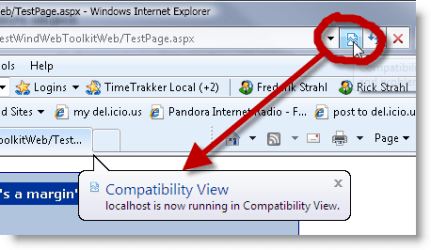
Have you tried clicking the Compatobility tab in IE8, When your on the webpage thats having issues?.
 

My Computer My Computer

At a glance

Windows 7 Home Premium 64 BitCore I7 1155 3.4GHZ8GB DDR 1600
Computer Manufacturer/Model Number
Cooler Master
OS
Windows 7 Home Premium 64 Bit
CPU
Core I7 1155 3.4GHZ
Memory
8GB DDR 1600
Hard Drives
64 GB SSD - OS
1TB - DATA
PSU
340 Watt Corsair
Case
Cooler Master
Cooling
Cooler Master
image_0fa2f0f9-9548-4516-b801-45bcc70aa8d9.png
 

My Computer My Computer

At a glance

Windows 7 Home Premium 64 BitCore I7 1155 3.4GHZ8GB DDR 1600
Computer Manufacturer/Model Number
Cooler Master
OS
Windows 7 Home Premium 64 Bit
CPU
Core I7 1155 3.4GHZ
Memory
8GB DDR 1600
Hard Drives
64 GB SSD - OS
1TB - DATA
PSU
340 Watt Corsair
Case
Cooler Master
Cooling
Cooler Master
Its external, and this is exactly the type of thing i'm attempting to test my end via IE8.

Thanks.

The site is fubar in IE8 in compatibility mode or not.. sigh, bloody IE8. Looks like a rewrite of CCS for me. :(
 

My Computer My Computer

At a glance

Windows 7 Ultimate x64Intel Core i5-3570K8.00 GB Dual-Channel DDR31535MB GeForce GTX 480 (EVGA)
OS
Windows 7 Ultimate x64
CPU
Intel Core i5-3570K
Motherboard
P8Z77-V (LGA1155)
Memory
8.00 GB Dual-Channel DDR3
Graphics Card(s)
1535MB GeForce GTX 480 (EVGA)
Sound Card
x-fi extreme music
Monitor(s) Displays
2 x 22"
Screen Resolution
1680x1050 x 2
Hard Drives
SSD, SATA & IDE
PSU
700W
Good Luck, Let me know how you get on.
 

My Computer My Computer

At a glance

Windows 7 Home Premium 64 BitCore I7 1155 3.4GHZ8GB DDR 1600
Computer Manufacturer/Model Number
Cooler Master
OS
Windows 7 Home Premium 64 Bit
CPU
Core I7 1155 3.4GHZ
Memory
8GB DDR 1600
Hard Drives
64 GB SSD - OS
1TB - DATA
PSU
340 Watt Corsair
Case
Cooler Master
Cooling
Cooler Master
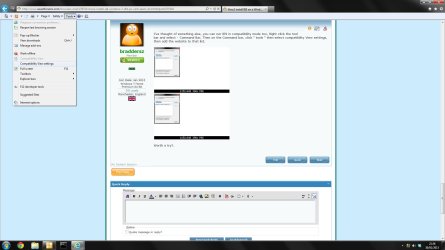
I've thought of something else, you can run IE9 in compatibility mode too, Right click the tool bar and select - Command Bar, Then on the Command bar, click " tools " then select compatibility View settings, then add the website to that list.

Untitled1111.jpg
Untitled.png

Worth a try?.
 

My Computer My Computer

At a glance

Windows 7 Home Premium 64 BitCore I7 1155 3.4GHZ8GB DDR 1600
Computer Manufacturer/Model Number
Cooler Master
OS
Windows 7 Home Premium 64 Bit
CPU
Core I7 1155 3.4GHZ
Memory
8GB DDR 1600
Hard Drives
64 GB SSD - OS
1TB - DATA
PSU
340 Watt Corsair
Case
Cooler Master
Cooling
Cooler Master
Thanks braddersz, unfortunately IE8 simply seems to hate all my custom CSS code, and unfortunately this site will need to be IE8 compliant.

I now have IE8 on my laptop at least, which is very helpful for testing. Thanks for your help.
 

My Computer My Computer

At a glance

Windows 7 Ultimate x64Intel Core i5-3570K8.00 GB Dual-Channel DDR31535MB GeForce GTX 480 (EVGA)
OS
Windows 7 Ultimate x64
CPU
Intel Core i5-3570K
Motherboard
P8Z77-V (LGA1155)
Memory
8.00 GB Dual-Channel DDR3
Graphics Card(s)
1535MB GeForce GTX 480 (EVGA)
Sound Card
x-fi extreme music
Monitor(s) Displays
2 x 22"
Screen Resolution
1680x1050 x 2
Hard Drives
SSD, SATA & IDE
PSU
700W
Back
Top