HP 6280 scanner

dreuzel

Never Ever any HP device
Member
Local time
5:03 PM
Messages
32
I've installed my printer under windows7 using microsoft standard software.
My printer/scanner is connected using ethernet.


For a long time there was no reaction from HP to support
their scanners . As far as I can see there still is no reaction ....

Could someone advice me on how to connect the canner to windows 7

general Idea flexible scanning to PDF

I'm not realy a fan of the HP software anyway ....


If I could get this to work it would be a great help


Thanks in advance
 

My Computer

OS
win7
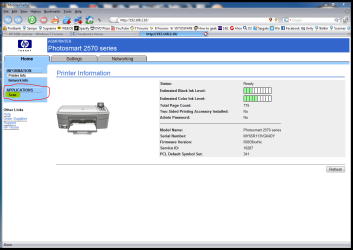
Your device is connected to network, so have you tried to use your scanners web interface? Just open your browser and give your scanners IP-addresse:

HP_scan.PNG

There you can start the scan. You have to allow scanners interface to open pop-ups, scan results are shown in a pop-up tab or window. An example: my HP printer/scanner has an internal IP 192.168.2.10, so I have to allow my browser to let website http://192.168.2.10 to open pop-ups to be able to see and save scan results.

Worth to try?

Kari
 

My Computer

Computer type
Laptop
Computer Manufacturer/Model Number
HP ENVY 17-1150eg
OS
Windows 10 Pro x64 EN-GB
CPU
1.6 GHz Intel Core i7-720QM Processor
Memory
6 GB
Graphics Card(s)
ATI Mobility Radeon HD 5850 Graphics
Sound Card
Beats sound system with integrated subwoofer
Monitor(s) Displays
17" laptop display, 22" LED and 32" Full HD TV through HDMI
Screen Resolution
1600*900 (1), 1920*1080 (2&3)
Hard Drives
Internal: 2 x 500 GB SATA Hard Disk Drive 7200 rpm
External: 2TB for backups, 3TB USB3 network drive for media
Cooling
As Envy runs a bit warm, I have it on a Cooler Master pad
Keyboard
Logitech diNovo Media Desktop Laser (bluetooth)
Mouse
Logitech Performance Mouse MX
Internet Speed
50/10 Mbps VDSL
Antivirus
Windows Defender 4.3.9431.0
Browser
Maxthon 3.5.2., IE11
I know about that solution ... but do not realy like it

any other software available ?


those things are a standard are they not ...


I use xsane on ubunto pretty good
 

My Computer

OS
win7
I'm not a fan of HP's software either.
I haven't installed my scanner to W7 yet .. But I never install all of HP's software.
I go to the HP support site and get the Basic driver package.

Then I use Irfanview to run my Scanner ... or M$ Office ...
or you should be able use the Fax n Scan wizard in W7..
 

My Computer

Computer Manufacturer/Model Number
HP d4996t (upgraded)
OS
XP MCE .... XP Pro 64 .... W7 U x64
CPU
E6750, 2.67GHz C2D
Memory
4GB, PC2 6400
Graphics Card(s)
GeForce 9400GT
Monitor(s) Displays
Twin Samsung 2443BWT
Screen Resolution
1920x1200
Hard Drives
Many .. 3 Installed
PSU
460W
Internet Speed
Cable
OK. Reading your first post I couldn't possible know you know all of this. I tried to help you by giving the easiest possible solution.

What's the difference anyway? Scanning using web-interface is exactly like using a software solution. Only the user interface is different. You can still save it as PDF, anywhere you want.

Kari
 

My Computer

Computer type
Laptop
Computer Manufacturer/Model Number
HP ENVY 17-1150eg
OS
Windows 10 Pro x64 EN-GB
CPU
1.6 GHz Intel Core i7-720QM Processor
Memory
6 GB
Graphics Card(s)
ATI Mobility Radeon HD 5850 Graphics
Sound Card
Beats sound system with integrated subwoofer
Monitor(s) Displays
17" laptop display, 22" LED and 32" Full HD TV through HDMI
Screen Resolution
1600*900 (1), 1920*1080 (2&3)
Hard Drives
Internal: 2 x 500 GB SATA Hard Disk Drive 7200 rpm
External: 2TB for backups, 3TB USB3 network drive for media
Cooling
As Envy runs a bit warm, I have it on a Cooler Master pad
Keyboard
Logitech diNovo Media Desktop Laser (bluetooth)
Mouse
Logitech Performance Mouse MX
Internet Speed
50/10 Mbps VDSL
Antivirus
Windows Defender 4.3.9431.0
Browser
Maxthon 3.5.2., IE11
Back
Top