

Lollies
New member
- Local time
- 8:36 PM
- Messages
- 301
Sorry if this is in the wrong section.
I've had this laptop for probably over a year now and its been long overdue for a clean up (never did initially). I'll leave all the excess details out of it as much as possible (I rant about it). I have a desktop, its been in pieces since September when either the Mobo or CPU had some issues. Long story short I never figured it out and have yet to do so. I ended up using my laptop from school for just about everything. I haven't done much with it but now I'm at least trying to clean it up until (if ever) I get my desktop working again.
I've been following Brink's and others tutorials to optimize my laptop for the time being: http://www.sevenforums.com/tutorials/11728-optimize-windows-7-a.html?filter[2]=Performance%20Maintenance
____________________________________________________________________
I'm at
28. Uninstall the Bloatware Programs from Your ComputerMost computers that you buy, at a retail store (OEM), have a ton of software installed on it. Some of these can take up a lot of resources. Uninstall the programs that you do not want to use from Programs and Features.
__________________________________________________________________
I've been reading some threads about HP's bloatware and just wanted to verify what I should/was removing before I went through with it. I've been looking for some solid info on the bloatware on the laptop before I mess with it.
Was looking here for starters:
http://www.sevenforums.com/software/38364-hp-bloatware-can-removed.html Here are all the programs so far.
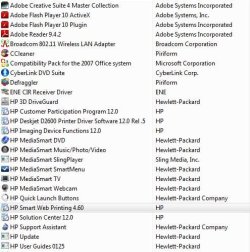
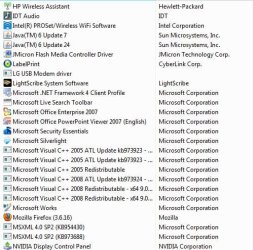
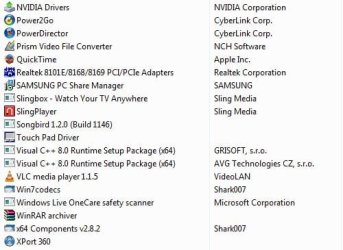
Thanks
I've had this laptop for probably over a year now and its been long overdue for a clean up (never did initially). I'll leave all the excess details out of it as much as possible (I rant about it). I have a desktop, its been in pieces since September when either the Mobo or CPU had some issues. Long story short I never figured it out and have yet to do so. I ended up using my laptop from school for just about everything. I haven't done much with it but now I'm at least trying to clean it up until (if ever) I get my desktop working again.
I've been following Brink's and others tutorials to optimize my laptop for the time being: http://www.sevenforums.com/tutorials/11728-optimize-windows-7-a.html?filter[2]=Performance%20Maintenance
____________________________________________________________________
I'm at
28. Uninstall the Bloatware Programs from Your ComputerMost computers that you buy, at a retail store (OEM), have a ton of software installed on it. Some of these can take up a lot of resources. Uninstall the programs that you do not want to use from Programs and Features.
__________________________________________________________________
I've been reading some threads about HP's bloatware and just wanted to verify what I should/was removing before I went through with it. I've been looking for some solid info on the bloatware on the laptop before I mess with it.
Was looking here for starters:
http://www.sevenforums.com/software/38364-hp-bloatware-can-removed.html Here are all the programs so far.
Thanks
Last edited:
My Computer
- Computer Manufacturer/Model Number
- Self-Built
- OS
- Windows 7 Ultimate x64
- CPU
- Intel Core 2 Extreme QX9650 @ 3.00GHz 1333FSB 12
- Motherboard
- Asus Striker II Formula nForce 780i SLI Mainboard
- Memory
- 8G Corsair Dominator DDR2
- Graphics Card(s)
- None LoL
- Sound Card
- Creative Labs X-FI XtremeGamer 24-Bit PCI Sound Card
- Monitor(s) Displays
- None LoL
- Screen Resolution
- None LoL
- Hard Drives
- 2 Western Digital Raid-0 10,000 RPM Velociraptor's
- PSU
- Corsair AX850
- Case
- Corsair Graphite 600T
- Cooling
- Corsair H70
- Keyboard
- None LoL
- Mouse
- None LoL
- Internet Speed
- Download: 14.95 MB/s Upload: 2.88 MB/s
- Other Info
- 32" LG LCD TV
Astro A40 Audio System
Logitech Z-2300 Speakers
Microsoft Xbox 360 Slim
Rosewill External Enclosure


