Solved HP desktop will not connect wirelessly

mcraft17

New member
Member
Local time
3:57 AM
Messages
18
We recently moved and my desktop computer before was hooked up directly into the modem
with a cable. It has a wireless adapter built in but I never really needed to use it. Now where we
live I need it, well I have tried everything and it is saying no connections available. All other devices
in the house, laptop, phones, tablet, etc. are connected but not the desktop. I tried updating the driver,
running the wizard, having the time warner tech check and it says the device ( wireless
adapter) is working properly. I called HP and they want $100 to tell me what is wrong. I even
did a whole system restore and that didn't work. So any help would be appreciated.
My adapter is 802.11n Wireless LAN card by Ralink tech
 

My Computer

Computer type
PC/Desktop
Computer Manufacturer/Model Number
HP
OS
Windows 7 64
Antivirus
TrendMicro
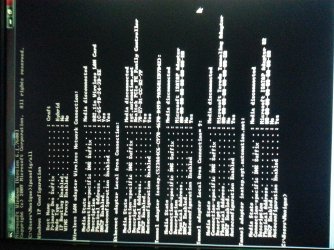
picture of ipconfig

Here is a picture of the ipconfig if that helps
 

Attachments

  • 1434112190845.jpg
    1434112190845.jpg
    858.3 KB · Views: 0

My Computer

Computer type
PC/Desktop
Computer Manufacturer/Model Number
HP
OS
Windows 7 64
Antivirus
TrendMicro
DHCP is enabled but you don't seem to get an IP address.
Run services.msc, check DHCP client (Automatic) service and WLAN AutoCOnfig (manual, also try automatic) if started? start if not.
 

My Computer

Computer type
PC/Desktop
Computer Manufacturer/Model Number
Custom Build
OS
Windows 7 Ultimate x64 SP1
CPU
AMD Phenom 2 1090T
Motherboard
Gigabyte GA-890FXA-UD5
Memory
2x8GB Kingston HyperX Fury Black 1600Mhz Unganged
Graphics Card(s)
MSI GTX 970 Gaming 4G
Sound Card
Realtek On-Board HD 7.1 Audio / Logitech G35
Monitor(s) Displays
3xAcer GD245HQ
Screen Resolution
1920x1080
Hard Drives
Samsung 850 Pro 512GB SSD - OS /
WD Caviar Black SATA 3 - 1 TBx2 - Dynamic RAID 0 /
WD Caviar Green SATA 2 - 640GBx2 - Dynamic RAID 0 /
WD Caviar Green SATA 2 - 640GB - Internal Backup /
Seagate Barracude SATA 3 - 3TB - External Backup/ Sync
PSU
HighPower 1000W
Case
Cooler Master HAF 932
Cooling
Noctua NH-D14
Keyboard
Logitech G19
Mouse
Logitech G500
Internet Speed
100/4 Mbit Cable (100GB quota)
Antivirus
ZoneAlarm Extreme Security / MBAM Pro / MBAE Free / SAS Free
Browser
IE 11 - Firefox - Chrome
Other Info
Logitech F710/ G27/ G940/ Z5500 // TrackIR 5 // Nvidia 3D Surround Vision
Thank you so much for your reply. I checked and both of those are started. Any other ideas? Or is this a hopeless cause?
 

My Computer

Computer type
PC/Desktop
Computer Manufacturer/Model Number
HP
OS
Windows 7 64
Antivirus
TrendMicro
Check these services for Started (automatic) - Network Connections, Network List Service

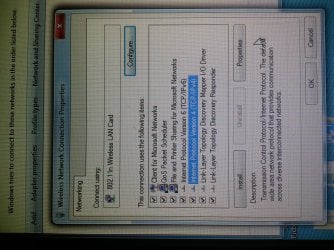
Open Wireless properties, details and post a screenshot.
Then open properties and take another screenshot.
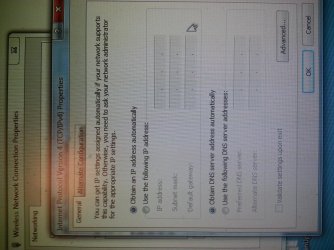
Go into IPv4 properties and take another screenshot there too :)

If all fail run cmd: netsh winsock reset
 

My Computer

Computer type
PC/Desktop
Computer Manufacturer/Model Number
Custom Build
OS
Windows 7 Ultimate x64 SP1
CPU
AMD Phenom 2 1090T
Motherboard
Gigabyte GA-890FXA-UD5
Memory
2x8GB Kingston HyperX Fury Black 1600Mhz Unganged
Graphics Card(s)
MSI GTX 970 Gaming 4G
Sound Card
Realtek On-Board HD 7.1 Audio / Logitech G35
Monitor(s) Displays
3xAcer GD245HQ
Screen Resolution
1920x1080
Hard Drives
Samsung 850 Pro 512GB SSD - OS /
WD Caviar Black SATA 3 - 1 TBx2 - Dynamic RAID 0 /
WD Caviar Green SATA 2 - 640GBx2 - Dynamic RAID 0 /
WD Caviar Green SATA 2 - 640GB - Internal Backup /
Seagate Barracude SATA 3 - 3TB - External Backup/ Sync
PSU
HighPower 1000W
Case
Cooler Master HAF 932
Cooling
Noctua NH-D14
Keyboard
Logitech G19
Mouse
Logitech G500
Internet Speed
100/4 Mbit Cable (100GB quota)
Antivirus
ZoneAlarm Extreme Security / MBAM Pro / MBAE Free / SAS Free
Browser
IE 11 - Firefox - Chrome
Other Info
Logitech F710/ G27/ G940/ Z5500 // TrackIR 5 // Nvidia 3D Surround Vision
Ok, I checked the two things in the system and they were set to manual not automatic. So I fixed that.
I am uploading the screenshots, hope they were the ones you wanted. And I reset the thing at the cmd prompt and no luck.
 

Attachments

  • 20150612_205511.jpg
    20150612_205511.jpg
    1.4 MB · Views: 1
  • 20150612_205544.jpg
    20150612_205544.jpg
    1,007.9 KB · Views: 0
  • 20150612_205607.jpg
    20150612_205607.jpg
    1.1 MB · Views: 0

My Computer

Computer type
PC/Desktop
Computer Manufacturer/Model Number
HP
OS
Windows 7 64
Antivirus
TrendMicro
I finally was able to get a cord long enough, and it works if it is plugged directly into the router but not wirelessly.
 

My Computer

Computer type
PC/Desktop
Computer Manufacturer/Model Number
HP
OS
Windows 7 64
Antivirus
TrendMicro
You can press Prt Scr (Print Screen) key on keyboard and run: mspaint - then CTRL+V and save as jpeg, no need to use phone :) Alt+Prt Scr will only copy the active window as opposed to full screen.

---------

Can you see the wireless connection at all? What happens when you try to connect? Does it ask for a password? Does the DHCP server on router has adequate IP range?

Edit: Can you try a clean startup? http://www.sevenforums.com/tutorial...ation-conflicts-performing-clean-startup.html

Did you have any AV that you uninstalled later? Firewall blocking perhaps?
 

My Computer

Computer type
PC/Desktop
Computer Manufacturer/Model Number
Custom Build
OS
Windows 7 Ultimate x64 SP1
CPU
AMD Phenom 2 1090T
Motherboard
Gigabyte GA-890FXA-UD5
Memory
2x8GB Kingston HyperX Fury Black 1600Mhz Unganged
Graphics Card(s)
MSI GTX 970 Gaming 4G
Sound Card
Realtek On-Board HD 7.1 Audio / Logitech G35
Monitor(s) Displays
3xAcer GD245HQ
Screen Resolution
1920x1080
Hard Drives
Samsung 850 Pro 512GB SSD - OS /
WD Caviar Black SATA 3 - 1 TBx2 - Dynamic RAID 0 /
WD Caviar Green SATA 2 - 640GBx2 - Dynamic RAID 0 /
WD Caviar Green SATA 2 - 640GB - Internal Backup /
Seagate Barracude SATA 3 - 3TB - External Backup/ Sync
PSU
HighPower 1000W
Case
Cooler Master HAF 932
Cooling
Noctua NH-D14
Keyboard
Logitech G19
Mouse
Logitech G500
Internet Speed
100/4 Mbit Cable (100GB quota)
Antivirus
ZoneAlarm Extreme Security / MBAM Pro / MBAE Free / SAS Free
Browser
IE 11 - Firefox - Chrome
Other Info
Logitech F710/ G27/ G940/ Z5500 // TrackIR 5 // Nvidia 3D Surround Vision
Sorry I was using my phone because I had no internet access at all on that computer. So no way to post the photos. No connections are showing up at all, I tried to manually input the connection but it still
wouldn't connect. I am only about 20 feet from the router and our laptop has access in
the same spot so there is a signal. Maybe it is a lost cause. :( I have been messing with this
for weeks!
 

My Computer

Computer type
PC/Desktop
Computer Manufacturer/Model Number
HP
OS
Windows 7 64
Antivirus
TrendMicro
Oh yeah, true that :) My bad.

Sorry it was not clear, when you changed those last 2 services, did you start them as well? or were they already started?
 

My Computer

Computer type
PC/Desktop
Computer Manufacturer/Model Number
Custom Build
OS
Windows 7 Ultimate x64 SP1
CPU
AMD Phenom 2 1090T
Motherboard
Gigabyte GA-890FXA-UD5
Memory
2x8GB Kingston HyperX Fury Black 1600Mhz Unganged
Graphics Card(s)
MSI GTX 970 Gaming 4G
Sound Card
Realtek On-Board HD 7.1 Audio / Logitech G35
Monitor(s) Displays
3xAcer GD245HQ
Screen Resolution
1920x1080
Hard Drives
Samsung 850 Pro 512GB SSD - OS /
WD Caviar Black SATA 3 - 1 TBx2 - Dynamic RAID 0 /
WD Caviar Green SATA 2 - 640GBx2 - Dynamic RAID 0 /
WD Caviar Green SATA 2 - 640GB - Internal Backup /
Seagate Barracude SATA 3 - 3TB - External Backup/ Sync
PSU
HighPower 1000W
Case
Cooler Master HAF 932
Cooling
Noctua NH-D14
Keyboard
Logitech G19
Mouse
Logitech G500
Internet Speed
100/4 Mbit Cable (100GB quota)
Antivirus
ZoneAlarm Extreme Security / MBAM Pro / MBAE Free / SAS Free
Browser
IE 11 - Firefox - Chrome
Other Info
Logitech F710/ G27/ G940/ Z5500 // TrackIR 5 // Nvidia 3D Surround Vision
Clean start up had no effect. When Time Warner came out and set up our internet they asked how many devices and he put 4 but I told him it would be more. He said that was ok. Could it be that we have too many devices?

Edit: Yes, they were already started I just changed them to automatic.
 
Last edited:

My Computer

Computer type
PC/Desktop
Computer Manufacturer/Model Number
HP
OS
Windows 7 64
Antivirus
TrendMicro
mcraft17,
You are in good hands with GokAy helping you.

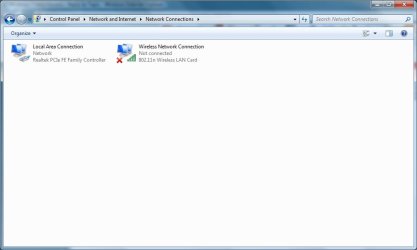
I'm just sticking my nose in to ask that you please post another screenshot of this...

wireless.png

...now that you are connected via a long wire to your router.

I would like to be sure that your wireless network is not disabled because of the wired connection.


:::wonders if the wireless radio is turned off:::
 

My Computer

Computer type
Laptop
Computer Manufacturer/Model Number
Employer provided Dell Latitude
OS
W7 Pro SP1 64bit
CPU
i7
Memory
8GB
Graphics Card(s)
Intel HD Graphics
Hard Drives
crappy SSD
Antivirus
Employer mandated Symantec Endpoint Protection
Browser
Pale Moon 64bit, IE11 64bit & Chrome 64bit
Well, if DHCP was the case you shouldn't have been getting an IP with Ethernet either but never can know.

Can you go into router management and check DHCP IP range?

UsernameIssues has a valid point, LAN may disable wireless. Try removing the cable and see if wireless comes back to its senses.

Can you try setting a wireless hotspot on one of your phones and see if wireless will connect to it?
 

My Computer

Computer type
PC/Desktop
Computer Manufacturer/Model Number
Custom Build
OS
Windows 7 Ultimate x64 SP1
CPU
AMD Phenom 2 1090T
Motherboard
Gigabyte GA-890FXA-UD5
Memory
2x8GB Kingston HyperX Fury Black 1600Mhz Unganged
Graphics Card(s)
MSI GTX 970 Gaming 4G
Sound Card
Realtek On-Board HD 7.1 Audio / Logitech G35
Monitor(s) Displays
3xAcer GD245HQ
Screen Resolution
1920x1080
Hard Drives
Samsung 850 Pro 512GB SSD - OS /
WD Caviar Black SATA 3 - 1 TBx2 - Dynamic RAID 0 /
WD Caviar Green SATA 2 - 640GBx2 - Dynamic RAID 0 /
WD Caviar Green SATA 2 - 640GB - Internal Backup /
Seagate Barracude SATA 3 - 3TB - External Backup/ Sync
PSU
HighPower 1000W
Case
Cooler Master HAF 932
Cooling
Noctua NH-D14
Keyboard
Logitech G19
Mouse
Logitech G500
Internet Speed
100/4 Mbit Cable (100GB quota)
Antivirus
ZoneAlarm Extreme Security / MBAM Pro / MBAE Free / SAS Free
Browser
IE 11 - Firefox - Chrome
Other Info
Logitech F710/ G27/ G940/ Z5500 // TrackIR 5 // Nvidia 3D Surround Vision
When I remove the cable the wireless still does not connect. But I wonder about this wireless radio. Because in the past I remember a pop up coming up about my wireless radio being off. This was a long time ago and I was using wired connection then and I didn't know what it meant. How do I find out if it is off and if it is off how do I turn it on? Thank you all so much for your help!!!

The router isn't ours it is the local cable companies so I don't think that I have access to it to go into the settings on it.
 

Attachments

  • connection.jpg
    connection.jpg
    26.7 KB · Views: 0
Last edited:

My Computer

Computer type
PC/Desktop
Computer Manufacturer/Model Number
HP
OS
Windows 7 64
Antivirus
TrendMicro
Thank you for posting that screenshot. It looks like the software controlling your wireless network adapter is not disabling it when a wired connection is established.

Can you tell us the model of the computer?

Also, look in the list of installed programs (Programs and Features) and see if there is HP software to control the wireless network adapter. Below is from a laptop, but it might be the same on a desktop:
c01615746.gif
 

My Computer

Computer type
Laptop
Computer Manufacturer/Model Number
Employer provided Dell Latitude
OS
W7 Pro SP1 64bit
CPU
i7
Memory
8GB
Graphics Card(s)
Intel HD Graphics
Hard Drives
crappy SSD
Antivirus
Employer mandated Symantec Endpoint Protection
Browser
Pale Moon 64bit, IE11 64bit & Chrome 64bit
ISP has no say what you do in your own network. Did they leave the manual for the router? Or brand / model?

Can you (if not have already) run a scan with ccleaner (including registry) and malwarebytes anti-malware?
 

My Computer

Computer type
PC/Desktop
Computer Manufacturer/Model Number
Custom Build
OS
Windows 7 Ultimate x64 SP1
CPU
AMD Phenom 2 1090T
Motherboard
Gigabyte GA-890FXA-UD5
Memory
2x8GB Kingston HyperX Fury Black 1600Mhz Unganged
Graphics Card(s)
MSI GTX 970 Gaming 4G
Sound Card
Realtek On-Board HD 7.1 Audio / Logitech G35
Monitor(s) Displays
3xAcer GD245HQ
Screen Resolution
1920x1080
Hard Drives
Samsung 850 Pro 512GB SSD - OS /
WD Caviar Black SATA 3 - 1 TBx2 - Dynamic RAID 0 /
WD Caviar Green SATA 2 - 640GBx2 - Dynamic RAID 0 /
WD Caviar Green SATA 2 - 640GB - Internal Backup /
Seagate Barracude SATA 3 - 3TB - External Backup/ Sync
PSU
HighPower 1000W
Case
Cooler Master HAF 932
Cooling
Noctua NH-D14
Keyboard
Logitech G19
Mouse
Logitech G500
Internet Speed
100/4 Mbit Cable (100GB quota)
Antivirus
ZoneAlarm Extreme Security / MBAM Pro / MBAE Free / SAS Free
Browser
IE 11 - Firefox - Chrome
Other Info
Logitech F710/ G27/ G940/ Z5500 // TrackIR 5 // Nvidia 3D Surround Vision
Dont know of any OEM Desktop with built in wifi card, probobly wrong tho
 

My Computer

Computer type
PC/Desktop
Computer Manufacturer/Model Number
medionl/Aspire 6930G/acer x55a
OS
W7 home premium 32bit/W7HP 64bit/w10 tp insider ring
CPU
E5300 dual core
Motherboard
medion MS7366
Memory
3gb
Graphics Card(s)
Nvidia Geforce 7100 Nforce 630i
Monitor(s) Displays
avixc
Internet Speed
n (isp resticted to 72)
Antivirus
mse/pands
Browser
palemoon
Other Info
Belkin Fd7050 n USB using Railink RT2870 drivers, more upto date
Dell and HP both have built-in Wi-Fi in desktops for the past 5 or so years. Some newer Dell models don't have an external antenna - which makes me wonder about their range.
 

My Computer

Computer type
Laptop
Computer Manufacturer/Model Number
Employer provided Dell Latitude
OS
W7 Pro SP1 64bit
CPU
i7
Memory
8GB
Graphics Card(s)
Intel HD Graphics
Hard Drives
crappy SSD
Antivirus
Employer mandated Symantec Endpoint Protection
Browser
Pale Moon 64bit, IE11 64bit & Chrome 64bit
Router is an Arris DG860 and there is no manual for it. I checked in installed programs and I didn't see anything for HP wireless assistant. And the model of my computer is and HP p6631p 64bit operating system windows 7.
 

My Computer

Computer type
PC/Desktop
Computer Manufacturer/Model Number
HP
OS
Windows 7 64
Antivirus
TrendMicro
Ok I ran the ccleaner and cleaned the registry. And after that when I took the wire out it showed my internet connection but when I went to click on it, it said it couldn't connect and then it was gone! Now again it says no connections available!! I tried to put the wire back in and take it out but no luck! UGH!!
 

My Computer

Computer type
PC/Desktop
Computer Manufacturer/Model Number
HP
OS
Windows 7 64
Antivirus
TrendMicro
Back
Top