Solved HP elitebook 8570w. After installing SSD, secondary HDD not recognized

rick20891

New member
Local time
1:42 PM
Messages
7
Hi all,

One week ago, I decided to buy a Samsung 840 evo 250gb SSD for my university laptop (HP 8570w). For the OEM HDD, i decided to buy a 'Nimitz' caddy for in the upgrade bay.
As the university covers the insurance and warranty, I was not allowed to install the SSD myself, but had to let their service center do it. And so they did..

After a few days of trouble, they managed to let the laptop run on the SSD, but the secondary HDD in the upgrade bay was not recognized. Their assistance covered only the installing and imaging of windows 7 with the university's VPN software, but the secondary HDD problem wasn't covered.
Therefore, i would like to try to fix the problem myself, ofcourse with a little help if possible:o

My line of thinking was as follows:
I've heard them switching BIOS setting from IDE or RAID to AHCI.
The secondary HDD was not formatted, and is recognized in BIOS, but not in Windows. Only the SSD is showing up in Windows Device Manager. On the contrary, the Intel Rapid Storage Technology software keeps on posting messages about the HDD drive, saying the status of the HDD is 'incompatible'.

I also saw in Intel RST that the 'internal SSD of 22GB' was also disabled and on status 'incompatible'. I remember the service center saying something about incompatibility between 'internal SSD' and samsung SSD, and therefore they disabled the internal SSD. (I'm sorry for the probably incorrect 'internal SSD' term;) )

With my little knowledge on HDD installations, i think the problem is in the switch of IDE/RAID to AHCI.
Because the HDD was always working fine, and is at least recognized by Intel RST, i tend to think the hardware (HDD+caddy) is fine.

I'm looking forward to hear the opinions of you guys, in order to tackle this problem :)

Regards,
Rick
 

My Computer My Computer

At a glance

Windows 7 EnterpriseIntel Core i7 - 3630QM @2.40GHzDDR3 PC3-12800 SDRAM (1600 MHz) 8GbAMD FirePro™ M4000 with 1 GB dedicated GDDR5 ...
Computer type
Laptop
Computer Manufacturer/Model Number
HP Elitebook 8570w
OS
Windows 7 Enterprise
CPU
Intel Core i7 - 3630QM @2.40GHz
Memory
DDR3 PC3-12800 SDRAM (1600 MHz) 8Gb
Graphics Card(s)
AMD FirePro™ M4000 with 1 GB dedicated GDDR5 video memory
Hard Drives
Primary slot: Samsung SSD 840 EVO 250GB
Upgrade bay: HGST HTS725050A7E630 (HP OEM?)
Antivirus
Symantec Corporate
Do you have a PC. try connecting the HDD to it?
Goto Disk Management and check if HDD shown there.
Reinstall Intel RST.
Its IDE by default in my laptop with caddy. Definitely no RAID.
 

My Computer My Computer

At a glance

Windows 7 Home Premium 64bitIntel Core i7 2670QMSamsung 8GB 1333MhznVidia Geforce 540M GT 2GB
Computer type
Laptop
Computer Manufacturer/Model Number
Dell XPS L502x
OS
Windows 7 Home Premium 64bit
CPU
Intel Core i7 2670QM
Motherboard
Intel HM67 Mobile Express Chipset
Memory
Samsung 8GB 1333Mhz
Graphics Card(s)
nVidia Geforce 540M GT 2GB
Sound Card
Realtek High Definition Audio
Monitor(s) Displays
15.6" Dell Standard RGB-LED Backlit Display
Screen Resolution
1366x768
Hard Drives
Seagate Momentus 2.5" 750GB HDD 5400rpm
Internet Speed
3.1 Mbits/s
Antivirus
AVG Free, Kaspersky
Browser
Google chrome
I have tried the caddy with hdd in my older acer 6930G notebook. There it was visible in bios as ATAPI device. In windows, no sign of life at all. Not visible in device manager.

Did not reinstall RST on the 8570w btw, but would it help, with the findings from above in mind?

Looking forward to hear any suggestion ;)
 

My Computer My Computer

At a glance

Windows 7 EnterpriseIntel Core i7 - 3630QM @2.40GHzDDR3 PC3-12800 SDRAM (1600 MHz) 8GbAMD FirePro™ M4000 with 1 GB dedicated GDDR5 ...
Computer type
Laptop
Computer Manufacturer/Model Number
HP Elitebook 8570w
OS
Windows 7 Enterprise
CPU
Intel Core i7 - 3630QM @2.40GHz
Memory
DDR3 PC3-12800 SDRAM (1600 MHz) 8Gb
Graphics Card(s)
AMD FirePro™ M4000 with 1 GB dedicated GDDR5 video memory
Hard Drives
Primary slot: Samsung SSD 840 EVO 250GB
Upgrade bay: HGST HTS725050A7E630 (HP OEM?)
Antivirus
Symantec Corporate
First up mate Imran suggestion of trying it on another machine - you used it with a USB connection?

Second it sounds like the folks that fitted the SSD really have made a mess of the job because it should have been easy. The switch to ACHI should not have made any difference and if the second drive is not formatted why not format it or have you got data on it?

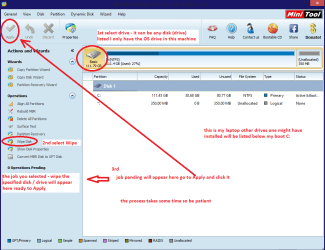
You can use diskpart to do that or Partition Wizard Best Free Partition Manager Freeware and free partition magic for Windows 7, Windows 8, Windows Vista and Windows XP 32 bit & 64 bit. MiniTool Free Partition Manager Software Home Edition.
I would wipe the drive before doing that and then format it see pic for wiping.
 

Attachments

  • MINI TOOLS _ WIPE.PNG
    MINI TOOLS _ WIPE.PNG
    34.6 KB · Views: 2

My Computer My Computer

At a glance

Desk1 7 Home Prem / Desk2 10 Pro / Main lap A...Desk1 i5 3750K / Laptop i7 GTX 860M / Desk2 i...Desk1 8GB (1866) / Desk2 16GB (1333) / Laptop...Desk 1& 2NVidia GTX 650 & Laptops on board Intel
Computer type
PC/Desktop
Computer Manufacturer/Model Number
Own build (new) Desk1 / Asus ROG Win 7 / Desk2 1st build
OS
Desk1 7 Home Prem / Desk2 10 Pro / Main lap Asus ROG 10 Pro 2 laptop Toshiba 7 Pro Asus P2520 7 & 10
CPU
Desk1 i5 3750K / Laptop i7 GTX 860M / Desk2 i5 2500
Motherboard
Desk1 Asus P877-V / Desk2 Gigabyte H67 UD3H / Laptop ?
Memory
Desk1 8GB (1866) / Desk2 16GB (1333) / Laptop 8Gb DDR3
Graphics Card(s)
Desk 1& 2NVidia GTX 650 & Laptops on board Intel
Sound Card
Desk 1 & 2 -XONAR DG Realtek High Def audio Laptop
Monitor(s) Displays
Desk 1 Benq HD 2450 / Desk2 Philips 24" / Laptop 17.5"
Screen Resolution
1920x1080 D1 & D2 & Laptop 1
Hard Drives
Desk1 Samsung 120GB 830 SSD
Asus ROG 256GB 850 Pro SSD
Desk2 Samsung 840 256 SSD
Toshiba 120GB EVO
PSU
Desk 1 Corsair HX 1050/ Laptop ? / Desk 2 Corsair HX 650
Case
Desk 1 Cooler HAF XM ? Toshiba laptop / Desk2 Coolermaster
Cooling
Fans on all Desk1 -2 Desk2 - all Coolermasters 5 Laptop ?
Keyboard
Desk 1 MS Sidewinder X6 Desk 2 MS Sidewinder X 4
Mouse
Desk 1&2 - Gigabyte MS 900 gamer - laptop - Logitec wireless
Internet Speed
ADSL2+
Other Info
One other Desktop (tester) and spare Toshba laptop both with SSD's
Running Kaspersky 2016 ISS on all machines config'd identically
Logitec audio stereo systems on each machine (x3)
Canon MG5250MFC
Router/modem TP-Link running WPA2SK
Thank you so much for the effort given!
Unfortunately, i cannot plug the drive in through usb. And for the wiping and formatting through software, i already tried acronis disk manager but the drive is not showing within those kind of programs so i cannot format. Would your program be different? It wouldn't be a problem to lose the data on the hdd btw.
 

My Computer My Computer

At a glance

Windows 7 EnterpriseIntel Core i7 - 3630QM @2.40GHzDDR3 PC3-12800 SDRAM (1600 MHz) 8GbAMD FirePro™ M4000 with 1 GB dedicated GDDR5 ...
Computer type
Laptop
Computer Manufacturer/Model Number
HP Elitebook 8570w
OS
Windows 7 Enterprise
CPU
Intel Core i7 - 3630QM @2.40GHz
Memory
DDR3 PC3-12800 SDRAM (1600 MHz) 8Gb
Graphics Card(s)
AMD FirePro™ M4000 with 1 GB dedicated GDDR5 video memory
Hard Drives
Primary slot: Samsung SSD 840 EVO 250GB
Upgrade bay: HGST HTS725050A7E630 (HP OEM?)
Antivirus
Symantec Corporate
According to your first post, those university guys replaced HDD with SSD. And put HDD in caddy. And HDD in caddy isn't working.
Change to IDE mode in bios, since all HDDs support this mode.
Have you checked whether caddy is working. http://www.amazon.co.uk/gp/aw/s/ref=is_box_?k=usb+to+2.5+hdd
There's lot of HDD to USB cables online. They come in handy in these kinda situations. Use these to check your HDD is working. If it works, replace your Nimitz Caddy.
 

My Computer My Computer

At a glance

Windows 7 Home Premium 64bitIntel Core i7 2670QMSamsung 8GB 1333MhznVidia Geforce 540M GT 2GB
Computer type
Laptop
Computer Manufacturer/Model Number
Dell XPS L502x
OS
Windows 7 Home Premium 64bit
CPU
Intel Core i7 2670QM
Motherboard
Intel HM67 Mobile Express Chipset
Memory
Samsung 8GB 1333Mhz
Graphics Card(s)
nVidia Geforce 540M GT 2GB
Sound Card
Realtek High Definition Audio
Monitor(s) Displays
15.6" Dell Standard RGB-LED Backlit Display
Screen Resolution
1366x768
Hard Drives
Seagate Momentus 2.5" 750GB HDD 5400rpm
Internet Speed
3.1 Mbits/s
Antivirus
AVG Free, Kaspersky
Browser
Google chrome
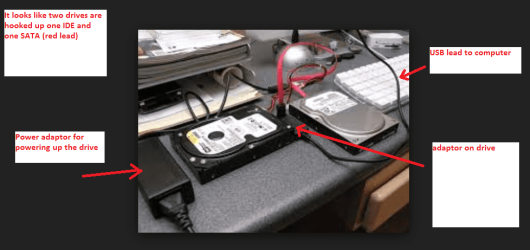
Ditto what Imran has suggested and the connection can be used with a USB adaptor as in pic.
These are really quite cheap and I use mine a fair bit to save putting drives into a machine or a caddy:)
 

Attachments

  • ADAPTOR 2.PNG
    ADAPTOR 2.PNG
    93.3 KB · Views: 2

My Computer My Computer

At a glance

Desk1 7 Home Prem / Desk2 10 Pro / Main lap A...Desk1 i5 3750K / Laptop i7 GTX 860M / Desk2 i...Desk1 8GB (1866) / Desk2 16GB (1333) / Laptop...Desk 1& 2NVidia GTX 650 & Laptops on board Intel
Computer type
PC/Desktop
Computer Manufacturer/Model Number
Own build (new) Desk1 / Asus ROG Win 7 / Desk2 1st build
OS
Desk1 7 Home Prem / Desk2 10 Pro / Main lap Asus ROG 10 Pro 2 laptop Toshiba 7 Pro Asus P2520 7 & 10
CPU
Desk1 i5 3750K / Laptop i7 GTX 860M / Desk2 i5 2500
Motherboard
Desk1 Asus P877-V / Desk2 Gigabyte H67 UD3H / Laptop ?
Memory
Desk1 8GB (1866) / Desk2 16GB (1333) / Laptop 8Gb DDR3
Graphics Card(s)
Desk 1& 2NVidia GTX 650 & Laptops on board Intel
Sound Card
Desk 1 & 2 -XONAR DG Realtek High Def audio Laptop
Monitor(s) Displays
Desk 1 Benq HD 2450 / Desk2 Philips 24" / Laptop 17.5"
Screen Resolution
1920x1080 D1 & D2 & Laptop 1
Hard Drives
Desk1 Samsung 120GB 830 SSD
Asus ROG 256GB 850 Pro SSD
Desk2 Samsung 840 256 SSD
Toshiba 120GB EVO
PSU
Desk 1 Corsair HX 1050/ Laptop ? / Desk 2 Corsair HX 650
Case
Desk 1 Cooler HAF XM ? Toshiba laptop / Desk2 Coolermaster
Cooling
Fans on all Desk1 -2 Desk2 - all Coolermasters 5 Laptop ?
Keyboard
Desk 1 MS Sidewinder X6 Desk 2 MS Sidewinder X 4
Mouse
Desk 1&2 - Gigabyte MS 900 gamer - laptop - Logitec wireless
Internet Speed
ADSL2+
Other Info
One other Desktop (tester) and spare Toshba laptop both with SSD's
Running Kaspersky 2016 ISS on all machines config'd identically
Logitec audio stereo systems on each machine (x3)
Canon MG5250MFC
Router/modem TP-Link running WPA2SK
If i interpret the answer correctly, i need to connect the HDD through an usb cable to the laptop right? (e-sata or just usb?) In case that the HDD is recognized in this way, can i be sure that it is the caddy, or could it still be a configuration problem of the internal sata port/bios setting?

First step that i will do is to hook myself up with such a cable, which will take some time through internet ordering.

I will report the steps taken and the results here of course:D
 

My Computer My Computer

At a glance

Windows 7 EnterpriseIntel Core i7 - 3630QM @2.40GHzDDR3 PC3-12800 SDRAM (1600 MHz) 8GbAMD FirePro™ M4000 with 1 GB dedicated GDDR5 ...
Computer type
Laptop
Computer Manufacturer/Model Number
HP Elitebook 8570w
OS
Windows 7 Enterprise
CPU
Intel Core i7 - 3630QM @2.40GHz
Memory
DDR3 PC3-12800 SDRAM (1600 MHz) 8Gb
Graphics Card(s)
AMD FirePro™ M4000 with 1 GB dedicated GDDR5 video memory
Hard Drives
Primary slot: Samsung SSD 840 EVO 250GB
Upgrade bay: HGST HTS725050A7E630 (HP OEM?)
Antivirus
Symantec Corporate
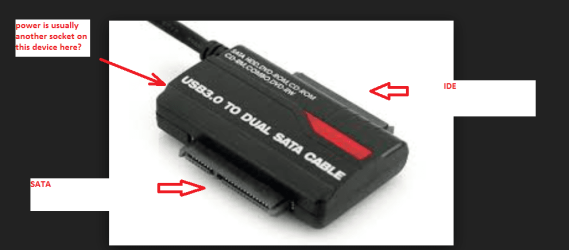
If the caddy has a USB connection no you don't necessarily need the adaptor I showed in that pic it is simply an alternative. From what I have seen some of those caddies some have a PCB (Printed Circuit Board) component and the drive runs from it the adaptor simply connects the drive without any such interface so avoids any other "distractions".
Of course it does depend on the connection type IDE or SATA but those adaptors have both types of connection on them. (see pic) it shows a dual SATA but it follows the same principle of both connections either side
 

Attachments

  • ADAPTOR 3.PNG
    ADAPTOR 3.PNG
    49.1 KB · Views: 2

My Computer My Computer

At a glance

Desk1 7 Home Prem / Desk2 10 Pro / Main lap A...Desk1 i5 3750K / Laptop i7 GTX 860M / Desk2 i...Desk1 8GB (1866) / Desk2 16GB (1333) / Laptop...Desk 1& 2NVidia GTX 650 & Laptops on board Intel
Computer type
PC/Desktop
Computer Manufacturer/Model Number
Own build (new) Desk1 / Asus ROG Win 7 / Desk2 1st build
OS
Desk1 7 Home Prem / Desk2 10 Pro / Main lap Asus ROG 10 Pro 2 laptop Toshiba 7 Pro Asus P2520 7 & 10
CPU
Desk1 i5 3750K / Laptop i7 GTX 860M / Desk2 i5 2500
Motherboard
Desk1 Asus P877-V / Desk2 Gigabyte H67 UD3H / Laptop ?
Memory
Desk1 8GB (1866) / Desk2 16GB (1333) / Laptop 8Gb DDR3
Graphics Card(s)
Desk 1& 2NVidia GTX 650 & Laptops on board Intel
Sound Card
Desk 1 & 2 -XONAR DG Realtek High Def audio Laptop
Monitor(s) Displays
Desk 1 Benq HD 2450 / Desk2 Philips 24" / Laptop 17.5"
Screen Resolution
1920x1080 D1 & D2 & Laptop 1
Hard Drives
Desk1 Samsung 120GB 830 SSD
Asus ROG 256GB 850 Pro SSD
Desk2 Samsung 840 256 SSD
Toshiba 120GB EVO
PSU
Desk 1 Corsair HX 1050/ Laptop ? / Desk 2 Corsair HX 650
Case
Desk 1 Cooler HAF XM ? Toshiba laptop / Desk2 Coolermaster
Cooling
Fans on all Desk1 -2 Desk2 - all Coolermasters 5 Laptop ?
Keyboard
Desk 1 MS Sidewinder X6 Desk 2 MS Sidewinder X 4
Mouse
Desk 1&2 - Gigabyte MS 900 gamer - laptop - Logitec wireless
Internet Speed
ADSL2+
Other Info
One other Desktop (tester) and spare Toshba laptop both with SSD's
Running Kaspersky 2016 ISS on all machines config'd identically
Logitec audio stereo systems on each machine (x3)
Canon MG5250MFC
Router/modem TP-Link running WPA2SK
I found out some interesting facts:
Through usb, my hdd is recognized in both my laptop and in another laptop.
The hdd of a friend installed in my caddy, plugged into my laptop is working immediately.

Really strange behavior. Next step that im going to take is to format my hdd through usb i think.

Im looking forward to hear your thoughts on this remarkable problem!
 

My Computer My Computer

At a glance

Windows 7 EnterpriseIntel Core i7 - 3630QM @2.40GHzDDR3 PC3-12800 SDRAM (1600 MHz) 8GbAMD FirePro™ M4000 with 1 GB dedicated GDDR5 ...
Computer type
Laptop
Computer Manufacturer/Model Number
HP Elitebook 8570w
OS
Windows 7 Enterprise
CPU
Intel Core i7 - 3630QM @2.40GHz
Memory
DDR3 PC3-12800 SDRAM (1600 MHz) 8Gb
Graphics Card(s)
AMD FirePro™ M4000 with 1 GB dedicated GDDR5 video memory
Hard Drives
Primary slot: Samsung SSD 840 EVO 250GB
Upgrade bay: HGST HTS725050A7E630 (HP OEM?)
Antivirus
Symantec Corporate
Really a good progress in this investigation process.
I think formatting not gonna change anything with HDD to Caddy Interface. But give it a try if formatting is not a problem for you.
May I know Model of the your HDD and your friends' too.
Everyone is a learner here though.
 

My Computer My Computer

At a glance

Windows 7 Home Premium 64bitIntel Core i7 2670QMSamsung 8GB 1333MhznVidia Geforce 540M GT 2GB
Computer type
Laptop
Computer Manufacturer/Model Number
Dell XPS L502x
OS
Windows 7 Home Premium 64bit
CPU
Intel Core i7 2670QM
Motherboard
Intel HM67 Mobile Express Chipset
Memory
Samsung 8GB 1333Mhz
Graphics Card(s)
nVidia Geforce 540M GT 2GB
Sound Card
Realtek High Definition Audio
Monitor(s) Displays
15.6" Dell Standard RGB-LED Backlit Display
Screen Resolution
1366x768
Hard Drives
Seagate Momentus 2.5" 750GB HDD 5400rpm
Internet Speed
3.1 Mbits/s
Antivirus
AVG Free, Kaspersky
Browser
Google chrome
Yes well the gadget device I linked to and sent pics of is a must have tool for me at least as it so easy to swap out drives on it without having to worry about the PCB's (Printed Circuit Board) that come in a lot of caddies, - one thing wrong with it (the caddy) is the drive might be perfectly good but the circuitry on that small board in the caddy is really out of whack or plain broken.

That could be something as much as the board is completely burnt out to something as simple as a capacitor gone bad. Such things as surges and brown outs can do that in the blink of an eye.
With the gadget there is no circuitry it is simply a connection just as if you were inserting the drive into machine itself:)
 

My Computer My Computer

At a glance

Desk1 7 Home Prem / Desk2 10 Pro / Main lap A...Desk1 i5 3750K / Laptop i7 GTX 860M / Desk2 i...Desk1 8GB (1866) / Desk2 16GB (1333) / Laptop...Desk 1& 2NVidia GTX 650 & Laptops on board Intel
Computer type
PC/Desktop
Computer Manufacturer/Model Number
Own build (new) Desk1 / Asus ROG Win 7 / Desk2 1st build
OS
Desk1 7 Home Prem / Desk2 10 Pro / Main lap Asus ROG 10 Pro 2 laptop Toshiba 7 Pro Asus P2520 7 & 10
CPU
Desk1 i5 3750K / Laptop i7 GTX 860M / Desk2 i5 2500
Motherboard
Desk1 Asus P877-V / Desk2 Gigabyte H67 UD3H / Laptop ?
Memory
Desk1 8GB (1866) / Desk2 16GB (1333) / Laptop 8Gb DDR3
Graphics Card(s)
Desk 1& 2NVidia GTX 650 & Laptops on board Intel
Sound Card
Desk 1 & 2 -XONAR DG Realtek High Def audio Laptop
Monitor(s) Displays
Desk 1 Benq HD 2450 / Desk2 Philips 24" / Laptop 17.5"
Screen Resolution
1920x1080 D1 & D2 & Laptop 1
Hard Drives
Desk1 Samsung 120GB 830 SSD
Asus ROG 256GB 850 Pro SSD
Desk2 Samsung 840 256 SSD
Toshiba 120GB EVO
PSU
Desk 1 Corsair HX 1050/ Laptop ? / Desk 2 Corsair HX 650
Case
Desk 1 Cooler HAF XM ? Toshiba laptop / Desk2 Coolermaster
Cooling
Fans on all Desk1 -2 Desk2 - all Coolermasters 5 Laptop ?
Keyboard
Desk 1 MS Sidewinder X6 Desk 2 MS Sidewinder X 4
Mouse
Desk 1&2 - Gigabyte MS 900 gamer - laptop - Logitec wireless
Internet Speed
ADSL2+
Other Info
One other Desktop (tester) and spare Toshba laptop both with SSD's
Running Kaspersky 2016 ISS on all machines config'd identically
Logitec audio stereo systems on each machine (x3)
Canon MG5250MFC
Router/modem TP-Link running WPA2SK
SOLVED!!!
Just as Imrankhan and ICit2lol advised, I connected my HDD through USB and it was recognized in Windows without a problem.

Just out of curiousity, I connected my friend's HDD in the caddy, which also started to work immediately in Windows.

Through Disk Manager, I saw that my friend's HDD was configured as GPT, while mine was configured as MBR (My SSD is also configured as MBR)

After a bit of reading, I decided to try the conversion from MBR to GPT for the 2nd HDD.

With the 2nd HDD connected through a USB cable, I went to Disk Manager to remove all partitions on the HDD. When every partition was removed, I was able to click 'Convert to GPT' (from the rightclick menu).

After the conversion, I disconnected the 2nd HDD from the USB cable.
With the laptop turned off, I of course removed my friend's HDD from the caddy first and put the 2nd HDD into the caddy. Afterwards I started up Disk Manager in Windows again.

This time, the 2nd HDD showed up.:D
After formatting the drive and assigning a drive letter, it all worked fine!

I think the steps taken are as follows:
1) connect the 2nd HDD through USB first
2) go to 'disk manager' and remove all partitions from the HDD
3) right click on 2nd HDD and select 'convert to gpt'
4) shut down system, disconnect USB cable and install HDD into caddy.
5) start up system, open 'disk manager' and create a new partition/assign a drive letter/format the HDD

Imrankhan and ICit2lol, I would REALLY like to thank you for the effort you took to help me and direct me into the right way. Keep up the good work!;)

Best regards,
Rick
 

My Computer My Computer

At a glance

Windows 7 EnterpriseIntel Core i7 - 3630QM @2.40GHzDDR3 PC3-12800 SDRAM (1600 MHz) 8GbAMD FirePro™ M4000 with 1 GB dedicated GDDR5 ...
Computer type
Laptop
Computer Manufacturer/Model Number
HP Elitebook 8570w
OS
Windows 7 Enterprise
CPU
Intel Core i7 - 3630QM @2.40GHz
Memory
DDR3 PC3-12800 SDRAM (1600 MHz) 8Gb
Graphics Card(s)
AMD FirePro™ M4000 with 1 GB dedicated GDDR5 video memory
Hard Drives
Primary slot: Samsung SSD 840 EVO 250GB
Upgrade bay: HGST HTS725050A7E630 (HP OEM?)
Antivirus
Symantec Corporate
@Imrankhan Just for the record ;)

My HDD: HGST HTS725050A7E630 (500GB)
Friend's HDD: Seagate ST1000 (1TB)
Caddy: Nimitz (bought on ebay)

My SSD: Samsung SSD 840 EVO 250GB

AHCI mode was selected in bios
 

My Computer My Computer

At a glance

Windows 7 EnterpriseIntel Core i7 - 3630QM @2.40GHzDDR3 PC3-12800 SDRAM (1600 MHz) 8GbAMD FirePro™ M4000 with 1 GB dedicated GDDR5 ...
Computer type
Laptop
Computer Manufacturer/Model Number
HP Elitebook 8570w
OS
Windows 7 Enterprise
CPU
Intel Core i7 - 3630QM @2.40GHz
Memory
DDR3 PC3-12800 SDRAM (1600 MHz) 8Gb
Graphics Card(s)
AMD FirePro™ M4000 with 1 GB dedicated GDDR5 video memory
Hard Drives
Primary slot: Samsung SSD 840 EVO 250GB
Upgrade bay: HGST HTS725050A7E630 (HP OEM?)
Antivirus
Symantec Corporate

My Computer My Computer

At a glance

Desk1 7 Home Prem / Desk2 10 Pro / Main lap A...Desk1 i5 3750K / Laptop i7 GTX 860M / Desk2 i...Desk1 8GB (1866) / Desk2 16GB (1333) / Laptop...Desk 1& 2NVidia GTX 650 & Laptops on board Intel
Computer type
PC/Desktop
Computer Manufacturer/Model Number
Own build (new) Desk1 / Asus ROG Win 7 / Desk2 1st build
OS
Desk1 7 Home Prem / Desk2 10 Pro / Main lap Asus ROG 10 Pro 2 laptop Toshiba 7 Pro Asus P2520 7 & 10
CPU
Desk1 i5 3750K / Laptop i7 GTX 860M / Desk2 i5 2500
Motherboard
Desk1 Asus P877-V / Desk2 Gigabyte H67 UD3H / Laptop ?
Memory
Desk1 8GB (1866) / Desk2 16GB (1333) / Laptop 8Gb DDR3
Graphics Card(s)
Desk 1& 2NVidia GTX 650 & Laptops on board Intel
Sound Card
Desk 1 & 2 -XONAR DG Realtek High Def audio Laptop
Monitor(s) Displays
Desk 1 Benq HD 2450 / Desk2 Philips 24" / Laptop 17.5"
Screen Resolution
1920x1080 D1 & D2 & Laptop 1
Hard Drives
Desk1 Samsung 120GB 830 SSD
Asus ROG 256GB 850 Pro SSD
Desk2 Samsung 840 256 SSD
Toshiba 120GB EVO
PSU
Desk 1 Corsair HX 1050/ Laptop ? / Desk 2 Corsair HX 650
Case
Desk 1 Cooler HAF XM ? Toshiba laptop / Desk2 Coolermaster
Cooling
Fans on all Desk1 -2 Desk2 - all Coolermasters 5 Laptop ?
Keyboard
Desk 1 MS Sidewinder X6 Desk 2 MS Sidewinder X 4
Mouse
Desk 1&2 - Gigabyte MS 900 gamer - laptop - Logitec wireless
Internet Speed
ADSL2+
Other Info
One other Desktop (tester) and spare Toshba laptop both with SSD's
Running Kaspersky 2016 ISS on all machines config'd identically
Logitec audio stereo systems on each machine (x3)
Canon MG5250MFC
Router/modem TP-Link running WPA2SK
Its good to hear that you fixed it yourself. Kudos. Thanks for reporting.
Because you have upgraded to SSD, you might want to read optimising Windows for SSD, through John's post.
http://www.sevenforums.com/tutorials/11728-optimize-windows-7-a.html
if you are unsure of the points involving the registry then just back it up - I do after each clean install for peace of mind. But Brinks tutorial is very safe.
http://www.sevenforums.com/tutorials/11728-optimize-windows-7-a.html
 

My Computer My Computer

At a glance

Windows 7 Home Premium 64bitIntel Core i7 2670QMSamsung 8GB 1333MhznVidia Geforce 540M GT 2GB
Computer type
Laptop
Computer Manufacturer/Model Number
Dell XPS L502x
OS
Windows 7 Home Premium 64bit
CPU
Intel Core i7 2670QM
Motherboard
Intel HM67 Mobile Express Chipset
Memory
Samsung 8GB 1333Mhz
Graphics Card(s)
nVidia Geforce 540M GT 2GB
Sound Card
Realtek High Definition Audio
Monitor(s) Displays
15.6" Dell Standard RGB-LED Backlit Display
Screen Resolution
1366x768
Hard Drives
Seagate Momentus 2.5" 750GB HDD 5400rpm
Internet Speed
3.1 Mbits/s
Antivirus
AVG Free, Kaspersky
Browser
Google chrome
Its good to hear that you fixed it yourself. Kudos. Thanks for reporting.
Because you have upgraded to SSD, you might want to read optimising Windows for SSD, through John's post.
http://www.sevenforums.com/tutorials/11728-optimize-windows-7-a.html
if you are unsure of the points involving the registry then just back it up - I do after each clean install for peace of mind. But Brinks tutorial is very safe.
http://www.sevenforums.com/tutorials/11728-optimize-windows-7-a.html
Yes Imran there are few points in there that I personably like as in the msconfig stuff.
The SSD's I use the Samsung magician to optimize the Samsungs at least (most of my SSD's are that brand):)
 

My Computer My Computer

At a glance

Desk1 7 Home Prem / Desk2 10 Pro / Main lap A...Desk1 i5 3750K / Laptop i7 GTX 860M / Desk2 i...Desk1 8GB (1866) / Desk2 16GB (1333) / Laptop...Desk 1& 2NVidia GTX 650 & Laptops on board Intel
Computer type
PC/Desktop
Computer Manufacturer/Model Number
Own build (new) Desk1 / Asus ROG Win 7 / Desk2 1st build
OS
Desk1 7 Home Prem / Desk2 10 Pro / Main lap Asus ROG 10 Pro 2 laptop Toshiba 7 Pro Asus P2520 7 & 10
CPU
Desk1 i5 3750K / Laptop i7 GTX 860M / Desk2 i5 2500
Motherboard
Desk1 Asus P877-V / Desk2 Gigabyte H67 UD3H / Laptop ?
Memory
Desk1 8GB (1866) / Desk2 16GB (1333) / Laptop 8Gb DDR3
Graphics Card(s)
Desk 1& 2NVidia GTX 650 & Laptops on board Intel
Sound Card
Desk 1 & 2 -XONAR DG Realtek High Def audio Laptop
Monitor(s) Displays
Desk 1 Benq HD 2450 / Desk2 Philips 24" / Laptop 17.5"
Screen Resolution
1920x1080 D1 & D2 & Laptop 1
Hard Drives
Desk1 Samsung 120GB 830 SSD
Asus ROG 256GB 850 Pro SSD
Desk2 Samsung 840 256 SSD
Toshiba 120GB EVO
PSU
Desk 1 Corsair HX 1050/ Laptop ? / Desk 2 Corsair HX 650
Case
Desk 1 Cooler HAF XM ? Toshiba laptop / Desk2 Coolermaster
Cooling
Fans on all Desk1 -2 Desk2 - all Coolermasters 5 Laptop ?
Keyboard
Desk 1 MS Sidewinder X6 Desk 2 MS Sidewinder X 4
Mouse
Desk 1&2 - Gigabyte MS 900 gamer - laptop - Logitec wireless
Internet Speed
ADSL2+
Other Info
One other Desktop (tester) and spare Toshba laptop both with SSD's
Running Kaspersky 2016 ISS on all machines config'd identically
Logitec audio stereo systems on each machine (x3)
Canon MG5250MFC
Router/modem TP-Link running WPA2SK
Back
Top