HP G72t-b00 laptop, windows 7 video problem

Mikeal

New member
Local time
3:54 PM
Messages
13
I have been trying to figure this out for a long time. I figure what's the worse that can happen, someone will come up with the multitude of avenues I have already tried or actually know how to correct this problem. Here goes, this has happened on 3 of my laptops, where the video works fine until a demand for more resources comes up and maybe a fraction is aloud. Pictures speak louder than words atm.
 

Attachments
  • Display prop.PNG
    Display prop.PNG
    8.7 KB · Views: 7
  • Display prop2.PNG
    Display prop2.PNG
    8.7 KB · Views: 9
  • Display prop3.PNG
    Display prop3.PNG
    42.9 KB · Views: 6
  • Display prop4.PNG
    Display prop4.PNG
    12.2 KB · Views: 10
  • Display prop5.PNG
    Display prop5.PNG
    4.9 KB · Views: 5

My Computer My Computer

At a glance

Windows 7 Home Premium4 gb
OS
Windows 7 Home Premium
Memory
4 gb
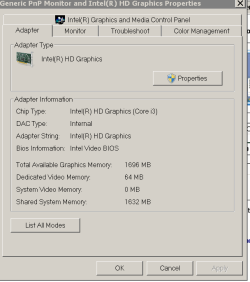
Trouble is the shared memory for Video, you only have base 64megs for video, it's higher speed than regular RAM, if you try to use high gfx need programs, you need more than 64megs, and that is where the trouble begins.

You'll be sending requests to your regular RAM for video and regular needs and it unable to handle it, thus the error.
Being a laptop, it's various cache is probably not exactly stellar either, another performance hit.

My base Windows 7 64-bit usage normally is using more than 2.4gigs of RAM, hit CTRL+SHIFT+ESC to bring up Task Manager and go to the Performance tab, and now run what you want to and check it.

Also, helps if you post the error. :)

That's a bad laptop for gaming/high end graphics needs, typical...
 

My Computer My Computer

At a glance

Windows 7 Ultimate Retail Box (64-bit install...AMD FX-8350 CPU v1.15 (or 1.0F) BIOS was requ...8G CAS-7 G-Skill DDR3 @1333 (2 fours) [mobo n...Radeon HD 7950 [3 gigs of GDDR5] MSI Twin Fro...
Computer type
PC/Desktop
Computer Manufacturer/Model Number
Self Built Custom
OS
Windows 7 Ultimate Retail Box (64-bit installed) + Service Pack 1
CPU
AMD FX-8350 CPU v1.15 (or 1.0F) BIOS was required!
Motherboard
MSI 890FXA-GD70
Memory
8G CAS-7 G-Skill DDR3 @1333 (2 fours) [mobo nonOC max rec'd]
Graphics Card(s)
Radeon HD 7950 [3 gigs of GDDR5] MSI Twin Frozr model
Sound Card
Realtek High Definition Audio (onboard mobo, ALC-889 chip)
Monitor(s) Displays
2 WS LED Monitors: One LG One Viewsonic
Screen Resolution
1920 by 1080
Hard Drives
SSD for OS: Samsung 840 Pro
SSD for VM and utilities: Adata SX900
7200 RPM SATA HDs for the rest: Hitachi and Seagate
PSU
Corsair TX850 - 850W max, in service since August 2010.
Case
Thermaltake Armor A90
Cooling
Thermaltake Spin Q CPU Cooler, in service since August 2010
Keyboard
Logitech G11
Mouse
Logitech M310 Wireless
Internet Speed
100 Megabit broadband supposedly upgraded from 50 (Cable)
Antivirus
Bitdefender Internet Security 2014 suite
Browser
Pale Moon 64-bit main, also IceDragon, Opera, and Maxthon.
Other Info
CompTIA A+ certified (220-800 series) in July 2013.
Thank you for the reply. I am sorry I should have explained some the pics but I was in a hurry to get to work.
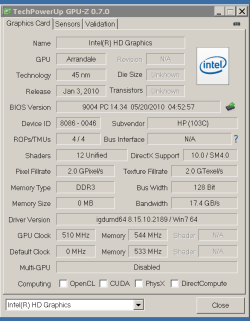
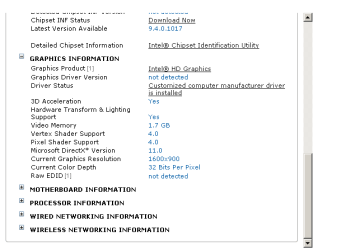
I do realize the amount of dedicated video ram, if you would take a closer look at the dxdiag it shows 1696 mb and (I am just assuming this) WDDM is not allowing the full use of this amount. I also realize this laptop is not really that good for gaming, but it still should be able to play games that are in the 512 mb range fairly easy, which is it not atm. The GPU-Z snip is from when it is full rendering mode, and you can see, that it is also only aloud to use 64 mb. (it took a long time to snip that pic btw)
 

My Computer My Computer

At a glance

Windows 7 Home Premium4 gb
OS
Windows 7 Home Premium
Memory
4 gb
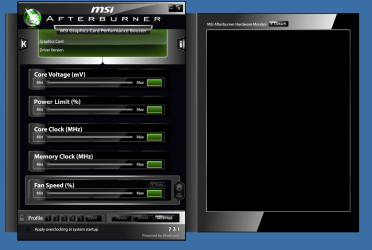
Also you can see MSI afterburner is not even finding the Intel HD Graphics, which is fully updated, same with the chipsets and the bios. No I can not set the dedicated video mem from the bios, thanks Intel >.>
 

My Computer My Computer

At a glance

Windows 7 Home Premium4 gb
OS
Windows 7 Home Premium
Memory
4 gb
Also I did replace the HDD and reloaded windows, nothing. Silly me I did not do that at the same time as replacing the motherboard. When I did replace the motherboard only the external HDMI port worked and still had the same issues, and no, the inverter and LCD screen are working fine. I replaced the new motherboard with old one and the screen came back on.
 

My Computer My Computer

At a glance

Windows 7 Home Premium4 gb
OS
Windows 7 Home Premium
Memory
4 gb
you could try looking in the bios to see if more ram can be dedicated, also, look if the Intel graphics utility can increase the amount of RAM, I'm pretty sure that there is a setting for that, although not sure of its effect.
 

My Computer My Computer

At a glance

Win 7 Pro 64-bit 7601AMD Phenom 9650 QuadCore, revision DR-B35 GB yes I run 2x 2GB and 1x 1GB, different b...NVIDIA GeForce 9800 GT 512 Mb, unknown manufa...
Computer type
PC/Desktop
Computer Manufacturer/Model Number
custom built
OS
Win 7 Pro 64-bit 7601
CPU
AMD Phenom 9650 QuadCore, revision DR-B3
Motherboard
ASUS M4A78
Memory
5 GB yes I run 2x 2GB and 1x 1GB, different brand, spank me.
Graphics Card(s)
NVIDIA GeForce 9800 GT 512 Mb, unknown manufacturer.
Sound Card
Crappy Realtek Integrated Audio
Monitor(s) Displays
Fujitsu Siemens P19-3P
Screen Resolution
1280 x 1024 x 32 bits @ 60 Hz Oh yeah, 4:3 rocks!
Hard Drives
(1) MAXTOR S TM3320613AS SATA Disk Device (2) STM35004 18AS SATA Disk Device (3) TOSHIBA USB 2.5"-HDD
PSU
whatever, around 450w
Case
Scavenged from old company PC, 10+ years old
Cooling
CPU fan, GPU fan, case fan, nothing fancy
Keyboard
Microsoft, PS/2, white.
Mouse
Optical, logitec.
Internet Speed
effective max speeds: 70-ish kB/s down 30-ish kB/s up
Antivirus
Avira, free edition.
Browser
Firefox with FXChrome to make it look like Google Chrome :P
Other Info
Was discarded by previous owner due to "horrible performance".
Was running Win Xp from a IDE drive. Yeah. Was a pain.
SATA II drive and Win7 and it zips away! Yay!
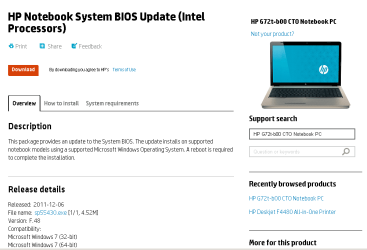
This is the version of BIOS, I simply can not adjust it in the BIOS.
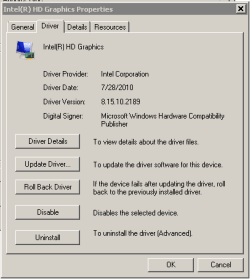
Notice the version of Graphics Driver, why would it say that?
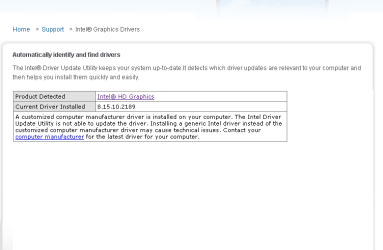
I can not update, just like it says in the picture. How would I go about removing that driver, by removing, I mean completely disintegrate install logs or pre set install dll's that might be installing graphics drivers incorrect and installing a fresh driver from intel?
 

Attachments

  • Display prop10.PNG
    Display prop10.PNG
    6.9 KB · Views: 3
  • Display prop9.PNG
    Display prop9.PNG
    4.3 KB · Views: 2
  • Display prop7.PNG
    Display prop7.PNG
    16.6 KB · Views: 4
  • Display prop8.PNG
    Display prop8.PNG
    20.4 KB · Views: 3
  • Display prop11.PNG
    Display prop11.PNG
    5.6 KB · Views: 3
Last edited:

My Computer My Computer

At a glance

Windows 7 Home Premium4 gb
OS
Windows 7 Home Premium
Memory
4 gb
Graphics Drivers will not install from HP or Intels websites.
 

My Computer My Computer

At a glance

Windows 7 Home Premium4 gb
OS
Windows 7 Home Premium
Memory
4 gb
Various date change/confusion possibilities:

3rd party download, they added something to the download and when they did it, sloppy, it changed the time stamps to all the files.
Fake driver update [verify/compare file sizes!]
Beta or release candidate driver that got elevated to release and didn't adjust time stamps.
Anyone who touched the file by copying files, and having it use copy date/time as new time stamp.
Date made available on site to download, not same as date it's created.
Bugs in the driver or .inf files.
Virus/Malware

That laptop, what's the total RAM on it?

Also, what specific games are you trying to run on it?

I suspect you are running into a hardware limitation on this particular laptop.

64megs only dedicated VRAM, anything above that, is probably going to be very awkward performance wise, but it's enough for the laptop monitor's native resolution, but graphic intensive gaming will need more.
 

My Computer My Computer

At a glance

Windows 7 Ultimate Retail Box (64-bit install...AMD FX-8350 CPU v1.15 (or 1.0F) BIOS was requ...8G CAS-7 G-Skill DDR3 @1333 (2 fours) [mobo n...Radeon HD 7950 [3 gigs of GDDR5] MSI Twin Fro...
Computer type
PC/Desktop
Computer Manufacturer/Model Number
Self Built Custom
OS
Windows 7 Ultimate Retail Box (64-bit installed) + Service Pack 1
CPU
AMD FX-8350 CPU v1.15 (or 1.0F) BIOS was required!
Motherboard
MSI 890FXA-GD70
Memory
8G CAS-7 G-Skill DDR3 @1333 (2 fours) [mobo nonOC max rec'd]
Graphics Card(s)
Radeon HD 7950 [3 gigs of GDDR5] MSI Twin Frozr model
Sound Card
Realtek High Definition Audio (onboard mobo, ALC-889 chip)
Monitor(s) Displays
2 WS LED Monitors: One LG One Viewsonic
Screen Resolution
1920 by 1080
Hard Drives
SSD for OS: Samsung 840 Pro
SSD for VM and utilities: Adata SX900
7200 RPM SATA HDs for the rest: Hitachi and Seagate
PSU
Corsair TX850 - 850W max, in service since August 2010.
Case
Thermaltake Armor A90
Cooling
Thermaltake Spin Q CPU Cooler, in service since August 2010
Keyboard
Logitech G11
Mouse
Logitech M310 Wireless
Internet Speed
100 Megabit broadband supposedly upgraded from 50 (Cable)
Antivirus
Bitdefender Internet Security 2014 suite
Browser
Pale Moon 64-bit main, also IceDragon, Opera, and Maxthon.
Other Info
CompTIA A+ certified (220-800 series) in July 2013.
while there is a risk the guy above is right, you can always try.

Btw, what is the processor of that laptop?

Set a new system restore point, so that in case you screw up you can restore it and get back to where you are now.

Then you uninstall the current driver using the Uninstall button in the panel you have in the screenshots above.
Then reboot, and install drivers from Intel.
 

My Computer My Computer

At a glance

Win 7 Pro 64-bit 7601AMD Phenom 9650 QuadCore, revision DR-B35 GB yes I run 2x 2GB and 1x 1GB, different b...NVIDIA GeForce 9800 GT 512 Mb, unknown manufa...
Computer type
PC/Desktop
Computer Manufacturer/Model Number
custom built
OS
Win 7 Pro 64-bit 7601
CPU
AMD Phenom 9650 QuadCore, revision DR-B3
Motherboard
ASUS M4A78
Memory
5 GB yes I run 2x 2GB and 1x 1GB, different brand, spank me.
Graphics Card(s)
NVIDIA GeForce 9800 GT 512 Mb, unknown manufacturer.
Sound Card
Crappy Realtek Integrated Audio
Monitor(s) Displays
Fujitsu Siemens P19-3P
Screen Resolution
1280 x 1024 x 32 bits @ 60 Hz Oh yeah, 4:3 rocks!
Hard Drives
(1) MAXTOR S TM3320613AS SATA Disk Device (2) STM35004 18AS SATA Disk Device (3) TOSHIBA USB 2.5"-HDD
PSU
whatever, around 450w
Case
Scavenged from old company PC, 10+ years old
Cooling
CPU fan, GPU fan, case fan, nothing fancy
Keyboard
Microsoft, PS/2, white.
Mouse
Optical, logitec.
Internet Speed
effective max speeds: 70-ish kB/s down 30-ish kB/s up
Antivirus
Avira, free edition.
Browser
Firefox with FXChrome to make it look like Google Chrome :P
Other Info
Was discarded by previous owner due to "horrible performance".
Was running Win Xp from a IDE drive. Yeah. Was a pain.
SATA II drive and Win7 and it zips away! Yay!
Faladu, total ram is 6 gb, and I am trying to run fable 3. Until I installed AVG (I suspect the time stamping infected Kaspersky as well) I was not able to play most FB games or Wild Tangent games. You are right, the native monitor runs smoothly until I try to run any other graphics intensive games or render machines. You are right on the hardware limitation. Thank you for the very insightful information about time stamps. I did not think that time stamping was so integral.
 

My Computer My Computer

At a glance

Windows 7 Home Premium4 gb
OS
Windows 7 Home Premium
Memory
4 gb
Now I have to find a way to completely remove the driver, and not allows windows to install it again, and do a slim install. Then maybe able to let intel do the install and updating. I suspect windows installer is behaving inappropriately when it comes to installing this specific driver.
 
Last edited:

My Computer My Computer

At a glance

Windows 7 Home Premium4 gb
OS
Windows 7 Home Premium
Memory
4 gb
bobafetthotmail the laptop has an i3 Core. Also, windows installs this corrupted driver after a reboot. I forget how to stop that. In the services? Custom boot?
 
Last edited:

My Computer My Computer

At a glance

Windows 7 Home Premium4 gb
OS
Windows 7 Home Premium
Memory
4 gb
msconfig?
 

My Computer My Computer

At a glance

Windows 7 Home Premium4 gb
OS
Windows 7 Home Premium
Memory
4 gb
if the driver comes from windows update, this is the tutorial

If not, when you uninstall the driver, tick the box about deleting the driver files. Repeat that until all drivers have been deleted and only the windows generic driver is left (you cannot delete it, so don't worry).

If not, then you need to find the folder it used to place its backups into and delete it (better just move it to an external drive in case you didn't catch the right one), then uninstall the driver from that panel again. Should be inside C: and clearly labeleld as INTEL or something like that, then it should contain files and and a setup to install the drivers (you can try running it to see if it is the right folder).

Or try to rollback drivers (again the same panel) and hope it rolls back to Windows generic video drivers (you notice this as the screen resolution becomes crappy), then install the drivers from a better source (Intel's website own installer).
 
Last edited:

My Computer My Computer

At a glance

Win 7 Pro 64-bit 7601AMD Phenom 9650 QuadCore, revision DR-B35 GB yes I run 2x 2GB and 1x 1GB, different b...NVIDIA GeForce 9800 GT 512 Mb, unknown manufa...
Computer type
PC/Desktop
Computer Manufacturer/Model Number
custom built
OS
Win 7 Pro 64-bit 7601
CPU
AMD Phenom 9650 QuadCore, revision DR-B3
Motherboard
ASUS M4A78
Memory
5 GB yes I run 2x 2GB and 1x 1GB, different brand, spank me.
Graphics Card(s)
NVIDIA GeForce 9800 GT 512 Mb, unknown manufacturer.
Sound Card
Crappy Realtek Integrated Audio
Monitor(s) Displays
Fujitsu Siemens P19-3P
Screen Resolution
1280 x 1024 x 32 bits @ 60 Hz Oh yeah, 4:3 rocks!
Hard Drives
(1) MAXTOR S TM3320613AS SATA Disk Device (2) STM35004 18AS SATA Disk Device (3) TOSHIBA USB 2.5"-HDD
PSU
whatever, around 450w
Case
Scavenged from old company PC, 10+ years old
Cooling
CPU fan, GPU fan, case fan, nothing fancy
Keyboard
Microsoft, PS/2, white.
Mouse
Optical, logitec.
Internet Speed
effective max speeds: 70-ish kB/s down 30-ish kB/s up
Antivirus
Avira, free edition.
Browser
Firefox with FXChrome to make it look like Google Chrome :P
Other Info
Was discarded by previous owner due to "horrible performance".
Was running Win Xp from a IDE drive. Yeah. Was a pain.
SATA II drive and Win7 and it zips away! Yay!
I did not get to try it this weekend, I will let you know what happens when I do
 

My Computer My Computer

At a glance

Windows 7 Home Premium4 gb
OS
Windows 7 Home Premium
Memory
4 gb
Well, I went into the system information and wrote down all the drivers (.dll), and a .sys file in the system32 folder, deleted them and Intel was able to find the graphics card, so that is a big step forward. I have to go to bed so I will update tomorrow.
 

My Computer My Computer

At a glance

Windows 7 Home Premium4 gb
OS
Windows 7 Home Premium
Memory
4 gb
Still not working properly <sigh>
 

My Computer My Computer

At a glance

Windows 7 Home Premium4 gb
OS
Windows 7 Home Premium
Memory
4 gb
Back
Top