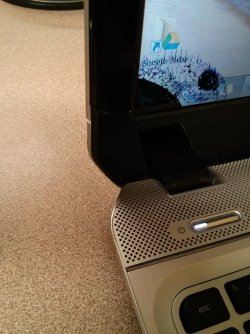
HP Pavilion m6 Stress crack on screen bezel, casing, and LCD

bensonmojo

New member
Local time
3:48 AM
Messages
9
I have a HP Pavilion m6 1045-dx. The rear casing of the screen was the first issue, as it began to become unattached, as you can see here:
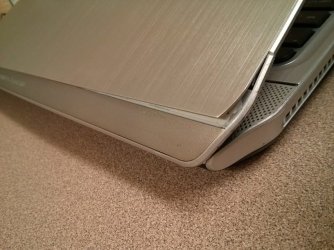
IMG_20141010_215453.jpg


I did not take care of this right away, so now the problem has only gotten worse so that now a part of the front bezel around the screen is cracked and the LCD is that same area. This is all due to stress closing/opening the lid, because since that panel on the back case of the screen began rising it is putting pressure on that area of the screen causing more damage.

Needless to say, it is probably time to fix this. In addition to the screen problems my built-in webcam/mic is not working, possibly because is goes through the screen and has become disconnected or something.

I have attached a couple more photos to show the damage. As far as the LCD goes, I know the only thing I can do is replace it. I am wondering about using some epoxy on the back screen to repair it, and also to seal the crack in the front screen bezel, or possibly replace it.
If I end up replacing the screen case (back) and bezel (front) plus the LCD screen itself should I be worried about the webcam and wireless antennas in the screen?
Also, out of warranty and in addition to all the parts charges they would charge me labor as well looking at around $300 USD so I opted to not go for that.

Long lasting epoxy suggestions?
 

Attachments
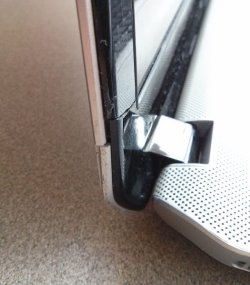
  • IMG_20141011_105603.jpg
    IMG_20141011_105603.jpg
    51 KB · Views: 8
  • IMG_20141010_215417.jpg
    IMG_20141010_215417.jpg
    87.7 KB · Views: 0

My Computer My Computer

At a glance

Windows 7 Home x64Intel core i58 GB
Computer type
Laptop
Computer Manufacturer/Model Number
HP Pavilion m6-1045dx
OS
Windows 7 Home x64
CPU
Intel core i5
Memory
8 GB
Browser
Chrome
Hello bensonmojo. Welcome to the Forum.

The wire that connects to the webcam is snaked around the outside edge of the bezel, behind the display screen. Very possible the wire is severed or frayed.

You will need to replace the outer lid cover, the bezel, and the display.
The display screen is attached to 2 thin steel rails which double as the hinge for the lid. The only structural protection for the screen is the lid cover. The bezel is little more than decorative, but protects the wiring. So not replacing any of these parts would be foolish.

Good place for replacement screens in N. America:
LAPTOP SCREEN from $34.99, replacement LCD screens. Repair Tablet, Acer, Apple, iPhone, iPad, Samsung, Dell, HP Compaq, Toshiba, IBM Lenovo, Sony, Asus, Gateway.
Be sure to watch a video on replacing a screen.

As for the cover and bezel, look for a non-working laptop of the same model line on Ebay and cannibalize it for parts.
 

My Computer My Computer

At a glance

Windows 7 64 Bit Home Premium SP1i7-3820GSkill F3-14900CL9Q - 16GBEVGA GeForce GTX660 - Driver 352.86
Computer type
PC/Desktop
Computer Manufacturer/Model Number
Home Built - Jan 2013
OS
Windows 7 64 Bit Home Premium SP1
CPU
i7-3820
Motherboard
Asus P9X79-PRO - Bios 4608
Memory
GSkill F3-14900CL9Q - 16GB
Graphics Card(s)
EVGA GeForce GTX660 - Driver 352.86
Sound Card
On board Realtek ALC898
Monitor(s) Displays
Acer S271HL
Screen Resolution
1920 x 1080
Hard Drives
#1- Samsung 840 Pro Series
#2- Western Digital WD1002FAEX Sata3 Black
#3- Western Digital WD1002FAEX Sata3 Black
PSU
Corsair CMPSU-850TX-V2 - 850 watt (by Seasonic)
Case
Corsair Obsidian 550D
Cooling
Standard 3 120mm case fans, Cooler Master Hyper 212 EVO
Keyboard
MS KC-0405
Mouse
Intellimouse 5-button
Internet Speed
56 Mbits/Sec (on a good day)
Antivirus
Avast & Malwarebytes
Browser
Firefox
Other Info
Asus DVD - DRW-24B1ST 24X
Thank you TVeblen.
I have looked at the service manual for my machine (http://h10032.www1.hp.com/ctg/Manual/c03328663.pdf) and found the product numbers, etc.

I have found a few listings of Display enclosure (lid cover) and bezel replacement parts on Ebay, and there are many places to buy the LCD (thanks for the link).

After doing this, I am wondering how I will go about actually replacing the back cover. I have found a video on how to replace the screen, but if I am replacing the back cover I am not sure how I will be able to reconnect it to the hinges, re-position the display cable, webcam/mic cable and WiFi antennas. I can't seem to find any videos on someone doing this so I'm not sure if I will need to buy replacement hinges, or screws?
 

My Computer My Computer

At a glance

Windows 7 Home x64Intel core i58 GB
Computer type
Laptop
Computer Manufacturer/Model Number
HP Pavilion m6-1045dx
OS
Windows 7 Home x64
CPU
Intel core i5
Memory
8 GB
Browser
Chrome
Not unless those parts are broken also. All covers go off and on a little differently, but as long as it is an exact replacement it is all you need.
Sometimes you have to do a little creative bending to get the steel rails straight again.
 

My Computer My Computer

At a glance

Windows 7 64 Bit Home Premium SP1i7-3820GSkill F3-14900CL9Q - 16GBEVGA GeForce GTX660 - Driver 352.86
Computer type
PC/Desktop
Computer Manufacturer/Model Number
Home Built - Jan 2013
OS
Windows 7 64 Bit Home Premium SP1
CPU
i7-3820
Motherboard
Asus P9X79-PRO - Bios 4608
Memory
GSkill F3-14900CL9Q - 16GB
Graphics Card(s)
EVGA GeForce GTX660 - Driver 352.86
Sound Card
On board Realtek ALC898
Monitor(s) Displays
Acer S271HL
Screen Resolution
1920 x 1080
Hard Drives
#1- Samsung 840 Pro Series
#2- Western Digital WD1002FAEX Sata3 Black
#3- Western Digital WD1002FAEX Sata3 Black
PSU
Corsair CMPSU-850TX-V2 - 850 watt (by Seasonic)
Case
Corsair Obsidian 550D
Cooling
Standard 3 120mm case fans, Cooler Master Hyper 212 EVO
Keyboard
MS KC-0405
Mouse
Intellimouse 5-button
Internet Speed
56 Mbits/Sec (on a good day)
Antivirus
Avast & Malwarebytes
Browser
Firefox
Other Info
Asus DVD - DRW-24B1ST 24X
Back
Top