Solved HP printer installation

judd

New member
Local time
4:07 PM
Messages
40
Location
MI - USA
Samsung netbook (Atom10)
Win 7 Starter.
Home lan ethernet connection
When I try to install the software for a HP C5180, it "checks the system" and "applies updates", ask for EULA and then starts the circle over again.:(

I've installed this printer many times on Vista and Win 7 Ultra with no problem.
I install a Brother TCIP laser with no problems.
I'm thinking it's a Win Starter problem.

Can any one shed any light on this problem?:rolleyes:


If this is the wrong forum, please advise.

Thanks to all who help.:D
 

My Computer

Computer Manufacturer/Model Number
custom - asus motherboard
OS
win 7 64 bit
CPU
5 GHZ i6-core
Motherboard
Asus
Memory
16gb
I have a C5280 and it works without any problems.

My suggestion is to first uninstall everything HP-related from your system, reboot if necessary, use Revo to make sure nothing is left over, then download the latest drivers and/or software from the HP website (do not use the discs that came with your printer, the software version there might be outdated) and install. Make sure you run the installer "As Administrator" using an account with administrative privileges.

I really doubt that HP software is incompatible with 7 Starter Edition. However, you might also try installing just the driver. This way you'll be able to print, but you'll have no HP tools (not sure if you actually need them).
 

My Computer

Computer Manufacturer/Model Number
Dell Inspiron 530
OS
Windows 7 Ultimate (x64)
CPU
Q6600
Memory
8 GB
Graphics Card(s)
ATI Radeon HD 2600 XT
Monitor(s) Displays
Samsung Syncmaster P2450
Screen Resolution
1920x1080
Hard Drives
Samsung HD103UJ
Samsung HD501LJ
Internet Speed
25 Mb/s
I have a C5280 and it works without any problems.

My suggestion is to first uninstall everything HP-related from your system, reboot if necessary, use Revo to make sure nothing is left over, then download the latest drivers and/or software from the HP website (do not use the discs that came with your printer, the software version there might be outdated) and install. Make sure you run the installer "As Administrator" using an account with administrative privileges.

I really doubt that HP software is incompatible with 7 Starter Edition. However, you might also try installing just the driver. This way you'll be able to print, but you'll have no HP tools (not sure if you actually need them).


Thanks for responding.

I've done emptied the temp and rebooted.
What is Revo. I searched HP for a cleaner without luck.

To my knowledge nothing is installed except the %temp% dir. I empty that on a regular basis.

The installation package is an exe file. So, I wouldn't know where the driver is unless Windows will find one.
 

My Computer

Computer Manufacturer/Model Number
custom - asus motherboard
OS
win 7 64 bit
CPU
5 GHZ i6-core
Motherboard
Asus
Memory
16gb

My Computer

Computer Manufacturer/Model Number
HP p6680t
OS
Windows 7 Home Premium 64bit-HP OEM SP1 Installed
CPU
Intel Core i5-650 3.2GHz
Motherboard
MS-7613 (Iona-GL8E) Intel H57 Express Chipset
Memory
6GB DDR3 1333Mhz SDRAM
Graphics Card(s)
Intergrated Intel H57
Sound Card
Intergrated Realtek 7/1
Monitor(s) Displays
HP 3310m 23" diagonal widescreen flat panel monitor
Screen Resolution
1920 x 1080
Hard Drives
1 TB (7,200) SATA 3Gb/s
1.5 TB External
PSU
300W
Case
HP Piano Black
Cooling
Couple Fans
Keyboard
HP USB
Mouse
HP Optical
Internet Speed
3-6.0 Mbps Average around 5.0 Mbps AT&T DSL
Other Info
Security Includes NIS 2011, Malwarebytes, Superantispyware, & SpywareBlaster. Acronis True Home Image 2011 for Backup
One thing I've noticed with the HP printers and all-in-ones I've setup here at home is, don't plug the USB cable in until prompted. If I plug the USB cable in before trying to install the software it fails at the detection stage. Even if the printer isn't turned on until I get to that screen. :confused:
 

My Computer

Computer type
PC/Desktop
Computer Manufacturer/Model Number
Home Built
OS
Windows 10 Education 64 bit
CPU
AMD Phenom II X4 980 Black Edition Deneb 3.7GHz
Motherboard
Asus M4N68T-M V2 µATX Motherboard
Memory
8GB 4GBx2 Kingston PC10600 DDR3 1333 Memory
Graphics Card(s)
Zotac NVIDIA Geforce GT640 2 Gig DDR3 PCIe
Sound Card
VIA VT1708s High Definition Audio 8-channel Onboard
Monitor(s) Displays
22" LG E2242 1080p and 2 19" I-INC AG191D
Screen Resolution
1280x1024 - 1920x1080 - 1280x1024
Hard Drives
Crucial M100 256 GB SSD and 500 GB WD Blue SATA
PSU
Thermaltake TR 620
Case
Power Up Black ATX Mid-Tower Case
Cooling
Stock heatsink and fan
Keyboard
Logitech Wireless K350 Wave
Mouse
Logitech Wireless M570 Trackman Wheel
Internet Speed
80 Mbps Down 30 Mbps Up
Antivirus
Windows Defender
Browser
Internet Explorer 11
Other Info
HP DVD1040e Lightscribe - External USB2
One thing I've noticed with the HP printers and all-in-ones I've setup here at home is, don't plug the USB cable in until prompted. If I plug the USB cable in before trying to install the software it fails at the detection stage. Even if the printer isn't turned on until I get to that screen. :confused:


I've tried everything!
The same file is used for 32 & 64 bit.
I tried compatibility XP sp2 & sp3
I've tried ethernet and USB. (USB cable connected and disconnected.)

The software never gets to the point of selecting type of install.

I'm no greenhorn at this. It's got me stumped.:mad:

I would like to know what Unifex meant by "REVO"
 

My Computer

Computer Manufacturer/Model Number
custom - asus motherboard
OS
win 7 64 bit
CPU
5 GHZ i6-core
Motherboard
Asus
Memory
16gb
Revo uninstaler I would think. > Download Revo Uninstaller Freeware - Free and Full Download - Uninstall software, remove programs, solve uninstall problems
Looks like you can download a 30 day trial. I've never used it but from what I have heard it can get some or maybe even all the bits left over from a failed install/uninstall. Like I said I haven't used it but I can't see it making things any worse. I like the HP printers, but the software could us some improvement. I haven't had any problems since I figured out to leave the printer off and disconnected until prompted. I've done some head scratching in the past though.
 
Last edited:

My Computer

Computer type
PC/Desktop
Computer Manufacturer/Model Number
Home Built
OS
Windows 10 Education 64 bit
CPU
AMD Phenom II X4 980 Black Edition Deneb 3.7GHz
Motherboard
Asus M4N68T-M V2 µATX Motherboard
Memory
8GB 4GBx2 Kingston PC10600 DDR3 1333 Memory
Graphics Card(s)
Zotac NVIDIA Geforce GT640 2 Gig DDR3 PCIe
Sound Card
VIA VT1708s High Definition Audio 8-channel Onboard
Monitor(s) Displays
22" LG E2242 1080p and 2 19" I-INC AG191D
Screen Resolution
1280x1024 - 1920x1080 - 1280x1024
Hard Drives
Crucial M100 256 GB SSD and 500 GB WD Blue SATA
PSU
Thermaltake TR 620
Case
Power Up Black ATX Mid-Tower Case
Cooling
Stock heatsink and fan
Keyboard
Logitech Wireless K350 Wave
Mouse
Logitech Wireless M570 Trackman Wheel
Internet Speed
80 Mbps Down 30 Mbps Up
Antivirus
Windows Defender
Browser
Internet Explorer 11
Other Info
HP DVD1040e Lightscribe - External USB2
Yes, thanks alphanumeric, that's what I meant. The free version works fine, the paid version is more powerful, but in my opinion is only useful if you install and uninstall programs on a daily basis.

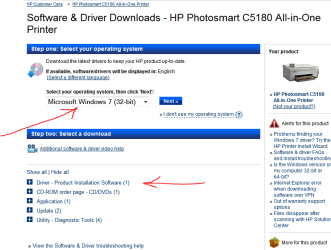
judd, did you try to download drivers from the HP site? At this page you can see everything you need, but don't forget to choose your OS.

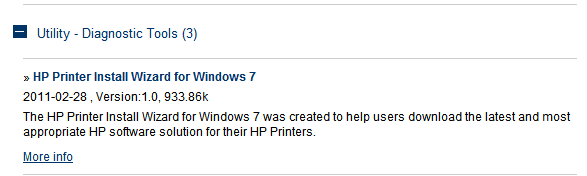
Edit: if you expand the "Utility" on that page I referred to, you'll find "HP install wizard". Perhaps that would be of help.
 

Attachments

  • Capture.PNG
    Capture.PNG
    26.5 KB · Views: 16
  • Capture2.PNG
    Capture2.PNG
    3.8 KB · Views: 3

My Computer

Computer Manufacturer/Model Number
Dell Inspiron 530
OS
Windows 7 Ultimate (x64)
CPU
Q6600
Memory
8 GB
Graphics Card(s)
ATI Radeon HD 2600 XT
Monitor(s) Displays
Samsung Syncmaster P2450
Screen Resolution
1920x1080
Hard Drives
Samsung HD103UJ
Samsung HD501LJ
Internet Speed
25 Mb/s
Hi Judd sometimes you may get a corrupt or incomplete download, I have had it happen to me resulting in a failed install. Use the link posted above by unifex to download the drivers but check to make sure the size of the downloaded file is the same size as that listed by HP.
 

My Computer

Computer type
PC/Desktop
Computer Manufacturer/Model Number
My own abomination, I call it the Money Pit
OS
Windows 10 Pro x 2/Windows 11 Home
CPU
Intel i7 2600K @ 3.40 GHz
Motherboard
ASUS Sabertooth P67
Memory
Corsair Vengeance 16GB DDR3 1600MHz CL8 Dual Channel Kit
Graphics Card(s)
EVGA GeForce RTX 3080 XC3 ULTRA GAMING 10GB GDDR6X
Sound Card
Onboard Realtek or Nvidia High Definition Audio (HDMI)
Monitor(s) Displays
Samsung JS7000 50" SUHD TV or Samsung 27" FHD 60Hz 8ms GTG V
Screen Resolution
1920 x 1080
Hard Drives
1 x Samsung 870 EVO 250 GB SSD (Windows 10 Pro), 1 x Samsung 850 EVO 250 GB SSD (Windows 10 Pro)
PSU
Corsair AX860 - 860W Modular Power Supply
Case
Phanteks Enthoo Luxe Full Tower Case - Black
Cooling
CORSAIR Hydro Series H150i PRO RGB 360mm Liquid CPU Cooler
Keyboard
Logitech K830 Illuminated Living-Room Keyboard
Mouse
Logitech MX Anywhere 2S Wireless Mouse
Internet Speed
100 Mbps
Antivirus
ESET Internet Security
Browser
Latest Version Of Firefox & Microsoft Edge Chromium Stable
Other Info
LG Super Multi Blue Internal Blu-ray Disk Rewriter - BH10LS30
6x2 HDMI Switcher (6 inputs, 2 outputs) so I can send the output of my Cable Box, Roku, or any my 4 computers to either my TV or Monitor separately or simultaneously.

My Computer

Computer type
PC/Desktop
Computer Manufacturer/Model Number
Custom
OS
Win7 Pro 32-bit, Win8 Pro 32-bit
CPU
AMD Phenom II X6 1090T
Motherboard
Gigabyte
Memory
4GB ddr3 1300
Graphics Card(s)
AMD HD 4290 onboard
Sound Card
Builtin Realtek HD Audio
Monitor(s) Displays
Samsung 24" widescreen, LG 23" widescreen
Screen Resolution
1920x1200/1920x1080
Hard Drives
Kingston 256GB SSD
Keyboard
Logitech Illuminated Keyboard
Mouse
Logitech M705 wireless mouse
Antivirus
Norton Av 2013
Browser
IE v10
Are you trying to install it as a network printer?

If so, the following thread will be interesting:

Windows 7 Starter Edition & network printer


MS indicates Starter 7 will connect to a network. It says nothing about using a network printer.

First some info:
Each Windows "user" has it's own temp folder buried deep below his/her account.

You empty it with the "run" command putting %temp% in the box and deleting the files. I have found each user can contain up to 3 gb or more hogging your HD.

The word is, empty these folders once and a while.

Ok. onward with the problem.
I'm logged in as admin. I have downloaded the file at least 3 times and checking size.
A new quirk added to the mystery. My temp folder is empty. I start to install the software. It extracts to the temp folder and part way through a popup says, "The system can not cannot find specified file." "blocksysuse................" I click "ok" and the software closes.


This file is suppose to have been put in my temp folder by this software.
It's impossible to expand and see the whole string.:rolleyes:
 

My Computer

Computer Manufacturer/Model Number
custom - asus motherboard
OS
win 7 64 bit
CPU
5 GHZ i6-core
Motherboard
Asus
Memory
16gb
Starter Edition can print to network shared printers. My daughters netbook, that is running starter, has no problem printing to a laser printer shared on my PC. I've never tried to share my all-in-one to it though. If I was going to try it, I think I would install it locally first. I'd do the install with the all-in-one connected to her netbook. Then try connecting over the network.
 

My Computer

Computer type
PC/Desktop
Computer Manufacturer/Model Number
Home Built
OS
Windows 10 Education 64 bit
CPU
AMD Phenom II X4 980 Black Edition Deneb 3.7GHz
Motherboard
Asus M4N68T-M V2 µATX Motherboard
Memory
8GB 4GBx2 Kingston PC10600 DDR3 1333 Memory
Graphics Card(s)
Zotac NVIDIA Geforce GT640 2 Gig DDR3 PCIe
Sound Card
VIA VT1708s High Definition Audio 8-channel Onboard
Monitor(s) Displays
22" LG E2242 1080p and 2 19" I-INC AG191D
Screen Resolution
1280x1024 - 1920x1080 - 1280x1024
Hard Drives
Crucial M100 256 GB SSD and 500 GB WD Blue SATA
PSU
Thermaltake TR 620
Case
Power Up Black ATX Mid-Tower Case
Cooling
Stock heatsink and fan
Keyboard
Logitech Wireless K350 Wave
Mouse
Logitech Wireless M570 Trackman Wheel
Internet Speed
80 Mbps Down 30 Mbps Up
Antivirus
Windows Defender
Browser
Internet Explorer 11
Other Info
HP DVD1040e Lightscribe - External USB2
Starter Edition can print to network shared printers. My daughters netbook, that is running starter, has no problem printing to a laser printer shared on my PC. I've never tried to share my all-in-one to it though. If I was going to try it, I think I would install it locally first. I'd do the install with the all-in-one connected to her netbook. Then try connecting over the network.

I did connect my laser with TCIP and it works.

The software doesn't get far enough to pick connection type. The simplest would be install USB and then add network. I found an old file from December and same results.

I should have mentioned it's on the same network and homegroup.
 

My Computer

Computer Manufacturer/Model Number
custom - asus motherboard
OS
win 7 64 bit
CPU
5 GHZ i6-core
Motherboard
Asus
Memory
16gb
My all-in-one is USB only, :(. I'd like to go wireless when I replace it but I'd settle for a LAN capable unit. What I did on my daughters netbook was just your basic shared printer setup. It's just an old Brother B&W laser with a centronics to USB adapter on it. Some how I completely missed the "network setup" you mentioned in your very first post. :o I have an XP PC on my LAN and don't use Homegroup at all. Everything is setup in advanced sharing options.
 

My Computer

Computer type
PC/Desktop
Computer Manufacturer/Model Number
Home Built
OS
Windows 10 Education 64 bit
CPU
AMD Phenom II X4 980 Black Edition Deneb 3.7GHz
Motherboard
Asus M4N68T-M V2 µATX Motherboard
Memory
8GB 4GBx2 Kingston PC10600 DDR3 1333 Memory
Graphics Card(s)
Zotac NVIDIA Geforce GT640 2 Gig DDR3 PCIe
Sound Card
VIA VT1708s High Definition Audio 8-channel Onboard
Monitor(s) Displays
22" LG E2242 1080p and 2 19" I-INC AG191D
Screen Resolution
1280x1024 - 1920x1080 - 1280x1024
Hard Drives
Crucial M100 256 GB SSD and 500 GB WD Blue SATA
PSU
Thermaltake TR 620
Case
Power Up Black ATX Mid-Tower Case
Cooling
Stock heatsink and fan
Keyboard
Logitech Wireless K350 Wave
Mouse
Logitech Wireless M570 Trackman Wheel
Internet Speed
80 Mbps Down 30 Mbps Up
Antivirus
Windows Defender
Browser
Internet Explorer 11
Other Info
HP DVD1040e Lightscribe - External USB2
For what ever reason my restore points are gone. If someone don't come up with a answer, it's format time.
 

My Computer

Computer Manufacturer/Model Number
custom - asus motherboard
OS
win 7 64 bit
CPU
5 GHZ i6-core
Motherboard
Asus
Memory
16gb
Back
Top