
i am using HP 2130 all in one inkjet printer for one month now and when today i changed the black cartridge, because the old cartridge black ink dried out
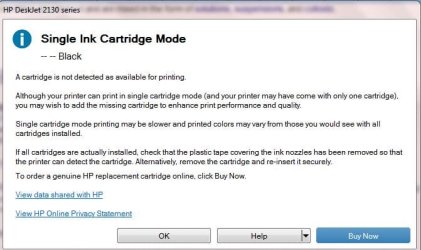
so i replaced the old cartridge with new one, and since then i am seeing this message
and also one red light of printer is on
there is no button with the light it just the light by itself
but it prints black & white pages without any trouble
when i inserted the old cartridge back in the printer
the red light and this message disappeared
i also can print color papers without any problems
so i replaced the old cartridge with new one, and since then i am seeing this message
and also one red light of printer is on
there is no button with the light it just the light by itself
but it prints black & white pages without any trouble
when i inserted the old cartridge back in the printer
the red light and this message disappeared
i also can print color papers without any problems
Attachments
My Computer
- Computer type
- PC/Desktop
- Computer Manufacturer/Model Number
- Dell Vostro A860 laptop
- OS
- Win 7 home premium 32 bit
- CPU
- 1.6 GHz dual core
- Memory
- 3GB
- Hard Drives
- 160GB
- Internet Speed
- 4Mbps
- Antivirus
- AVG
- Browser
- chrome

 We all have done something similar. At least you figured it out and took the time to come back and post your findings.