HP remote with Windows 7

pviola01

New member
Local time
5:44 PM
Messages
4
I recently did a clean-install of Windows 7 on my dv5t and my HP remote no longer works (which I half expected). Anyone know if there is new software/hardware to remedy this or is the remote essentially useless now?

For those that don't know what remote I'm talking about, its the mini-remote that comes standard with HP laptops and fits in the ExpressCard 54 slot.
 

My Computer

Computer Manufacturer/Model Number
HP Pavilion dv5t
OS
Windows 7 Professional x64
CPU
Intel Core2 Duo T9400 2.53 GHz
Memory
4 GB DDR2
Graphics Card(s)
NVIDIA GeForce 9600M GT
Product search results

If that doesn't help, right click on the remote in device manager. Choose properties. Details tab. Change dropdown to hardware ids. Copy and paste results to here.
 

My Computer

Computer Manufacturer/Model Number
self built
OS
7600.20510 x86
CPU
P4 550 3.4 GHz HT running at 3.5 GHz
Motherboard
MSI PM8M3-V (MS-7211 v1.x) Micro-ATX mainboard
Memory
OCZ 2 GB(2x1GB) DDR400mHz running @ 414 mHz
Graphics Card(s)
HIS Radeon HD 3850 IceQ 3 Turbo HDMI Dual DL-DVI AGP
Sound Card
MOTU Traveler firewire studio interface 192 kHz 24 bit
Monitor(s) Displays
22" widescreen Acer X223W LCD, 17" Compaq P75 CRT
Screen Resolution
1680x1050 and 1280x1024
Hard Drives
SATA I x2 WD, 400 GB and 120 GB, SATA 2 WD Caviar Black 1 TB
PSU
350W generic
Case
Cybertronpc, it glows blue
Cooling
stock cpu fan, Ice-Q 3 gpu and system, many case fans
Keyboard
Logitch Classical Keyboard 200
Mouse
Logitech Mediaplay cordless
Internet Speed
1792/448 kbits/sec
Other Info
SATA II PCI fake RAID adapter, 1 GB Readyboost, original ATI Remote Wonder (even works with WMC perfectly), Logitech Rumblepad 2 game controller x2
Yeah, I had already downloaded and installed all the latest Windows 7 drivers/apps from the HP site.

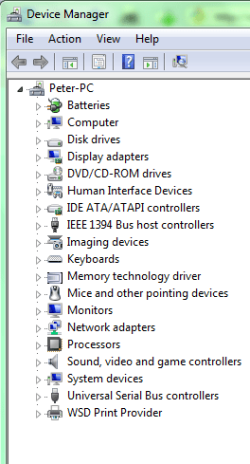
I did not see the remote in device manager though (even after checking many of the sub-categories). Prolly one of the reasons it isn't working I guess?
 

Attachments

  • no remote.PNG
    no remote.PNG
    13.4 KB · Views: 35

My Computer

Computer Manufacturer/Model Number
HP Pavilion dv5t
OS
Windows 7 Professional x64
CPU
Intel Core2 Duo T9400 2.53 GHz
Memory
4 GB DDR2
Graphics Card(s)
NVIDIA GeForce 9600M GT
Hi there,
I have to say I had to run the setup file twice on my DV7z to get my remote to work, seems odd but now i can open MC and select things in MC as for the DVD buttons on the remote still dont work, guess I will have to give HP some time to fix it.
 

My Computer

Computer Manufacturer/Model Number
Custom Build
OS
Windows 7 Ultimate x64 SP1
CPU
AMD Phenom II 1090 3.2 six core
Motherboard
MSI 890FXA-GD65
Memory
16 gig DDR3
Graphics Card(s)
MSI R6950 2gig
Sound Card
on board
Monitor(s) Displays
Acer 23inch led
Screen Resolution
1900x1080 widescreen
Hard Drives
Seagate 1tb SATA6
2x 1tb HITACHI Deskstar
PSU
CORSAIR Enthusiast Series TX750 V2 750W
Case
CoolMaster HAF 922
Cooling
Box AMD Heatsink/Fan
Internet Speed
Cable 12Mbps/3Mbps
Back
Top