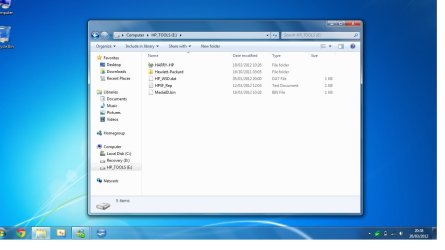
Hp_tools (e:)

Yvette

New member
Local time
7:20 PM
Messages
1
Have tried to search for this problem I am having so I apologize in advance for repeating this problem I am experiencing.
Recently this year in January I bought a Pavilion dv7 laptop.
I bought a 4 year warranty with it.
I have been using it just for email and search engines.
There were a few things I downloaded--but not 6 gb of anything.
I started getting a small window about HP_tools (E) and when I click on the icon flag it says for me to check backup disk space (Important) then the following message: "the disk that your backup is saved on doesn't have enough free space."
I was told that I should go to the my "computer" and click on to see what amount I had free. It said 9.35 mb free of 3.95 gb
I checked my recycle bin and I had 0 to empty to clear up for free space.
Is this something that is covered in my warranty.
My son said that it is nothing to worry about, but I am wondering if somehow something got saved on the E drive.
I am totally a novice in computer and bought the laptop to go to school.
I am at a loss.
I am concerned I will run out of space.
I have a 6 gb and 750 (I think that is the memory?)
I would appreciate any thoughts on this and I sincerely appreciate any informative and/or constructive thoughts.
There are 5 items on the HP_TOOLS (E)

Hewlett_Packard File folder
Yvette-HP File folder
HP_WSD.dat DAT file 1 KB
HPSF_Rep Text Document 1 KB
MediaD.bin BIN File 1 KB

So can anyone tell me what I did wrong?

Thanks,
Yvette
 
Last edited:

My Computer

OS
Windows 7 Home Premium 64 bit
Call HP support. They will take remote control of your computer and fix it for you.

1-800-474-6836
 

My Computer

Computer Manufacturer/Model Number
HP/ Pavilion P6751C
OS
windows 7 home premium 64 bit
CPU
AMD Phenom(tm) II X4 830 Processor, 2800 Mhz, 4 core
Motherboard
N-Alvorix-RS880-uATX (Alvorix) motherboard
Memory
12.00 GB
Graphics Card(s)
ATI Radeon 4200
Sound Card
Creative Labs Sound Blaster Recon3D
Monitor(s) Displays
46" Sony TV KDL-46NX810
Screen Resolution
1920x1090P
Hard Drives
1 TB
PSU
Internal 250W
Case
Mid-size ATX
Cooling
1 rear case fan
Keyboard
Logitech USB Wireless K800
Mouse
Logitech USB Wireless M305
Internet Speed
22mb-28mb
Open Disk Management (right-click "Computer" on the Desktop, left-click "Manage". Then use the snipping tool to post a screenshot of the contents of your E: drive. :)
 

My Computer

Computer Manufacturer/Model Number
Self
OS
Main - Windows 7 Pro SP1 64-Bit; 2nd - Windows Server 2008 R2
CPU
Main - Core i7 2600K; 2nd - Core i7 920
Motherboard
Main - Asus P8Z68-V Pro/Gen3; 2nd - Gigabyte GA-EX58-UDR3
Memory
Main - 16GB Corsair Vengeance; 2nd - 12GB Corsair Vengeance
Graphics Card(s)
Main - XFX Radeon 6870 1GB; 2nd - XFX Radeon 4870 1GB
Sound Card
Both: Onboard Realtek Azalia
Monitor(s) Displays
Main - Hann 25" + I-INC 25" + Acer 23"; 2nd - Upgrading Soon
Screen Resolution
Main - 1920x1080 (All Three Monitors); 2nd - Upgrading Soon
Hard Drives
Main - (1) Crucial M4 128GB (Boot)
Main - (1) Seagate 2TB 64MB Cache (Data)
Main - (1) Seagate 2TB 64MB Cache (Data Backup)
2nd - (1) Intel X25-M SSD 80GB (Boot)
2nd - (3) Seagate 1TB 32MB Cache (Data Backup)
2nd - (1) Seagate 320GB (Because)
PSU
Main - OCZ 600W Modular; 2nd - OCZ 600W
Case
Main - Thermaltake Element G; 2nd - NZXT something or other
Cooling
Main - Corsair H80; 2nd - Prolimatech Megahalems
Keyboard
Main - Razer Reclusa; 2nd - Old MS Keyboard
Mouse
Main - Logitech MX Revolution; 2nd - Old MS Mouse
Internet Speed
20Mbps Time-Warner Cable
No one can tell you what's hogging the space on the drive unless you show us.

Working in the dark, the only answer would be "Just randomly delete a bunch of stuff off the drive. That will give you more space as soon as you empty the recycle bin."

(Don't do that...)

See Post #3 above. ;)
 

My Computer

Computer Manufacturer/Model Number
Self
OS
Main - Windows 7 Pro SP1 64-Bit; 2nd - Windows Server 2008 R2
CPU
Main - Core i7 2600K; 2nd - Core i7 920
Motherboard
Main - Asus P8Z68-V Pro/Gen3; 2nd - Gigabyte GA-EX58-UDR3
Memory
Main - 16GB Corsair Vengeance; 2nd - 12GB Corsair Vengeance
Graphics Card(s)
Main - XFX Radeon 6870 1GB; 2nd - XFX Radeon 4870 1GB
Sound Card
Both: Onboard Realtek Azalia
Monitor(s) Displays
Main - Hann 25" + I-INC 25" + Acer 23"; 2nd - Upgrading Soon
Screen Resolution
Main - 1920x1080 (All Three Monitors); 2nd - Upgrading Soon
Hard Drives
Main - (1) Crucial M4 128GB (Boot)
Main - (1) Seagate 2TB 64MB Cache (Data)
Main - (1) Seagate 2TB 64MB Cache (Data Backup)
2nd - (1) Intel X25-M SSD 80GB (Boot)
2nd - (3) Seagate 1TB 32MB Cache (Data Backup)
2nd - (1) Seagate 320GB (Because)
PSU
Main - OCZ 600W Modular; 2nd - OCZ 600W
Case
Main - Thermaltake Element G; 2nd - NZXT something or other
Cooling
Main - Corsair H80; 2nd - Prolimatech Megahalems
Keyboard
Main - Razer Reclusa; 2nd - Old MS Keyboard
Mouse
Main - Logitech MX Revolution; 2nd - Old MS Mouse
Internet Speed
20Mbps Time-Warner Cable
Heres my HP Tools if you can see the attachments
 

Attachments

  • Hp Tools 2.png
    Hp Tools 2.png
    176.2 KB · Views: 183
  • Hp Tools.jpg
    Hp Tools.jpg
    68 KB · Views: 157

My Computer

Computer type
Laptop
I see nothing wrong. Those little tools partitions that the manufacturers put on the system are seldom used and should be left alone. HP always cuts their own partitions (tools and recovery) very tight. Nothing to worry abot.
 

My Computer

Computer Manufacturer/Model Number
HP, Dell, Gateway, Toshiba - 4 laptops and 2 desktops
OS
Vista, Windows7, Mint Mate, Zorin, Windows 8
CPU
from 1.6GHz Duo to i7
Monitor(s) Displays
2x HP w2207
Hard Drives
5x HDD, 7x SSD, 12x Externals
Keyboard
with trackball - no mices
Mouse
Trackball mice
Internet Speed
DSL 6000

My Computer

Computer Manufacturer/Model Number
HP/ Pavilion P6751C
OS
windows 7 home premium 64 bit
CPU
AMD Phenom(tm) II X4 830 Processor, 2800 Mhz, 4 core
Motherboard
N-Alvorix-RS880-uATX (Alvorix) motherboard
Memory
12.00 GB
Graphics Card(s)
ATI Radeon 4200
Sound Card
Creative Labs Sound Blaster Recon3D
Monitor(s) Displays
46" Sony TV KDL-46NX810
Screen Resolution
1920x1090P
Hard Drives
1 TB
PSU
Internal 250W
Case
Mid-size ATX
Cooling
1 rear case fan
Keyboard
Logitech USB Wireless K800
Mouse
Logitech USB Wireless M305
Internet Speed
22mb-28mb
@yvette

It might be windows backup sticking stuff on there.

Best turn it off.
 

My Computers

System One System Two

  • Computer type
    PC/Desktop
    OS
    7 X64
    CPU
    i5 8400
    Motherboard
    gigabyte b365m ds3h
    Memory
    2x8gb 3200mhz
    Hard Drives
    various
    PSU
    pure power 11 400w cm
    Case
    Coolermaster
    Cooling
    cryorig m9i
  • Computer type
    PC/Desktop
    OS
    7x64
    CPU
    g5400
    Motherboard
    ga b365m ds3h
    Memory
    8gb ddr4 2400
    PSU
    xfx pro 450w
"the disk that your backup is saved on doesn't have enough free space."

If you were trying to back up something into the recovery partition, you would receive this type of message.

In this case it is better to just shoot the messenger. There is no problem with having a full recovery partition, it has a set amount of space and the files are protected. If the message continues to pop-up, you just need to disable it.

Windows would apply the same message, if you were using too small of a USB flashdrive, and trying to back up there.
 

My Computer

Computer Manufacturer/Model Number
HP/ Pavilion P6751C
OS
windows 7 home premium 64 bit
CPU
AMD Phenom(tm) II X4 830 Processor, 2800 Mhz, 4 core
Motherboard
N-Alvorix-RS880-uATX (Alvorix) motherboard
Memory
12.00 GB
Graphics Card(s)
ATI Radeon 4200
Sound Card
Creative Labs Sound Blaster Recon3D
Monitor(s) Displays
46" Sony TV KDL-46NX810
Screen Resolution
1920x1090P
Hard Drives
1 TB
PSU
Internal 250W
Case
Mid-size ATX
Cooling
1 rear case fan
Keyboard
Logitech USB Wireless K800
Mouse
Logitech USB Wireless M305
Internet Speed
22mb-28mb
On Yvette's post the Yvette-HP file folder AND on BlueRobot post the Harry-HP file folder should not be on the E:\HP_Tools FAT32 partition. Check system protection is turned off for drive E:. Probably restore points being saved to that file folder.

TJG :)
 

My Computer

Computer Manufacturer/Model Number
Dell Dimension E510
OS
Windows 7 Home Premium 32bits
CPU
Intel Pentium 4 521
Motherboard
Dell Inc. ORD203
Memory
DDR2 4096MBytes
Graphics Card(s)
ATI Radeon HD 2400 Series
Sound Card
On-Board Sigma Tel High Definition Audio
Monitor(s) Displays
Dell ST2210 1920x1080x60 hertz
Hard Drives
320 SATA
500 SATA
PSU
Antec 430 Watts
Case
Dell
Cooling
Standard Fans
I've moved my Harry - HP folder onto the c: drive, therefore at least I won't have those annoying backup messages, saying need to free more space on E: HP Tools drive.. (:
 

My Computer

Computer type
Laptop
Back
Top