
HSF Position?

boogieboy

Mmmmeeeh!
Guru
Gold Member
VIP
Local time
8:49 AM
Messages
3,458
Location
Lahore, Pakistan
Hi i got CM 430 Elite Case and Xigmatek LOKI CPU Cooler (like Hyper 212). Problem is when i install 2 120mm's on the Top of the Case so the CPU Cooler does'nt fit at all so i have remove the fans from top. My question is can i position the CPU Cooler upwards? instead of placing it in regular position like throwning air to the back of the case.
 

My Computer

Computer type
PC/Desktop
Computer Manufacturer/Model Number
Self Built
OS
Windows 10 Pro
CPU
Core i5 9600K
Motherboard
ASUS ROG Strix Z390-F Gaming
Memory
Corsair Vengeance Pro 2x 8GB (16GB) 3200MHz DDR4
Graphics Card(s)
MSI GTX 1070 Gaming X 8GB
Sound Card
ASRock A-Style Purity Sound
Monitor(s) Displays
ASUS VX239H IPS
Screen Resolution
1920x1080
Hard Drives
XPG SPECTRIX S40G 2566GB M.2 NVMe | Patriot P210 512GB SSD | Seagate BarraCuda 4TB 5400RPM
PSU
Thermaltake Smart 600w RGB 80Plus
Case
NZXT H500 with 3x Corsair HD120 RGB w/Node Pro
Cooling
Cryorig H7
Keyboard
Corsair K70 RapidFire RGB (Cherry MX Speed)
Mouse
Logitech G402 Hyperion Fury
Internet Speed
20MB Cable Broadband
Browser
Chrome
Other Info
Corsair MM300 Extended Anti-Fray Mouse Pad | Edifier C2 2.1ch Sound System | XBOX One S Controller | XBOX 360 Wireless Controller for Windows | APC SUA1000i Smart-UPS | PS4 Slim 500GB [Region 1 - USA]
Very interesting question....I would like to see some pictures of your current layout and positions of fans.
 

My Computer

Computer Manufacturer/Model Number
Custom built
OS
Windows 7 Ultimate 64 bit
CPU
AMD Phenom II X4 965 Black Edition
Motherboard
Gigabyte GA-MA790X-DS4
Memory
GSkill 4 X 2 GB PC 8500
Graphics Card(s)
XFX Radeon HD 6790 D
Sound Card
On board RealTek HD
Monitor(s) Displays
Dual monitors:Samsung SyncMaster S20B300
Screen Resolution
1600 X 900
Hard Drives
Seagate Barracuda 1TB (primary)
Seagate Barracuda 2 X 320 GB
PSU
Ultra X4 750 watt fully modular
Case
Thermaltake Overseer RX 1 full tower
Cooling
Core-Contact 92 mm CPU Cooler
Keyboard
Logitech G510
Mouse
Razor DeathAdder
Internet Speed
50/5 Mbps UL/DL
Other Info
Optical: Super Muliti DVD burner w/lightscribe, Hauppauge WinTV HVR-1800
Ok i post in few mins
 

My Computer

Computer type
PC/Desktop
Computer Manufacturer/Model Number
Self Built
OS
Windows 10 Pro
CPU
Core i5 9600K
Motherboard
ASUS ROG Strix Z390-F Gaming
Memory
Corsair Vengeance Pro 2x 8GB (16GB) 3200MHz DDR4
Graphics Card(s)
MSI GTX 1070 Gaming X 8GB
Sound Card
ASRock A-Style Purity Sound
Monitor(s) Displays
ASUS VX239H IPS
Screen Resolution
1920x1080
Hard Drives
XPG SPECTRIX S40G 2566GB M.2 NVMe | Patriot P210 512GB SSD | Seagate BarraCuda 4TB 5400RPM
PSU
Thermaltake Smart 600w RGB 80Plus
Case
NZXT H500 with 3x Corsair HD120 RGB w/Node Pro
Cooling
Cryorig H7
Keyboard
Corsair K70 RapidFire RGB (Cherry MX Speed)
Mouse
Logitech G402 Hyperion Fury
Internet Speed
20MB Cable Broadband
Browser
Chrome
Other Info
Corsair MM300 Extended Anti-Fray Mouse Pad | Edifier C2 2.1ch Sound System | XBOX One S Controller | XBOX 360 Wireless Controller for Windows | APC SUA1000i Smart-UPS | PS4 Slim 500GB [Region 1 - USA]
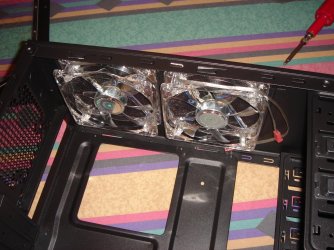
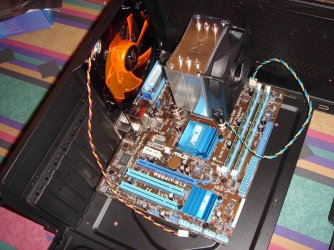
in the first pic i installed 2 fans but with them on top it does not let the board with fit with the CPU cooler like this so i had to remove like in the 2nd pic.
 

Attachments

  • DSC08034.jpg
    DSC08034.jpg
    381 KB · Views: 15
  • DSC08064.jpg
    DSC08064.jpg
    468.4 KB · Views: 23

My Computer

Computer type
PC/Desktop
Computer Manufacturer/Model Number
Self Built
OS
Windows 10 Pro
CPU
Core i5 9600K
Motherboard
ASUS ROG Strix Z390-F Gaming
Memory
Corsair Vengeance Pro 2x 8GB (16GB) 3200MHz DDR4
Graphics Card(s)
MSI GTX 1070 Gaming X 8GB
Sound Card
ASRock A-Style Purity Sound
Monitor(s) Displays
ASUS VX239H IPS
Screen Resolution
1920x1080
Hard Drives
XPG SPECTRIX S40G 2566GB M.2 NVMe | Patriot P210 512GB SSD | Seagate BarraCuda 4TB 5400RPM
PSU
Thermaltake Smart 600w RGB 80Plus
Case
NZXT H500 with 3x Corsair HD120 RGB w/Node Pro
Cooling
Cryorig H7
Keyboard
Corsair K70 RapidFire RGB (Cherry MX Speed)
Mouse
Logitech G402 Hyperion Fury
Internet Speed
20MB Cable Broadband
Browser
Chrome
Other Info
Corsair MM300 Extended Anti-Fray Mouse Pad | Edifier C2 2.1ch Sound System | XBOX One S Controller | XBOX 360 Wireless Controller for Windows | APC SUA1000i Smart-UPS | PS4 Slim 500GB [Region 1 - USA]
Have you considered mounting the fans on the outside of the case? Obviously, they would need to be in the same orientation so that they are drawing air out, and you will probably (advisably) need to install a safety grid to protect your fingers from the spinning blades. In addition, you will need to find a way of feeding the power connectors back in to the case (a suitable hole, protected by a rubber grommet).

Alternatively, yes you could turn the heat sink round so that it sits with the fan on the bottom, which should give room to mount the case fans as normal. You will need to check the airflow direction, and if it is drawing air away from the heat sink, turn the fan around so that it is feeding air in. Otherwise, you might find it overheats as there will be no air flow through it (thanks to the case fans). Obviously, all this will depend on whether it will physically fit in any other orientation than what you have at the moment.
 

My Computer

Computer type
PC/Desktop
Computer Manufacturer/Model Number
Dwarf Dwf/11/2012 r09/2013
OS
Windows 8.1 Pro RTM x64
CPU
Intel Core-i5-3570K 4-core @ 3.4GHz (Ivy Bridge) (OC 4.4GHz)
Motherboard
ASRock Z77 Extreme4-M
Memory
4 x 4GB DDR3-1600 Corsair Vengeance CMZ8GX3M2A1600C9B (16GB)
Graphics Card(s)
MSI GeForce GTX770 Gaming OC 2GB
Sound Card
Realtek High Definition on board solution (ALC 898)
Monitor(s) Displays
ViewSonic VA1912w Widescreen (VGA)
Screen Resolution
1440x900
Hard Drives
OCZ Agility 3 SSD 120GB SATA III x2 (RAID 0)
Samsung HD501LJ 500GB SATA II x2
Hitachi HDS721010CLA332 1TB SATA II
Iomega 1.5TB Ext USB 2.0
WD 2.0TB Ext USB 3.0
PSU
XFX Pro Series 850W Semi-Modular
Case
Gigabyte IF233
Cooling
1 x 120mm Front Inlet 1 x 120mm Rear Exhaust
Keyboard
Microsoft Comfort Curve Keyboard 3000 (USB)
Mouse
Microsoft Comfort Mouse 3000 for Business (USB)
Internet Speed
NetGear DG834Gv3 ADSL Modem/Router (Ethernet) ~4.0 Mb/s (O2)
Antivirus
Avast! 8.0.1497
Browser
IE 11
Other Info
Optical Drive: HL-DT-ST BD-RE BH10LS30 SATA Bluray
Lexmark S305 Printer/Scanner/Copier (USB)
WEI Score: 8.1/8.1/8.5/8.5/8.25
Asus Eee PC 1011PX Netbook (Windows 7 x86 Starter)
I seen some people modded there 430's and installed water cooling's and also like you said by installing the fans outside but i dont wanna do any modifications in the case although i installed 1 fan in the botton (intake) and other one will be going on the side window (intake also) but i really wanted them to stick on the top as im also using fan controller coz i wanted to the see the side window clean without any fan :(
 

My Computer

Computer type
PC/Desktop
Computer Manufacturer/Model Number
Self Built
OS
Windows 10 Pro
CPU
Core i5 9600K
Motherboard
ASUS ROG Strix Z390-F Gaming
Memory
Corsair Vengeance Pro 2x 8GB (16GB) 3200MHz DDR4
Graphics Card(s)
MSI GTX 1070 Gaming X 8GB
Sound Card
ASRock A-Style Purity Sound
Monitor(s) Displays
ASUS VX239H IPS
Screen Resolution
1920x1080
Hard Drives
XPG SPECTRIX S40G 2566GB M.2 NVMe | Patriot P210 512GB SSD | Seagate BarraCuda 4TB 5400RPM
PSU
Thermaltake Smart 600w RGB 80Plus
Case
NZXT H500 with 3x Corsair HD120 RGB w/Node Pro
Cooling
Cryorig H7
Keyboard
Corsair K70 RapidFire RGB (Cherry MX Speed)
Mouse
Logitech G402 Hyperion Fury
Internet Speed
20MB Cable Broadband
Browser
Chrome
Other Info
Corsair MM300 Extended Anti-Fray Mouse Pad | Edifier C2 2.1ch Sound System | XBOX One S Controller | XBOX 360 Wireless Controller for Windows | APC SUA1000i Smart-UPS | PS4 Slim 500GB [Region 1 - USA]
You could turn it if it will clear everything. It appears like the ram might be a problem. It appears that you back case fan is blowing inward. Check the direction of air flow on all your fans. The only sure way to tell if you can rotate the cooler is you to try it carefully making sure it doesn't hit anything.
 

My Computer

Computer type
PC/Desktop
Computer Manufacturer/Model Number
Home made Desktop
OS
Windows 10 Pro. 64/ version 1709 Windows 7 Pro/64
CPU
Intel i7-6800K @ 4.3
Motherboard
ASUS X-99 Deluxe II
Memory
Corsair Platinum 16 gig @2400
Graphics Card(s)
EVGA GTX 1070 OC
Monitor(s) Displays
Asus 27" LED LCD/VE278Q
Screen Resolution
1920-1080 or 1280-720 HDMI
Hard Drives
INTEL SSD 730-240 Gb Sata 3.0/
PSU
EVGA Platium 1200W
Case
Phanteks Luxe Tempered Glass 8 fans/ one radiator
Cooling
XSPC/ Water Cooled CPU
Keyboard
Das 4 Professional
Mouse
Logitech M705/MX Anywhere 2-S
Internet Speed
100 mbits
Antivirus
Microsoft Security Essentials/ Malwarebytes Premium 3.0/ SAS
Browser
I.E. 11 default/Firefox/ ISP Time Warner Cable/Spectrum
Other Info
LG BluRay Burner/
Sound system-KLipsch-THX/
Icy Dock ssd Hot Swap bays.
The cooler will not touch rams as its higher in height and no the rear orange fan is blowing air out
 

My Computer

Computer type
PC/Desktop
Computer Manufacturer/Model Number
Self Built
OS
Windows 10 Pro
CPU
Core i5 9600K
Motherboard
ASUS ROG Strix Z390-F Gaming
Memory
Corsair Vengeance Pro 2x 8GB (16GB) 3200MHz DDR4
Graphics Card(s)
MSI GTX 1070 Gaming X 8GB
Sound Card
ASRock A-Style Purity Sound
Monitor(s) Displays
ASUS VX239H IPS
Screen Resolution
1920x1080
Hard Drives
XPG SPECTRIX S40G 2566GB M.2 NVMe | Patriot P210 512GB SSD | Seagate BarraCuda 4TB 5400RPM
PSU
Thermaltake Smart 600w RGB 80Plus
Case
NZXT H500 with 3x Corsair HD120 RGB w/Node Pro
Cooling
Cryorig H7
Keyboard
Corsair K70 RapidFire RGB (Cherry MX Speed)
Mouse
Logitech G402 Hyperion Fury
Internet Speed
20MB Cable Broadband
Browser
Chrome
Other Info
Corsair MM300 Extended Anti-Fray Mouse Pad | Edifier C2 2.1ch Sound System | XBOX One S Controller | XBOX 360 Wireless Controller for Windows | APC SUA1000i Smart-UPS | PS4 Slim 500GB [Region 1 - USA]
Funny, all my fans blow air towards the logo. If it won't hit the ram or anything else that is good. From where I'm sitting I can't tell from the picture. Must be my position on the planet.
 

My Computer

Computer type
PC/Desktop
Computer Manufacturer/Model Number
Home made Desktop
OS
Windows 10 Pro. 64/ version 1709 Windows 7 Pro/64
CPU
Intel i7-6800K @ 4.3
Motherboard
ASUS X-99 Deluxe II
Memory
Corsair Platinum 16 gig @2400
Graphics Card(s)
EVGA GTX 1070 OC
Monitor(s) Displays
Asus 27" LED LCD/VE278Q
Screen Resolution
1920-1080 or 1280-720 HDMI
Hard Drives
INTEL SSD 730-240 Gb Sata 3.0/
PSU
EVGA Platium 1200W
Case
Phanteks Luxe Tempered Glass 8 fans/ one radiator
Cooling
XSPC/ Water Cooled CPU
Keyboard
Das 4 Professional
Mouse
Logitech M705/MX Anywhere 2-S
Internet Speed
100 mbits
Antivirus
Microsoft Security Essentials/ Malwarebytes Premium 3.0/ SAS
Browser
I.E. 11 default/Firefox/ ISP Time Warner Cable/Spectrum
Other Info
LG BluRay Burner/
Sound system-KLipsch-THX/
Icy Dock ssd Hot Swap bays.
If you can orient the CPU cooler towards the top mounted fans then fit the top fans as exhaust that would cool like crazy!
 

My Computer

Computer type
PC/Desktop
Computer Manufacturer/Model Number
A blend of brains, brawn and dumb luck.
OS
Windows 7 Ultimate 64
CPU
i7 3770k OC'd 4.6 @ 1.17v, also FX 8120 & i5 miniITX
Motherboard
MSI P67A-GD80 b3
Memory
32 gb G.Skill Sniper DDR3 10-12-12-31 @ 2133
Graphics Card(s)
XFX Radeon 7870 2GB DDR5
Sound Card
Sound Blaster Z Series Card
Monitor(s) Displays
(2) LG LED 23" 1920 x 1080 2ms Monitors via mini d-port
Screen Resolution
1680 X 1050 p
Hard Drives
Samsung 256 gb 830 SSD sata III
(1) 1 tb WD Black
(2) 1 tb Hitachi deskmates/sata II
(2) 1 tb WD green/sata II
(2) 3 tb Seagate Barracuda
(1) 120 gb OCZ Vertex SS
(1) Drobo 5N w/5 Seagate 3tb
PSU
EVGA modular 1000G2 80% gold rating & APC 1200 RS
Case
CoolerMaster Storm Styker
Cooling
7 case fans 140mm & 120mm, NZXT Kraken X60
Keyboard
(2) Logitech Illuminated Keyboards (1) usb (1) wireless
Mouse
Logitech G700 & T-BC21 - nano nx for the laptop
Internet Speed
Basic 120mbps down
Antivirus
Trend Micro Titanium Max Security & Malwarebytes Premium
Browser
Chrome and IE 10
Other Info
5 Noctua case fans + 3 Noctua in p/p on NZXT cooler
Integrated hot swap drive bays for 2.5" Drives
(2) Lite-on dvd/cd/Blu Ray optical 22X
Integrated fan controller and led on/off
HP Officejet Pro 8630 all-n-one
Hot-swappable 3.5" hard drive bay
Netgear Nighthawk router
Asus USB 3 & sata 6 PCIe card
Vantec IDE to sata adptr./Ultra sata adptr
Lenovo L420 i5 lappy with m sata
Drobo 5N advanced NAS
It may be due to the mATX board which puts the CPU much higher in the case than an ATX does.
 

My Computer

Computer type
PC/Desktop
Computer Manufacturer/Model Number
Home Built Desktop By DataTech
OS
Windows 7 Ultimate X64 SP1
CPU
Intel i5-2550K, Differing ~4.4-4.8GHz No built in GPU
Motherboard
ASUS P8Z68-V PRO/GEN3
Memory
16GB G.Skill Sniper 1866MHz @ 2133MHz 2x8GB
Graphics Card(s)
ASUS GTX650TIB-DC2OC-2GD5, (650TI Boost)
Sound Card
Onboard Realtek 5-1
Monitor(s) Displays
Samsung P2570HD
Screen Resolution
1920x1080
Hard Drives
Samsung 840 Pro 256GB SSD for OS, 500GB Seagate Constellation (Enterprise drive) for Data
PSU
Corsair HX650W
Case
Inwin Dragon Rider
Cooling
Hyper 212 EVO w/two Noctua fans, push-pull, @1300 RPM
Keyboard
E-Z Eyes, bright yellow keys with large characters
Mouse
steelseries SENSEI Laser Pro Gaming
Internet Speed
48-51Mbs Mbs down, 11 Mbs up Xfinity Cable
Antivirus
Norton Internet Security 2013
Browser
IE 10, Opera, Pale Moon if needed
Other Info
4 case fans, LG BluRay-RE, ASUS DVD-RW, Mr. Fusion power supply, 1.21 gigawatts.
My point is simple. We can not over the Internet turn the cpu cooler and check if it hits anything that it should not hit. The OP has to do that and let us know how it worked out. If it can be turned properly and exhaust using the top fans I think it would work well. Trying it and monitoring the temps is the only way to know. All fans should be checked for direction of air flow. It doesn't mater whether using the arrows on the fan, smoke test, using the hair on the back of your hand. Test and make sure the fans are blowing air in the direction the owner operator wants them to. Pictures only indicate so much.
 

My Computer

Computer type
PC/Desktop
Computer Manufacturer/Model Number
Home made Desktop
OS
Windows 10 Pro. 64/ version 1709 Windows 7 Pro/64
CPU
Intel i7-6800K @ 4.3
Motherboard
ASUS X-99 Deluxe II
Memory
Corsair Platinum 16 gig @2400
Graphics Card(s)
EVGA GTX 1070 OC
Monitor(s) Displays
Asus 27" LED LCD/VE278Q
Screen Resolution
1920-1080 or 1280-720 HDMI
Hard Drives
INTEL SSD 730-240 Gb Sata 3.0/
PSU
EVGA Platium 1200W
Case
Phanteks Luxe Tempered Glass 8 fans/ one radiator
Cooling
XSPC/ Water Cooled CPU
Keyboard
Das 4 Professional
Mouse
Logitech M705/MX Anywhere 2-S
Internet Speed
100 mbits
Antivirus
Microsoft Security Essentials/ Malwarebytes Premium 3.0/ SAS
Browser
I.E. 11 default/Firefox/ ISP Time Warner Cable/Spectrum
Other Info
LG BluRay Burner/
Sound system-KLipsch-THX/
Icy Dock ssd Hot Swap bays.
Having the top fans as exhaust and pointing the cooler upwards will work just fine.
 

My Computer

Computer Manufacturer/Model Number
tw33k
OS
Windows 7 Ultimate (x64) SP1
CPU
Intel 3770k 4.6GHz
Motherboard
ASUS Maximus V Formula
Memory
8GB (2x 4GB) Crucial Ballistix
Graphics Card(s)
Sapphire 7950 (1060/1600)
Sound Card
On Board Realtek HD Audio
Monitor(s) Displays
27" Acer B273HU (via HDMI)
Screen Resolution
2048 x 1152
Hard Drives
Crucial M4 128GB
2TB WD Black
1TB Samsung F3 SATA
1TB WD Elite External
2TB WD USB 3.0
PSU
Corsair AX750 Gold
Case
Corsair Obsidian 800DW
Cooling
Corsair H100 (2x AP-121/2x UK-3000 push/pull)
Keyboard
Microsoft Wireless 5000
Mouse
Microsoft Wireless 5000
Internet Speed
5mb/s
Other Info
Logitech z-2300 2.1 speakers
Lamptron FC-5 v2
in the first pic i installed 2 fans but with them on top it does not let the board with fit with the CPU cooler like this so i had to remove like in the 2nd pic.


If your Case is like the 371 Elite the case I am using you can afford to lose a fan on the top to compensate for the room if need be

Remember you have a spot for a 120 MM in the front of your case pop off the face plate install a fan blowing in then put the face plate back on

make the fan on the top exhaust the air make the side panel fans exhaust that way your heat sink both fans /push pull sequence and that have exhausting the air out the back with the fan in the frontpushing air through

the heat will rise to the top the side panel fans use them to exhaust heat from the gpu

I have this configuration but i am water cooled so i have a push /pull on the fan exhausting my case and one 120 mm at the top because the radiator takes to much space for the other fan to go

remember you can make it work just have to compensate and you will still have great temps
 

My Computer

Computer type
PC/Desktop
Computer Manufacturer/Model Number
CoreI7-6700K MrFingerIII Special Builds
OS
Windows 10 Home Premium 64bit sp1
CPU
Intel I7-6700K @ 4.6 Ghz 1.344 volts everyday OC
Motherboard
Asrock Fatality K6 Z170 Socket 1151
Memory
32GB G-Skill TridentZ 3200mhz 16-18-18-38 DDR4
Graphics Card(s)
Sli Gigabyte Windforce GTX 980 G1
Sound Card
AC97 Creative Rage Tactic 3D Headphones Bluetooth
Monitor(s) Displays
27" Asus ROG Swift PG278Q G-Sync 48" Vizio Smart HD TV
Screen Resolution
2560x1440p 27"- 48" Currently Gaming at 2560x1440p Res 2K
Hard Drives
250GB Samsung Evo840SSD Seagate baracuda 500 GB WD Mybook 500Gb 1TB Seagate Barracuda
PSU
HX1050w Corsair Silver 80plus certified crosfire/sli
Case
Enthod Pro Full Tower
Cooling
Corsair H110i GT 280 mm High Performance WaterBlock
Keyboard
Logitech wireless keyboard
Mouse
Logitech wireless mouse
Internet Speed
Cox Cable 100+ mb
Antivirus
WebRoot Spysweeper with Antivirus
Browser
IE-10, Chrome, Opera
Other Info
My Other Rig is a AMD FX8320E @4.6Ghz 16GB Ballistic Sport Ram
Mobo Asrock Fatality 990FX 120GB OCZ SSD 1TB Seagate Barracuda Corsair H75 Cooling PSU Corsair CX750
GPU GTX Gigabyte 970G1
Hmmm, I would simply use the two top exhaust fans like so:

1. Side Panel (sucking air out / blowing in if you have a GFX card)
2. Front Panel (blowing air in)

As for the CPU, the current push 'n pull setup in addition to the rear case fan will suffice. easy.
 

My Computer

Computer Manufacturer/Model Number
Dell / Custom
OS
Windows 7 HP / Ultimate x64
CPU
Core i5 / X4 955 BE
Motherboard
OEM / Gigabyte 880GM-USB3
Memory
4GB DDR3 1333Mhz / 8GB DDR3 1600Mhz
Graphics Card(s)
HD5470 / HD5670
Sound Card
Onboard
Monitor(s) Displays
FullHD 15" / Dell 22" WS
Screen Resolution
1920x1080 / 1680x1050
Hard Drives
320GB / 1.5TB
PSU
CM
Case
CM
Cooling
CM, Antec
Keyboard
Logitech
Mouse
Logitech
Sorry for late reply and thanks for the advise guys but unfortunetely the G.Skill NT series RAM's i got were faulty so i sent them back for replacement and will be getting RipjawX 1333 instead which will arrive in 2 to 3 days although i fit all the fans in following order:

Fan 1 = 120mm Front (Intake pre-installed)
Fan 2 = 120mm Rear (Exhaust)
Fan 3 = 120mm Bottom (Intake)
Fan 4 = 120mm Side Window (Intake)

When i will get RAM i'll be able to test this setup properly. I'll try posting few pics tomorrow from my brother's PC.
 

My Computer

Computer type
PC/Desktop
Computer Manufacturer/Model Number
Self Built
OS
Windows 10 Pro
CPU
Core i5 9600K
Motherboard
ASUS ROG Strix Z390-F Gaming
Memory
Corsair Vengeance Pro 2x 8GB (16GB) 3200MHz DDR4
Graphics Card(s)
MSI GTX 1070 Gaming X 8GB
Sound Card
ASRock A-Style Purity Sound
Monitor(s) Displays
ASUS VX239H IPS
Screen Resolution
1920x1080
Hard Drives
XPG SPECTRIX S40G 2566GB M.2 NVMe | Patriot P210 512GB SSD | Seagate BarraCuda 4TB 5400RPM
PSU
Thermaltake Smart 600w RGB 80Plus
Case
NZXT H500 with 3x Corsair HD120 RGB w/Node Pro
Cooling
Cryorig H7
Keyboard
Corsair K70 RapidFire RGB (Cherry MX Speed)
Mouse
Logitech G402 Hyperion Fury
Internet Speed
20MB Cable Broadband
Browser
Chrome
Other Info
Corsair MM300 Extended Anti-Fray Mouse Pad | Edifier C2 2.1ch Sound System | XBOX One S Controller | XBOX 360 Wireless Controller for Windows | APC SUA1000i Smart-UPS | PS4 Slim 500GB [Region 1 - USA]
Sorry for late reply and thanks for the advise guys but unfortunetely the G.Skill NT series RAM's i got were faulty so i sent them back for replacement and will be getting RipjawX 1333 instead which will arrive in 2 to 3 days although i fit all the fans in following order:

Fan 1 = 120mm Front (Intake pre-installed)
Fan 2 = 120mm Rear (Exhaust)
Fan 3 = 120mm Bottom (Intake)
Fan 4 = 120mm Side Window (Intake)

When i will get RAM i'll be able to test this setup properly. I'll try posting few pics tomorrow from my brother's PC.

I would use the side as an Exhaust your Gpu or Gpu's will be sitting right there

If you already have a front intake good but is the fan good enough ?

The top fan at the top of the case where the double 120mm goes should be Exhaust Heat rises to the top you will just be blowing hot air on the heatsink

Basicly doing that set up is like a Ocean current it will send that air in a circular direction

which should bring you down pretty well if you have super good fans
 

My Computer

Computer type
PC/Desktop
Computer Manufacturer/Model Number
CoreI7-6700K MrFingerIII Special Builds
OS
Windows 10 Home Premium 64bit sp1
CPU
Intel I7-6700K @ 4.6 Ghz 1.344 volts everyday OC
Motherboard
Asrock Fatality K6 Z170 Socket 1151
Memory
32GB G-Skill TridentZ 3200mhz 16-18-18-38 DDR4
Graphics Card(s)
Sli Gigabyte Windforce GTX 980 G1
Sound Card
AC97 Creative Rage Tactic 3D Headphones Bluetooth
Monitor(s) Displays
27" Asus ROG Swift PG278Q G-Sync 48" Vizio Smart HD TV
Screen Resolution
2560x1440p 27"- 48" Currently Gaming at 2560x1440p Res 2K
Hard Drives
250GB Samsung Evo840SSD Seagate baracuda 500 GB WD Mybook 500Gb 1TB Seagate Barracuda
PSU
HX1050w Corsair Silver 80plus certified crosfire/sli
Case
Enthod Pro Full Tower
Cooling
Corsair H110i GT 280 mm High Performance WaterBlock
Keyboard
Logitech wireless keyboard
Mouse
Logitech wireless mouse
Internet Speed
Cox Cable 100+ mb
Antivirus
WebRoot Spysweeper with Antivirus
Browser
IE-10, Chrome, Opera
Other Info
My Other Rig is a AMD FX8320E @4.6Ghz 16GB Ballistic Sport Ram
Mobo Asrock Fatality 990FX 120GB OCZ SSD 1TB Seagate Barracuda Corsair H75 Cooling PSU Corsair CX750
GPU GTX Gigabyte 970G1
I would use the side as an Exhaust your Gpu or Gpu's will be sitting right there

If you already have a front intake good but is the fan good enough ?

The top fan at the top of the case where the double 120mm goes should be Exhaust Heat rises to the top you will just be blowing hot air on the heatsink

Basicly doing that set up is like a Ocean current it will send that air in a circular direction

which should bring you down pretty well if you have super good fans

I installed the side fan intake coz the GPU is dual slot with cover on it and has vents to throw air out from the top and end as its fan sucks air in and ventilate air inside on both ends.

The front fan is Cooler Master 120mm and it came already installed with the case to cool down HDD's.

The CPU Cooler does not fit with fans installed on top as it's a mATX board you can also see in the pics i posted above.

I would definitely try the position of fans as you suggested for the side window as soon as my RAM's will be arrived in a day or two so i can boot up the system and see the temps and everything. Also im using Lamptron FC-5 V2 Fan Controller for all 4 fans. I'll try posting pics too today :)
 

My Computer

Computer type
PC/Desktop
Computer Manufacturer/Model Number
Self Built
OS
Windows 10 Pro
CPU
Core i5 9600K
Motherboard
ASUS ROG Strix Z390-F Gaming
Memory
Corsair Vengeance Pro 2x 8GB (16GB) 3200MHz DDR4
Graphics Card(s)
MSI GTX 1070 Gaming X 8GB
Sound Card
ASRock A-Style Purity Sound
Monitor(s) Displays
ASUS VX239H IPS
Screen Resolution
1920x1080
Hard Drives
XPG SPECTRIX S40G 2566GB M.2 NVMe | Patriot P210 512GB SSD | Seagate BarraCuda 4TB 5400RPM
PSU
Thermaltake Smart 600w RGB 80Plus
Case
NZXT H500 with 3x Corsair HD120 RGB w/Node Pro
Cooling
Cryorig H7
Keyboard
Corsair K70 RapidFire RGB (Cherry MX Speed)
Mouse
Logitech G402 Hyperion Fury
Internet Speed
20MB Cable Broadband
Browser
Chrome
Other Info
Corsair MM300 Extended Anti-Fray Mouse Pad | Edifier C2 2.1ch Sound System | XBOX One S Controller | XBOX 360 Wireless Controller for Windows | APC SUA1000i Smart-UPS | PS4 Slim 500GB [Region 1 - USA]
Back
Top