
entropy1963
New member
Hello everybody,
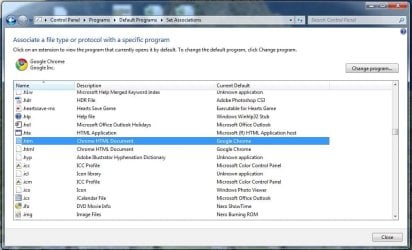
When I set Chrome as my default browser I lose the icon of htm & html file types. However, in another computer where Chrome is the default browser, I do not have this problem.
I’ve done everything I found online but still nothing happened. In the registry the HKEY_CLASSES_ROOT\ChromeHTML\DefaultIcon is set as it should be. (same as in the other come that doesn’t have the problem)
For your information note that I installed the windows yesterday, therefore it is a fresh installation.
Any help?
Thanks
Christos
When I set Chrome as my default browser I lose the icon of htm & html file types. However, in another computer where Chrome is the default browser, I do not have this problem.
I’ve done everything I found online but still nothing happened. In the registry the HKEY_CLASSES_ROOT\ChromeHTML\DefaultIcon is set as it should be. (same as in the other come that doesn’t have the problem)
For your information note that I installed the windows yesterday, therefore it is a fresh installation.
Any help?
Thanks
Christos
Attachments
Last edited:
My Computer
- Computer Manufacturer/Model Number
- Built to order
- OS
- Windows 7 Pro x64
- CPU
- Intel(R) Core(TM)2 Quad CPU Q6600 @ 2.40GHz
- Motherboard
- Gigabyte P35-DQ6
- Memory
- mushkin DDR2 PC2-8000 Total 8.00 GB RAM
- Graphics Card(s)
- NVIDIA GeForce 9800 GX2
- Monitor(s) Displays
- Eizo FlexScan S1910


