HTTP Authentication issues with IE8 & Win7

Hoss

New member
Local time
9:20 PM
Messages
9
Just starting to dig into this one, but I cannot get Win7 w/ IE8 to remember and log me into ANY link requiring username & P/W authentication.
Which when Admining a server I do quite a lot of! I can bypass this for some pages, but for my Xcache Admin Panel I cannot.
I can confirm it's a Win 7 issue, as after repeated tries to access my Xcache Admin in Win7, I rebooted into XP and accessed as usual without a hitch.
I have the same problem with both WHM & Cpanel logins, but those can be logged into without HTTP Auth
.
I did see an article about editing the registry to change how IE8 acts. But this cannot be an IE8 issue when it works fine in XP?

I suppose a possible workaround would be to install and use Chrome or Firefox, but....
 

My Computer

Computer Manufacturer/Model Number
CyberPower
OS
XP & Win 7
CPU
DUO E6550 2.33 GHz
Motherboard
Asus P5N-E SLI
Memory
2 GB
Graphics Card(s)
NVIDIA GeForce 8400 GS
Monitor(s) Displays
DELL 1907FP
I suppose a possible workaround would be to install and use Chrome or Firefox, but....
As you suggest, that is only a workaround and does nothing to actually fix the underlying problem.

Most problems with IE8 are caused by corrupt, conflicting, or otherwise misbehaving add-ons. I would start first by doing a quick clean of your system to make sure this is not a cookie or malware problem. I recommend purging the hard drives of clutter with Windows Disk Cleanup), ATF Cleaner or CCleaner. If using CCleaner, uncheck the option to install the Yahoo toolbar during installation. Before first use, go to Options > Settings > Advanced and ensure Only delete files in Windows Temp folders older than 24 hours is unchecked. Know your site credentials (user names and passwords) for sites you frequent before cleaning; you may have to login again at next visit.

Scan for malware. If you don't already have it, download and install Malwarebytes's Anti-Malware (MBAM), and scan as follows:
Check for updates before scanning,
Select Perform quick scan > Scan,
When complete, click OK, then Show Results,
Ensure all is selected, and click Remove Selected,
When complete, save the log in Notepad to a convenient place for future reference.​

Repeat for all computers in the "Trusted Zone" of your network (your side of the Internet "gateway" - typically the cable or DSL modem).

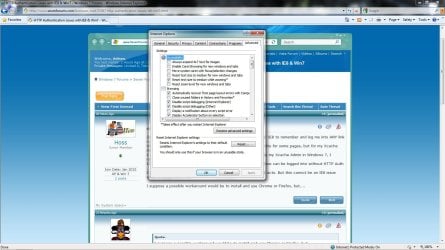
Then, reset IE8. Go to Tools > Internet Options > Advanced and click the reset button. Then see how it goes. If all is well, then, one at a time, add your favorite add-ons.
 

My Computer

Computer Manufacturer/Model Number
BrightWorks Systems B4
OS
Windows 7 Profession 64-bit
CPU
Intel Core i7-860 Quad
Motherboard
Gigabyte P55-UD4P
Memory
Mushkin 4x2Gb PC12800
Graphics Card(s)
Gigabyte GTX260 896Mb
Sound Card
Integrated 7.1 HD Dolby
Monitor(s) Displays
2 Samsung 2220wm-HAS 22"
Screen Resolution
1680 x 1050 | 1680 x 1050
Hard Drives
WD HE 1Tb
PSU
Corsair TX-750W
Case
Ultra M998
Cooling
OEM
Keyboard
MS Wireless Comfort 5000
Mouse
MS Wireless 5000
Internet Speed
Cable and pretty darn fast
Hoss, welcome to Windows 7 Support Forums.
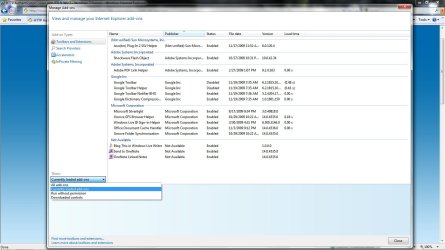
I suggest you also may want to reset your default options in the IE option box, also check your permissions. I attached a couple of screens for your reference.

Regards,
Adrian
 

Attachments

  • ie_options.jpg
    ie_options.jpg
    154.2 KB · Views: 812
  • ie_tool.jpg
    ie_tool.jpg
    125.1 KB · Views: 626

My Computer

Computer Manufacturer/Model Number
Custom Build
OS
Windows 7 7600 1 X64
CPU
AMD PHENOM II X 550 PROCESSOR 3.1 ghz
Motherboard
ASUS M4A78-TE
Memory
Corsair 4 gig ddr 3
Graphics Card(s)
ati radeon 3300
Sound Card
ati hd
Monitor(s) Displays
syncmaster 2033sw
Screen Resolution
1600X900 60 hz refresh
Hard Drives
twin_seagates SATA's 1 TB & 500 Gig, hitachi_slimline 160 gig
PSU
antec_550 watt
Case
cooler master GLite
Cooling
stock_heat sink
Internet Speed
20mbs up/ 1.5mbs down
Other Info
favorite child "stewie"
favorite dog "brian"
Thanks for the suggestions ladz, alas no luck. I disabled all addons, reset IE8 to default and even tried logging into my Win 7 Admin account which I had made no adjustments to and still the same.

Can't believe I'm the only one having this issue, but for the time being I've disabled authentication for the xcache admin, and secured that folder better. I'll get to the bottom of this eventually, but anymore suggestions to try are more then welcome. :)
 

My Computer

Computer Manufacturer/Model Number
CyberPower
OS
XP & Win 7
CPU
DUO E6550 2.33 GHz
Motherboard
Asus P5N-E SLI
Memory
2 GB
Graphics Card(s)
NVIDIA GeForce 8400 GS
Monitor(s) Displays
DELL 1907FP
Perhaps there's a reason XCache is no longer available for sale. My guess is that it is not supported on Windows 7.
 

My Computer

Computer Manufacturer/Model Number
BrightWorks Systems B4
OS
Windows 7 Profession 64-bit
CPU
Intel Core i7-860 Quad
Motherboard
Gigabyte P55-UD4P
Memory
Mushkin 4x2Gb PC12800
Graphics Card(s)
Gigabyte GTX260 896Mb
Sound Card
Integrated 7.1 HD Dolby
Monitor(s) Displays
2 Samsung 2220wm-HAS 22"
Screen Resolution
1680 x 1050 | 1680 x 1050
Hard Drives
WD HE 1Tb
PSU
Corsair TX-750W
Case
Ultra M998
Cooling
OEM
Keyboard
MS Wireless Comfort 5000
Mouse
MS Wireless 5000
Internet Speed
Cable and pretty darn fast
Ahh wrong Xcache my friend
XCache

It's a PHP Cache for servers, I run 2 vBulletin Boards among other things. :)
 

My Computer

Computer Manufacturer/Model Number
CyberPower
OS
XP & Win 7
CPU
DUO E6550 2.33 GHz
Motherboard
Asus P5N-E SLI
Memory
2 GB
Graphics Card(s)
NVIDIA GeForce 8400 GS
Monitor(s) Displays
DELL 1907FP
Ah, that would make a difference. ;)

So let's make we understand the problem. You said "ANY" link that requires authentication gives problems. So when you login to Windows SevenForums after checking the box to remember your username and password, then close the browser session without logging out, next time you come in you have to enter your username and password again? If so, that is typically a cookie problem, cookies are not being saved, or are deleted when exiting.

Did you purge your system of clutter and run MBAM?
 

My Computer

Computer Manufacturer/Model Number
BrightWorks Systems B4
OS
Windows 7 Profession 64-bit
CPU
Intel Core i7-860 Quad
Motherboard
Gigabyte P55-UD4P
Memory
Mushkin 4x2Gb PC12800
Graphics Card(s)
Gigabyte GTX260 896Mb
Sound Card
Integrated 7.1 HD Dolby
Monitor(s) Displays
2 Samsung 2220wm-HAS 22"
Screen Resolution
1680 x 1050 | 1680 x 1050
Hard Drives
WD HE 1Tb
PSU
Corsair TX-750W
Case
Ultra M998
Cooling
OEM
Keyboard
MS Wireless Comfort 5000
Mouse
MS Wireless 5000
Internet Speed
Cable and pretty darn fast
No specifically what I'm having problems with is any secure/password protected link requiring you type in a password and username in the separate ....I suppose you'd call it... pop up window, where you enter that info. The one that has the "remember my credentials" option tick box at bottom left.
No cookie files enter this situation. A remembered password would be the closest thing, but that's another kettle of fish. And those are working fine for me in any case.

It's the "pop window" that seems to not be functioning as it should. You can enter your P/W and username as normal, but it doesn't seem to be "passing" that info properly to allow the login. It simply pops back up as if you never entered anything to start with. No wrong password or username, nothing. And with this particualr logon if I hit cancel I cannot login via a secondary login window or by any other means.
 

My Computer

Computer Manufacturer/Model Number
CyberPower
OS
XP & Win 7
CPU
DUO E6550 2.33 GHz
Motherboard
Asus P5N-E SLI
Memory
2 GB
Graphics Card(s)
NVIDIA GeForce 8400 GS
Monitor(s) Displays
DELL 1907FP
but it doesn't seem to be "passing" that info properly to allow the login. It simply pops back up as if you never entered anything to start with
Ah, I see. I don't know the solution but I better understand the problem.

Food for thought (or at least something to gnaw on):
Fix IE8 unable to authenticate on a local website using Windows authentication (is this the same reg fix you found?)
IE 8 Authentication Denied on local SharePoint Site - Server Fault
Prashanth's blog: IE 8 NTLM Authentication on Windows 2008
 

My Computer

Computer Manufacturer/Model Number
BrightWorks Systems B4
OS
Windows 7 Profession 64-bit
CPU
Intel Core i7-860 Quad
Motherboard
Gigabyte P55-UD4P
Memory
Mushkin 4x2Gb PC12800
Graphics Card(s)
Gigabyte GTX260 896Mb
Sound Card
Integrated 7.1 HD Dolby
Monitor(s) Displays
2 Samsung 2220wm-HAS 22"
Screen Resolution
1680 x 1050 | 1680 x 1050
Hard Drives
WD HE 1Tb
PSU
Corsair TX-750W
Case
Ultra M998
Cooling
OEM
Keyboard
MS Wireless Comfort 5000
Mouse
MS Wireless 5000
Internet Speed
Cable and pretty darn fast

My Computer

Computer Manufacturer/Model Number
CyberPower
OS
XP & Win 7
CPU
DUO E6550 2.33 GHz
Motherboard
Asus P5N-E SLI
Memory
2 GB
Graphics Card(s)
NVIDIA GeForce 8400 GS
Monitor(s) Displays
DELL 1907FP
Okay boys and girls, "There is a sign post up ahead....." and we just entered the Windows 7 Twilight Zone!
I've just confirmed that what I'm about to type below is accurate. And this is really very, very strange. And goes to show sometimes it is the simplest of things.

It was not the LoopbackCheck Reg Edit as I've deleted that key and rebooted. It was the following...
If I enter my Password using only the mouse, highlight >> right Click menu, to copy and paste, then mouse click the OK box, the page does not load as described above.

However, if I enter my Username and Password using only the keyboard, CRTL V, and then hit the Enter Key, walla success! I have no idea why this little quirk is occuring, but at least on my PC it is.
 

My Computer

Computer Manufacturer/Model Number
CyberPower
OS
XP & Win 7
CPU
DUO E6550 2.33 GHz
Motherboard
Asus P5N-E SLI
Memory
2 GB
Graphics Card(s)
NVIDIA GeForce 8400 GS
Monitor(s) Displays
DELL 1907FP
Now why IE8 in XP worked and not in Windows 7
I think there are many differences in the versions of IE8 for XP and Win7. Win7 is quite a different OS.
 

My Computer

Computer Manufacturer/Model Number
BrightWorks Systems B4
OS
Windows 7 Profession 64-bit
CPU
Intel Core i7-860 Quad
Motherboard
Gigabyte P55-UD4P
Memory
Mushkin 4x2Gb PC12800
Graphics Card(s)
Gigabyte GTX260 896Mb
Sound Card
Integrated 7.1 HD Dolby
Monitor(s) Displays
2 Samsung 2220wm-HAS 22"
Screen Resolution
1680 x 1050 | 1680 x 1050
Hard Drives
WD HE 1Tb
PSU
Corsair TX-750W
Case
Ultra M998
Cooling
OEM
Keyboard
MS Wireless Comfort 5000
Mouse
MS Wireless 5000
Internet Speed
Cable and pretty darn fast
using only the mouse, highlight >> right Click menu, to copy and paste, then mouse click the OK box, the page does not load as described above.

However, if I enter my Username and Password using only the keyboard, CRTL V, and then hit the Enter Key, walla success! I have no idea why this little quirk is occuring, but at least on my PC it is.
That is really weird. And you are sure you did not pick up a space or a control character with the mouse?
 

My Computer

Computer Manufacturer/Model Number
BrightWorks Systems B4
OS
Windows 7 Profession 64-bit
CPU
Intel Core i7-860 Quad
Motherboard
Gigabyte P55-UD4P
Memory
Mushkin 4x2Gb PC12800
Graphics Card(s)
Gigabyte GTX260 896Mb
Sound Card
Integrated 7.1 HD Dolby
Monitor(s) Displays
2 Samsung 2220wm-HAS 22"
Screen Resolution
1680 x 1050 | 1680 x 1050
Hard Drives
WD HE 1Tb
PSU
Corsair TX-750W
Case
Ultra M998
Cooling
OEM
Keyboard
MS Wireless Comfort 5000
Mouse
MS Wireless 5000
Internet Speed
Cable and pretty darn fast
I'm positive, I checked many times. Plus the time it worked, mostly by accident, I had copied using the mouse, but entered using keyboard CRTL + V
Yep strange indeed.
 

My Computer

Computer Manufacturer/Model Number
CyberPower
OS
XP & Win 7
CPU
DUO E6550 2.33 GHz
Motherboard
Asus P5N-E SLI
Memory
2 GB
Graphics Card(s)
NVIDIA GeForce 8400 GS
Monitor(s) Displays
DELL 1907FP
Well, when copying by mouse it is easy to pickup a space at the end. But it is not likely you did that every time.

I wonder if it is a java thing?
 

My Computer

Computer Manufacturer/Model Number
BrightWorks Systems B4
OS
Windows 7 Profession 64-bit
CPU
Intel Core i7-860 Quad
Motherboard
Gigabyte P55-UD4P
Memory
Mushkin 4x2Gb PC12800
Graphics Card(s)
Gigabyte GTX260 896Mb
Sound Card
Integrated 7.1 HD Dolby
Monitor(s) Displays
2 Samsung 2220wm-HAS 22"
Screen Resolution
1680 x 1050 | 1680 x 1050
Hard Drives
WD HE 1Tb
PSU
Corsair TX-750W
Case
Ultra M998
Cooling
OEM
Keyboard
MS Wireless Comfort 5000
Mouse
MS Wireless 5000
Internet Speed
Cable and pretty darn fast
Man I was hoping one of these worked for me...but no. I am trying to access my company's portal to work on the budget from my home computer and cannot get through the log in process.

Works in Firefox and Chrome - but I cannot then open the excel file in Sharepoint.

I've tried the Loopback registry fix and tried without the mouse but with no luck
 

My Computer

OS
Windows 7
I have this issue amongst other issues with IE8 in Windows seven (these issues dont occur with IE8 in XP)

The last link posted is not even relevant and people need to be careful in what they are posting.

This issue seems something inside windows seven blocking non encrypted http basic auth on IE.

So.

IE8 in XP works.
Chrome in windows seven works
Firefox ""
Opera ""
IE8 in windows seven does not work.
 

My Computer

Computer type
PC/Desktop
Computer Manufacturer/Model Number
home built
OS
windows 8.1 Pro x64
CPU
intel i5 4670k @ 4.3ghz
Motherboard
asus z87-plus
Memory
16 gig ram ddr3 @ 1600 corsair vengeance
Graphics Card(s)
evga 970 GTX 4 GIG FTW ACX 2.0
Sound Card
asus xonar D2X
Monitor(s) Displays
benq gw2765ht
Screen Resolution
2560x1440
Hard Drives
Samsung 850 pro SSD 512gig - boot device wooosh
WD black cavalier 640gig WD6401AALS
Seagate 500gig ST3500630AS
WD 2TB Green WDC20EARS
2 x WD Red 3TB WD30EFRX
Samsung 750gig HD753LG - on asmedia controller
PSU
coolermaster silent pro 600watt modular
Case
fractal define R4
Cooling
artic freezer i30, 3 case fans
Keyboard
microsoft business ps2 keyboard
Mouse
microsoft optical black mouse
Internet Speed
80/20 FTTC SkyBB
Antivirus
Nod32 AV v8, HitmanProAlert, SRP, System Hardening
Browser
Chrome x64
Other Info
Intel controller is in AHCI mode currently using IaSTOR 12.8.0.1016 drivers
I am having no issues with IE8, regardless if XPP, W7Pro 64-bit, or W7HomePrem 64-bit. Therefore, not sure I could say it is a Win7 issue. I would suspect, as noted above, a Java thing, a security setting you, or one of your security programs set, or a problem with an add-in IE. I would probably suggest running Secunia PSI to make sure you are current, then Reset IE (Tools > Internet Option > Advanced > Reset...) to get rid of all other ad-adds - the typical cause for IE problems. This assumes the system is clean of malware.
 

My Computer

Computer Manufacturer/Model Number
BrightWorks Systems B4
OS
Windows 7 Profession 64-bit
CPU
Intel Core i7-860 Quad
Motherboard
Gigabyte P55-UD4P
Memory
Mushkin 4x2Gb PC12800
Graphics Card(s)
Gigabyte GTX260 896Mb
Sound Card
Integrated 7.1 HD Dolby
Monitor(s) Displays
2 Samsung 2220wm-HAS 22"
Screen Resolution
1680 x 1050 | 1680 x 1050
Hard Drives
WD HE 1Tb
PSU
Corsair TX-750W
Case
Ultra M998
Cooling
OEM
Keyboard
MS Wireless Comfort 5000
Mouse
MS Wireless 5000
Internet Speed
Cable and pretty darn fast
Back
Top