HUGE desktop icons!

Hello, Scootermyth. Welcome to the SevenForums.

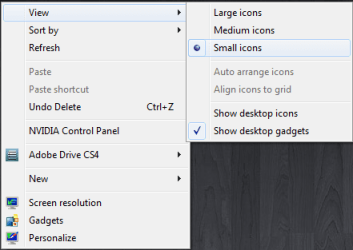
Have you tried right click an empty spot on desktop and choose View > Small Icons, or do you mean you want even smaller icons?

small_icons.PNG

Kari
 

My Computer

Computer type
Laptop
Computer Manufacturer/Model Number
HP ENVY 17-1150eg
OS
Windows 10 Pro x64 EN-GB
CPU
1.6 GHz Intel Core i7-720QM Processor
Memory
6 GB
Graphics Card(s)
ATI Mobility Radeon HD 5850 Graphics
Sound Card
Beats sound system with integrated subwoofer
Monitor(s) Displays
17" laptop display, 22" LED and 32" Full HD TV through HDMI
Screen Resolution
1600*900 (1), 1920*1080 (2&3)
Hard Drives
Internal: 2 x 500 GB SATA Hard Disk Drive 7200 rpm
External: 2TB for backups, 3TB USB3 network drive for media
Cooling
As Envy runs a bit warm, I have it on a Cooler Master pad
Keyboard
Logitech diNovo Media Desktop Laser (bluetooth)
Mouse
Logitech Performance Mouse MX
Internet Speed
50/10 Mbps VDSL
Antivirus
Windows Defender 4.3.9431.0
Browser
Maxthon 3.5.2., IE11
Click a blank area on your desktop and hold - scroll your mosue wheel. You can also right click the desktop, view.

You can also increase your resolution.

Or, right click desktop, personalization, display, choose 100%
 
Even smaller yet!

Yes...I do want them smaller than WIN7 will allow me to choose (Small Icons) 100%.
 

My Computer

OS
win7
Probably a silly question, but you did installed/updated your video drivers, right? In my dilemma over my graphics issue when I was operating without a 3D accelerator driver, my icons were pretty large at their smallest setting.
 

My Computer

OS
XP / Win 7 RC
CPU
AMD 64 X2 4200 (S-939)
Motherboard
ASUS A8E SLI Deluxe
Memory
OCZ Platinum 3200
Graphics Card(s)
Nvidia 7800 GT
Sound Card
Audigy ZS 2
Monitor(s) Displays
24" BenQ
Hard Drives
2 IDE M/S;
4 SATA
PSU
450 W OCZ
Then...

Click a blank area on your desktop and hold - scroll your mouse wheel.

That doesn't seem to do anything for me. Could it be because I am using dual monitors or something?
 

My Computer

Computer Manufacturer/Model Number
Custom
OS
Win7 64bit Ultimate
CPU
AMD Phenom II X6 1100T Black Edition Thuban 3.3GHz, 3.7GHz
Motherboard
Gigabyte GA-890FXA-UD5
Memory
CORSAIR DOMINATOR GT 8GB (2 x 4GB) 1866 DDR3
Graphics Card(s)
XFX HD-697A-CNDC Radeon HD6970 2GB 256-bit
Sound Card
Creative SoundBlaster X-Fi Platinum Fatal1ty Edition
Monitor(s) Displays
Dual 25 Inch Hanns-G HZ251
Screen Resolution
1920x1080 X 2
PSU
Corsair 850W Single Rail
Case
Thermaltake V9 BlacX w/ Dual HDD Docking Station
Cooling
Air lots and lots of air and copper...
Keyboard
Kensington (Low-Profile)
Mouse
Creative Fatal1ty
Internet Speed
15Gbit (15 Down 5 Up)
Other Info
XIGMATEK HDT-S1284F 120mm HYPRO Bearing CPU Cooler, LG Blu-Ray Burner.
Highlight an icon on your desktop.

Keep your mouse over it

Hold CTRL

Scroll your mouse wheel until they are the desired size.
 

My Computer

Computer Manufacturer/Model Number
Custom
OS
Windows 7
CPU
Intel Core 2 Duo Extreme X6800
Motherboard
XFX nForce 780i
Memory
OCZ Reaper HPC 8GB (4 x 2GB) 240-Pin DDR2 SDRAM DDR2 1066
Graphics Card(s)
EVGA GeForce GTX 260
Sound Card
Creative Sound Blaster X-Fi XtremeMusic
Monitor(s) Displays
DELL 3007WFP
Screen Resolution
1680x1050
Hard Drives
360GB SATAII WD
PSU
Thermaltake toughpower W0104RU 650W
Case
XCLIO ATX Full Tower
Cooling
ZALMAN CNPS9500 CPU Cooling Fan/Heatsink
Keyboard
Logitech G11
Mouse
OCZ Behemoth
Internet Speed
Comcast 10Mb Up 2.5 Down
Back
Top