
Huge DPC Latency Spikes, Ive tried everything please help

blazinn831

New member
Local time
3:45 AM
Messages
2
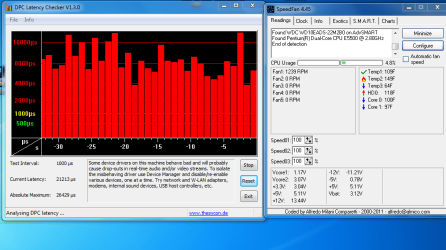
i have a Gateway SX2801-e desktop. i have had a huge dpc latency issue since ive gotten the computer. ive sent it in to gateway several times and the issue is still there. ive reinstalled windows, drivers updates, on performance mode, enabling and disabling drivers. ive used latency mon to try and track it. ive spent numerous hours trying to find out how to fix it. ive finally given up trying to solve it myself with all the research ive done. i dont ask for help ever... but PLEASE can someone bounce some other ideas at me. THANK YOU

3 pics include
sorry if im missing any info
 

Attachments
My Computer My Computer

At a glance

windows 7 home premium 64bit.Pentium(R) Dual-Core CPU E5500 @ 2.80GHzDDR3 6GB
Computer Manufacturer/Model Number
Gateway SX2801-e
OS
windows 7 home premium 64bit.
CPU
Pentium(R) Dual-Core CPU E5500 @ 2.80GHz
Motherboard
Gateway WG43M
Memory
DDR3 6GB
I have a home recording studio (using Sonar X1) so Latency is a big issue for me.

I've seen so many posts on Latency and suggestions that it will boggle your mind.

The first thing is running programs or processes. There are startup programs that many not be needed. There could be processess that may not be needed. However on a laptop there are extra or special processes such as facial recognition, etc that you may want to keep. So the first place to begin is with the startups - launch msconfig and uncheck anything absolutely not needed (there are some that must be there).

Second, ensure you have Gateway specific device drivers for certain devices. Discounting latency, we have still found that some device drivers require vendor specific drivers (e.g. sound driver) for proper operation.

Wi-Fi, although a big issue with a laptop can also cause latency problems.

So many different things or possibilities - there's not a "one fix" we can tell you about or recommend that will take care of the problem.
 

My Computer My Computer

At a glance

Windows 10 64 bitIntel i7 6700K16GB Corsair DominatorIntel CPU Graphics
Computer type
PC/Desktop
Computer Manufacturer/Model Number
My Own Build
OS
Windows 10 64 bit
CPU
Intel i7 6700K
Motherboard
ASUS ROG Maximus VIII Hero
Memory
16GB Corsair Dominator
Graphics Card(s)
Intel CPU Graphics
Sound Card
RealTek
Monitor(s) Displays
27" Dell S2719dgf
Screen Resolution
2560X1440
Hard Drives
1 TB Samsung 850 EVO SSD for Win 10 Pro
500GB Samsung 850 EVO SSD for Win 10 Insider
2 TB drive for backup
PSU
EVGA Supernova 750G2
Case
BeQuiet Silent Base 600
Cooling
Deepcool Captain 120EX
Keyboard
Microsoft Wireless 2000
Mouse
Microsoft wireless
Internet Speed
100 MB/sec (Cable)
Antivirus
Microsoft Defender and Malwarebytes
Browser
Edge/Firefox
Other Info
Cakewalk (Sonar) by BandLab and Studio One 4.1 Pro recording studio software. MOTU 896Mk3 Hybrid recording interface, Frontier Tranzport wireless control unit, Behringer X-Touch Control Surface.
Five USB connected optical drives for CD Audio production using Nero BurningROM
thanks for the response. i have pretty much nothin starting up. that was another suggestion i read somewhere else and tried. could a HDD overheating cause latency issues?"I've seen so many posts on Latency and suggestions that it will boggle your mind." LOL oh i know, i know. thats why i am here. done so much research without posting to a single forum, finally just gave in and posted on here.
 

My Computer My Computer

At a glance

windows 7 home premium 64bit.Pentium(R) Dual-Core CPU E5500 @ 2.80GHzDDR3 6GB
Computer Manufacturer/Model Number
Gateway SX2801-e
OS
windows 7 home premium 64bit.
CPU
Pentium(R) Dual-Core CPU E5500 @ 2.80GHz
Motherboard
Gateway WG43M
Memory
DDR3 6GB
Back
Top