Huge pagefile.sys file

AdeonC

New member
Local time
11:33 PM
Messages
23
Hello everyone. I have a doubt in an odd situation.


I divided my Hard Disc onto three partitions. One of them I haven't used yet, so, hipotetically (I guess), it should be blank (with no files), right?

Well, I've just noticed that this "empty" partition has 5GB occupied already.

When I unchecked "Hide protected operating system files" feature, I found out this pagefile.sys file which has about 5.12GB.

What's that file for? Can I just get rid of it or, at least, reduce its size?


Thanks.
 

My Computer

OS
Win 7 Ultimate
CPU
AMD Phenom II x6 3.2gHz
Memory
Kingstone 4GB 1333Hz
Graphics Card(s)
Radeon 6970 2GB
Monitor(s) Displays
Samsung SyncMaster TA550
Screen Resolution
1920x1080px
PSU
XFX Pro 650W
Case
Some fancy case from Leadership
Internet Speed
10mb/s (when it works)
I have that same file on my main HDD :-)

But since it is that big... I don't think we should delete it :-p
 

My Computer

Computer Manufacturer/Model Number
MSI
OS
Vista
CPU
Q9450 @ 3.0 Ghz
Memory
8GB Ram DDR-3
Graphics Card(s)
9800 GTX 512mb Tri SLI
Sound Card
Soundblaster
Monitor(s) Displays
30" monitor
Hard Drives
250GB & 1TB together in raid 0
Case
Antec 900
Keyboard
Logitech G11
Mouse
Logitech G9
Internet Speed
21Mbps
That 5 gb file is the virtuam memory....if you have more than 3 or 4 gb of ram it is ok to disable virtual memory. To to that: right click on "my computher" then click prop. Go to "Advanced System Settings", go to "Advanced" tab and click "Settings" under Performance, then go to advanced tab and click "Change" hit "No paging file" and then hit "Set".

Warning: After doing this some games or appz won't work anymore, extremely rarely but it might just happen. Fuel doesn't work without a pagefile.
 

My Computer

OS
Windows 7 Build 7264 X64
CPU
E5200 @ 3.0 Ghz
Motherboard
Gigabyte GA-EP43-S3L
Memory
4 GB @ 800 Mhz
Graphics Card(s)
Ati HD 4670
Sound Card
Realtek
Monitor(s) Displays
LG Flatron w1934S 19''
Screen Resolution
1440x900@60 Hz
Hard Drives
1 x WD 160 GB
1 x Maxtor 120 GB
PSU
500 W Raidmax
Aright Thanks for the information Tzeapa,
But i'll leave it there, I have space enough...

Although I have 8GB of ram... I play Fuel (atm) so i'll leave it on ^^
 

My Computer

Computer Manufacturer/Model Number
MSI
OS
Vista
CPU
Q9450 @ 3.0 Ghz
Memory
8GB Ram DDR-3
Graphics Card(s)
9800 GTX 512mb Tri SLI
Sound Card
Soundblaster
Monitor(s) Displays
30" monitor
Hard Drives
250GB & 1TB together in raid 0
Case
Antec 900
Keyboard
Logitech G11
Mouse
Logitech G9
Internet Speed
21Mbps

My Computer

Computer Manufacturer/Model Number
self built
OS
Windows 7 Professional 64-bit
CPU
Intel E8400 3GHz
Motherboard
Intel DX48BT2
Memory
Kingston PC3-10700H 4Gb
Graphics Card(s)
XFX Radeon HD 5850 BlackEd.
Sound Card
Asus Xonar DG
Monitor(s) Displays
2x Samsung SM-T220HD 22"
Screen Resolution
1680x1050 on two monitors
Hard Drives
OCZ Vertex 2 120gb 3.5" (OS)
Seagate Momentus XT 500gb
Samsung F3 1Tb (games)
2x Samsung F1 1Tb
PSU
Thermaltake ToughPower 850w
Case
Thermaltake Armor
Cooling
Scythe Mugen II
Keyboard
Microsoft Comfort Curve USB
Mouse
Razer Diamondback 3G
Internet Speed
8128/443
I would never guess that it's the virtual memory file.

If I remember correctly, Windows XP wouldn't display the paging file occuping my partition - it would just show a lower data capacity to the same. That's probably why I found it odd.

Anyhow, thanks for the replies.
 

My Computer

OS
Win 7 Ultimate
CPU
AMD Phenom II x6 3.2gHz
Memory
Kingstone 4GB 1333Hz
Graphics Card(s)
Radeon 6970 2GB
Monitor(s) Displays
Samsung SyncMaster TA550
Screen Resolution
1920x1080px
PSU
XFX Pro 650W
Case
Some fancy case from Leadership
Internet Speed
10mb/s (when it works)
I would never guess that it's the virtual memory file.

If I remember correctly, Windows XP wouldn't display the paging file occuping my partition - it would just show a lower data capacity to the same. That's probably why I found it odd.

Anyhow, thanks for the replies.

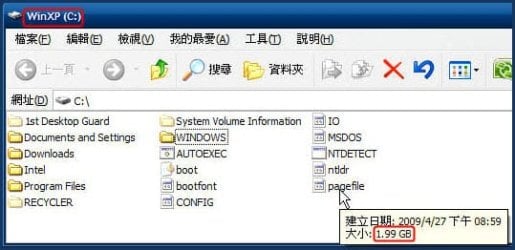
The pagefile exists in the partition of the Windows XP:

Snap1.jpg
 

My Computer

OS
Server 2008 R2 SP1, Win7 x64 Pro SP1
CPU
Intel Core 2 Duo E6700 @3.3GHz
Motherboard
ASUS P5W DH DELUXE
Memory
Transcend DDRII 800 4GB (2 x 2GB )
Graphics Card(s)
GeForce 7950GX2
Sound Card
Realtek ALC882M Integrated on board
Monitor(s) Displays
ACER AL2723 27" LCD
Screen Resolution
1920x1200
Hard Drives
WD 6401 AALS 640G x 1
Seagate 160 GB (Barracuda 7200.7) x 2
PSU
Zippy PSL-6720P(G1)720W
Case
Thermaltake Kandalf VA9000SWA
Cooling
Zalman CNPS9500
Keyboard
Standard
Mouse
Standard
Internet Speed
10M, Cable
Other Info
Above is one of my desktops.
What is happening is Win 7 is using the drive with the greater amount of free space for virtual memory. Before you go turning off this feature completely it would be a good idea to test out what would happen if you do; may be all you need to do is to down size it from what it is set at first (example: if at 5.2 mbs then try 1.2 mbs (these are only examples, and nothing more)). I am running 16 Gbit of DDR2 6400, and really don't pay attention to the Virtual Drive settings It is not going to increase you performance all that much.
 

My Computer

Computer Manufacturer/Model Number
HP Pavilion a4302f
OS
Win 7 Pro x64, VM Win XP, Win7 Pro Sandbox, Kubuntu 11
CPU
AMD Athlon(tm) II X4 640 @ 3.0 Gbz
Memory
12GB 1066MHz DDR3 SDRAM - 2x4GB, 2x2GB
Graphics Card(s)
ATI Radeon HD 4350 HD Graphics/Audio with 512MB
Sound Card
Realtek High Definition Audio
Monitor(s) Displays
1. Dell 23" SP2307, 2. Mitsublishi 40" HDTV, Hannspree 25"
Screen Resolution
1. 2048x1152, 2. 1920-1080, 3. 1920x1200
Hard Drives
Int: 1 120 Gig SSD i
1 - 2.5" 500 USB External HDD
1 -1 Tb USB External HDD
Case
Mid Tower
Cooling
Standard Fans - 5 fans (very quiet)
Keyboard
Microsoft Wireless 2000
Mouse
Microsoft Wireless Mouse 5000
Internet Speed
10 Mbit (realistically 500 Kbit - 1.2 Mbit)
Other Info
Speakers - Bose Desktop (Excellent Sound)
1 external CD|DVD\Blue-ray Recorders/Players (Sony)
For the love of...

Just disable the thing, entirely. Sheesh, it's a throw-back to the stoneage.
 

My Computer

Computer type
PC/Desktop
Computer Manufacturer/Model Number
Custom Build/Mod
OS
Windows 7 Home Premium x64
CPU
Intel QX9650 Extreme 4.0 GHz
Motherboard
ASUS Rampage Extreme Rev2
Memory
8GB (4x2) Corsair Dominator DDR3
Graphics Card(s)
2x Radeon R390X [8GB]
Sound Card
SupremeFX X-Fi
Monitor(s) Displays
Dell 2408WFP 26" Panel
Screen Resolution
1920x1200
Hard Drives
4x WD 2TB (8TB+ Total)
2x Crucial SSD 128GB (RAID-0)
1x LG Blu-ray read/write
1x Phillips LightScribe DVD read/write
PSU
Corsair HX1000
Case
CoolerMaster - Cosmos S
Cooling
Custom Liquid - 320mm rad w/ 3x 80mm fans, CPU/NB/SB Blocks
Keyboard
Logitech Illuminater Pro
Mouse
Logitech
Internet Speed
Fractional T1 - 125Mbps
Antivirus
ESET Security Suite / Microsoft Security Essentials
Browser
Cyberfox Intel x64
Other Info
OC'd to 5.0GHz @ 44c under full load
Actually virtual memory is slowing down the computer because the os instead of using RAM uses pagefile.sys wich is located on HDD. Disabling it will give your computer a boost of performance...

Virtual Memory is for computers with small amounts of ram !

And I can't understand why games like Fuel won't start with no virtual memory
 

My Computer

OS
Windows 7 Build 7264 X64
CPU
E5200 @ 3.0 Ghz
Motherboard
Gigabyte GA-EP43-S3L
Memory
4 GB @ 800 Mhz
Graphics Card(s)
Ati HD 4670
Sound Card
Realtek
Monitor(s) Displays
LG Flatron w1934S 19''
Screen Resolution
1440x900@60 Hz
Hard Drives
1 x WD 160 GB
1 x Maxtor 120 GB
PSU
500 W Raidmax
And I can't understand why games like Fuel won't start with no virtual memory

For almost 7 years, I have NOT run a pagefile at all and have never found a game/program that wouldn't run. And any that require a pagefile are not worth running. ;)
 

My Computer

Computer type
PC/Desktop
Computer Manufacturer/Model Number
Custom Build/Mod
OS
Windows 7 Home Premium x64
CPU
Intel QX9650 Extreme 4.0 GHz
Motherboard
ASUS Rampage Extreme Rev2
Memory
8GB (4x2) Corsair Dominator DDR3
Graphics Card(s)
2x Radeon R390X [8GB]
Sound Card
SupremeFX X-Fi
Monitor(s) Displays
Dell 2408WFP 26" Panel
Screen Resolution
1920x1200
Hard Drives
4x WD 2TB (8TB+ Total)
2x Crucial SSD 128GB (RAID-0)
1x LG Blu-ray read/write
1x Phillips LightScribe DVD read/write
PSU
Corsair HX1000
Case
CoolerMaster - Cosmos S
Cooling
Custom Liquid - 320mm rad w/ 3x 80mm fans, CPU/NB/SB Blocks
Keyboard
Logitech Illuminater Pro
Mouse
Logitech
Internet Speed
Fractional T1 - 125Mbps
Antivirus
ESET Security Suite / Microsoft Security Essentials
Browser
Cyberfox Intel x64
Other Info
OC'd to 5.0GHz @ 44c under full load
Because of the way that some applications are written it is not a good idea to remove the pagefile completely.

However if you have a lot of available ram you may gain disk space by setting the page file size to a lower number (at least 512 MB) just to keep any programs that require it's presence happy.

Due to the way the pagefile is used if you have sufficient RAM the pagefile should never be used so would not slow the system down.
 

My Computers

System One System Two

  • Computer type
    PC/Desktop
    Computer Manufacturer/Model Number
    ChillBlast - Custom to my design
    OS
    Windows 11 Pro x64 [Latest Release and Release Preview]
    CPU
    Ryzen 9 5950X, 3.8 - 5.2 MHz
    Motherboard
    Asus Prime X570-Pro
    Memory
    64GB [2 x 32GB] DDR4 3200MHz
    Graphics Card(s)
    4GB NVIDIA GEFORCE GTX 1650 Ti
    Sound Card
    On-board SPDIF to 5.1 System + HDMI [5.1 system]
    Monitor(s) Displays
    32" UHD 32 Bit HDR Monitor + 43" UHD 4K 32Bit HDR TV
    Screen Resolution
    2 x 3840 x 2160 @60Hz
    Hard Drives
    1TB M2 SSD OS, 500GB Fast Access SSD, 2 x 8TB Data + Various Externals from 1TB to 4TB, 10TB NAS
    PSU
    NZXT C750 80 PLUS Gold 750W Modular PSU
    Case
    Workstation Case [Matt Black]
    Cooling
    NZXT Kraken X63 280mm CPU Cooler +2x Quiet Case fans
    Keyboard
    Logitech Wireless MX Keys & K400 + others
    Mouse
    Logitech Wireless MX Master 3S
    Internet Speed
    920 MB Down 50 MB Up
    Antivirus
    BitDefender Total Security Pro
    Browser
    Chrome (always run latest Non-Beta)
    Other Info
    Also run ...
    Laptop - Quad 8GB - Windows 10 Pro x64
    Nexus 7 Android tablet x2
    Samsung 10.2" tablet
    Blackview TAB 8 4G Android Tablet c/w Keyboard
    Wacom Intuos Pro Medium Pen Pad
    Wacom Intuos Pro Small Pen Pad
    Wacom Expresskeys Remote
    Loopdeck+ Graphics Controller
    Shuttle Pro v2 Control
  • Computer type
    Laptop
    System Manufacturer/Model Number
    Dell XPS 17 10750H
    OS
    Windows 11 Pro x64 Latest RP
    CPU
    Intel I7 10750H 5.0GHz
    Motherboard
    Dell XPS
    Memory
    32GB [2x16GB] DDR4 2933 MHz
    Graphics Card(s)
    nVidia GTX1650Ti 4 GB GDDR6
    Sound Card
    Stock [Realtek] 4 Speaker
    Monitor(s) Displays
    17" IPS UHD+ Infinity Edge Touchscreen
    Screen Resolution
    3840 x 2400
    Hard Drives
    2TB M2 NVMe, 4TB External + various 500GB & 1TB External NVMe (also have access to spinner HDD from
    PSU
    Stock
    Case
    Stock XPS Aluminium & Carbon Fibre
    Cooling
    Stock - Active Fan Control
    Keyboard
    Backlit + Various Logitech
    Mouse
    Stock Track Pad + Logitech MX Trackball
    Internet Speed
    72 MB Down 18MB Up
    Browser
    Chrome
    Other Info
    Also run ...
    Laptop - Quad 8GB - Windows 10 Pro x64
    Nexus 7 Android tablet x2
    10.2" tablet
    Sony Z3 Android Smartphone
    Wacom Intuos Pro Medium Pen Pad
    Wacom Intuos Pro Small Pen Pad
    Wacom Expresskeys Remote
    Loopdeck+ Graphics Controller
    Shuttle Pro v2 Control Pad
    10TB NAS
The pagefile is where the Windows Memory Manager stores data that isn't currently in RAM. It does this under several conditions - the most common being when there isn't enough RAM to work the system.

Some programs (particularly video games) will require a pagefile. If you attempt to run them without a pagefile they'll complain about it and refuse to run. I ran an XP system a while back without a pagefile and it worked well until I ran into one of those games referred to above.

Any "average" system with at least 4gB of RAM shouldn't have issues with the pagefile unless there's a lot of stuff open and working. Corrupted programs can cause excessive pagefile usage - and monkeying with the pagefile may help out, but that's just treating the symptoms without fixing the problem.

You can easily create a pagefile if one is needed. Go to Start and type in "sysdm.cpl" (without the quotes) and press Enter
Click on the Advanced tab
Click on the Performance Settings button
Click on the Advanced tab
Click on the Virtual Memory Change button
That will get you into the dialog to create, edit, or delete the pagefile.

A final caveat is that, if you don't have a pagefile, you won't be able to create memory dump files in the event of a crash.
 

My Computer

Computer Manufacturer/Model Number
Home built (x64), Lenovo x61s Tablet, Samsung Netbook
OS
Win7 x64 + x86
CPU
Intel i7 920, other Intel chips, and the Atom in the netbook
Motherboard
Asus P6T Deluxe
Memory
12 gB; 4 gB Lenovo; 1 gB Samsung netbook
Graphics Card(s)
ATI 4870
Sound Card
Yes, I have one of these
Monitor(s) Displays
32" Sharp Aquos TV
Screen Resolution
800x600 - I have vision issues
Hard Drives
4 - 150 gB Velociraptors in RAID 5
Promise controller
PSU
1000 watt (can't recall the brand)
Case
Antec 300
Cooling
Big honking cooler that was rated highly at Toms Hardware
Keyboard
Microsoft Natural
Mouse
Logitech Trackman
Internet Speed
Cable
Other Info
GeekSquad UPS
CyberPower UPS
DLink DNS-323 NAS (2 tB)
Netgear wireless router as an access point
Netgear wired router FSV-318
Home network consists of
4 desktop computers (2 Vista, 2 Win7)
1 netbook (Win7)
4 laptop computers (XP, 2-Vista, Win7)
Wii and XBox 360
Windows will page to disk no matter what. If you run in to something that requires one it is going to take a lot longer for the OS to create one and start one, than if it were there to begin with. Just change it to something small if you have 8GB of ram, like 1024MB (1GB)

I have 6GB of ram and still create one just as big.
 

My Computer

Computer Manufacturer/Model Number
Built Myself
OS
Windows 7 7600.16384 x64
CPU
Intel Core i7 OC'd to 3.20 GHz
Motherboard
Gigabyte
Memory
6GB GSkillz Triple Channel DDR3 OC'd to 1600 MHz
Graphics Card(s)
Nvidia GTX 280
Sound Card
X-Fi Platinum
Monitor(s) Displays
Dual 2001FWP
Screen Resolution
1680x1050 x 2
Hard Drives
System - Dual 150GB Raptors Raid0
Doc Storage - 1TB SATA 32MB cache Samsung
TV Recordings - 1TB SATA 32MB cache Samsung
PSU
Gigawatt Antec
Case
Antec 900
Keyboard
Saitek
Mouse
logitech MX 10000
Internet Speed
30 mb/s
Actually virtual memory is slowing down the computer because the os instead of using RAM uses pagefile.sys wich is located on HDD. Disabling it will give your computer a boost of performance...

Virtual Memory is for computers with small amounts of ram !

And I can't understand why games like Fuel won't start with no virtual memory


Has anyone ever been able to prove this? Are there any benchmarks or something that show this is true? Or do people just "feel" like it's faster.


With HDD's being 1+ TB nowadays, losing 5-8 GB to pagefile is no big deal. But it would make sense that it's not worth having anymore. I like the idea of setting pagefile to something very small like 512MB - 1GB.
 

My Computer

Computer Manufacturer/Model Number
Apple MacBook Pro
OS
Windows 7 64-bit (7127) & Mac OS X 10.5.7
CPU
2.53 GHz Intel Core2Duo (6MB L2 Cache)
Memory
4GB DDR2 667
Graphics Card(s)
8600M GT 512MB
Monitor(s) Displays
15.4 LED backlit LCD
Screen Resolution
1440x900
Hard Drives
Hitachi 250GB 5400 RPM (soon to be replaced)
Mouse
Logitech
With HDD's being 1+ TB nowadays, losing 5-8 GB to pagefile is no big deal. But it would make sense that it's not worth having anymore. I like the idea of setting pagefile to something very small like 512MB - 1GB.

With SSDs becoming a little more popular the pagefile becomes more comlicated than it is already. I have turned mine off because I don't want needless stuff being written to it. Seems to be fine.
 

My Computer

Computer Manufacturer/Model Number
Keeps changing - (Custom)
OS
Windows 7 Professional x64
CPU
Intel Core i7 860
Motherboard
Gigabyte GA-P55-UD4P
Memory
4GB DDR3 Mushkin 1600Mhz @ 7-8-7-20
Graphics Card(s)
MSI GTS250 1GB DDR3 Twin Frozr
Sound Card
Onboard realtek
Monitor(s) Displays
Samsung SyncMaster 24" P2450 + Samsung 20" 2033
Screen Resolution
1920 X 1080 and 1600 X 900 (#2 system 1440 X 900)
Hard Drives
Patriot Inferno 120GB SSD + 3 WD Blue 640GB drives
PSU
Corsair 750 HX Modular
Case
Lancool PC-K62
Cooling
Cooler Master TX3 CPU cooler and 4-140mm and 1-120mm case
Keyboard
Gigabyte USB keyboard
Mouse
Microsoft wireless laser mouse 5000
Internet Speed
7 Mb down 1.5 up
Other Info
System #2: AMD Phenom II X6 1055T (Freezer 7 Pro cooler) - Gigabyte 880GMA-UD2H - WD 500GB Black - 9500GT (1GB) 500W OCZ modular PSU - Antec 200 case. System #3 (LapTop) Core 2 Duo T6670 - 320GB 7200RPM HD - 4GB DDR3 RAM.
With SSDs becoming a little more popular the pagefile becomes more comlicated than it is already. I have turned mine off because I don't want needless stuff being written to it. Seems to be fine.

Now that there are SSD out in the wild and with wear I would turn it off. But since I still have a standard drive and use programs that want to have a swap space I leave it set to 1.5 of my ram, I also have stuff open all the time. You will find people all over the place that says to leave it or to turn it off, let windows choose the size or set it manually. I've see all of them done and used all of them and each machine works differently with each setting. I would say try it off see how it run, then set it to a size or just let windows do its thing. I would love to see programers stop using the swap space and just use ram or unload items when needed. People have the ram now and faster hard drives so the swap drive is not needed as much as before.
Test each of the settings see how your machine acts then go with the best results.
 

My Computer

Computer Manufacturer/Model Number
Custom Build
OS
Windows 7 Ultimate x64 SP1
CPU
AMD Phenom II 1090 3.2 six core
Motherboard
MSI 890FXA-GD65
Memory
16 gig DDR3
Graphics Card(s)
MSI R6950 2gig
Sound Card
on board
Monitor(s) Displays
Acer 23inch led
Screen Resolution
1900x1080 widescreen
Hard Drives
Seagate 1tb SATA6
2x 1tb HITACHI Deskstar
PSU
CORSAIR Enthusiast Series TX750 V2 750W
Case
CoolMaster HAF 922
Cooling
Box AMD Heatsink/Fan
Internet Speed
Cable 12Mbps/3Mbps
With SSDs becoming a little more popular the pagefile becomes more comlicated than it is already. I have turned mine off because I don't want needless stuff being written to it. Seems to be fine.


Even if you disable the pagfile, if it needs it, it will create it or page to kernel won't it?
 

My Computer

Computer Manufacturer/Model Number
Built Myself
OS
Windows 7 7600.16384 x64
CPU
Intel Core i7 OC'd to 3.20 GHz
Motherboard
Gigabyte
Memory
6GB GSkillz Triple Channel DDR3 OC'd to 1600 MHz
Graphics Card(s)
Nvidia GTX 280
Sound Card
X-Fi Platinum
Monitor(s) Displays
Dual 2001FWP
Screen Resolution
1680x1050 x 2
Hard Drives
System - Dual 150GB Raptors Raid0
Doc Storage - 1TB SATA 32MB cache Samsung
TV Recordings - 1TB SATA 32MB cache Samsung
PSU
Gigawatt Antec
Case
Antec 900
Keyboard
Saitek
Mouse
logitech MX 10000
Internet Speed
30 mb/s
page file

Hello everyone. I have a doubt in an odd situation.


I divided my Hard Disc onto three partitions. One of them I haven't used yet, so, hipotetically (I guess), it should be blank (with no files), right?

Well, I've just noticed that this "empty" partition has 5GB occupied already.

When I unchecked "Hide protected operating system files" feature, I found out this pagefile.sys file which has about 5.12GB.

What's that file for? Can I just get rid of it or, at least, reduce its size?


Thanks.

You dont actually have to have a page file especially if you have 4gigs or more of ram. You want tro set a lower and upper limit not let the system manage it. I have zero page file and nothing has happens. If you are more caoutious set on on a diff drive than where yhe OS is and make it abt 1.5 times the amount of ram

Hope this helps and let me know how it turns out


Ken
 

My Computer

Computer Manufacturer/Model Number
HP Pavillion dv-7 1005 Tx
OS
Win 8 Release candidate 8400
CPU
[email protected]
Memory
4 gigs
Graphics Card(s)
Nvidia 9600M
Sound Card
HD built-in
Monitor(s) Displays
17" Wxga
Screen Resolution
1440x900
Cooling
none
Internet Speed
45Mb down 5Mb up
Hi there, folks!
Just to state that this amount of virtual memory that I've set was proposital. I'm currently using 3d programs for CGi, such as 3ds max, which requires a bunch of memory.

Actually virtual memory is slowing down the computer because the os instead of using RAM uses pagefile.sys wich is located on HDD. Disabling it will give your computer a boost of performance...
I didn't say that my machine is running slow ever since :sarc: It's running quite well though

Anyways, thanks for the answers. It's been an interesting discussion.
 

My Computer

OS
Win 7 Ultimate
CPU
AMD Phenom II x6 3.2gHz
Memory
Kingstone 4GB 1333Hz
Graphics Card(s)
Radeon 6970 2GB
Monitor(s) Displays
Samsung SyncMaster TA550
Screen Resolution
1920x1080px
PSU
XFX Pro 650W
Case
Some fancy case from Leadership
Internet Speed
10mb/s (when it works)
Back
Top