
Solved Huge Problem with "Limited Access"

If you have not already, try loading BIOS defaults. How to reset CMOS or BIOS settings

Then:
Download and make bootable USB/DVD for Linux Mint MATE. Boot with it (no installation needed) and see if network is working alright. If it is, we can try some more perhaps.
 

My Computer

Computer type
PC/Desktop
Computer Manufacturer/Model Number
Custom Build
OS
Windows 7 Ultimate x64 SP1
CPU
AMD Phenom 2 1090T
Motherboard
Gigabyte GA-890FXA-UD5
Memory
2x8GB Kingston HyperX Fury Black 1600Mhz Unganged
Graphics Card(s)
MSI GTX 970 Gaming 4G
Sound Card
Realtek On-Board HD 7.1 Audio / Logitech G35
Monitor(s) Displays
3xAcer GD245HQ
Screen Resolution
1920x1080
Hard Drives
Samsung 850 Pro 512GB SSD - OS /
WD Caviar Black SATA 3 - 1 TBx2 - Dynamic RAID 0 /
WD Caviar Green SATA 2 - 640GBx2 - Dynamic RAID 0 /
WD Caviar Green SATA 2 - 640GB - Internal Backup /
Seagate Barracude SATA 3 - 3TB - External Backup/ Sync
PSU
HighPower 1000W
Case
Cooler Master HAF 932
Cooling
Noctua NH-D14
Keyboard
Logitech G19
Mouse
Logitech G500
Internet Speed
100/4 Mbit Cable (100GB quota)
Antivirus
ZoneAlarm Extreme Security / MBAM Pro / MBAE Free / SAS Free
Browser
IE 11 - Firefox - Chrome
Other Info
Logitech F710/ G27/ G940/ Z5500 // TrackIR 5 // Nvidia 3D Surround Vision
If you have not already, try loading BIOS defaults. How to reset CMOS or BIOS settings

Then:
Download and make bootable USB/DVD for Linux Mint MATE. Boot with it (no installation needed) and see if network is working alright. If it is, we can try some more perhaps.

You are THE MAN, GokAy.

It looks like we have some progress. I DO HAVE INTERNET CONNECTION booting from DVD for Linux Mint Mate.

So it is not hardware problem but some kind of Windows mish-mash. Or perhaps it is kind of virus or something but I am unable to scan comp while not being connected.

What next now?
 

My Computer

Computer type
PC/Desktop
Computer Manufacturer/Model Number
Custom built
OS
Windows 7 Utimate x64
CPU
AMD Athlon 64x2 5600+
Motherboard
Asus M2N32 SLI Deluxe wireless
Memory
4x Corsair CM2X2048-6400C5DHX XMS2-6400 800mHz
Graphics Card(s)
ATI Radeon X1950
Hard Drives
Samsung SSD 840 EVO, + 2 WD ATA 500gB
Antivirus
AVG
Browser
Yahoo
Alright, you said network services were started but check these (not all are relevant but doesn't hurt):
- Computer Browser
- DHCP Client
- DNS Client
- Network Connections
- Network Location Awareness
- Remote Procedure Call (RPC)
- Server
- TCP/IP Netbios helper
- Workstation
- IPsec
- Network List Service
- Network Store Interface Service

Also check whether you have Bonjour service, stop/disable (then restart) as a test

Check with firewall disabled
 

My Computer

Computer type
PC/Desktop
Computer Manufacturer/Model Number
Custom Build
OS
Windows 7 Ultimate x64 SP1
CPU
AMD Phenom 2 1090T
Motherboard
Gigabyte GA-890FXA-UD5
Memory
2x8GB Kingston HyperX Fury Black 1600Mhz Unganged
Graphics Card(s)
MSI GTX 970 Gaming 4G
Sound Card
Realtek On-Board HD 7.1 Audio / Logitech G35
Monitor(s) Displays
3xAcer GD245HQ
Screen Resolution
1920x1080
Hard Drives
Samsung 850 Pro 512GB SSD - OS /
WD Caviar Black SATA 3 - 1 TBx2 - Dynamic RAID 0 /
WD Caviar Green SATA 2 - 640GBx2 - Dynamic RAID 0 /
WD Caviar Green SATA 2 - 640GB - Internal Backup /
Seagate Barracude SATA 3 - 3TB - External Backup/ Sync
PSU
HighPower 1000W
Case
Cooler Master HAF 932
Cooling
Noctua NH-D14
Keyboard
Logitech G19
Mouse
Logitech G500
Internet Speed
100/4 Mbit Cable (100GB quota)
Antivirus
ZoneAlarm Extreme Security / MBAM Pro / MBAE Free / SAS Free
Browser
IE 11 - Firefox - Chrome
Other Info
Logitech F710/ G27/ G940/ Z5500 // TrackIR 5 // Nvidia 3D Surround Vision
Alright, you said network services were started but check these (not all are relevant but doesn't hurt):
- Computer Browser
- DHCP Client
- DNS Client
- Network Connections
- Network Location Awareness
- Remote Procedure Call (RPC)
- Server
- TCP/IP Netbios helper
- Workstation
- IPsec
- Network List Service
- Network Store Interface Service

Also check whether you have Bonjour service, stop/disable (then restart) as a test

Check with firewall disabled

Hello GokAy:

Let me make some things clear: I do have basic knowledge about Windows. I would say that my knowledge is a tad more than basic but with one exception: networking. I would say that my knowledge about networking is a tad lesser than basic.

So I would like to ask you for advice: what do I suppose to check and how. I mean, due to your current post, I know what I suppose to check. But all things have kind of settings. Some have tiny boxes checked, other have boxes unchecked e.t.c.

I know that it is pain in a neck but I need more precise description of what I have to do. Point after point.

I want to be sure that I can solve this problem but not by myself. I need somebody's help.

Would you be so kind?:D
 

My Computer

Computer type
PC/Desktop
Computer Manufacturer/Model Number
Custom built
OS
Windows 7 Utimate x64
CPU
AMD Athlon 64x2 5600+
Motherboard
Asus M2N32 SLI Deluxe wireless
Memory
4x Corsair CM2X2048-6400C5DHX XMS2-6400 800mHz
Graphics Card(s)
ATI Radeon X1950
Hard Drives
Samsung SSD 840 EVO, + 2 WD ATA 500gB
Antivirus
AVG
Browser
Yahoo
Sorry for late reply.

Of course, you just need to ask ;)

Run services.msc
In the list check the Status (all should be started) and Startup Type for the following services:
- Computer Browser - Manual
- DHCP Client - Automatic
- DNS Client - Automatic
- Network Connections - Manual
- Network Location Awareness - Automatic
- Remote Procedure Call (RPC) - Automatic
- Server - Automatic
- TCP/IP Netbios helper - Automatic
- Workstation - Automatic
- IPsec - Manual
- Network List Service - Automatic
- Network Store Interface Service - Automatic

Then check whether you have Bonjour (comes with some Logitech keyboard, iTunes and some others) and try stopping it.
 

My Computer

Computer type
PC/Desktop
Computer Manufacturer/Model Number
Custom Build
OS
Windows 7 Ultimate x64 SP1
CPU
AMD Phenom 2 1090T
Motherboard
Gigabyte GA-890FXA-UD5
Memory
2x8GB Kingston HyperX Fury Black 1600Mhz Unganged
Graphics Card(s)
MSI GTX 970 Gaming 4G
Sound Card
Realtek On-Board HD 7.1 Audio / Logitech G35
Monitor(s) Displays
3xAcer GD245HQ
Screen Resolution
1920x1080
Hard Drives
Samsung 850 Pro 512GB SSD - OS /
WD Caviar Black SATA 3 - 1 TBx2 - Dynamic RAID 0 /
WD Caviar Green SATA 2 - 640GBx2 - Dynamic RAID 0 /
WD Caviar Green SATA 2 - 640GB - Internal Backup /
Seagate Barracude SATA 3 - 3TB - External Backup/ Sync
PSU
HighPower 1000W
Case
Cooler Master HAF 932
Cooling
Noctua NH-D14
Keyboard
Logitech G19
Mouse
Logitech G500
Internet Speed
100/4 Mbit Cable (100GB quota)
Antivirus
ZoneAlarm Extreme Security / MBAM Pro / MBAE Free / SAS Free
Browser
IE 11 - Firefox - Chrome
Other Info
Logitech F710/ G27/ G940/ Z5500 // TrackIR 5 // Nvidia 3D Surround Vision
Sorry for late reply.

Of course, you just need to ask ;)

Run services.msc
In the list check the Status (all should be started) and Startup Type for the following services:
- Computer Browser - Manual
- DHCP Client - Automatic
- DNS Client - Automatic
- Network Connections - Manual
- Network Location Awareness - Automatic
- Remote Procedure Call (RPC) - Automatic
- Server - Automatic
- TCP/IP Netbios helper - Automatic
- Workstation - Automatic
- IPsec - Manual
- Network List Service - Automatic
- Network Store Interface Service - Automatic

Then check whether you have Bonjour (comes with some Logitech keyboard, iTunes and some others) and try stopping it.

No need for apology, GokAy. I understand and appreciate your help.

All services, you have listed are started and are either in manual or automatic mode, so no any errors there.

I do not have Bonjour installed.

But I'd like to put your attention on this thing:

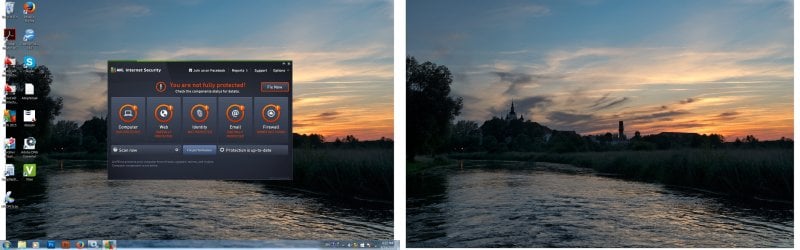
AVG.jpg

AVG is all red because no internet connection. Perhaps this thing is blocking my connection somehow. I've heard about such cases in the past. I did disabled it temporarily and tried to connect to network. No success. Still "Limited Access". But when I restart computer AVG is enabled again. I don't know how to disable it while booting.

But I only wonder.....
 

My Computer

Computer type
PC/Desktop
Computer Manufacturer/Model Number
Custom built
OS
Windows 7 Utimate x64
CPU
AMD Athlon 64x2 5600+
Motherboard
Asus M2N32 SLI Deluxe wireless
Memory
4x Corsair CM2X2048-6400C5DHX XMS2-6400 800mHz
Graphics Card(s)
ATI Radeon X1950
Hard Drives
Samsung SSD 840 EVO, + 2 WD ATA 500gB
Antivirus
AVG
Browser
Yahoo

My Computer

Computer type
PC/Desktop
Computer Manufacturer/Model Number
Custom Build
OS
Windows 7 Ultimate x64 SP1
CPU
AMD Phenom 2 1090T
Motherboard
Gigabyte GA-890FXA-UD5
Memory
2x8GB Kingston HyperX Fury Black 1600Mhz Unganged
Graphics Card(s)
MSI GTX 970 Gaming 4G
Sound Card
Realtek On-Board HD 7.1 Audio / Logitech G35
Monitor(s) Displays
3xAcer GD245HQ
Screen Resolution
1920x1080
Hard Drives
Samsung 850 Pro 512GB SSD - OS /
WD Caviar Black SATA 3 - 1 TBx2 - Dynamic RAID 0 /
WD Caviar Green SATA 2 - 640GBx2 - Dynamic RAID 0 /
WD Caviar Green SATA 2 - 640GB - Internal Backup /
Seagate Barracude SATA 3 - 3TB - External Backup/ Sync
PSU
HighPower 1000W
Case
Cooler Master HAF 932
Cooling
Noctua NH-D14
Keyboard
Logitech G19
Mouse
Logitech G500
Internet Speed
100/4 Mbit Cable (100GB quota)
Antivirus
ZoneAlarm Extreme Security / MBAM Pro / MBAE Free / SAS Free
Browser
IE 11 - Firefox - Chrome
Other Info
Logitech F710/ G27/ G940/ Z5500 // TrackIR 5 // Nvidia 3D Surround Vision
Still, check properties for Network Adapters (Network and Sharing Center - Change Adapter Settings - properties - make sure all are ticked - then IPv4 properties - obtain IP and DNS server automatically.
 

My Computer

Computer type
PC/Desktop
Computer Manufacturer/Model Number
Custom Build
OS
Windows 7 Ultimate x64 SP1
CPU
AMD Phenom 2 1090T
Motherboard
Gigabyte GA-890FXA-UD5
Memory
2x8GB Kingston HyperX Fury Black 1600Mhz Unganged
Graphics Card(s)
MSI GTX 970 Gaming 4G
Sound Card
Realtek On-Board HD 7.1 Audio / Logitech G35
Monitor(s) Displays
3xAcer GD245HQ
Screen Resolution
1920x1080
Hard Drives
Samsung 850 Pro 512GB SSD - OS /
WD Caviar Black SATA 3 - 1 TBx2 - Dynamic RAID 0 /
WD Caviar Green SATA 2 - 640GBx2 - Dynamic RAID 0 /
WD Caviar Green SATA 2 - 640GB - Internal Backup /
Seagate Barracude SATA 3 - 3TB - External Backup/ Sync
PSU
HighPower 1000W
Case
Cooler Master HAF 932
Cooling
Noctua NH-D14
Keyboard
Logitech G19
Mouse
Logitech G500
Internet Speed
100/4 Mbit Cable (100GB quota)
Antivirus
ZoneAlarm Extreme Security / MBAM Pro / MBAE Free / SAS Free
Browser
IE 11 - Firefox - Chrome
Other Info
Logitech F710/ G27/ G940/ Z5500 // TrackIR 5 // Nvidia 3D Surround Vision
From post #1

Unfortunately I was wrong because BSOD started to visit me more and more often.

jadom are you still getting BSOD?
 

My Computer

Computer type
PC/Desktop
Computer Manufacturer/Model Number
Home made Desktop
OS
Windows 10 Pro. 64/ version 1709 Windows 7 Pro/64
CPU
Intel i7-6800K @ 4.3
Motherboard
ASUS X-99 Deluxe II
Memory
Corsair Platinum 16 gig @2400
Graphics Card(s)
EVGA GTX 1070 OC
Monitor(s) Displays
Asus 27" LED LCD/VE278Q
Screen Resolution
1920-1080 or 1280-720 HDMI
Hard Drives
INTEL SSD 730-240 Gb Sata 3.0/
PSU
EVGA Platium 1200W
Case
Phanteks Luxe Tempered Glass 8 fans/ one radiator
Cooling
XSPC/ Water Cooled CPU
Keyboard
Das 4 Professional
Mouse
Logitech M705/MX Anywhere 2-S
Internet Speed
100 mbits
Antivirus
Microsoft Security Essentials/ Malwarebytes Premium 3.0/ SAS
Browser
I.E. 11 default/Firefox/ ISP Time Warner Cable/Spectrum
Other Info
LG BluRay Burner/
Sound system-KLipsch-THX/
Icy Dock ssd Hot Swap bays.
Yes. Yes. Yes.:D:D:D

Uninstalling AVG made a miracle!!!

Comp works like charm with full internet connection. It looks like last AVG update and failure of one of RAM memory module combination might cause it.

Anyway. Thanks so much, GekAy and all other folks involved.

Layback Bear: as soon as I removed broken module BSOD became to be a history.

Thanks again all.:):):)
 

My Computer

Computer type
PC/Desktop
Computer Manufacturer/Model Number
Custom built
OS
Windows 7 Utimate x64
CPU
AMD Athlon 64x2 5600+
Motherboard
Asus M2N32 SLI Deluxe wireless
Memory
4x Corsair CM2X2048-6400C5DHX XMS2-6400 800mHz
Graphics Card(s)
ATI Radeon X1950
Hard Drives
Samsung SSD 840 EVO, + 2 WD ATA 500gB
Antivirus
AVG
Browser
Yahoo
The reason I asked about the BSOD is. The BSOD report instruction would of probably give a clue that AVG was causing the problem.

Now that you have completely remove AVG like GokAy recommended you should install another anti virus program.

Remember only one anti virus program at a time on one computer.
 

My Computer

Computer type
PC/Desktop
Computer Manufacturer/Model Number
Home made Desktop
OS
Windows 10 Pro. 64/ version 1709 Windows 7 Pro/64
CPU
Intel i7-6800K @ 4.3
Motherboard
ASUS X-99 Deluxe II
Memory
Corsair Platinum 16 gig @2400
Graphics Card(s)
EVGA GTX 1070 OC
Monitor(s) Displays
Asus 27" LED LCD/VE278Q
Screen Resolution
1920-1080 or 1280-720 HDMI
Hard Drives
INTEL SSD 730-240 Gb Sata 3.0/
PSU
EVGA Platium 1200W
Case
Phanteks Luxe Tempered Glass 8 fans/ one radiator
Cooling
XSPC/ Water Cooled CPU
Keyboard
Das 4 Professional
Mouse
Logitech M705/MX Anywhere 2-S
Internet Speed
100 mbits
Antivirus
Microsoft Security Essentials/ Malwarebytes Premium 3.0/ SAS
Browser
I.E. 11 default/Firefox/ ISP Time Warner Cable/Spectrum
Other Info
LG BluRay Burner/
Sound system-KLipsch-THX/
Icy Dock ssd Hot Swap bays.
The only problem was that every BSOD was giving me different numbers so after 5th or so time I gave up.

I use AVG for about 4 years already and had not ever any problem with it. It covers my PC and 2 laptops and I like it.

No any other anti-virus is being installed.

When I was running out of idea about my network connection, I started to investigate AVG and I have found some posts from 2013 or 2012 on the Web saying that somebody had similar problem with it.

So it was my last chance before reinstalling system. Thank God it worked.

Thanks for your involvement, LB.:D
 

My Computer

Computer type
PC/Desktop
Computer Manufacturer/Model Number
Custom built
OS
Windows 7 Utimate x64
CPU
AMD Athlon 64x2 5600+
Motherboard
Asus M2N32 SLI Deluxe wireless
Memory
4x Corsair CM2X2048-6400C5DHX XMS2-6400 800mHz
Graphics Card(s)
ATI Radeon X1950
Hard Drives
Samsung SSD 840 EVO, + 2 WD ATA 500gB
Antivirus
AVG
Browser
Yahoo
You can try re-installing AVG if you are fond of it. Which AV to use is a constant debate. If you can get a Malwarebytes Anti-Malware subscription then Microsoft Security Essentials will be enough.
 

My Computer

Computer type
PC/Desktop
Computer Manufacturer/Model Number
Custom Build
OS
Windows 7 Ultimate x64 SP1
CPU
AMD Phenom 2 1090T
Motherboard
Gigabyte GA-890FXA-UD5
Memory
2x8GB Kingston HyperX Fury Black 1600Mhz Unganged
Graphics Card(s)
MSI GTX 970 Gaming 4G
Sound Card
Realtek On-Board HD 7.1 Audio / Logitech G35
Monitor(s) Displays
3xAcer GD245HQ
Screen Resolution
1920x1080
Hard Drives
Samsung 850 Pro 512GB SSD - OS /
WD Caviar Black SATA 3 - 1 TBx2 - Dynamic RAID 0 /
WD Caviar Green SATA 2 - 640GBx2 - Dynamic RAID 0 /
WD Caviar Green SATA 2 - 640GB - Internal Backup /
Seagate Barracude SATA 3 - 3TB - External Backup/ Sync
PSU
HighPower 1000W
Case
Cooler Master HAF 932
Cooling
Noctua NH-D14
Keyboard
Logitech G19
Mouse
Logitech G500
Internet Speed
100/4 Mbit Cable (100GB quota)
Antivirus
ZoneAlarm Extreme Security / MBAM Pro / MBAE Free / SAS Free
Browser
IE 11 - Firefox - Chrome
Other Info
Logitech F710/ G27/ G940/ Z5500 // TrackIR 5 // Nvidia 3D Surround Vision
You can try re-installing AVG if you are fond of it. Which AV to use is a constant debate. If you can get a Malwarebytes Anti-Malware subscription then Microsoft Security Essentials will be enough.

Well.... I have renewed AVG in April 2015 for two years due to good deal. I had no any problem with it in the past.

I think that comp crashes due to Ram module failure at the moment of AVG update might cause this disaster. Reinstalled AVG works with no problem. So far.:)
 

My Computer

Computer type
PC/Desktop
Computer Manufacturer/Model Number
Custom built
OS
Windows 7 Utimate x64
CPU
AMD Athlon 64x2 5600+
Motherboard
Asus M2N32 SLI Deluxe wireless
Memory
4x Corsair CM2X2048-6400C5DHX XMS2-6400 800mHz
Graphics Card(s)
ATI Radeon X1950
Hard Drives
Samsung SSD 840 EVO, + 2 WD ATA 500gB
Antivirus
AVG
Browser
Yahoo
Back
Top