HUGE problem with Memory Detection

I have tried them all one at a time with no change. I have tried various tensions on the screws with no change. I have tried 2 bios 701 and 602. I am a member I 4 Memory Forum and have tried every thing their that I could find. Here is the kicker. The bios see 8 instead of 12 and the same with Windows 7 and Belarc but CPU-Z reads a little over 12 gigs. I have read some suggestions, I think the Asus forum to use the O.E.M cooler, hog bananas. You don't buy a motherboard advertised to be a over clocking board and run stock cooling. In doing research I have found that people with Asus board that aren't X58 are also having the same problem. IMHO Asus is running from this problem. I don't believe it's the cpu because the i7-960 works on many other branded boards just fine. When the cure is found their will be thousands of happy clockers.
 

My Computer

Computer type
PC/Desktop
Computer Manufacturer/Model Number
Home made Desktop
OS
Windows 10 Pro. 64/ version 1709 Windows 7 Pro/64
CPU
Intel i7-6800K @ 4.3
Motherboard
ASUS X-99 Deluxe II
Memory
Corsair Platinum 16 gig @2400
Graphics Card(s)
EVGA GTX 1070 OC
Monitor(s) Displays
Asus 27" LED LCD/VE278Q
Screen Resolution
1920-1080 or 1280-720 HDMI
Hard Drives
INTEL SSD 730-240 Gb Sata 3.0/
PSU
EVGA Platium 1200W
Case
Phanteks Luxe Tempered Glass 8 fans/ one radiator
Cooling
XSPC/ Water Cooled CPU
Keyboard
Das 4 Professional
Mouse
Logitech M705/MX Anywhere 2-S
Internet Speed
100 mbits
Antivirus
Microsoft Security Essentials/ Malwarebytes Premium 3.0/ SAS
Browser
I.E. 11 default/Firefox/ ISP Time Warner Cable/Spectrum
Other Info
LG BluRay Burner/
Sound system-KLipsch-THX/
Icy Dock ssd Hot Swap bays.
Layback may be asking the obvious, but have you ever had a good look at the pins inside the socket? Can't find the links now, but have also seen it mentioned around that a bent pin in the socket can cause the memory problem to occur as well.
 

My Computer

Computer type
PC/Desktop
Computer Manufacturer/Model Number
Me
OS
Win 7 Ultimate x64
CPU
FX-8350 @ 4.6 GHz so far
Motherboard
Asus M5A97 EVO
Memory
ADATA XPG V1 Series Black 8GB DDR3 1600
Graphics Card(s)
Sapphire R9 270x Dual-X
Sound Card
Xonar DGX w/ Corsair Vengence 1300
Monitor(s) Displays
Acer S232HL Abid
Screen Resolution
1920x1080
Hard Drives
120 GB OCZ Vertex 3
500 GB Seagate 7200.12
PSU
Antec Earthwatts 650W Green
Case
Antec Three Hundred
Cooling
Cooler Master 212 EVO
Keyboard
Logitech G510
Mouse
Logitech G500s
Internet Speed
35000/3000
Yes I have with a magnifying glass and didn't see anything wrong. My dealer sent the board back to Asus and they sent the same board back, no problem found.
 

My Computer

Computer type
PC/Desktop
Computer Manufacturer/Model Number
Home made Desktop
OS
Windows 10 Pro. 64/ version 1709 Windows 7 Pro/64
CPU
Intel i7-6800K @ 4.3
Motherboard
ASUS X-99 Deluxe II
Memory
Corsair Platinum 16 gig @2400
Graphics Card(s)
EVGA GTX 1070 OC
Monitor(s) Displays
Asus 27" LED LCD/VE278Q
Screen Resolution
1920-1080 or 1280-720 HDMI
Hard Drives
INTEL SSD 730-240 Gb Sata 3.0/
PSU
EVGA Platium 1200W
Case
Phanteks Luxe Tempered Glass 8 fans/ one radiator
Cooling
XSPC/ Water Cooled CPU
Keyboard
Das 4 Professional
Mouse
Logitech M705/MX Anywhere 2-S
Internet Speed
100 mbits
Antivirus
Microsoft Security Essentials/ Malwarebytes Premium 3.0/ SAS
Browser
I.E. 11 default/Firefox/ ISP Time Warner Cable/Spectrum
Other Info
LG BluRay Burner/
Sound system-KLipsch-THX/
Icy Dock ssd Hot Swap bays.
its just that I payed for 12 gigs of RAM and i am not receiving what I payed for.. any chance you guys can provide me with a link to a post where someone had a similar issue to mine? so I can be sure to let it be.
You have what you payed for ,you don't see it used cause WINDOWS is waiting on something BIG to use it

I have 8 gigs only 4 usable which means my system has no need till i run somthing that will use all 4 gigs at once it will never happen unless you are doing extensive encoding photo shop and programs using to creat music etc those take up alot of ram

If this is just random task then you did waste your money ,I ope'd for 16 gigs but i don't need it and windows will lock away more ram for later use if i did add another 8 gigs

i would just leave it Be there is no more you can do at this point Windows is in control of the ram which is a good thing :cool:


Also 12 gigs runs triple channel that might be a clue too
 

My Computer

Computer type
PC/Desktop
Computer Manufacturer/Model Number
CoreI7-6700K MrFingerIII Special Builds
OS
Windows 10 Home Premium 64bit sp1
CPU
Intel I7-6700K @ 4.6 Ghz 1.344 volts everyday OC
Motherboard
Asrock Fatality K6 Z170 Socket 1151
Memory
32GB G-Skill TridentZ 3200mhz 16-18-18-38 DDR4
Graphics Card(s)
Sli Gigabyte Windforce GTX 980 G1
Sound Card
AC97 Creative Rage Tactic 3D Headphones Bluetooth
Monitor(s) Displays
27" Asus ROG Swift PG278Q G-Sync 48" Vizio Smart HD TV
Screen Resolution
2560x1440p 27"- 48" Currently Gaming at 2560x1440p Res 2K
Hard Drives
250GB Samsung Evo840SSD Seagate baracuda 500 GB WD Mybook 500Gb 1TB Seagate Barracuda
PSU
HX1050w Corsair Silver 80plus certified crosfire/sli
Case
Enthod Pro Full Tower
Cooling
Corsair H110i GT 280 mm High Performance WaterBlock
Keyboard
Logitech wireless keyboard
Mouse
Logitech wireless mouse
Internet Speed
Cox Cable 100+ mb
Antivirus
WebRoot Spysweeper with Antivirus
Browser
IE-10, Chrome, Opera
Other Info
My Other Rig is a AMD FX8320E @4.6Ghz 16GB Ballistic Sport Ram
Mobo Asrock Fatality 990FX 120GB OCZ SSD 1TB Seagate Barracuda Corsair H75 Cooling PSU Corsair CX750
GPU GTX Gigabyte 970G1
layback - i have a 930 and the same problem and also i dont have an asus board but an EVGA one.. asked in the EVGA forums and nothing solves it..

Solar - how do you explain that 2 months ago it was 12 gigs and 12 gigs usable and then suddenly went to 10 gigs usable and then 8 gigs? this isnt normal and intel should be actually looking into it.. and if this is the way they make their CPUs that its supposed to be this way - id go amd next time. and honestly i never heard of windows locking up ram.. if you are able to provide it from an official source like intel or microsoft id be glad to change my mind but right now it just doesnt make any sense. there are 2 games i wanted to buy this year and now i am debating whether or not i should buy them because my computer is giving me such hard time
 
Last edited:

My Computer

OS
Windows 7 Ultimate 64 bit
CPU
Intel Core i7 930
Motherboard
EVGA X58 FTW3
Memory
2x Corsair Dominator 6GB DDR3 1600
Graphics Card(s)
EVGA GTX 470 Superclocked
Monitor(s) Displays
Asus VW266H
Screen Resolution
1920x1200
Hard Drives
WD Velociraptor 300GB 10,000RPM SATA II
SEAGATE BARRACUDA 2TB 7,200RPM SATA III
PSU
Enermax Revolution 85+ 1050W
Case
Corsair Obsidian 650D
Cooling
Corsair H50
Keyboard
Logitech G510
Mouse
Logitech G700
I can't figure this one out either. The bios and Windows see 8 gigs and cpu-z see's 12 gig on my computer. That tells me (I think) that all connection, slots, pins, mounting of cooler and power are correct.
I don't think it a Windows problem more like a bios problem. I'm not sure but I think Windows get its memory amount from the motherboard. Then again it happens on many brand many boards so it could be a Windows problem.
Their are so many people with this problem and not just on x58 boards. We all didn't buy bad ram, cpu's and mount are coolers incorrectly.
 

My Computer

Computer type
PC/Desktop
Computer Manufacturer/Model Number
Home made Desktop
OS
Windows 10 Pro. 64/ version 1709 Windows 7 Pro/64
CPU
Intel i7-6800K @ 4.3
Motherboard
ASUS X-99 Deluxe II
Memory
Corsair Platinum 16 gig @2400
Graphics Card(s)
EVGA GTX 1070 OC
Monitor(s) Displays
Asus 27" LED LCD/VE278Q
Screen Resolution
1920-1080 or 1280-720 HDMI
Hard Drives
INTEL SSD 730-240 Gb Sata 3.0/
PSU
EVGA Platium 1200W
Case
Phanteks Luxe Tempered Glass 8 fans/ one radiator
Cooling
XSPC/ Water Cooled CPU
Keyboard
Das 4 Professional
Mouse
Logitech M705/MX Anywhere 2-S
Internet Speed
100 mbits
Antivirus
Microsoft Security Essentials/ Malwarebytes Premium 3.0/ SAS
Browser
I.E. 11 default/Firefox/ ISP Time Warner Cable/Spectrum
Other Info
LG BluRay Burner/
Sound system-KLipsch-THX/
Icy Dock ssd Hot Swap bays.
any chance you can provide me with a link to that cpu-z program? so i can see what it tells me
 

My Computer

OS
Windows 7 Ultimate 64 bit
CPU
Intel Core i7 930
Motherboard
EVGA X58 FTW3
Memory
2x Corsair Dominator 6GB DDR3 1600
Graphics Card(s)
EVGA GTX 470 Superclocked
Monitor(s) Displays
Asus VW266H
Screen Resolution
1920x1200
Hard Drives
WD Velociraptor 300GB 10,000RPM SATA II
SEAGATE BARRACUDA 2TB 7,200RPM SATA III
PSU
Enermax Revolution 85+ 1050W
Case
Corsair Obsidian 650D
Cooling
Corsair H50
Keyboard
Logitech G510
Mouse
Logitech G700

My Computer

Computer Manufacturer/Model Number
Self
OS
Main - Windows 7 Pro SP1 64-Bit; 2nd - Windows Server 2008 R2
CPU
Main - Core i7 2600K; 2nd - Core i7 920
Motherboard
Main - Asus P8Z68-V Pro/Gen3; 2nd - Gigabyte GA-EX58-UDR3
Memory
Main - 16GB Corsair Vengeance; 2nd - 12GB Corsair Vengeance
Graphics Card(s)
Main - XFX Radeon 6870 1GB; 2nd - XFX Radeon 4870 1GB
Sound Card
Both: Onboard Realtek Azalia
Monitor(s) Displays
Main - Hann 25" + I-INC 25" + Acer 23"; 2nd - Upgrading Soon
Screen Resolution
Main - 1920x1080 (All Three Monitors); 2nd - Upgrading Soon
Hard Drives
Main - (1) Crucial M4 128GB (Boot)
Main - (1) Seagate 2TB 64MB Cache (Data)
Main - (1) Seagate 2TB 64MB Cache (Data Backup)
2nd - (1) Intel X25-M SSD 80GB (Boot)
2nd - (3) Seagate 1TB 32MB Cache (Data Backup)
2nd - (1) Seagate 320GB (Because)
PSU
Main - OCZ 600W Modular; 2nd - OCZ 600W
Case
Main - Thermaltake Element G; 2nd - NZXT something or other
Cooling
Main - Corsair H80; 2nd - Prolimatech Megahalems
Keyboard
Main - Razer Reclusa; 2nd - Old MS Keyboard
Mouse
Main - Logitech MX Revolution; 2nd - Old MS Mouse
Internet Speed
20Mbps Time-Warner Cable

My Computer

Computer type
PC/Desktop
Computer Manufacturer/Model Number
Home made Desktop
OS
Windows 10 Pro. 64/ version 1709 Windows 7 Pro/64
CPU
Intel i7-6800K @ 4.3
Motherboard
ASUS X-99 Deluxe II
Memory
Corsair Platinum 16 gig @2400
Graphics Card(s)
EVGA GTX 1070 OC
Monitor(s) Displays
Asus 27" LED LCD/VE278Q
Screen Resolution
1920-1080 or 1280-720 HDMI
Hard Drives
INTEL SSD 730-240 Gb Sata 3.0/
PSU
EVGA Platium 1200W
Case
Phanteks Luxe Tempered Glass 8 fans/ one radiator
Cooling
XSPC/ Water Cooled CPU
Keyboard
Das 4 Professional
Mouse
Logitech M705/MX Anywhere 2-S
Internet Speed
100 mbits
Antivirus
Microsoft Security Essentials/ Malwarebytes Premium 3.0/ SAS
Browser
I.E. 11 default/Firefox/ ISP Time Warner Cable/Spectrum
Other Info
LG BluRay Burner/
Sound system-KLipsch-THX/
Icy Dock ssd Hot Swap bays.
YEP, layback we are on the same boat sadly.. it shows me 12gigs as well.. funny that windows doesnt show me my exact cpu clock speed - while other programs including the cpu-z show the correct one.. I believe I have come to a conclusion that this is microsofts fault, we will see what happens with windows 8.. i can bet that this problem will be gone in windows 8..

I just cant connect it to intel asus evga corsair gskill and all those hardware making companies.. we all have totally different setups and yet the same thing.. I have seen even someone on the EVGA forums with the same freaking problem as me with the same memory modules as me and a similar setup.. I just dont see how this has anything to do with the bios as people have been having the same thing on various motherboards with 100 different manufacturers and like 20 different bios's - one thing is similar and that is that everyone who has this has a windows 7.
 
Last edited:

My Computer

OS
Windows 7 Ultimate 64 bit
CPU
Intel Core i7 930
Motherboard
EVGA X58 FTW3
Memory
2x Corsair Dominator 6GB DDR3 1600
Graphics Card(s)
EVGA GTX 470 Superclocked
Monitor(s) Displays
Asus VW266H
Screen Resolution
1920x1200
Hard Drives
WD Velociraptor 300GB 10,000RPM SATA II
SEAGATE BARRACUDA 2TB 7,200RPM SATA III
PSU
Enermax Revolution 85+ 1050W
Case
Corsair Obsidian 650D
Cooling
Corsair H50
Keyboard
Logitech G510
Mouse
Logitech G700
Or another way to look at it might be. Microsoft doesn't make a operating system to get along with bios. Mother board manufactures make the bios to get along with Microsoft's operating systems. The operating system couldn't cause my double boot into bios.
 

My Computer

Computer type
PC/Desktop
Computer Manufacturer/Model Number
Home made Desktop
OS
Windows 10 Pro. 64/ version 1709 Windows 7 Pro/64
CPU
Intel i7-6800K @ 4.3
Motherboard
ASUS X-99 Deluxe II
Memory
Corsair Platinum 16 gig @2400
Graphics Card(s)
EVGA GTX 1070 OC
Monitor(s) Displays
Asus 27" LED LCD/VE278Q
Screen Resolution
1920-1080 or 1280-720 HDMI
Hard Drives
INTEL SSD 730-240 Gb Sata 3.0/
PSU
EVGA Platium 1200W
Case
Phanteks Luxe Tempered Glass 8 fans/ one radiator
Cooling
XSPC/ Water Cooled CPU
Keyboard
Das 4 Professional
Mouse
Logitech M705/MX Anywhere 2-S
Internet Speed
100 mbits
Antivirus
Microsoft Security Essentials/ Malwarebytes Premium 3.0/ SAS
Browser
I.E. 11 default/Firefox/ ISP Time Warner Cable/Spectrum
Other Info
LG BluRay Burner/
Sound system-KLipsch-THX/
Icy Dock ssd Hot Swap bays.
layback - i have a 930 and the same problem and also i dont have an asus board but an EVGA one.. asked in the EVGA forums and nothing solves it..

Solar - how do you explain that 2 months ago it was 12 gigs and 12 gigs usable and then suddenly went to 10 gigs usable and then 8 gigs? this isnt normal and intel should be actually looking into it.. and if this is the way they make their CPUs that its supposed to be this way - id go amd next time. and honestly i never heard of windows locking up ram.. if you are able to provide it from an official source like intel or microsoft id be glad to change my mind but right now it just doesnt make any sense. there are 2 games i wanted to buy this year and now i am debating whether or not i should buy them because my computer is giving me such hard time
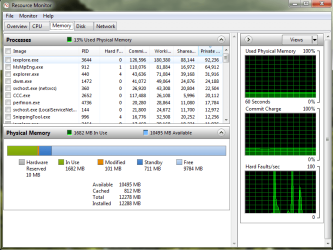
This problem has been out there for some time and I've tried to help at least one other person here solve it, including giving the i4 memory link. I don't know if that person resolved it or not. I'd like to see though what all of your Resource Monitor windows say. Could all of you who have this problem use the Snipping Tool and post a shot of your Resource Monitor?
 

My Computer

Computer type
PC/Desktop
Computer Manufacturer/Model Number
Wordsworth 5000
OS
Windows 10 Pro 64 bit
CPU
Core i7 6700K Skylake 4.0GHz
Motherboard
Asus Z170 Pro
Memory
Corsair Vengeance LPX DDR4 32GB 3000MHz
Graphics Card(s)
Asus Radeon RX480 Strix 8GB
Sound Card
Asus Xonar DSX
Monitor(s) Displays
HP 2709m
Screen Resolution
1920x1080
Hard Drives
Intel 600p M.2 PCIe NVMe SSD 512GB; Intel 335 SSD 240GB ;Western Digital Caviar Black 1TB
PSU
Thermaltake Toughpower Grand Platinum 850W
Case
Lian Li PC-B70
Cooling
CPU-Noctua NH D15, GPU-Stock, Case-Noctua 2x140, 2x120
Keyboard
Microsoft Natural Ergo 4000
Mouse
Microsoft Wireless Optical 1000
Internet Speed
Cable
Other Info
HP bd 340,
HP bd 240,
Klipsch Promedia 5.1 THX
here you go -
24qmzkg.png

I am just completely tired of my computer to be honest.. its like I don't care about it anymore and I am trying to but I fail to do it because this problem just gives me the feeling of a complete fail build when I know it isn't my fault but I fail to realize it.

My biggest problem with the I4 memory link is that its an Asus board and I will admit it - I am no expert in overclocking therefore I am not willing to experiment unless someone actually walks me through this, and specifically for my components so I do not end up ruining anything

Layback-
I do not have any double boots going on.. Last year though I did and then it suddenly stopped I figured its because it was too cold in the room because once temperatures went up the problem went away.
But still the bios and operating system going along etc. isn't a problem of one motherboard manufacturer that is why I doubt its the manufacturers fault as every single motherboard manufacturer has people that own its products with this problem going on.

I am also willing to bet that maybe going back to XP is going to solve this.. I see it as an only win 7 issue as I stated before what was common between all the cases is win 7.. Unless of course you can prove me wrong and provide a post from anywhere where someone with either vista or xp has it.
 

My Computer

OS
Windows 7 Ultimate 64 bit
CPU
Intel Core i7 930
Motherboard
EVGA X58 FTW3
Memory
2x Corsair Dominator 6GB DDR3 1600
Graphics Card(s)
EVGA GTX 470 Superclocked
Monitor(s) Displays
Asus VW266H
Screen Resolution
1920x1200
Hard Drives
WD Velociraptor 300GB 10,000RPM SATA II
SEAGATE BARRACUDA 2TB 7,200RPM SATA III
PSU
Enermax Revolution 85+ 1050W
Case
Corsair Obsidian 650D
Cooling
Corsair H50
Keyboard
Logitech G510
Mouse
Logitech G700
Bad idea, mixing a new build with an 11 year old OS. Are there even X58 mobo chipset drivers for XP??? I doubt it!

Sit back and relax... You're going to have a heart attack worrying about something so trivial. You have more available RAM than most people have RAM!

Since this is a fresh build, surely Asus will release BIOS revisions and even possibly newer chipset drivers that correct the issue somewhere down the road!
 

My Computer

Computer Manufacturer/Model Number
Homebrew PC - "Alpha_Dawg"
OS
Windows 7 Ultimate 64 bit Steve Ballmer Signature Edition
CPU
Intel Core 2 Quad - Q9550 - 2.83GHz stock - OC'd to 3.6GHz
Motherboard
Gigabyte EP45-UD3P
Memory
4GB DDR2 800MHz (PC6400) OCZ Reaper
Graphics Card(s)
Nvidia GE Force 8800 GTS
Sound Card
Asus Xonar DX
Monitor(s) Displays
Samsung SyncMaster 2333HD
Screen Resolution
1920 x 1080
Hard Drives
WD Caviar Black 750GB - 7200RPM - 32MB cache
WD Caviar Green 1.5TB - 5400RPM - 64MB cache
WD Caviar Green 2.0TB - 5400RPM - 64MB cache
PSU
PC Power & Cooling Silencer 750
Case
Gigabyte 3D Aurora
Cooling
Case is Air - 5ea. 120mm fans (mix of Arctic and Xigmatec)
Keyboard
MS Natural Wireless KB
Mouse
MS Wireless Mouse
Internet Speed
50 mbps down/5 mbps up
Other Info
AVerMedia - AVerTVHD G2 Dual Tuner Card
Take a look at this thread Windows 7 Hardware Reserved Memory and especially at posts #37, #38, and #40. From your earlier posts you spoke of overclocking and that at one time your memory installed and available were normal. You likely skewed something while overclocking. Read these posts to see if they help with your problem and check again all of your BIOS DRAM timing settings. You may need to use the BIOS default reset option (if you haven't already). If everything is reset and the problem persists then I would wonder if the BIOS is actually resetting the sytem.

Edit: Reading your first post again I can see you had the problem then tried overclocking to fix it. But the time the problem appears seems to be when you added the new RAM as you say, "A couple of months back I added another set of 6gb ram" and "everything worked perfectly fine up until about 2 months ago", so I'm unsure of the timeline exactly. Are all the RAM modules the same manufacturer and exactly the same?

Here's my ResMon screen with the Hardware Reserved so negligible it hardly shows in the color graph.
 

Attachments

  • Resource Monitor.PNG
    Resource Monitor.PNG
    117.6 KB · Views: 18

My Computer

Computer type
PC/Desktop
Computer Manufacturer/Model Number
Wordsworth 5000
OS
Windows 10 Pro 64 bit
CPU
Core i7 6700K Skylake 4.0GHz
Motherboard
Asus Z170 Pro
Memory
Corsair Vengeance LPX DDR4 32GB 3000MHz
Graphics Card(s)
Asus Radeon RX480 Strix 8GB
Sound Card
Asus Xonar DSX
Monitor(s) Displays
HP 2709m
Screen Resolution
1920x1080
Hard Drives
Intel 600p M.2 PCIe NVMe SSD 512GB; Intel 335 SSD 240GB ;Western Digital Caviar Black 1TB
PSU
Thermaltake Toughpower Grand Platinum 850W
Case
Lian Li PC-B70
Cooling
CPU-Noctua NH D15, GPU-Stock, Case-Noctua 2x140, 2x120
Keyboard
Microsoft Natural Ergo 4000
Mouse
Microsoft Wireless Optical 1000
Internet Speed
Cable
Other Info
HP bd 340,
HP bd 240,
Klipsch Promedia 5.1 THX
Darryl,
I payed for 12 gigs I expect 12 gigs I didn't spend money on 12 gigs to have only 8 usable. and please dont tell me that i have more ram than most people i am not most people I have payed for 12 gigs and I expect 12 gigs and quite frankly I dont really care about what people have, this is a problem that needs to be solved and i am not the only one with this

Words,
A couple of months ago was about mid may I believe something like that then at mid july something like that I cannot provide exact dates I did my regular maintenance checking if everything is working and ok and noticed it doesnt use all my 12 gigs. The picture you provided the guy has 12gigs and it shows total of 12 gigs for me it shows 12 gigs installed and total 8 gigs that is where the problem is obviously I cant use all the 12 gigs what I mean by this problem is that the WINDOWS wont use the 12 gigs, it would only use 8.. where are the other 4?

as for overclocking, I put everything as advertised 8-8-8-24, 1600mhz ram, 12:2 ratio 6 way this 4 way that, voltage 1.65, tried putting on defaults where memory works at 1068Mhz nothing helps simply nothing, tried to OC my cpu a bit it didnt help I put it back in stock settings, I have tried nearly everything have asked and have had suggestions in corsair forums, evga forums, here and simply nothings helping

memory sets are obviously the same model i am not that of an idiot to buy different memory sets.. also if you read my other posts when i take out one set i am left with 6 gigs installed and only 4 usable.. and that is definitely not normal
 

My Computer

OS
Windows 7 Ultimate 64 bit
CPU
Intel Core i7 930
Motherboard
EVGA X58 FTW3
Memory
2x Corsair Dominator 6GB DDR3 1600
Graphics Card(s)
EVGA GTX 470 Superclocked
Monitor(s) Displays
Asus VW266H
Screen Resolution
1920x1200
Hard Drives
WD Velociraptor 300GB 10,000RPM SATA II
SEAGATE BARRACUDA 2TB 7,200RPM SATA III
PSU
Enermax Revolution 85+ 1050W
Case
Corsair Obsidian 650D
Cooling
Corsair H50
Keyboard
Logitech G510
Mouse
Logitech G700
Darryl,
I payed for 12 gigs I expect 12 gigs:cry::cry::cry::cry::cry: I didn't spend money on 12 gigs to have only 8 usable. and please dont tell me that i have more ram than most people i am not most people I have payed for 12 gigs and I expect 12 gigs:cry::cry::cry::cry::cry:

... I SAID YOU HAVE MORE AVAILABLE RAM THAN MOST PEOPLE!!!

DO YOU FREQUENTLY RUN OUT OF MEMORY??? :roflmao:
 

My Computer

Computer Manufacturer/Model Number
Homebrew PC - "Alpha_Dawg"
OS
Windows 7 Ultimate 64 bit Steve Ballmer Signature Edition
CPU
Intel Core 2 Quad - Q9550 - 2.83GHz stock - OC'd to 3.6GHz
Motherboard
Gigabyte EP45-UD3P
Memory
4GB DDR2 800MHz (PC6400) OCZ Reaper
Graphics Card(s)
Nvidia GE Force 8800 GTS
Sound Card
Asus Xonar DX
Monitor(s) Displays
Samsung SyncMaster 2333HD
Screen Resolution
1920 x 1080
Hard Drives
WD Caviar Black 750GB - 7200RPM - 32MB cache
WD Caviar Green 1.5TB - 5400RPM - 64MB cache
WD Caviar Green 2.0TB - 5400RPM - 64MB cache
PSU
PC Power & Cooling Silencer 750
Case
Gigabyte 3D Aurora
Cooling
Case is Air - 5ea. 120mm fans (mix of Arctic and Xigmatec)
Keyboard
MS Natural Wireless KB
Mouse
MS Wireless Mouse
Internet Speed
50 mbps down/5 mbps up
Other Info
AVerMedia - AVerTVHD G2 Dual Tuner Card
I'm with xxking on this. If I bought a motherboard which was supposed to support 12GB of RAM and put 12GB of RAM in it I would expect to get...wait for it...12GB of RAM. Whether someone else thinks I need it is irrelevant.
 

My Computer

Computer Manufacturer/Model Number
Self
OS
Main - Windows 7 Pro SP1 64-Bit; 2nd - Windows Server 2008 R2
CPU
Main - Core i7 2600K; 2nd - Core i7 920
Motherboard
Main - Asus P8Z68-V Pro/Gen3; 2nd - Gigabyte GA-EX58-UDR3
Memory
Main - 16GB Corsair Vengeance; 2nd - 12GB Corsair Vengeance
Graphics Card(s)
Main - XFX Radeon 6870 1GB; 2nd - XFX Radeon 4870 1GB
Sound Card
Both: Onboard Realtek Azalia
Monitor(s) Displays
Main - Hann 25" + I-INC 25" + Acer 23"; 2nd - Upgrading Soon
Screen Resolution
Main - 1920x1080 (All Three Monitors); 2nd - Upgrading Soon
Hard Drives
Main - (1) Crucial M4 128GB (Boot)
Main - (1) Seagate 2TB 64MB Cache (Data)
Main - (1) Seagate 2TB 64MB Cache (Data Backup)
2nd - (1) Intel X25-M SSD 80GB (Boot)
2nd - (3) Seagate 1TB 32MB Cache (Data Backup)
2nd - (1) Seagate 320GB (Because)
PSU
Main - OCZ 600W Modular; 2nd - OCZ 600W
Case
Main - Thermaltake Element G; 2nd - NZXT something or other
Cooling
Main - Corsair H80; 2nd - Prolimatech Megahalems
Keyboard
Main - Razer Reclusa; 2nd - Old MS Keyboard
Mouse
Main - Logitech MX Revolution; 2nd - Old MS Mouse
Internet Speed
20Mbps Time-Warner Cable
Darryl Licht,
if you really think you can troll me - i will cease to respond to your idiotic comments. its making me laugh how people likeyou are jealous that i have 12 gigs and you have only 4 :)

profdlp,
you are totally correct.
 

My Computer

OS
Windows 7 Ultimate 64 bit
CPU
Intel Core i7 930
Motherboard
EVGA X58 FTW3
Memory
2x Corsair Dominator 6GB DDR3 1600
Graphics Card(s)
EVGA GTX 470 Superclocked
Monitor(s) Displays
Asus VW266H
Screen Resolution
1920x1200
Hard Drives
WD Velociraptor 300GB 10,000RPM SATA II
SEAGATE BARRACUDA 2TB 7,200RPM SATA III
PSU
Enermax Revolution 85+ 1050W
Case
Corsair Obsidian 650D
Cooling
Corsair H50
Keyboard
Logitech G510
Mouse
Logitech G700
Words,
A couple of months ago was about mid may I believe something like that then at mid july something like that I cannot provide exact dates I did my regular maintenance checking if everything is working and ok and noticed it doesnt use all my 12 gigs. The picture you provided the guy has 12gigs and it shows total of 12 gigs for me it shows 12 gigs installed and total 8 gigs that is where the problem is obviously I cant use all the 12 gigs what I mean by this problem is that the WINDOWS wont use the 12 gigs, it would only use 8.. where are the other 4?

as for overclocking, I put everything as advertised 8-8-8-24, 1600mhz ram, 12:2 ratio 6 way this 4 way that, voltage 1.65, tried putting on defaults where memory works at 1068Mhz nothing helps simply nothing, tried to OC my cpu a bit it didnt help I put it back in stock settings, I have tried nearly everything have asked and have had suggestions in corsair forums, evga forums, here and simply nothings helping

memory sets are obviously the same model i am not that of an idiot to buy different memory sets.. also if you read my other posts when i take out one set i am left with 6 gigs installed and only 4 usable.. and that is definitely not normal
xxking, don't take questions I ask as insulting your intelligence; I'm covering all the bases again as many times any of us can overlook something that we'd afterward slap our forehead for and say to ourselves, "well da." I know I've done it.

From the beginning of looking at this thread I've wondered about the BIOS. There is a thread at the EVGA site on just that. Have you updated your BIOS at any time? Even if you haven't, clearing the CMOS may be in order; if you've never done this read your manual and know well what you are doing beforehand.
 

My Computer

Computer type
PC/Desktop
Computer Manufacturer/Model Number
Wordsworth 5000
OS
Windows 10 Pro 64 bit
CPU
Core i7 6700K Skylake 4.0GHz
Motherboard
Asus Z170 Pro
Memory
Corsair Vengeance LPX DDR4 32GB 3000MHz
Graphics Card(s)
Asus Radeon RX480 Strix 8GB
Sound Card
Asus Xonar DSX
Monitor(s) Displays
HP 2709m
Screen Resolution
1920x1080
Hard Drives
Intel 600p M.2 PCIe NVMe SSD 512GB; Intel 335 SSD 240GB ;Western Digital Caviar Black 1TB
PSU
Thermaltake Toughpower Grand Platinum 850W
Case
Lian Li PC-B70
Cooling
CPU-Noctua NH D15, GPU-Stock, Case-Noctua 2x140, 2x120
Keyboard
Microsoft Natural Ergo 4000
Mouse
Microsoft Wireless Optical 1000
Internet Speed
Cable
Other Info
HP bd 340,
HP bd 240,
Klipsch Promedia 5.1 THX
Back
Top