
hi.... im here to report a severe problem that i had yesterday... on the afternoon, i noted that the disk space has being filled up without no apparent reason... regardless of that, i continued to play games, and browse the internet... with a very slow perfomance....
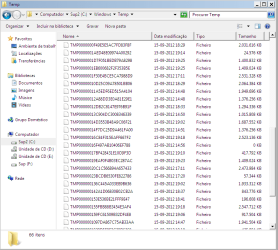
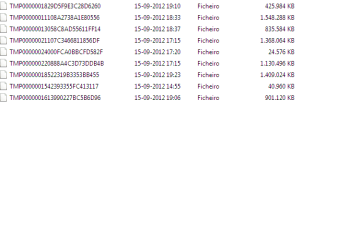
5 hours later, i noted that the rhytm of the creation of that TEMP files was increasing dramatically(which they didnt have the .tmp extensions, it was just files without extension, and with names starting TMP000000 and then random letters or numbers...)
i seen that the disk has filling about 100 mb in one second, with the system very, very, very unresponsive... and when the disk reached 1 gb and counting... i immediately switched to the safe mode.... i used a program to see the folders that were occuping the majority of space in the disk, and i was totally catched up by surprise to see that the Temp folder was immensely filled up... i deleted that files, and then, i switched to the normal mode of the OS, no trace of that files again... however i have fear that they can return sooner or later...
so i need help to resolve this... i will post 2 screenshots that clearly illustrates that files...
for now, thanks if you can help me....
5 hours later, i noted that the rhytm of the creation of that TEMP files was increasing dramatically(which they didnt have the .tmp extensions, it was just files without extension, and with names starting TMP000000 and then random letters or numbers...)
i seen that the disk has filling about 100 mb in one second, with the system very, very, very unresponsive... and when the disk reached 1 gb and counting... i immediately switched to the safe mode.... i used a program to see the folders that were occuping the majority of space in the disk, and i was totally catched up by surprise to see that the Temp folder was immensely filled up... i deleted that files, and then, i switched to the normal mode of the OS, no trace of that files again... however i have fear that they can return sooner or later...
so i need help to resolve this... i will post 2 screenshots that clearly illustrates that files...
for now, thanks if you can help me....
Attachments
My Computer
At a glance
Windows 7 Enterprise x86
- OS
- Windows 7 Enterprise x86
