Solved I accidentally removed Intel Graphics from Taskbar

ihavequestions

New member
Local time
11:50 AM
Messages
12
Hi,

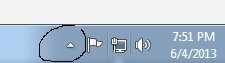
Noob user here. I accidentally removed the Intel Graphics from the bottom right taskbar and now I can't figure out how to put it back.

The igfxTray Module > Show icons and notifications is already enabled but still nothing. I even restarted the computer after enabling it but I still don't see the icon.

Can someone help me out?
 

My Computer My Computer

At a glance

Windows 7 Home 64 bitIntel I5-3750K Ivy BridgeCORSAIR Vengeance 8GB (2 x 4GB)Intel 4000
Computer type
PC/Desktop
Computer Manufacturer/Model Number
Custom Built
OS
Windows 7 Home 64 bit
CPU
Intel I5-3750K Ivy Bridge
Motherboard
ASRock Z77 Extreme4
Memory
CORSAIR Vengeance 8GB (2 x 4GB)
Graphics Card(s)
Intel 4000
Monitor(s) Displays
Asus VS239H-P IPS (2x)
Screen Resolution
1920 x 1080
Hard Drives
Samsung SSD 840 Pro - 128 GB
Western Digital Blue (WD10EZEX) - 1TB
PSU
Corsair HX650 650W
Case
Corsair Graphite Series 600T
Cooling
Cool Master Hyper 212 EVO
Keyboard
Logitech K800
Mouse
Logitech Performance Mouse MX
It's really not needed, nor is igfxpers and one other Intel program.
 

My Computer My Computer

At a glance

Windows 10 Pro X64Intel Quad Core i7-4770 @ 3.4Ghz16.0GB PC3-12800 DDR3 SDRAM 1600 MHzIntel Integrated HD Graphics
Computer type
PC/Desktop
Computer Manufacturer/Model Number
Lenovo IdeaCenter 450
OS
Windows 10 Pro X64
CPU
Intel Quad Core i7-4770 @ 3.4Ghz
Memory
16.0GB PC3-12800 DDR3 SDRAM 1600 MHz
Graphics Card(s)
Intel Integrated HD Graphics
Sound Card
Realtek HD Audio
Monitor(s) Displays
HP 22" LCD
Screen Resolution
1680 x 1050
Hard Drives
250GB Samsung EVO SATA-3 SSD
2TB Seagate ST2000DM001 SATA-2
1.5TB Seagate ST3150041AS SATA
Keyboard
Dell USB
Mouse
Lenovo USB
Internet Speed
Cable via Road Runner 3MB Upload, 30MB Download
Antivirus
Windows Defender, MBAM Pro, MBAE
Browser
Seamonkey
Other Info
UEFI/GPT
PLDS DVD-RW DH16AERSH

My Computer My Computer

At a glance

Win 10 Pro x64Intel I5-2500K @3.3GHz16GB G.Skill Ripjaws X (4x4GB)EVGA GeForce 750 Ti SC 2GB
Computer type
PC/Desktop
Computer Manufacturer/Model Number
Self Built
OS
Win 10 Pro x64
CPU
Intel I5-2500K @3.3GHz
Motherboard
Asrock P67 Extreme4
Memory
16GB G.Skill Ripjaws X (4x4GB)
Graphics Card(s)
EVGA GeForce 750 Ti SC 2GB
Sound Card
ASUS Xonar DG 5.1 Channels 24-bit 96KHz PCI Interface Sound
Monitor(s) Displays
auria eq2367
Screen Resolution
1920 x 1080
Hard Drives
250GB Samsung 850 EVO SSD
1TB WD Blue
1TB Hitachi
PSU
SeaSonic X 650W 80 Plus Gold
Case
Corsair Obsidian 750D
Cooling
Corsair H60, Three 140mm case fans
Keyboard
Logitech Wireless Keyboard K520
Mouse
Logitech Wireless Mouse M310
Internet Speed
Wave Broadband ~ 100 dn 5 up
Antivirus
Windows Defender, Malwarebytes Premium
Browser
Edge, IE11, Chrome
Other Info
Laptop specs: HP g7-1365dx /
CPU: AMD A6-3420M APU with Radeon(tm) HD Graphics /
RAM: Crucial 8Gb (2x4Gb) /
SSD: Crucial M4-CT128M4SSD2 ATA Device/ FW 000F /
GFX: AMD Radeon HD 6520G /
OS: Windows 10 Pro x64

My Computer My Computer

At a glance

Windows 10 Pro X64Intel(R) Core(TM) i5-3570K CPU OC@ 4.5GHZ Turbo8.00 GB DDR3 1600MhzMSI Gaming X GTX 1070
Computer type
PC/Desktop
Computer Manufacturer/Model Number
Dude Build
OS
Windows 10 Pro X64
CPU
Intel(R) Core(TM) i5-3570K CPU OC@ 4.5GHZ Turbo
Motherboard
MSI Z77A-G45 Gaming
Memory
8.00 GB DDR3 1600Mhz
Graphics Card(s)
MSI Gaming X GTX 1070
Sound Card
Realtek High Definition
Monitor(s) Displays
Dell S23O9W, HP L1710
Screen Resolution
DELL-1920 x 1080 HP-1280 x1024
Hard Drives
Crucial m4 256 SSD, WD 7200RPM 500GB WD 1TB
PSU
Seasonic X650 GOLD
Case
Zalman Z12
Cooling
Antec Kuhler 920
Keyboard
Logitech
Mouse
MSI DS100 Interceptor
Internet Speed
50 down and 5 up
Antivirus
MSE
Browser
Chrome, IE 11
Other Info
Logitech X-620 Speakers
Control Panel

Can you access it in your Control Panel?
If so, there may be an option in the program's preferences.
 

My Computer My Computer

At a glance

W7 Ultimate SP1, LM19.2 MATE, W10 Home 1703, ...AMD Phenom II x6 1100T, 3.3 GHz12GB DDR3 1333 G-Skill (4GB x 2), G-Skill (2G...NVIDIA GeForce GTX 660
Computer type
PC/Desktop
Computer Manufacturer/Model Number
n/a
OS
W7 Ultimate SP1, LM19.2 MATE, W10 Home 1703, W10 Pro 1703 VM, #All 64 bit
CPU
AMD Phenom II x6 1100T, 3.3 GHz
Motherboard
ASUS M4A88T-M/USB3 (AM3)
Memory
12GB DDR3 1333 G-Skill (4GB x 2), G-Skill (2GB x 2)
Graphics Card(s)
NVIDIA GeForce GTX 660
Sound Card
Realtek?
Monitor(s) Displays
Samsung S23B350
Screen Resolution
1920x1080
Hard Drives
WD Green 2TB (SATA), WD Green 3TB (SATA), WD Blue 4TB (SATA), WD Blue 6TB (SATA)
PSU
Cooler Master
Case
Antec GX300 Tower
Cooling
3x Antec TRICOOL 120mm Fans
Mouse
Wired Optical
Internet Speed
DSL
Antivirus
Avast
Browser
Pale Moon (64 bit)
Other Info
2018-12-27 Upgraded HDDs
2015-12-10 Upgraded case, graphics card, storage
2015-08-15 Upgraded motherboard & RAM
2015-07-15 Upgraded LM17.1 to LM17.2
@Ztruker not needed for you or for me?

@derekimo thanks. I think I accidentally right clicked on the program and removed it. I just checked msconfig and the application has a checkmark. However, when I restart the computer the program doesn't load. Not sure if this matters but I checked Program Files > Start Up and didn't see the icon there.

@Dude The program has Show icon and notification but I still don't see the icon anywhere.
 

My Computer My Computer

At a glance

Windows 7 Home 64 bitIntel I5-3750K Ivy BridgeCORSAIR Vengeance 8GB (2 x 4GB)Intel 4000
Computer type
PC/Desktop
Computer Manufacturer/Model Number
Custom Built
OS
Windows 7 Home 64 bit
CPU
Intel I5-3750K Ivy Bridge
Motherboard
ASRock Z77 Extreme4
Memory
CORSAIR Vengeance 8GB (2 x 4GB)
Graphics Card(s)
Intel 4000
Monitor(s) Displays
Asus VS239H-P IPS (2x)
Screen Resolution
1920 x 1080
Hard Drives
Samsung SSD 840 Pro - 128 GB
Western Digital Blue (WD10EZEX) - 1TB
PSU
Corsair HX650 650W
Case
Corsair Graphite Series 600T
Cooling
Cool Master Hyper 212 EVO
Keyboard
Logitech K800
Mouse
Logitech Performance Mouse MX
@lehnerus2000 I checked control panel a few times already but couldn't figure out how to put the application back on the tray.
 

My Computer My Computer

At a glance

Windows 7 Home 64 bitIntel I5-3750K Ivy BridgeCORSAIR Vengeance 8GB (2 x 4GB)Intel 4000
Computer type
PC/Desktop
Computer Manufacturer/Model Number
Custom Built
OS
Windows 7 Home 64 bit
CPU
Intel I5-3750K Ivy Bridge
Motherboard
ASRock Z77 Extreme4
Memory
CORSAIR Vengeance 8GB (2 x 4GB)
Graphics Card(s)
Intel 4000
Monitor(s) Displays
Asus VS239H-P IPS (2x)
Screen Resolution
1920 x 1080
Hard Drives
Samsung SSD 840 Pro - 128 GB
Western Digital Blue (WD10EZEX) - 1TB
PSU
Corsair HX650 650W
Case
Corsair Graphite Series 600T
Cooling
Cool Master Hyper 212 EVO
Keyboard
Logitech K800
Mouse
Logitech Performance Mouse MX
Try to disable it in device manager, then re enable
 

My Computer My Computer

At a glance

Windows 10 Pro X64Intel(R) Core(TM) i5-3570K CPU OC@ 4.5GHZ Turbo8.00 GB DDR3 1600MhzMSI Gaming X GTX 1070
Computer type
PC/Desktop
Computer Manufacturer/Model Number
Dude Build
OS
Windows 10 Pro X64
CPU
Intel(R) Core(TM) i5-3570K CPU OC@ 4.5GHZ Turbo
Motherboard
MSI Z77A-G45 Gaming
Memory
8.00 GB DDR3 1600Mhz
Graphics Card(s)
MSI Gaming X GTX 1070
Sound Card
Realtek High Definition
Monitor(s) Displays
Dell S23O9W, HP L1710
Screen Resolution
DELL-1920 x 1080 HP-1280 x1024
Hard Drives
Crucial m4 256 SSD, WD 7200RPM 500GB WD 1TB
PSU
Seasonic X650 GOLD
Case
Zalman Z12
Cooling
Antec Kuhler 920
Keyboard
Logitech
Mouse
MSI DS100 Interceptor
Internet Speed
50 down and 5 up
Antivirus
MSE
Browser
Chrome, IE 11
Other Info
Logitech X-620 Speakers
@Dude what am I looking for in the device manager? All of the options are hardware related.
 

My Computer My Computer

At a glance

Windows 7 Home 64 bitIntel I5-3750K Ivy BridgeCORSAIR Vengeance 8GB (2 x 4GB)Intel 4000
Computer type
PC/Desktop
Computer Manufacturer/Model Number
Custom Built
OS
Windows 7 Home 64 bit
CPU
Intel I5-3750K Ivy Bridge
Motherboard
ASRock Z77 Extreme4
Memory
CORSAIR Vengeance 8GB (2 x 4GB)
Graphics Card(s)
Intel 4000
Monitor(s) Displays
Asus VS239H-P IPS (2x)
Screen Resolution
1920 x 1080
Hard Drives
Samsung SSD 840 Pro - 128 GB
Western Digital Blue (WD10EZEX) - 1TB
PSU
Corsair HX650 650W
Case
Corsair Graphite Series 600T
Cooling
Cool Master Hyper 212 EVO
Keyboard
Logitech K800
Mouse
Logitech Performance Mouse MX

My Computer My Computer

At a glance

Windows 10 Pro X64Intel(R) Core(TM) i5-3570K CPU OC@ 4.5GHZ Turbo8.00 GB DDR3 1600MhzMSI Gaming X GTX 1070
Computer type
PC/Desktop
Computer Manufacturer/Model Number
Dude Build
OS
Windows 10 Pro X64
CPU
Intel(R) Core(TM) i5-3570K CPU OC@ 4.5GHZ Turbo
Motherboard
MSI Z77A-G45 Gaming
Memory
8.00 GB DDR3 1600Mhz
Graphics Card(s)
MSI Gaming X GTX 1070
Sound Card
Realtek High Definition
Monitor(s) Displays
Dell S23O9W, HP L1710
Screen Resolution
DELL-1920 x 1080 HP-1280 x1024
Hard Drives
Crucial m4 256 SSD, WD 7200RPM 500GB WD 1TB
PSU
Seasonic X650 GOLD
Case
Zalman Z12
Cooling
Antec Kuhler 920
Keyboard
Logitech
Mouse
MSI DS100 Interceptor
Internet Speed
50 down and 5 up
Antivirus
MSE
Browser
Chrome, IE 11
Other Info
Logitech X-620 Speakers
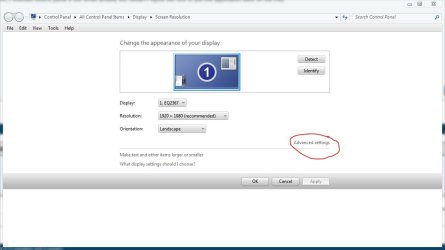
You can try right clicking on the desktop, then click screen resolution, then advanced settings,

advanced.JPG

From there you might find a Intel Graphics and Media Control Panel and a check box to enable it.
 

My Computer My Computer

At a glance

Win 10 Pro x64Intel I5-2500K @3.3GHz16GB G.Skill Ripjaws X (4x4GB)EVGA GeForce 750 Ti SC 2GB
Computer type
PC/Desktop
Computer Manufacturer/Model Number
Self Built
OS
Win 10 Pro x64
CPU
Intel I5-2500K @3.3GHz
Motherboard
Asrock P67 Extreme4
Memory
16GB G.Skill Ripjaws X (4x4GB)
Graphics Card(s)
EVGA GeForce 750 Ti SC 2GB
Sound Card
ASUS Xonar DG 5.1 Channels 24-bit 96KHz PCI Interface Sound
Monitor(s) Displays
auria eq2367
Screen Resolution
1920 x 1080
Hard Drives
250GB Samsung 850 EVO SSD
1TB WD Blue
1TB Hitachi
PSU
SeaSonic X 650W 80 Plus Gold
Case
Corsair Obsidian 750D
Cooling
Corsair H60, Three 140mm case fans
Keyboard
Logitech Wireless Keyboard K520
Mouse
Logitech Wireless Mouse M310
Internet Speed
Wave Broadband ~ 100 dn 5 up
Antivirus
Windows Defender, Malwarebytes Premium
Browser
Edge, IE11, Chrome
Other Info
Laptop specs: HP g7-1365dx /
CPU: AMD A6-3420M APU with Radeon(tm) HD Graphics /
RAM: Crucial 8Gb (2x4Gb) /
SSD: Crucial M4-CT128M4SSD2 ATA Device/ FW 000F /
GFX: AMD Radeon HD 6520G /
OS: Windows 10 Pro x64

My Computer My Computer

At a glance

Windows 7 Home 64 bitIntel I5-3750K Ivy BridgeCORSAIR Vengeance 8GB (2 x 4GB)Intel 4000
Computer type
PC/Desktop
Computer Manufacturer/Model Number
Custom Built
OS
Windows 7 Home 64 bit
CPU
Intel I5-3750K Ivy Bridge
Motherboard
ASRock Z77 Extreme4
Memory
CORSAIR Vengeance 8GB (2 x 4GB)
Graphics Card(s)
Intel 4000
Monitor(s) Displays
Asus VS239H-P IPS (2x)
Screen Resolution
1920 x 1080
Hard Drives
Samsung SSD 840 Pro - 128 GB
Western Digital Blue (WD10EZEX) - 1TB
PSU
Corsair HX650 650W
Case
Corsair Graphite Series 600T
Cooling
Cool Master Hyper 212 EVO
Keyboard
Logitech K800
Mouse
Logitech Performance Mouse MX

My Computer My Computer

At a glance

Windows 10 Pro X64Intel(R) Core(TM) i5-3570K CPU OC@ 4.5GHZ Turbo8.00 GB DDR3 1600MhzMSI Gaming X GTX 1070
Computer type
PC/Desktop
Computer Manufacturer/Model Number
Dude Build
OS
Windows 10 Pro X64
CPU
Intel(R) Core(TM) i5-3570K CPU OC@ 4.5GHZ Turbo
Motherboard
MSI Z77A-G45 Gaming
Memory
8.00 GB DDR3 1600Mhz
Graphics Card(s)
MSI Gaming X GTX 1070
Sound Card
Realtek High Definition
Monitor(s) Displays
Dell S23O9W, HP L1710
Screen Resolution
DELL-1920 x 1080 HP-1280 x1024
Hard Drives
Crucial m4 256 SSD, WD 7200RPM 500GB WD 1TB
PSU
Seasonic X650 GOLD
Case
Zalman Z12
Cooling
Antec Kuhler 920
Keyboard
Logitech
Mouse
MSI DS100 Interceptor
Internet Speed
50 down and 5 up
Antivirus
MSE
Browser
Chrome, IE 11
Other Info
Logitech X-620 Speakers
You can try right clicking on the desktop, then click screen resolution, then advanced settings,

View attachment 271149

From there you might find a Intel Graphics and Media Control Panel and a check box to enable it.

There you go! I was looking for this option awhile ago but totally forgot where to find it. Thanks for the big help!

Consider this issue resolved
 

My Computer My Computer

At a glance

Windows 7 Home 64 bitIntel I5-3750K Ivy BridgeCORSAIR Vengeance 8GB (2 x 4GB)Intel 4000
Computer type
PC/Desktop
Computer Manufacturer/Model Number
Custom Built
OS
Windows 7 Home 64 bit
CPU
Intel I5-3750K Ivy Bridge
Motherboard
ASRock Z77 Extreme4
Memory
CORSAIR Vengeance 8GB (2 x 4GB)
Graphics Card(s)
Intel 4000
Monitor(s) Displays
Asus VS239H-P IPS (2x)
Screen Resolution
1920 x 1080
Hard Drives
Samsung SSD 840 Pro - 128 GB
Western Digital Blue (WD10EZEX) - 1TB
PSU
Corsair HX650 650W
Case
Corsair Graphite Series 600T
Cooling
Cool Master Hyper 212 EVO
Keyboard
Logitech K800
Mouse
Logitech Performance Mouse MX
Glad to hear it, you're welcome. :)
 

My Computer My Computer

At a glance

Win 10 Pro x64Intel I5-2500K @3.3GHz16GB G.Skill Ripjaws X (4x4GB)EVGA GeForce 750 Ti SC 2GB
Computer type
PC/Desktop
Computer Manufacturer/Model Number
Self Built
OS
Win 10 Pro x64
CPU
Intel I5-2500K @3.3GHz
Motherboard
Asrock P67 Extreme4
Memory
16GB G.Skill Ripjaws X (4x4GB)
Graphics Card(s)
EVGA GeForce 750 Ti SC 2GB
Sound Card
ASUS Xonar DG 5.1 Channels 24-bit 96KHz PCI Interface Sound
Monitor(s) Displays
auria eq2367
Screen Resolution
1920 x 1080
Hard Drives
250GB Samsung 850 EVO SSD
1TB WD Blue
1TB Hitachi
PSU
SeaSonic X 650W 80 Plus Gold
Case
Corsair Obsidian 750D
Cooling
Corsair H60, Three 140mm case fans
Keyboard
Logitech Wireless Keyboard K520
Mouse
Logitech Wireless Mouse M310
Internet Speed
Wave Broadband ~ 100 dn 5 up
Antivirus
Windows Defender, Malwarebytes Premium
Browser
Edge, IE11, Chrome
Other Info
Laptop specs: HP g7-1365dx /
CPU: AMD A6-3420M APU with Radeon(tm) HD Graphics /
RAM: Crucial 8Gb (2x4Gb) /
SSD: Crucial M4-CT128M4SSD2 ATA Device/ FW 000F /
GFX: AMD Radeon HD 6520G /
OS: Windows 10 Pro x64
Glad to hear it, you're welcome. :)

Do you mind helping me on another topic? It's somewhat related to my previous post. Is there a way to remove (not hide) programs from the taskbar? I have two applications showing on the taskbar and I can't seem to remove them. I already uninstalled one of them but both are still showing.
 

My Computer My Computer

At a glance

Windows 7 Home 64 bitIntel I5-3750K Ivy BridgeCORSAIR Vengeance 8GB (2 x 4GB)Intel 4000
Computer type
PC/Desktop
Computer Manufacturer/Model Number
Custom Built
OS
Windows 7 Home 64 bit
CPU
Intel I5-3750K Ivy Bridge
Motherboard
ASRock Z77 Extreme4
Memory
CORSAIR Vengeance 8GB (2 x 4GB)
Graphics Card(s)
Intel 4000
Monitor(s) Displays
Asus VS239H-P IPS (2x)
Screen Resolution
1920 x 1080
Hard Drives
Samsung SSD 840 Pro - 128 GB
Western Digital Blue (WD10EZEX) - 1TB
PSU
Corsair HX650 650W
Case
Corsair Graphite Series 600T
Cooling
Cool Master Hyper 212 EVO
Keyboard
Logitech K800
Mouse
Logitech Performance Mouse MX
Use the option explained in post number 4 and choose to hide. What programs are they?
 

My Computer My Computer

At a glance

Windows 10 Pro X64Intel(R) Core(TM) i5-3570K CPU OC@ 4.5GHZ Turbo8.00 GB DDR3 1600MhzMSI Gaming X GTX 1070
Computer type
PC/Desktop
Computer Manufacturer/Model Number
Dude Build
OS
Windows 10 Pro X64
CPU
Intel(R) Core(TM) i5-3570K CPU OC@ 4.5GHZ Turbo
Motherboard
MSI Z77A-G45 Gaming
Memory
8.00 GB DDR3 1600Mhz
Graphics Card(s)
MSI Gaming X GTX 1070
Sound Card
Realtek High Definition
Monitor(s) Displays
Dell S23O9W, HP L1710
Screen Resolution
DELL-1920 x 1080 HP-1280 x1024
Hard Drives
Crucial m4 256 SSD, WD 7200RPM 500GB WD 1TB
PSU
Seasonic X650 GOLD
Case
Zalman Z12
Cooling
Antec Kuhler 920
Keyboard
Logitech
Mouse
MSI DS100 Interceptor
Internet Speed
50 down and 5 up
Antivirus
MSE
Browser
Chrome, IE 11
Other Info
Logitech X-620 Speakers
Use the option explained in post number 4 and choose to hide. What programs are they?

They're already hidden but I want to remove them from the list completely. It's an application called ShareMouse. For some reason I installed the application twice. I uninstalled one of them but I can't seem to uninstall the second one.
 

My Computer My Computer

At a glance

Windows 7 Home 64 bitIntel I5-3750K Ivy BridgeCORSAIR Vengeance 8GB (2 x 4GB)Intel 4000
Computer type
PC/Desktop
Computer Manufacturer/Model Number
Custom Built
OS
Windows 7 Home 64 bit
CPU
Intel I5-3750K Ivy Bridge
Motherboard
ASRock Z77 Extreme4
Memory
CORSAIR Vengeance 8GB (2 x 4GB)
Graphics Card(s)
Intel 4000
Monitor(s) Displays
Asus VS239H-P IPS (2x)
Screen Resolution
1920 x 1080
Hard Drives
Samsung SSD 840 Pro - 128 GB
Western Digital Blue (WD10EZEX) - 1TB
PSU
Corsair HX650 650W
Case
Corsair Graphite Series 600T
Cooling
Cool Master Hyper 212 EVO
Keyboard
Logitech K800
Mouse
Logitech Performance Mouse MX

My Computer My Computer

At a glance

Win 10 Pro x64Intel I5-2500K @3.3GHz16GB G.Skill Ripjaws X (4x4GB)EVGA GeForce 750 Ti SC 2GB
Computer type
PC/Desktop
Computer Manufacturer/Model Number
Self Built
OS
Win 10 Pro x64
CPU
Intel I5-2500K @3.3GHz
Motherboard
Asrock P67 Extreme4
Memory
16GB G.Skill Ripjaws X (4x4GB)
Graphics Card(s)
EVGA GeForce 750 Ti SC 2GB
Sound Card
ASUS Xonar DG 5.1 Channels 24-bit 96KHz PCI Interface Sound
Monitor(s) Displays
auria eq2367
Screen Resolution
1920 x 1080
Hard Drives
250GB Samsung 850 EVO SSD
1TB WD Blue
1TB Hitachi
PSU
SeaSonic X 650W 80 Plus Gold
Case
Corsair Obsidian 750D
Cooling
Corsair H60, Three 140mm case fans
Keyboard
Logitech Wireless Keyboard K520
Mouse
Logitech Wireless Mouse M310
Internet Speed
Wave Broadband ~ 100 dn 5 up
Antivirus
Windows Defender, Malwarebytes Premium
Browser
Edge, IE11, Chrome
Other Info
Laptop specs: HP g7-1365dx /
CPU: AMD A6-3420M APU with Radeon(tm) HD Graphics /
RAM: Crucial 8Gb (2x4Gb) /
SSD: Crucial M4-CT128M4SSD2 ATA Device/ FW 000F /
GFX: AMD Radeon HD 6520G /
OS: Windows 10 Pro x64
thanks again. done and done. now on to the next topic.
 

My Computer My Computer

At a glance

Windows 7 Home 64 bitIntel I5-3750K Ivy BridgeCORSAIR Vengeance 8GB (2 x 4GB)Intel 4000
Computer type
PC/Desktop
Computer Manufacturer/Model Number
Custom Built
OS
Windows 7 Home 64 bit
CPU
Intel I5-3750K Ivy Bridge
Motherboard
ASRock Z77 Extreme4
Memory
CORSAIR Vengeance 8GB (2 x 4GB)
Graphics Card(s)
Intel 4000
Monitor(s) Displays
Asus VS239H-P IPS (2x)
Screen Resolution
1920 x 1080
Hard Drives
Samsung SSD 840 Pro - 128 GB
Western Digital Blue (WD10EZEX) - 1TB
PSU
Corsair HX650 650W
Case
Corsair Graphite Series 600T
Cooling
Cool Master Hyper 212 EVO
Keyboard
Logitech K800
Mouse
Logitech Performance Mouse MX
Back
Top