Solved I am looking to uninstall vista on a dual boot with win

Win 7 or Mac Snow Lepord

  • Mac OSX snow lepoard

    Votes: 1 25.0%
  • Win 7

    Votes: 3 75.0%

  • Total voters
    4
  • Poll closed .

devenprasad

New member
Local time
11:50 AM
Messages
97
Location
Canada
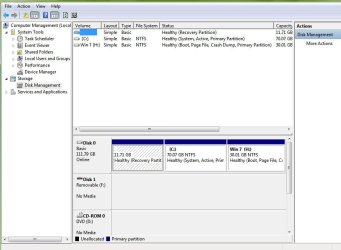
Hi I know this has been solved before. Ok well i want to uninstall windows Vista but keep Win 7. Ok so Windows Vista is installed on the C:// while Win 7 is installed on the H:// drive. My Edition of windows 7 is Ultimate, I could reinstall but I have installed lots of stuff on it. I have Easy BCD. Picture of Disk Management is attached


Edit: I dont have a cd drive (i installed using Virtual Clone Drive)

Thanks in advanced

Deven Prasad
peoplewithacamera productions:D
 

Attachments

  • DISK MGMT.JPG
    DISK MGMT.JPG
    65.6 KB · Views: 34
  • eazy bcsd.JPG
    eazy bcsd.JPG
    91.8 KB · Views: 28
Last edited:

My Computer My Computer

At a glance

Windows 7 Ultimate x64Intel Core i3 350M4GB Kingston DDR3 1033 Laptop Ram + 6GB Ready...ATI Mobile Graphics, Intel(R) HD Graphics (Ba...
Computer Manufacturer/Model Number
Sony Vaio VPCEB24FD
OS
Windows 7 Ultimate x64
CPU
Intel Core i3 350M
Motherboard
Stock Foxxcon Board with American Megatrend BIOS
Memory
4GB Kingston DDR3 1033 Laptop Ram + 6GB Readyboost
Graphics Card(s)
ATI Mobile Graphics, Intel(R) HD Graphics (Battery Power)
Sound Card
Realtek Sound Driver
Monitor(s) Displays
Generic PnP Monitor
Screen Resolution
1366 x 768
Hard Drives
500 GB Western Digital Scorpio Blue SATA Drive
1TB Western Digital My Book With Cavalier Green Drive
PSU
SONY
Case
Bright Blue Stock Case
Cooling
Panasonic Heatsink Fan & No-Name Cooling Pad
Keyboard
Backlit "Chicklet" Ketboard
Mouse
ALPS Touch Pad/Microsoft Wireless Mobile Mouse 3000
Internet Speed
Shaw Cable 25mbps down, 2.5mbps upload
Without an optical drive you are severely limited in what you can do.

You can create a bootable Win7 installer or repair stick using USB flash key. Write the Win7 ISO to flash drive using bootable tab on UltraISO trial downloaded here: http://download.cnet.com/UltraISO-Premium/3000-2646_4-10177302.html

If you do not want the full installer, you NEED a repair stick for emergencies anyway, so download and write to flash the Win7 repair console here: http://www.sevenforums.com/installa...oot-windows-xp-windows-7-a-16.html#post440486

You will need to download and install free Partition Wizard, then rightclick delete the first and second partitions.

Now rightclick Modify>Set Active and right click Resize the Win7 partition, slide the left border all the way over to the left side. Repartition as desired, including a suggested primary partition to store a Win7 backup image later. Apply all steps.

Now boot the Win7 installer Repair console or repair stick and run Startup repair 3 separate times to rewrite the MBR to the Win7 partition.

It might actually be easier to reinstall but you might want to try this first anyway, since you do need a bootable repair stick if not installer for emergencies.
 
gregrocker

I know that part but the bootmgr is on the c:// drive not on the win 7 drive.

Does he drive need to be empty
 
Last edited:

My Computer My Computer

At a glance

Windows 7 Ultimate x64Intel Core i3 350M4GB Kingston DDR3 1033 Laptop Ram + 6GB Ready...ATI Mobile Graphics, Intel(R) HD Graphics (Ba...
Computer Manufacturer/Model Number
Sony Vaio VPCEB24FD
OS
Windows 7 Ultimate x64
CPU
Intel Core i3 350M
Motherboard
Stock Foxxcon Board with American Megatrend BIOS
Memory
4GB Kingston DDR3 1033 Laptop Ram + 6GB Readyboost
Graphics Card(s)
ATI Mobile Graphics, Intel(R) HD Graphics (Battery Power)
Sound Card
Realtek Sound Driver
Monitor(s) Displays
Generic PnP Monitor
Screen Resolution
1366 x 768
Hard Drives
500 GB Western Digital Scorpio Blue SATA Drive
1TB Western Digital My Book With Cavalier Green Drive
PSU
SONY
Case
Bright Blue Stock Case
Cooling
Panasonic Heatsink Fan & No-Name Cooling Pad
Keyboard
Backlit "Chicklet" Ketboard
Mouse
ALPS Touch Pad/Microsoft Wireless Mobile Mouse 3000
Internet Speed
Shaw Cable 25mbps down, 2.5mbps upload
Yes i see that C: is System active which is why you will need to mark active and recover the MBR into Windows 7 partition after deleting the unwanted partitions and resizing Win7 into their space.

Startup repair is automated in Win7 with the bootrec and bootsect commands to do this when run repeatedly.

We do this here every day, over 100 dual boot extractions since Win7 release with around 95% success rate. Just follow the steps.

Back up your files or if you want to be able to start over, save a Win7 backup image externally.
 
gregrocker

Could you please help me with ultra iso

I cant get it to got on the flash drive
 

My Computer My Computer

At a glance

Windows 7 Ultimate x64Intel Core i3 350M4GB Kingston DDR3 1033 Laptop Ram + 6GB Ready...ATI Mobile Graphics, Intel(R) HD Graphics (Ba...
Computer Manufacturer/Model Number
Sony Vaio VPCEB24FD
OS
Windows 7 Ultimate x64
CPU
Intel Core i3 350M
Motherboard
Stock Foxxcon Board with American Megatrend BIOS
Memory
4GB Kingston DDR3 1033 Laptop Ram + 6GB Readyboost
Graphics Card(s)
ATI Mobile Graphics, Intel(R) HD Graphics (Battery Power)
Sound Card
Realtek Sound Driver
Monitor(s) Displays
Generic PnP Monitor
Screen Resolution
1366 x 768
Hard Drives
500 GB Western Digital Scorpio Blue SATA Drive
1TB Western Digital My Book With Cavalier Green Drive
PSU
SONY
Case
Bright Blue Stock Case
Cooling
Panasonic Heatsink Fan & No-Name Cooling Pad
Keyboard
Backlit "Chicklet" Ketboard
Mouse
ALPS Touch Pad/Microsoft Wireless Mobile Mouse 3000
Internet Speed
Shaw Cable 25mbps down, 2.5mbps upload
could i do this???

Use Easy BCD in Win 7 to Remove Vista Entry

Then

Copy Vista boot folder and replace the one in 7 with the one in vista

also copy the bootmgr file from vista and pop it into 7

Then
open upscaled cmd and enter bcdedit /export C:\boot\bcd or copy bcd using easybcd

Then mark the win 7 partion as active

Then Format the C://
 

My Computer My Computer

At a glance

Windows 7 Ultimate x64Intel Core i3 350M4GB Kingston DDR3 1033 Laptop Ram + 6GB Ready...ATI Mobile Graphics, Intel(R) HD Graphics (Ba...
Computer Manufacturer/Model Number
Sony Vaio VPCEB24FD
OS
Windows 7 Ultimate x64
CPU
Intel Core i3 350M
Motherboard
Stock Foxxcon Board with American Megatrend BIOS
Memory
4GB Kingston DDR3 1033 Laptop Ram + 6GB Readyboost
Graphics Card(s)
ATI Mobile Graphics, Intel(R) HD Graphics (Battery Power)
Sound Card
Realtek Sound Driver
Monitor(s) Displays
Generic PnP Monitor
Screen Resolution
1366 x 768
Hard Drives
500 GB Western Digital Scorpio Blue SATA Drive
1TB Western Digital My Book With Cavalier Green Drive
PSU
SONY
Case
Bright Blue Stock Case
Cooling
Panasonic Heatsink Fan & No-Name Cooling Pad
Keyboard
Backlit "Chicklet" Ketboard
Mouse
ALPS Touch Pad/Microsoft Wireless Mobile Mouse 3000
Internet Speed
Shaw Cable 25mbps down, 2.5mbps upload
Better to use the proven method. But you need a repair option at hand before doing anything.

Use Ultra ISO bootable tab to write the ISO to your formatted flash stick.

If fail, then use Win2flash

What works for me is to format the flash stick primary and copy the Win7 files into the root, then boot using the BIOS boot menu f-key given on first bootup screen.

 
Solved

Thnx for all your help i used gregs method but poped the file on a different way and it worked thanks

Deven Prasad
 

My Computer My Computer

At a glance

Windows 7 Ultimate x64Intel Core i3 350M4GB Kingston DDR3 1033 Laptop Ram + 6GB Ready...ATI Mobile Graphics, Intel(R) HD Graphics (Ba...
Computer Manufacturer/Model Number
Sony Vaio VPCEB24FD
OS
Windows 7 Ultimate x64
CPU
Intel Core i3 350M
Motherboard
Stock Foxxcon Board with American Megatrend BIOS
Memory
4GB Kingston DDR3 1033 Laptop Ram + 6GB Readyboost
Graphics Card(s)
ATI Mobile Graphics, Intel(R) HD Graphics (Battery Power)
Sound Card
Realtek Sound Driver
Monitor(s) Displays
Generic PnP Monitor
Screen Resolution
1366 x 768
Hard Drives
500 GB Western Digital Scorpio Blue SATA Drive
1TB Western Digital My Book With Cavalier Green Drive
PSU
SONY
Case
Bright Blue Stock Case
Cooling
Panasonic Heatsink Fan & No-Name Cooling Pad
Keyboard
Backlit "Chicklet" Ketboard
Mouse
ALPS Touch Pad/Microsoft Wireless Mobile Mouse 3000
Internet Speed
Shaw Cable 25mbps down, 2.5mbps upload
Back
Top