Solved I can no longer use my external hardrive, it say says "format hardive"

If Seagate indicated that the drive did NOT use hardware encryption then the PCB board I linked to should work.
Trying to solder a new USB connector to the board would require a like connector with the same pin configuration.
 

My Computer My Computer

At a glance

Windows 10 22H2 ProIntel(R) Xeon W-10885M2x 32 GB DDR4 ECC memory (128 GB max)Intel onboard GPU 1080p - Quadro RTX 5000 Max...
Computer type
Laptop
Computer Manufacturer/Model Number
Dell Precision 15 7550 Workstation
OS
Windows 10 22H2 Pro
CPU
Intel(R) Xeon W-10885M
Motherboard
Dell
Memory
2x 32 GB DDR4 ECC memory (128 GB max)
Graphics Card(s)
Intel onboard GPU 1080p - Quadro RTX 5000 Max-Q GPU 4K
Hard Drives
1TB Samsung 9100 Pro main M2 SSD
2x 2TB Samsung 9100 Pro temp storage M2 SSD (6 TB max)
Mouse
Logitech MX-25 Bluetooth
Internet Speed
slow
Antivirus
MS
Browser
Pale Moon 34.x.x - x64 AVX2 build
The drive is specially formatted to be able to use as MBR even with more than 2.2T (AF - Advanced Formatted)
The drive itself has everything to be in good condition. The problem is how it was originally formatted (4096 cluster size and not 512). The conversion from 4096 cluster size to 512 is made by the SATA-USB circuit.
Please read jumanji explanation about (Post#15).

If the problem is on the micro USB connector, I can only see a solution by changing the connector or removing it and soldering a USB cable (easy fix).
 

My Computers My Computers

  • At a glance

    Windows 7 HP 64i5 6600K - 800MHz to 4200MHz4+4G GSkill DDR4 3000IG - Intel 530
    Computer type
    PC/Desktop
    Computer Manufacturer/Model Number
    custom build
    OS
    Windows 7 HP 64
    CPU
    i5 6600K - 800MHz to 4200MHz
    Motherboard
    GA-Z170-HD3P
    Memory
    4+4G GSkill DDR4 3000
    Graphics Card(s)
    IG - Intel 530
    Monitor(s) Displays
    Samsung 226BW
    Screen Resolution
    1680x1050
    Hard Drives
    (1) -1 SM951 – 128GB M.2 AHCI PCIe SSD drive for Windows 7 and Lubuntu
    (2) -1 WD SATA 3 - 1T for Data
    (3) -1 WD SATA 3 - 1T for backup
    PSU
    Thermaltake 450W TR2 gold
    Keyboard
    Old and good Chicony mechanical keyboard
    Mouse
    Logitech mX performance - 9 buttons (had to disable some)
    Internet Speed
    500Mb/s
    Browser
    Firefox 64
    Other Info
    TinyWall firewall
  • At a glance

    Windows 7 Proi7-4500U 800MHz to 3.0GHz(4+4)G DDR3 1600IG intel 4400 + NVIDIA GeForce GT 745M
    Computer type
    Laptop
    System Manufacturer/Model Number
    Asus Q550LF
    OS
    Windows 7 Pro
    CPU
    i7-4500U 800MHz to 3.0GHz
    Motherboard
    Asus Q550LF
    Memory
    (4+4)G DDR3 1600
    Graphics Card(s)
    IG intel 4400 + NVIDIA GeForce GT 745M
    Sound Card
    Realtek
    Monitor(s) Displays
    LG Display LP156WF4-SPH1
    Screen Resolution
    1920 x 1080
    Hard Drives
    BX500 120G SSD for Windows and programs +
    1T HDD for data
    Internet Speed
    500 Mb/s
    Browser
    Firefox
    Other Info
    TinyWall firewall
Hi digiman2372, In my post # 15 I asked you to "post a screenshot of Windows Disk Management with only your Seagate 3TB drive connected.
Disk Management - Post a Screen Capture Image

Screenshots and Files - Upload and Post in Seven Forums

How to Use the Snipping Tool in Vista | Vista Forums

If you follow the above three tutorials you should be able to post the screenshots.

Please also read Hard Drive seems corrupt. 1 Partition now showing as 3 Partitions? Solved - Windows 10 Forums where a user recovered the data in a similar case, changing the physical sector size to 4096.

Only by changing the physical sector size to 4096 using TestDisk you can recover the data or you should fix the USB connector/solder a USB cable appropriately as Megahertz told in the last post and use the original PCB.
 
Last edited:

My Computer My Computer

At a glance

Windows 7 Home Premium 32 bit
OS
Windows 7 Home Premium 32 bit
Hi digiman2372

Here you go using TestDisk to change the sector size to 4096 and copy the data. Since you had already used Testdisk, I am attaching only a few screenshots as we go through step by step.

Run TestDisk.

Screen 1 - [No Log] Enter

Screen 2 - Select your 3TB drive ( Plugged in with your SATA to USB adapter) [Proceed] is highlighted.
Press Enter.

Screen 3 - [Intel] - Enter

Screen 4 - Move to/highlight [Geometry] Enter.

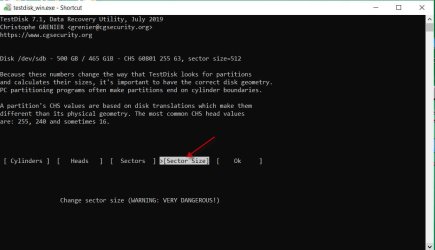
Screen 5 - Is the Sector size shown as 512 in the first line? Move to/highlight [Sector Size] and press Enter.

20-08-2020 12-17-21.jpg

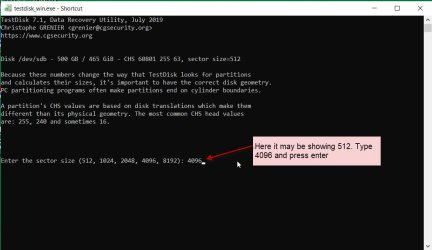
Screen 6 - Type 4096 as shown in the following Screenshot and press Enter.

20-08-2020 12-19-17.jpg

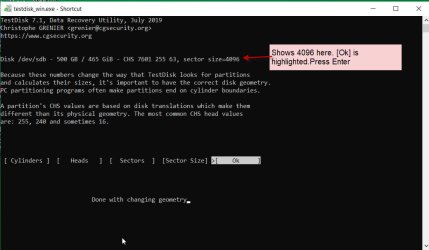
Screen 7 - The sector size should be shown as 4096 in the first line instead of the previous 512. [Ok] is highlighted .Press Enter

20-08-2020 12-23-04.jpg

Screen 8 - Move to/ highlight [Analyse] Enter

Screen 9 - [Quick Search] Enter.

Screen 10: Do you see your partition/partitions ( don't know how many partitions you had]
Does it say "Structure OK ...... blah ...blah ...." Type P to list your files

Screen 11: Do you see your files?

Copy the files.

To copy the files you should have plugged in another external drive with adequate space to copy all files. If you hadn't done it , you can close TestDisk. At anytime when you are ready with the external destination drive plug it in also alongwith your 3TB Sata -USB adapter disk. Note the drive letter of the external drive. You will need it to specify the destination disk to copy the files.

Run TestDisk and repeat the above process.

How to copy the files listed by TestDisk : https://www.sevenforums.com/hardwar...suddenly-became-unllocated-3.html#post2395385 ( Screenshot 4 onwards in this post)

Good Luck.
 
Last edited:

My Computer My Computer

At a glance

Windows 7 Home Premium 32 bit
OS
Windows 7 Home Premium 32 bit
If Seagate indicated that the drive did NOT use hardware encryption then the PCB board I linked to should work.
Trying to solder a new USB connector to the board would require a like connector with the same pin configuration.


I did not ask them about the encryption, I shall call them again and ask.


Hi @digiman2372, In my post # 15 I asked you to "post a screenshot of Windows Disk Management with only your Seagate 3TB drive connected.
Disk Management - Post a Screen Capture Image

Screenshots and Files - Upload and Post in Seven Forums

How to Use the Snipping Tool in Vista | Vista Forums

If you follow the above three tutorials you should be able to post the screenshots.

Please also read Hard Drive seems corrupt. 1 Partition now showing as 3 Partitions? Solved - Windows 10 Forums where a user recovered the data in a similar case, changing the physical sector size to 4096.

Only by changing the physical sector size to 4096 using TestDisk you can recover the data or you should fix the USB connector/solder a USB cable appropriately as Megahertz told in the last post and use the original PCB.


hey jumanji, in post #20 I asked for hep on how to post a screenshot because the website wouldn't let me. it was saying that I had too many words typed or something like that, even though it was a screenshot , and not words. How do I get around this issue? I have two screenshots, and one of testdisk that says my sector size doesn't match just as you and megahertz are saying. should I just proceed with the instructions you just posted? or should I wait to show you the screenshots?
 

My Computer My Computer

At a glance

64
Computer type
Laptop
Computer Manufacturer/Model Number
Hp pavillion dv6 laptop(stock)
OS
64

My Computers My Computers

  • At a glance

    Windows 7 HP 64i5 6600K - 800MHz to 4200MHz4+4G GSkill DDR4 3000IG - Intel 530
    Computer type
    PC/Desktop
    Computer Manufacturer/Model Number
    custom build
    OS
    Windows 7 HP 64
    CPU
    i5 6600K - 800MHz to 4200MHz
    Motherboard
    GA-Z170-HD3P
    Memory
    4+4G GSkill DDR4 3000
    Graphics Card(s)
    IG - Intel 530
    Monitor(s) Displays
    Samsung 226BW
    Screen Resolution
    1680x1050
    Hard Drives
    (1) -1 SM951 – 128GB M.2 AHCI PCIe SSD drive for Windows 7 and Lubuntu
    (2) -1 WD SATA 3 - 1T for Data
    (3) -1 WD SATA 3 - 1T for backup
    PSU
    Thermaltake 450W TR2 gold
    Keyboard
    Old and good Chicony mechanical keyboard
    Mouse
    Logitech mX performance - 9 buttons (had to disable some)
    Internet Speed
    500Mb/s
    Browser
    Firefox 64
    Other Info
    TinyWall firewall
  • At a glance

    Windows 7 Proi7-4500U 800MHz to 3.0GHz(4+4)G DDR3 1600IG intel 4400 + NVIDIA GeForce GT 745M
    Computer type
    Laptop
    System Manufacturer/Model Number
    Asus Q550LF
    OS
    Windows 7 Pro
    CPU
    i7-4500U 800MHz to 3.0GHz
    Motherboard
    Asus Q550LF
    Memory
    (4+4)G DDR3 1600
    Graphics Card(s)
    IG intel 4400 + NVIDIA GeForce GT 745M
    Sound Card
    Realtek
    Monitor(s) Displays
    LG Display LP156WF4-SPH1
    Screen Resolution
    1920 x 1080
    Hard Drives
    BX500 120G SSD for Windows and programs +
    1T HDD for data
    Internet Speed
    500 Mb/s
    Browser
    Firefox
    Other Info
    TinyWall firewall
To take the screenshot, are you using the snipping tool as in this tutorial How to Use the Snipping Tool in Vista | Vista Forums ?

To upload the screenshot, are you following the procedure indicated in this tutorial Screenshots and Files - Upload and Post in Seven Forums ?

If you follow the above procedures you should not have any problem in posting the screenshots. None of us have any problem posting the screenshot.

As far as TestDisk is concerned, I would ideally like to see each and every screenshot starting from screen 1. TestDisk is highly interactive and screen #5 can be slightly different from what I have shown in post #24. If there is any difference and you need clarification, then you should post that screenshot mentioning the screen number.. I should see what you see.Only then I can clarify and tell you what next to do.

Take the help of any of your friends if you are unable to understand and carry out the instructions in posting the screenshots or executing the tasks in TestDisk. .
 
Last edited:

My Computer My Computer

At a glance

Windows 7 Home Premium 32 bit
OS
Windows 7 Home Premium 32 bit
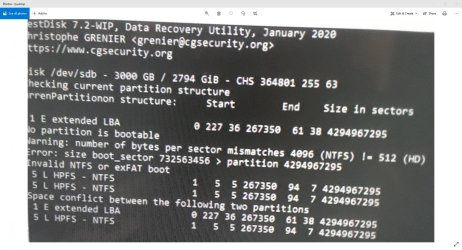
sorry for the late reply, life has been really busy, but I finally learned the snip! ok, here is the screenshot showing the sector problem you guys mentioned. the other screenshot is just disk management showing my hard drive as "RAW". this screenshot was not from following the instructions in post # 24, this is from a bit before. I can still follow the instructions of post #24 if need be, I was just hoping this would be enough. I must also say that when I ran the "partition find and mount" program I found 5 differnt partitions of the FAT format, not the original NTFS format. would this help? Also, I was still considering using the ubuntu OS to possibly bypass all of this. what do you all think? If you need anything else from me please let me know!

Annotation 2020-08-29 162649.jpg
 

My Computer My Computer

At a glance

64
Computer type
Laptop
Computer Manufacturer/Model Number
Hp pavillion dv6 laptop(stock)
OS
64
hello everyone i'm back. I now have a brand new original circuit board for the hard drive!!! I plugged it in and it says all of the hard drive has unallocated space. how do I see my files? do i just start from number 8 on the last screenhot and do a quicksearch?
 
Last edited:

My Computer My Computer

At a glance

64
Computer type
Laptop
Computer Manufacturer/Model Number
Hp pavillion dv6 laptop(stock)
OS
64
i used the methods above and it worked!! I have all my files back now!! thank you everyone for taking the time to reply to this thread and give me any advice as to what was going on and how to handle it. thank you all!!
 

My Computer My Computer

At a glance

64
Computer type
Laptop
Computer Manufacturer/Model Number
Hp pavillion dv6 laptop(stock)
OS
64
Back
Top