I can share laptop's files when it's signed on 5G, not 2.5G channel.

stanhilliard

New member
Member
Local time
7:44 AM
Messages
97
When I sign on my Windows 7 Pro laptop to the 5G channel of my Netgear R7000 router my cabled desktop PC can access its files. But not when I switch the laptop to the 2.5G channel. The laptop can access the internet through either channel.

Why the difference and how can I fix it?
 

My Computer My Computer

At a glance

Windows 7 x644 MB, 16 MB
Computer type
PC/Desktop
Computer Manufacturer/Model Number
Dell Studio 15, HP Spectre
OS
Windows 7 x64
Memory
4 MB, 16 MB
Check the drivers Advanced option settings on your PC and laptop.
Depending on the driver some can use both, (2.4 & 5) others cant.

Roy
 

Attachments

  • wifiband.PNG
    wifiband.PNG
    39.9 KB · Views: 1

My Computer My Computer

At a glance

W7 home premium 32bit/W7HP 64bit/w10 tp insid...E5300 dual core3gbNvidia Geforce 7100 Nforce 630i
Computer type
PC/Desktop
Computer Manufacturer/Model Number
medionl/Aspire 6930G/acer x55a
OS
W7 home premium 32bit/W7HP 64bit/w10 tp insider ring
CPU
E5300 dual core
Motherboard
medion MS7366
Memory
3gb
Graphics Card(s)
Nvidia Geforce 7100 Nforce 630i
Monitor(s) Displays
avixc
Internet Speed
n (isp resticted to 72)
Antivirus
mse/pands
Browser
palemoon
Other Info
Belkin Fd7050 n USB using Railink RT2870 drivers, more upto date
Thanks,

My laptop driver does not have the same options. The adapter is [Intel(R) WiFi Link 5300 AGN]. The [advanced] tab contains all the same options except [Preferred Band]. It is just not there.

The desktop PC has an [Intel(R) Ethernet Connection I217-LM] having no equivalent options.
 

My Computer My Computer

At a glance

Windows 7 x644 MB, 16 MB
Computer type
PC/Desktop
Computer Manufacturer/Model Number
Dell Studio 15, HP Spectre
OS
Windows 7 x64
Memory
4 MB, 16 MB
Hi Stan,
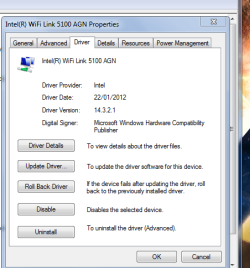
Strangely enough your 5300 shares the same drivers as my 5100.
so yours should look like mine.

Roy
 

Attachments

  • 5100dets.PNG
    5100dets.PNG
    19 KB · Views: 27

My Computer My Computer

At a glance

W7 home premium 32bit/W7HP 64bit/w10 tp insid...E5300 dual core3gbNvidia Geforce 7100 Nforce 630i
Computer type
PC/Desktop
Computer Manufacturer/Model Number
medionl/Aspire 6930G/acer x55a
OS
W7 home premium 32bit/W7HP 64bit/w10 tp insider ring
CPU
E5300 dual core
Motherboard
medion MS7366
Memory
3gb
Graphics Card(s)
Nvidia Geforce 7100 Nforce 630i
Monitor(s) Displays
avixc
Internet Speed
n (isp resticted to 72)
Antivirus
mse/pands
Browser
palemoon
Other Info
Belkin Fd7050 n USB using Railink RT2870 drivers, more upto date
Thanks, My driver is v12.4.1.4 dated 3/26/2009 and is provided by Microsoft.

I will update it and post back.
 

My Computer My Computer

At a glance

Windows 7 x644 MB, 16 MB
Computer type
PC/Desktop
Computer Manufacturer/Model Number
Dell Studio 15, HP Spectre
OS
Windows 7 x64
Memory
4 MB, 16 MB
The online search for a driver ended with "Windows has determined the driver software on your device is up to date."
 

My Computer My Computer

At a glance

Windows 7 x644 MB, 16 MB
Computer type
PC/Desktop
Computer Manufacturer/Model Number
Dell Studio 15, HP Spectre
OS
Windows 7 x64
Memory
4 MB, 16 MB
go via the intel site download it to your desktop and point the updater to it.

Roy
 

My Computer My Computer

At a glance

W7 home premium 32bit/W7HP 64bit/w10 tp insid...E5300 dual core3gbNvidia Geforce 7100 Nforce 630i
Computer type
PC/Desktop
Computer Manufacturer/Model Number
medionl/Aspire 6930G/acer x55a
OS
W7 home premium 32bit/W7HP 64bit/w10 tp insider ring
CPU
E5300 dual core
Motherboard
medion MS7366
Memory
3gb
Graphics Card(s)
Nvidia Geforce 7100 Nforce 630i
Monitor(s) Displays
avixc
Internet Speed
n (isp resticted to 72)
Antivirus
mse/pands
Browser
palemoon
Other Info
Belkin Fd7050 n USB using Railink RT2870 drivers, more upto date
I downloaded and ran the Intel Driver Update Utility. It did not find any drivers out of date on the Win7 Pro Dell Studio laptop.

I downloaded and ran the Intel Driver Update Utility. It did not find any drivers out of date on the Win7 Pro Dell Studio laptop.

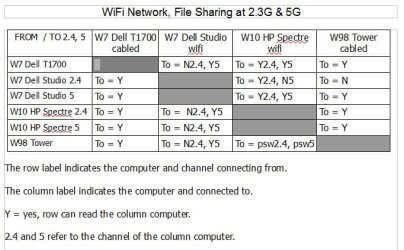
Confirming the problem -- I have tried to access that laptop's files from two other computers. In each case the files can be accessed when the laptop is connected 5G, but not when it is connected 2.4G.

From that laptop in both 2.4G and 5G modes, it can read files on the cabled desktop computer. It can read a Win10 laptop when both are in connected 2.4G, but not when the Win10 is 5G, unless the laptop is also 5G.
 

My Computer My Computer

At a glance

Windows 7 x644 MB, 16 MB
Computer type
PC/Desktop
Computer Manufacturer/Model Number
Dell Studio 15, HP Spectre
OS
Windows 7 x64
Memory
4 MB, 16 MB
I have attached a summary of results with 4 computers.
 

Attachments

  • WiFi network connection experiment.JPG
    WiFi network connection experiment.JPG
    55.1 KB · Views: 14
Last edited:

My Computer My Computer

At a glance

Windows 7 x644 MB, 16 MB
Computer type
PC/Desktop
Computer Manufacturer/Model Number
Dell Studio 15, HP Spectre
OS
Windows 7 x64
Memory
4 MB, 16 MB
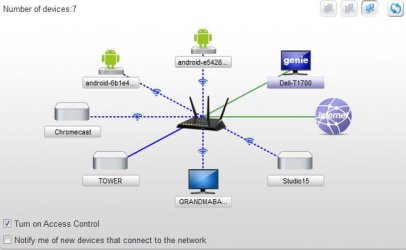
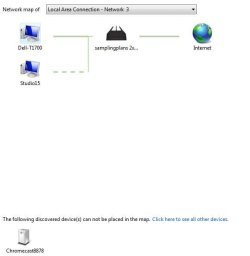
The networks maps look very different when I switch the Studio laptop from 5G to 2.4G.

Three maps are attached.:
1) Total network
2) Laptop on 5G
3) Laptop on 2.4G
 

Attachments

  • Network Map.JPG
    Network Map.JPG
    28.3 KB · Views: 14
  • Windows Network Map with Studio Laptop 5G.JPG
    Windows Network Map with Studio Laptop 5G.JPG
    28.5 KB · Views: 14
  • Windows Network Map with Studio Laptop 2.4G.JPG
    Windows Network Map with Studio Laptop 2.4G.JPG
    21.2 KB · Views: 14

My Computer My Computer

At a glance

Windows 7 x644 MB, 16 MB
Computer type
PC/Desktop
Computer Manufacturer/Model Number
Dell Studio 15, HP Spectre
OS
Windows 7 x64
Memory
4 MB, 16 MB
Back
Top