
You are using an out of date browser. It may not display this or other websites correctly.
You should upgrade or use an alternative browser.
You should upgrade or use an alternative browser.
I cannot alt-tab to my desktop
- Thread starter Wyrd
- Start date

Rowan1
Banned
- Local time
- 1:41 AM
- Messages
- 114

My Computer
- OS
- Windows 7 Proffesional 64 bit
- Motherboard
- Asus M2N MX SE Plus
- Internet Speed
- Virgin Media 10MB broadband
I recently had an issue with my computer (in my last post) that somehow rendered the graphics...austere. Now my computer looks like this, and I don't know how to change it (make it modern again):
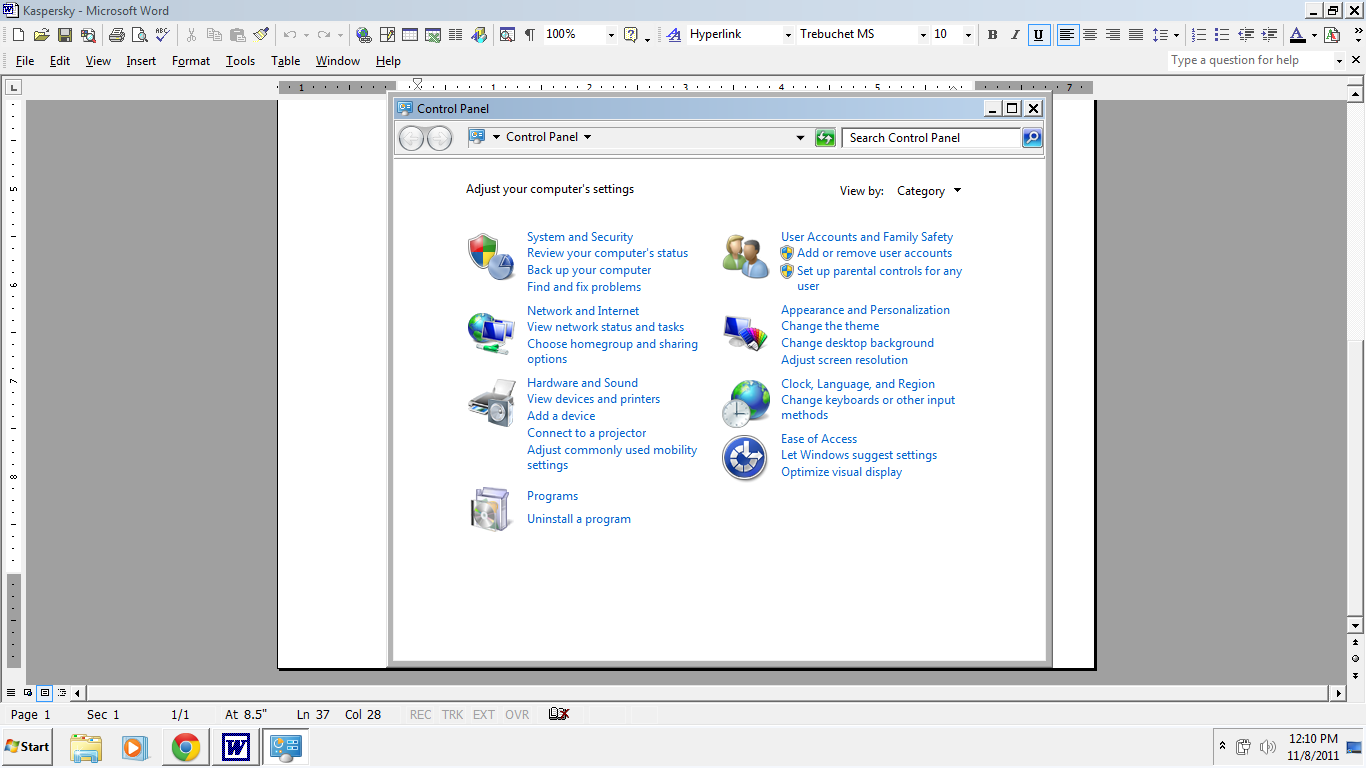
So the 3D flip is not working. What do you think I could do to get it to the point where 3D flip could work?
So the 3D flip is not working. What do you think I could do to get it to the point where 3D flip could work?
Last edited by a moderator:
My Computer
- OS
- Windows 7 home premium 64 (I Think)

It looks like your aero has stopped working.I recently had an issue with my computer (in my last post) that somehow rendered the graphics...austere. Now my computer looks like this, and I don't know how to change it (make it modern again):
So the 3D flip is not working. What do you think I could do to get it to the point where 3D flip could work?
Click on the
 rb: Start Button type in Services In the search box and then click on Services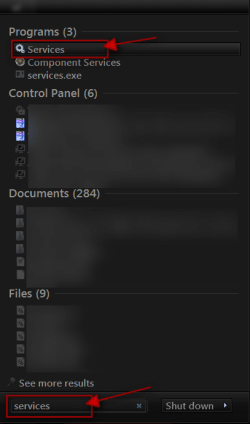
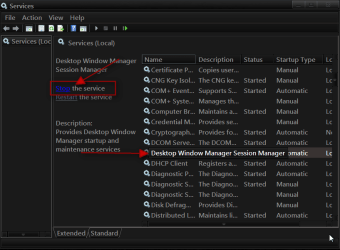
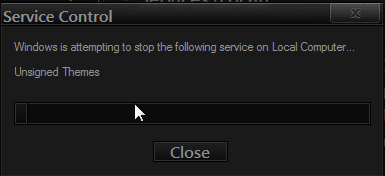
Scroll down until you see Desktop Windows Manager Sessions Manager select it in click on the Stop text and let it stop after that click on Start text and see if that works. Your screen may blink when you do this.
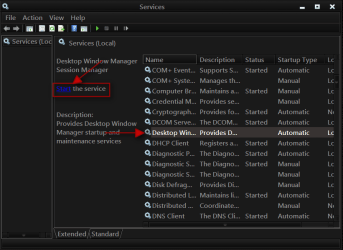
Jerry
My Computer
- Computer type
- Laptop
- Computer Manufacturer/Model Number
- Sager NP9170
- OS
- Win 7 Pro x64 / Win 10 Pro
- CPU
- Intel(R) Core(TM) i7-3630QM CPU @ 2.40GHz
- Motherboard
- CLEVO P170EM
- Memory
- 12 GB
- Graphics Card(s)
- (1) Intel(R) HD Graphics 4000 (2) NVIDIA GeForce GTX 675M
- Sound Card
- (1) Realtek High Definition Audio (2) Intel(R) Display Aud
- Monitor(s) Displays
- 17.3
- Screen Resolution
- 1920x1080
- Hard Drives
- (1) Samsung 860 EVO 500GB(OS) (1) Samsung 860 EVO 500GB(Data)
- Keyboard
- Backlite
- Antivirus
- MSE, Malwarebytes Pro
- Browser
- Firefox
- Other Info
- DESKTOP: Custom-built.
OS: Win 10 Pro x64.
CASE: Rosewill R5.
CPU: Intel I5 4670K CPU @ 3.40GHz.
CPU COOLER: Cool Master Hyper 212 EVO.
MOTHERBOARD: Asus Z87-A.
MEMORY: Kingston HyperX 2x4 GB.
GPU: Nvidia Geforce 650 TI.
PSU: Corsair TX750.
DRIVES: (1) Samsung 840 120 GB SSD (2) Western Digital blue 500 GB 7200 RPM.
I am not home at the moment, so I have to wait to try that, but thank you!
I think I may have to reinstall Windows 7. I bought my laptop from Best Buy, and it came pre-installed with it. How can I reinstall Windows 7, should it come to that?
I think I may have to reinstall Windows 7. I bought my laptop from Best Buy, and it came pre-installed with it. How can I reinstall Windows 7, should it come to that?
My Computer
- OS
- Windows 7 home premium 64 (I Think)
Most laptops come with a recovery partition you will need to consult your manufactures website or your manual to see how to get to it by pressing one of the F key at startup, when you first started your laptop when it was new you should of have the option to burn your operating system to DVDs again consult your manufactures website or your manual.
Jerry
Jerry
My Computer
- Computer type
- Laptop
- Computer Manufacturer/Model Number
- Sager NP9170
- OS
- Win 7 Pro x64 / Win 10 Pro
- CPU
- Intel(R) Core(TM) i7-3630QM CPU @ 2.40GHz
- Motherboard
- CLEVO P170EM
- Memory
- 12 GB
- Graphics Card(s)
- (1) Intel(R) HD Graphics 4000 (2) NVIDIA GeForce GTX 675M
- Sound Card
- (1) Realtek High Definition Audio (2) Intel(R) Display Aud
- Monitor(s) Displays
- 17.3
- Screen Resolution
- 1920x1080
- Hard Drives
- (1) Samsung 860 EVO 500GB(OS) (1) Samsung 860 EVO 500GB(Data)
- Keyboard
- Backlite
- Antivirus
- MSE, Malwarebytes Pro
- Browser
- Firefox
- Other Info
- DESKTOP: Custom-built.
OS: Win 10 Pro x64.
CASE: Rosewill R5.
CPU: Intel I5 4670K CPU @ 3.40GHz.
CPU COOLER: Cool Master Hyper 212 EVO.
MOTHERBOARD: Asus Z87-A.
MEMORY: Kingston HyperX 2x4 GB.
GPU: Nvidia Geforce 650 TI.
PSU: Corsair TX750.
DRIVES: (1) Samsung 840 120 GB SSD (2) Western Digital blue 500 GB 7200 RPM.
It appears the Services bit did not do the trick--do I need to restart the computer?
And thanks so much for your help, I really appreciate it. I found a post regarding the reinstallation of Windows here:
Reinstall Windows 7 - Toshiba Forums
Does that seem like the right sort of thing? I just get a blank DVD, burn the recovery files onto it, and run that DVD from the F12 boot menu?
And thanks so much for your help, I really appreciate it. I found a post regarding the reinstallation of Windows here:
Reinstall Windows 7 - Toshiba Forums
Does that seem like the right sort of thing? I just get a blank DVD, burn the recovery files onto it, and run that DVD from the F12 boot menu?
My Computer
- OS
- Windows 7 home premium 64 (I Think)
I did not read the whole thing but I would make the DVDs just for backup purposes in case the recovery partition does not work both ways should restore your computer to factory conditions. After making the DVDs set them aside and tried the F12 at boot up.It appears the Services bit did not do the trick--do I need to restart the computer?
And thanks so much for your help, I really appreciate it. I found a post regarding the reinstallation of Windows here:
Reinstall Windows 7 - Toshiba Forums
Does that seem like the right sort of thing? I just get a blank DVD, burn the recovery files onto it, and run that DVD from the F12 boot menu?
Jerry
My Computer
- Computer type
- Laptop
- Computer Manufacturer/Model Number
- Sager NP9170
- OS
- Win 7 Pro x64 / Win 10 Pro
- CPU
- Intel(R) Core(TM) i7-3630QM CPU @ 2.40GHz
- Motherboard
- CLEVO P170EM
- Memory
- 12 GB
- Graphics Card(s)
- (1) Intel(R) HD Graphics 4000 (2) NVIDIA GeForce GTX 675M
- Sound Card
- (1) Realtek High Definition Audio (2) Intel(R) Display Aud
- Monitor(s) Displays
- 17.3
- Screen Resolution
- 1920x1080
- Hard Drives
- (1) Samsung 860 EVO 500GB(OS) (1) Samsung 860 EVO 500GB(Data)
- Keyboard
- Backlite
- Antivirus
- MSE, Malwarebytes Pro
- Browser
- Firefox
- Other Info
- DESKTOP: Custom-built.
OS: Win 10 Pro x64.
CASE: Rosewill R5.
CPU: Intel I5 4670K CPU @ 3.40GHz.
CPU COOLER: Cool Master Hyper 212 EVO.
MOTHERBOARD: Asus Z87-A.
MEMORY: Kingston HyperX 2x4 GB.
GPU: Nvidia Geforce 650 TI.
PSU: Corsair TX750.
DRIVES: (1) Samsung 840 120 GB SSD (2) Western Digital blue 500 GB 7200 RPM.

Wyrd , A bit OT here , It's just been announced that Best Buy are closing all their UK shops what's happening to the US side of the bussiness ? 
My Computer
- Computer type
- PC/Desktop
- Computer Manufacturer/Model Number
- self build
- OS
- win 7 ultimate32bit, Win8.1pro wmc 32bit
- CPU
- amd phenom x4 9600
- Motherboard
- asus m2n32-sli deluxe
- Memory
- corsair twinxs 2x2gb
- Graphics Card(s)
- 2x nvidia 1gb 8500gt
- Sound Card
- onboard
- Monitor(s) Displays
- 23" PB Viseo 233d
- Screen Resolution
- 1920x1080
- Hard Drives
- maxtor sata 500gb
maxtor sata 320gb
fujitsu sata200gb
- PSU
- oryxx tornado 750w
- Case
- thermaltake xaser lll
- Cooling
- artic freezer64 pro + 7 case fans