A friend needs a recovery disk to access a backup file on his computers external drive. I said" NP I'll make you one and you can have it!" Little did I realize that installing Acronis makes it impossible to see the option to make a true Win 7 Pro recovery disk. He is using Win 7 home edition.
How do I make one for my buddy?
His son allegedly made a 7 backup to the 1TB drive before the main HD crashed but he didn't make a recovery disk so he can't get at the files! His business is on the image of the HD hopefully we can get it back or he is screwed royally.
Now I can't make one either, I do know that Acronis will allow you to convert Windows backups to Acronis format and vice versa but I don't think an Acronis start up disk would see the Win 7 image.... or would it?
Thanks to all in advance!
J T
My Computer
At a glance
Dual boot Win7 Pro 64 & Linux Mint 18.3Intel Core 2 Quad Core8GBNvidia GeForce GTX 750 Ti
I've been using Acronis Trueimage for my backups and never had a problem seeing the Pro 7 backup.
What program did your friend use for the backup?
If you make a boot cd from the Acronis program ( free version) your friend is going to have to have a Seagate, Maxtor or WD hdd for it to work.
This is the reason I always tell anyone who uses this program ( and it is great) to always
create a boot cd.
When you go to Start menu > Seagate Discwizard - are you getting an error?
My Computer
At a glance
Windows 7 Professional X64Core i7 (2nd gen) i7-2600K / 3.40GHzDDR3 2400MHz (OC) 16gbIntel(R) HD Graphics 3000, -1988 Mb
Computer type
PC/Desktop
Computer Manufacturer/Model Number
Self-Built
OS
Windows 7 Professional X64
CPU
Core i7 (2nd gen) i7-2600K / 3.40GHz
Motherboard
ASUS P8Z77-V Intel 7 Series Motherboard
Memory
DDR3 2400MHz (OC) 16gb
Graphics Card(s)
Intel(R) HD Graphics 3000, -1988 Mb
Sound Card
8 ChannelsAudio Chipset Realtek ALC892
Monitor(s) Displays
LG 29UM65 Black 29"
Screen Resolution
2560 x 1080
Hard Drives
840 EVO 250 GB SSD ;2tb (2);Seagate;1tb Seagate; 750 gb Seagate; wd ext (2) 750 gb,WD 2tb X 2;WD 3TB Black
PSU
750 watt
Case
Thermaltake RX -1
Cooling
2120mm Fans Included 1Other Fan Ports 5x 200mm Fan Ports
Keyboard
Microsoft Digital Media Pro
Mouse
Microsoft Wireless 6000
Internet Speed
U-verse 18 mbps
Antivirus
MSE
Browser
Firefox, Chrome and my favorite: Pale Moon
Other Info
HdHomerun Dual Tuner.
SRS Audio Lab,
Pioneer BDR 208-DBK
PS3-What a difference in my Surround Sound Receiver!
HP 4540s - My new Toy.
Epson R280 Printer- To personalize my Dvds.
Canon MP 560 - For scanning.
I guess I wasn't clear in my description of the problem.
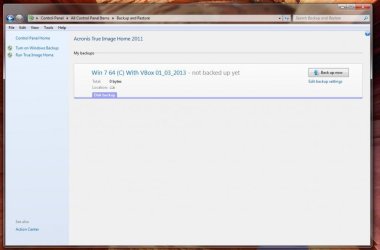
With Acronis installed I do not have the option to make a Windows Recovery Disc. Yes I can run Acronis and make an Acronis disc.
As you can see from the attached .jpg the option that was in 7 isn't there anymore, it only shows Acronis as being the only way to make an image or recovery disc (from within Acronis).
My friend has an identical system as mine in the sense he uses Acronis too and Win 7 Pro and HE has the option to make a Windows Recovery disc as well as run Acronis. In other words on his machine for whatever reason installing Acronis didn't obliterate his ability to make a Windows recovery disc.
At this juncture it's all a moot point anyway, the guy I was trying to help says he sent his machine back to Dell for repair. That won't help because the image he needs is on an external drive, it was created using Win 7 according to him. So really I guess I need to ask the question in the Acronis forum and see what they have to say about it as well.
Thanks again!
J T
My Computer
At a glance
Dual boot Win7 Pro 64 & Linux Mint 18.3Intel Core 2 Quad Core8GBNvidia GeForce GTX 750 Ti
Gyration wireless, Logitech wireless, Dell USB wired
Mouse
Gyration wireless, Logitech wireless, V7 USB wired
Internet Speed
Spectrum - 100Mbps D / 10Mbps U
Antivirus
Avast, MBAM3, EMET, WinPatrol
Browser
Pale Moon, Firefox, IE
Other Info
2 multi-boot PC's
Mainly HTPC/Office/Gen purpose (no gaming).
Trendnet USB KVM.
LG DVD burner/Blue Ray Player.
Tray system for removable SATA backup drives.
Not currently OCd, under-volted.
I use Hybrid sleep, rarely re-boot or shutdown.
Hauppauge HD-PVR, Avermedia PCIe TV Tuner, Hauppauge PCI TV Tuner.
Gyration wireless, Logitech wireless, Dell USB wired
Mouse
Gyration wireless, Logitech wireless, V7 USB wired
Internet Speed
Spectrum - 100Mbps D / 10Mbps U
Antivirus
Avast, MBAM3, EMET, WinPatrol
Browser
Pale Moon, Firefox, IE
Other Info
2 multi-boot PC's
Mainly HTPC/Office/Gen purpose (no gaming).
Trendnet USB KVM.
LG DVD burner/Blue Ray Player.
Tray system for removable SATA backup drives.
Not currently OCd, under-volted.
I use Hybrid sleep, rarely re-boot or shutdown.
Hauppauge HD-PVR, Avermedia PCIe TV Tuner, Hauppauge PCI TV Tuner.
Yes and I also discover that in Acronis under HELP there is a message box that says " Integrate Acronis with Windows>" when you check that box, at least on my machine all you see is Acronis backup options. Untick the box and you are back to Windows defaults.
There is a registry hack that allows you to see both at once. I don't need that now that I know I can toggle between them if need be, but I can't imagine needing to do it.
This WAS a problem for Acronis initially but has been addressed in their forum.
Regards,
J T
Last edited:
My Computer
At a glance
Dual boot Win7 Pro 64 & Linux Mint 18.3Intel Core 2 Quad Core8GBNvidia GeForce GTX 750 Ti
I have Acronis with Windows integration turned on, but I guess forturnately I was too dumb to go to the control panel -- I typed "create repair disc" into the start menu search box and it came right up. Actual it came up after I entered the word create.
My Computer
At a glance
Microsoft Windows10 Professional 64-bit Build...Intel(R) Core(TM) i5-4590 CPU @ 3.30GHz, 3301...8.00 GBNVIDIA GeForce GTX 560 Ti
Computer type
PC/Desktop
Computer Manufacturer/Model Number
Homebuilt
OS
Microsoft Windows10 Professional 64-bit Build 16299
CPU
Intel(R) Core(TM) i5-4590 CPU @ 3.30GHz, 3301 Mhz 4 Core
Motherboard
Asrock H97M Pro4
Memory
8.00 GB
Graphics Card(s)
NVIDIA GeForce GTX 560 Ti
Sound Card
(1) Webcam 200 (2) Realtek High Definition Audio (3) Int
Monitor(s) Displays
Samsung Syncmaster 24 inch
Screen Resolution
1600 x 900 x 32 bits (4294967296 colors) @ 60 Hz
Hard Drives
(1) WDC WD5000AAKS-00E4A0 ATA Device (2) WDC WD5000AAKX-00ERMA0 ATA Device (3) WDC WD10EZEX-08M2NA0 (4) WD 7500AAC External USB Device (5) WD My Passport Ultra USB Device
I have always use Windows 7 to create a repair disk. I just type (rep) in the Start Orb search and bingo it is at the top. Tick on it and away you go. If Windows 7 doesn't know how to make a disk to repair itself I don't know what would.
I use the Start Orb search box for many things. Just keep indexing working properly and it finds things very quickly.
My Computer
At a glance
Windows 10 Pro. 64/ version 1709 Windows 7 Pr...Intel i7-6800K @ 4.3Corsair Platinum 16 gig @2400EVGA GTX 1070 OC
Computer type
PC/Desktop
Computer Manufacturer/Model Number
Home made Desktop
OS
Windows 10 Pro. 64/ version 1709 Windows 7 Pro/64
CPU
Intel i7-6800K @ 4.3
Motherboard
ASUS X-99 Deluxe II
Memory
Corsair Platinum 16 gig @2400
Graphics Card(s)
EVGA GTX 1070 OC
Monitor(s) Displays
Asus 27" LED LCD/VE278Q
Screen Resolution
1920-1080 or 1280-720 HDMI
Hard Drives
INTEL SSD 730-240 Gb Sata 3.0/
PSU
EVGA Platium 1200W
Case
Phanteks Luxe Tempered Glass 8 fans/ one radiator
Cooling
XSPC/ Water Cooled CPU
Keyboard
Das 4 Professional
Mouse
Logitech M705/MX Anywhere 2-S
Internet Speed
100 mbits
Antivirus
Microsoft Security Essentials/ Malwarebytes Premium 3.0/ SAS
Browser
I.E. 11 default/Firefox/ ISP Time Warner Cable/Spectrum
Other Info
LG BluRay Burner/
Sound system-KLipsch-THX/
Icy Dock ssd Hot Swap bays.
Heh, heh, for me, getting the dialog box to come up was only the start of the fun. When I tried to get it to actually make the CD, it gave me some lame excuse like 0x80070057. This led to hours of fun with bcdedit, C:\Recover (which I had long ago co-opted for my own purposes) and repairs which also fixed the "Repair your computer option" in the F8 Boot Menu.
For the curious, see this Technet thread (scroll down to the posting by klickster that starts off "Here's the correct way to fix the problem...").
Please note this is a different issue from that previously discussed which was getting the "Create Repair CD" box to come up at all. I threw it in for interest. I'll move this post to a new thread if advised to do so.
My Computer
At a glance
Microsoft Windows10 Professional 64-bit Build...Intel(R) Core(TM) i5-4590 CPU @ 3.30GHz, 3301...8.00 GBNVIDIA GeForce GTX 560 Ti
Computer type
PC/Desktop
Computer Manufacturer/Model Number
Homebuilt
OS
Microsoft Windows10 Professional 64-bit Build 16299
CPU
Intel(R) Core(TM) i5-4590 CPU @ 3.30GHz, 3301 Mhz 4 Core
Motherboard
Asrock H97M Pro4
Memory
8.00 GB
Graphics Card(s)
NVIDIA GeForce GTX 560 Ti
Sound Card
(1) Webcam 200 (2) Realtek High Definition Audio (3) Int
Monitor(s) Displays
Samsung Syncmaster 24 inch
Screen Resolution
1600 x 900 x 32 bits (4294967296 colors) @ 60 Hz
Hard Drives
(1) WDC WD5000AAKS-00E4A0 ATA Device (2) WDC WD5000AAKX-00ERMA0 ATA Device (3) WDC WD10EZEX-08M2NA0 (4) WD 7500AAC External USB Device (5) WD My Passport Ultra USB Device