I cannot use screen rotation option.

Klintonix

New member
Local time
10:35 AM
Messages
6
Hello all.
I got an Acer Extensa 5220 laptop with Windows 7 RC and integrated graphic card of Intel. The properties of this graphics don't have the screen rotation option and neither does Windows in the Screen Resolution menu.
I tried to reinstall the system (to RC again and to RTM), downloaded programs such as EEErotate, iRotate, PivotPro; used the Ctrl+Alt+(arrows) combination, upgraded the graphic card to the latest drivers and none of these options worked.
I was wondering if this could be enabled through the Windows Registry Editor.
Could you help me please? I'm open for suggestions.
 

My Computer

Computer Manufacturer/Model Number
Acer Extensa 5220 - Notebook
OS
Windows 7 Ultimate Build 7600 32-bit
CPU
Intel Celeron processor 530 (1,73 GHz)
Memory
1 GB
Graphics Card(s)
Mobile Intel GMA X3100 (965 Express Chipset Family)
Sound Card
Intel High Definition Audio Device
Monitor(s) Displays
15,4" WXGA LCD - Laptop Display
Screen Resolution
1280x800
Hard Drives
120 GB
Hello all.
I got an Acer Extensa 5220 laptop with Windows 7 RC and integrated graphic card of Intel. The properties of this graphics don't have the screen rotation option and neither does Windows in the Screen Resolution menu.
I tried to reinstall the system (to RC again and to RTM), downloaded programs such as EEErotate, iRotate, PivotPro; used the Ctrl+Alt+(arrows) combination, upgraded the graphic card to the latest drivers and none of these options worked.
I was wondering if this could be enabled through the Windows Registry Editor.
Could you help me please? I'm open for suggestions.
Hello, Klintonix and welcome to the SevenForums.

Background rotation is not found in Screen Resolution, you have to go to Personalization > Desktop Background. Choose images you want to use and set rotation interval.

Kari
 

My Computer

Computer type
Laptop
Computer Manufacturer/Model Number
HP ENVY 17-1150eg
OS
Windows 10 Pro x64 EN-GB
CPU
1.6 GHz Intel Core i7-720QM Processor
Memory
6 GB
Graphics Card(s)
ATI Mobility Radeon HD 5850 Graphics
Sound Card
Beats sound system with integrated subwoofer
Monitor(s) Displays
17" laptop display, 22" LED and 32" Full HD TV through HDMI
Screen Resolution
1600*900 (1), 1920*1080 (2&3)
Hard Drives
Internal: 2 x 500 GB SATA Hard Disk Drive 7200 rpm
External: 2TB for backups, 3TB USB3 network drive for media
Cooling
As Envy runs a bit warm, I have it on a Cooler Master pad
Keyboard
Logitech diNovo Media Desktop Laser (bluetooth)
Mouse
Logitech Performance Mouse MX
Internet Speed
50/10 Mbps VDSL
Antivirus
Windows Defender 4.3.9431.0
Browser
Maxthon 3.5.2., IE11
I meant the option to change the orientation of the desktop to 90, 180 or 270 degrees.
And the Scrren Resolution menu I meant is the one where I can choose my screen, resolution and orientation.
 
Last edited:

My Computer

Computer Manufacturer/Model Number
Acer Extensa 5220 - Notebook
OS
Windows 7 Ultimate Build 7600 32-bit
CPU
Intel Celeron processor 530 (1,73 GHz)
Memory
1 GB
Graphics Card(s)
Mobile Intel GMA X3100 (965 Express Chipset Family)
Sound Card
Intel High Definition Audio Device
Monitor(s) Displays
15,4" WXGA LCD - Laptop Display
Screen Resolution
1280x800
Hard Drives
120 GB
I meant the option to change the orientation of the desktop to 90, 180 or 270 degrees.
My bad. Sorry!

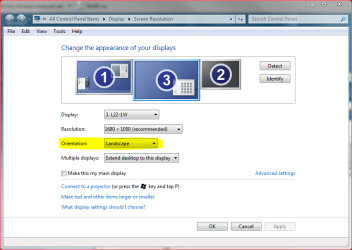
So you mean you do not have this option:

orientation.PNG

Not knowing the type of your integrated GPU I can not tell if your system is capable to do that. Please fill your system specs by clicking My System Specs link on bottom left corner of your own post and filling the form.

Kari
 

My Computer

Computer type
Laptop
Computer Manufacturer/Model Number
HP ENVY 17-1150eg
OS
Windows 10 Pro x64 EN-GB
CPU
1.6 GHz Intel Core i7-720QM Processor
Memory
6 GB
Graphics Card(s)
ATI Mobility Radeon HD 5850 Graphics
Sound Card
Beats sound system with integrated subwoofer
Monitor(s) Displays
17" laptop display, 22" LED and 32" Full HD TV through HDMI
Screen Resolution
1600*900 (1), 1920*1080 (2&3)
Hard Drives
Internal: 2 x 500 GB SATA Hard Disk Drive 7200 rpm
External: 2TB for backups, 3TB USB3 network drive for media
Cooling
As Envy runs a bit warm, I have it on a Cooler Master pad
Keyboard
Logitech diNovo Media Desktop Laser (bluetooth)
Mouse
Logitech Performance Mouse MX
Internet Speed
50/10 Mbps VDSL
Antivirus
Windows Defender 4.3.9431.0
Browser
Maxthon 3.5.2., IE11
Updated.
Oh by the way, when I was running Windows XP Professional and Media Center Edition on it the driver of the graphic card ALLOWED me to rotate my screen. The issue I have is only on Windows 7.
 

My Computer

Computer Manufacturer/Model Number
Acer Extensa 5220 - Notebook
OS
Windows 7 Ultimate Build 7600 32-bit
CPU
Intel Celeron processor 530 (1,73 GHz)
Memory
1 GB
Graphics Card(s)
Mobile Intel GMA X3100 (965 Express Chipset Family)
Sound Card
Intel High Definition Audio Device
Monitor(s) Displays
15,4" WXGA LCD - Laptop Display
Screen Resolution
1280x800
Hard Drives
120 GB
Updated.
Oh by the way, when I was running Windows XP Professional and Media Center Edition on it the driver of the graphic card ALLOWED me to rotate my screen. The issue I have is only on Windows 7.
You have been able to do it in Windows XP cause the driver there allowed for it. However, it appears Intel has yet to implement it for Windows Vista or Sever, which ever drive you used. You should ask Intel about it...


It is rather strange but my laptop's screen has the rotation options. XD
 

My Computer

Computer type
PC/Desktop
Computer Manufacturer/Model Number
Alienware Aurora ALX R4
OS
Windows 10 Pro (x64)
CPU
Intel Core i7-3930K (3.2GHz - 4.5GHz)
Motherboard
Alienware Aurora-R4 x79
Memory
4x Samsung 4GB PC3-12800 DDR3 (16GB 1600MHz)
Graphics Card(s)
Nvidia Geforce GTX 690
Sound Card
SteelSeries Siberia Elite
Monitor(s) Displays
Dell UltraSharp U3011
Screen Resolution
2560x1600
Hard Drives
Samsung 850 Pro 256 GB, Seagate 1TB Desktop Hybrid HDD, 2x Western Digital 4TB Green HDD
PSU
875W Some Dell PSU <.<
Case
Alienware Aurora ALX
Cooling
Custom Liquid Cooling (EK CPU & GPU blocks) dual EK 480RAD
Keyboard
Logitech G710+ Mechanical
Mouse
Logitech G700s
Internet Speed
Verizon Fios (50 mbps average)
Other Info
Server: Intel NUC D54250WYK: i5-4250U, 16GB, 256 GB mSATA, Windows Server 2012 R2
Ok. Thanks for help:)
 

My Computer

Computer Manufacturer/Model Number
Acer Extensa 5220 - Notebook
OS
Windows 7 Ultimate Build 7600 32-bit
CPU
Intel Celeron processor 530 (1,73 GHz)
Memory
1 GB
Graphics Card(s)
Mobile Intel GMA X3100 (965 Express Chipset Family)
Sound Card
Intel High Definition Audio Device
Monitor(s) Displays
15,4" WXGA LCD - Laptop Display
Screen Resolution
1280x800
Hard Drives
120 GB
I have a Sony Vaio VGN-BX61XN Notebook with a second Monitor attached (HP ZR22w).

The Notebook has been upgraded from having the default Vista Business to Windows 7 Professional 32-bit, and despite trying Ctrl+Alt+(arrows) and a Trial Version of PivotPro, I too am unable to rotate the Image on the Screen, despite being ale to rotate the Screen physically.

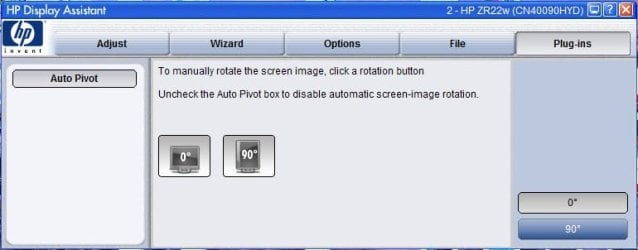
I have used the Driver Disk that came with the Monitor, where the Display Assistant appears to to allow for Manual and Auto Pivot, but nothing happens when I try to use these functions.

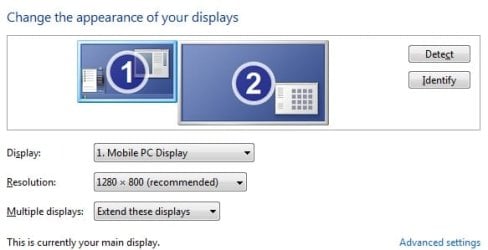
My wife's Desktop HP PC, also running Windows 7 Professional 32bit, unlike mine (see image below), does have an Orientation setting with the Screen Resolution Screen. I can even rotate the image without even having to rotate her Monitor.

I suspect it may be the Graphics Card prohibiting rotation of the 2nd LCD Monitor, but would appreciate advice from anyone with a resolution to this problem.

Porthale
 

Attachments

  • Screen Resolution.jpg
    Screen Resolution.jpg
    18.9 KB · Views: 80
  • Display Assistant.jpg
    Display Assistant.jpg
    27.2 KB · Views: 156

My Computer

Computer Manufacturer/Model Number
Sony Vaio VGN-BX61XN C101ZJ3B
OS
Windows 7 Professional (build 7600) 32bit
CPU
Intel Core2 Duo T7250 2GHz
Motherboard
Bus Clock: 200 MHz, BIOS: Phoenix Technologies LTD R0210X9
Memory
2040 Megabytes Usable Installed Memory
Graphics Card(s)
Intel GMA X3100 Dynamic Video Memory Technology 4.0
Sound Card
Built In
Monitor(s) Displays
15.4" TFT 1280 x 800 ( WXGA ) - X-black & HP ZR22w
Hard Drives
FUJITSU MJA2250BH G2 [Hard drive] (250.06 GB)
PSU
Built In
Case
Built In
Cooling
Built In
I have the same problem and am afraid it's been disabled by HP which really pisses me off. Did you ever find a fix?
 

My Computer

Computer Manufacturer/Model Number
HP Pavillion DV7
OS
Win 7 home premium
CPU
i7-2630m
Motherboard
HP?
Memory
8gb
Graphics Card(s)
Integrated Intel HD
Monitor(s) Displays
HP ROTATING 22" DISPLAY
Back
Top