Solved I can't access internet problem

mita11

New member
Local time
8:32 PM
Messages
20
Location
Belgrade
I have wireless at my home and everything worked perfectly until yesterday afternoon. Internet icon at the task bar shows me that I'm connected to the network, when I do the ping test in cmd, everything works fine, it has a connection to the Internet, when I connect to wireless on my phone it works fine too, at the other computers that I have internet works, just doesn't work at this one computer, I even tried to "host" internet via my phone (portable hotspot and USB tethering), but no results (even on the phone all works perfectly). I guess the problem is somewhere in my computer but can not figure out what it is. Do you happen to have any idea what could cause the problem? I even tried to uninstall drivers for my network adapter, reboot PC and to let it install again, disable all firewalls, flush dns, and again, no results.
 

My Computer

OS
Windows 7 Professional x64
CPU
Intel Core 2 Duo E7500 @ 2.93 GHz
Motherboard
Gigabyte EP45-UD3LR
Monitor(s) Displays
Samsung SyncMaster 2333HD and LG FLATRON L1753S
Screen Resolution
1920x1080

My Computer

Computer type
PC/Desktop
Computer Manufacturer/Model Number
Custom Built
OS
Windows 7 Professional x64 SP1 ; Windows Server 2012 R2 Standard
CPU
Intel Core i5 2400 @ 3.10GHz
Motherboard
Foxconn H67MP-S/-V/H67MP
Memory
8.0GB DDR3 @ 665MHz (2GBx4)
Graphics Card(s)
AMD Radeon HD 6870
Sound Card
Realtek High Definition Audio
Monitor(s) Displays
AOC 2243W & SMB1930NW
Screen Resolution
1440x900 & 1920x1080
Hard Drives
977GB Seagate ST31000524AS ATA Drive (SATA)
250GB WD iSCSI attached Drive
PSU
750W Gaming PSU
Case
Novatech Night
Cooling
Fan
Keyboard
Dell Standard PS/2 Keyboard
Mouse
R.A.T 07 Gaming Mouse
Internet Speed
Download: 10 Mbps Ping: 30ms Upload: 0.81 Mbps
Browser
Google Chrome
Other Info
Optiarc DVD RW AD-5260S ATA Device
I see you are using Google's Public DNS servers. While this should not be the cause could you please click on 'Obtain Automatically' in the TCP/IPv4 settings for your device

See this on how to access TCP/IP settings - http://www.sevenforums.com/tutorials/15037-dns-addressing-how-change-windows-7-a.html

It may be possible that your computer is having issues resolving DNS names. Are you able to provide a screenshot or tell us the error message when you try to connect to the internet? This can help us narrow down your problem

Many Thanks,
Josh! :)
 
Last edited:

My Computer

Computer type
PC/Desktop
Computer Manufacturer/Model Number
Custom Built
OS
Windows 7 Professional x64 SP1 ; Windows Server 2012 R2 Standard
CPU
Intel Core i5 2400 @ 3.10GHz
Motherboard
Foxconn H67MP-S/-V/H67MP
Memory
8.0GB DDR3 @ 665MHz (2GBx4)
Graphics Card(s)
AMD Radeon HD 6870
Sound Card
Realtek High Definition Audio
Monitor(s) Displays
AOC 2243W & SMB1930NW
Screen Resolution
1440x900 & 1920x1080
Hard Drives
977GB Seagate ST31000524AS ATA Drive (SATA)
250GB WD iSCSI attached Drive
PSU
750W Gaming PSU
Case
Novatech Night
Cooling
Fan
Keyboard
Dell Standard PS/2 Keyboard
Mouse
R.A.T 07 Gaming Mouse
Internet Speed
Download: 10 Mbps Ping: 30ms Upload: 0.81 Mbps
Browser
Google Chrome
Other Info
Optiarc DVD RW AD-5260S ATA Device
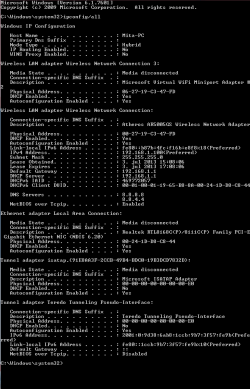
Here is the screenshot of ipconfig
 

Attachments

  • image.png
    image.png
    14.5 KB · Views: 3

My Computer

OS
Windows 7 Professional x64
CPU
Intel Core 2 Duo E7500 @ 2.93 GHz
Motherboard
Gigabyte EP45-UD3LR
Monitor(s) Displays
Samsung SyncMaster 2333HD and LG FLATRON L1753S
Screen Resolution
1920x1080
Please follow the same steps as stated above :)
 

My Computer

Computer type
PC/Desktop
Computer Manufacturer/Model Number
Custom Built
OS
Windows 7 Professional x64 SP1 ; Windows Server 2012 R2 Standard
CPU
Intel Core i5 2400 @ 3.10GHz
Motherboard
Foxconn H67MP-S/-V/H67MP
Memory
8.0GB DDR3 @ 665MHz (2GBx4)
Graphics Card(s)
AMD Radeon HD 6870
Sound Card
Realtek High Definition Audio
Monitor(s) Displays
AOC 2243W & SMB1930NW
Screen Resolution
1440x900 & 1920x1080
Hard Drives
977GB Seagate ST31000524AS ATA Drive (SATA)
250GB WD iSCSI attached Drive
PSU
750W Gaming PSU
Case
Novatech Night
Cooling
Fan
Keyboard
Dell Standard PS/2 Keyboard
Mouse
R.A.T 07 Gaming Mouse
Internet Speed
Download: 10 Mbps Ping: 30ms Upload: 0.81 Mbps
Browser
Google Chrome
Other Info
Optiarc DVD RW AD-5260S ATA Device
I tried before to set up DNS to 'Obtain Automatically', but again nothing was changed :)
In Chrome I get "This webpage is not available" error, in Firefox I get 'Unable to connect' error and in IE I get 'this page cannot be displayed' error :)
 

My Computer

OS
Windows 7 Professional x64
CPU
Intel Core 2 Duo E7500 @ 2.93 GHz
Motherboard
Gigabyte EP45-UD3LR
Monitor(s) Displays
Samsung SyncMaster 2333HD and LG FLATRON L1753S
Screen Resolution
1920x1080
Could you please try in Safe mode With Networking (Option One) - http://www.sevenforums.com/tutorials/69585-safe-mode.html

This will see if there are any third party applications which could affect the connection. You said you have pinged using cmd - What did you ping? Was a website or a device on your network? If a device could you please do

Code:
 ping www.google.co.uk

and then try :

Code:
tracert www.google.co.uk
Please post back your results of these :)

Josh
 

My Computer

Computer type
PC/Desktop
Computer Manufacturer/Model Number
Custom Built
OS
Windows 7 Professional x64 SP1 ; Windows Server 2012 R2 Standard
CPU
Intel Core i5 2400 @ 3.10GHz
Motherboard
Foxconn H67MP-S/-V/H67MP
Memory
8.0GB DDR3 @ 665MHz (2GBx4)
Graphics Card(s)
AMD Radeon HD 6870
Sound Card
Realtek High Definition Audio
Monitor(s) Displays
AOC 2243W & SMB1930NW
Screen Resolution
1440x900 & 1920x1080
Hard Drives
977GB Seagate ST31000524AS ATA Drive (SATA)
250GB WD iSCSI attached Drive
PSU
750W Gaming PSU
Case
Novatech Night
Cooling
Fan
Keyboard
Dell Standard PS/2 Keyboard
Mouse
R.A.T 07 Gaming Mouse
Internet Speed
Download: 10 Mbps Ping: 30ms Upload: 0.81 Mbps
Browser
Google Chrome
Other Info
Optiarc DVD RW AD-5260S ATA Device
I pinged google.com and IPs of devices in my network. Now I will try to open in Safe Mode and do trecert and ping again and I will post screenshots then. :)
 

My Computer

OS
Windows 7 Professional x64
CPU
Intel Core 2 Duo E7500 @ 2.93 GHz
Motherboard
Gigabyte EP45-UD3LR
Monitor(s) Displays
Samsung SyncMaster 2333HD and LG FLATRON L1753S
Screen Resolution
1920x1080
Yes, it works in Safe Mode, but I can't figure out what program is blocking access, but I doubt that this problem has something to do with program "Hide My IP", I downloaded it several days ago just to see how it forks and what it affects. And since then my browsing speed was slowing down until access was completely blocked. I uninstaled that program but I supose that it left some kind of trace in my copmuter :)
 

Attachments

  • ping.png
    ping.png
    6.8 KB · Views: 3

My Computer

OS
Windows 7 Professional x64
CPU
Intel Core 2 Duo E7500 @ 2.93 GHz
Motherboard
Gigabyte EP45-UD3LR
Monitor(s) Displays
Samsung SyncMaster 2333HD and LG FLATRON L1753S
Screen Resolution
1920x1080
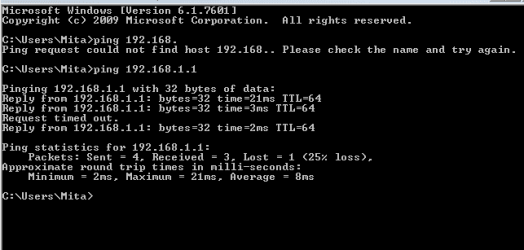
Your machine isn't able to find a route to the internet and is calling webpages from cache. Could you please ping 192.168.1.1 - Do you receive a response?

Also could you please complete a system restore to a point before the Hide my IP was installed and when you didn't have this issue - http://www.sevenforums.com/tutorials/700-system-restore.html
 

My Computer

Computer type
PC/Desktop
Computer Manufacturer/Model Number
Custom Built
OS
Windows 7 Professional x64 SP1 ; Windows Server 2012 R2 Standard
CPU
Intel Core i5 2400 @ 3.10GHz
Motherboard
Foxconn H67MP-S/-V/H67MP
Memory
8.0GB DDR3 @ 665MHz (2GBx4)
Graphics Card(s)
AMD Radeon HD 6870
Sound Card
Realtek High Definition Audio
Monitor(s) Displays
AOC 2243W & SMB1930NW
Screen Resolution
1440x900 & 1920x1080
Hard Drives
977GB Seagate ST31000524AS ATA Drive (SATA)
250GB WD iSCSI attached Drive
PSU
750W Gaming PSU
Case
Novatech Night
Cooling
Fan
Keyboard
Dell Standard PS/2 Keyboard
Mouse
R.A.T 07 Gaming Mouse
Internet Speed
Download: 10 Mbps Ping: 30ms Upload: 0.81 Mbps
Browser
Google Chrome
Other Info
Optiarc DVD RW AD-5260S ATA Device
Here it is. And about System restore, when that guy was installing my system (several years ago, back then I knew nothing abouth PCs), he disabled it, and I have no restore points now (I am felling so shamed now :)) ).
 

Attachments

  • 192_168_1_1.png
    192_168_1_1.png
    4.1 KB · Views: 2

My Computer

OS
Windows 7 Professional x64
CPU
Intel Core 2 Duo E7500 @ 2.93 GHz
Motherboard
Gigabyte EP45-UD3LR
Monitor(s) Displays
Samsung SyncMaster 2333HD and LG FLATRON L1753S
Screen Resolution
1920x1080
Those pings are rather high for a default gateway. You said that your connection worked in safe mode. Could you please follow this tutorial to trial and error what applications could be causing the issue. Please be advised that this is a pain and can be a long process however since there isn't a system restore point there is no other way of identifying what application is causing the issue

http://www.sevenforums.com/tutorials/179159-troubleshoot-application-conflicts-performing-clean-startup.html

Make sure you uncheck any anti-virus software temporarily since this is a suspect as well

Also while you are troubleshooting could you please turn on system restore so that restore points are made. They do eat up Harddrive space but in desperate measures it can be a life saver and should never be turned off - http://www.sevenforums.com/tutorials/81499-system-restore-configuration-enable-disable.html


Hope This Helps,
Josh! :)
 

My Computer

Computer type
PC/Desktop
Computer Manufacturer/Model Number
Custom Built
OS
Windows 7 Professional x64 SP1 ; Windows Server 2012 R2 Standard
CPU
Intel Core i5 2400 @ 3.10GHz
Motherboard
Foxconn H67MP-S/-V/H67MP
Memory
8.0GB DDR3 @ 665MHz (2GBx4)
Graphics Card(s)
AMD Radeon HD 6870
Sound Card
Realtek High Definition Audio
Monitor(s) Displays
AOC 2243W & SMB1930NW
Screen Resolution
1440x900 & 1920x1080
Hard Drives
977GB Seagate ST31000524AS ATA Drive (SATA)
250GB WD iSCSI attached Drive
PSU
750W Gaming PSU
Case
Novatech Night
Cooling
Fan
Keyboard
Dell Standard PS/2 Keyboard
Mouse
R.A.T 07 Gaming Mouse
Internet Speed
Download: 10 Mbps Ping: 30ms Upload: 0.81 Mbps
Browser
Google Chrome
Other Info
Optiarc DVD RW AD-5260S ATA Device
When I go to any site, in adress bar I get message that all cookies are blocked (screenshot), then when I go to 'Manage cookie blocking', this window pops out (screenshot), when I click to puzzle icon it shows me this box (screenshot), but I haven't any extension with similar icon (screenshot). Maybe this will help a little?
 

My Computer

OS
Windows 7 Professional x64
CPU
Intel Core 2 Duo E7500 @ 2.93 GHz
Motherboard
Gigabyte EP45-UD3LR
Monitor(s) Displays
Samsung SyncMaster 2333HD and LG FLATRON L1753S
Screen Resolution
1920x1080
Thank you for providing that information. While it is possible for it to block the access it would not explain the other Browsers issue. As a process of elimination could you uncheck the 'Enabled' box on all extensions in Google Chrome and then test connectivity.

Many Thanks,
Josh! :)
 

My Computer

Computer type
PC/Desktop
Computer Manufacturer/Model Number
Custom Built
OS
Windows 7 Professional x64 SP1 ; Windows Server 2012 R2 Standard
CPU
Intel Core i5 2400 @ 3.10GHz
Motherboard
Foxconn H67MP-S/-V/H67MP
Memory
8.0GB DDR3 @ 665MHz (2GBx4)
Graphics Card(s)
AMD Radeon HD 6870
Sound Card
Realtek High Definition Audio
Monitor(s) Displays
AOC 2243W & SMB1930NW
Screen Resolution
1440x900 & 1920x1080
Hard Drives
977GB Seagate ST31000524AS ATA Drive (SATA)
250GB WD iSCSI attached Drive
PSU
750W Gaming PSU
Case
Novatech Night
Cooling
Fan
Keyboard
Dell Standard PS/2 Keyboard
Mouse
R.A.T 07 Gaming Mouse
Internet Speed
Download: 10 Mbps Ping: 30ms Upload: 0.81 Mbps
Browser
Google Chrome
Other Info
Optiarc DVD RW AD-5260S ATA Device
I disabled all extensions and, as expected, no results (but cookies are not blocked any more), I tried Troubleshoot 'Application Conflicts by Performing a Clean Startup' but after first step I saw no results, and I stoped using that method (as said in tutorial). Now I suppose that problem is in programs that runs in Clean Startup, and don't runs in Safe Mode, if there are some. If there are no such programs, I'm afraid that maybe there is some kond of virus im my PC which antivirus programs can't recognize :sarc:. And thank you sooooo much for your help so fair :)
 

My Computer

OS
Windows 7 Professional x64
CPU
Intel Core 2 Duo E7500 @ 2.93 GHz
Motherboard
Gigabyte EP45-UD3LR
Monitor(s) Displays
Samsung SyncMaster 2333HD and LG FLATRON L1753S
Screen Resolution
1920x1080
It is possible that a Virus could do this. Typically a clean boot won't disable the A/V however safe mode will. My only and last possible solution I can think of is that your Anti-Virus and firewall is causing this issue. What is your Anti-Virus? If you can could you temporarily uninstall this and then test? If it still doesn't work then the only other option I could suggest is a clean fresh install especially if you suspect your machine to have been compromised :(

Josh
 

My Computer

Computer type
PC/Desktop
Computer Manufacturer/Model Number
Custom Built
OS
Windows 7 Professional x64 SP1 ; Windows Server 2012 R2 Standard
CPU
Intel Core i5 2400 @ 3.10GHz
Motherboard
Foxconn H67MP-S/-V/H67MP
Memory
8.0GB DDR3 @ 665MHz (2GBx4)
Graphics Card(s)
AMD Radeon HD 6870
Sound Card
Realtek High Definition Audio
Monitor(s) Displays
AOC 2243W & SMB1930NW
Screen Resolution
1440x900 & 1920x1080
Hard Drives
977GB Seagate ST31000524AS ATA Drive (SATA)
250GB WD iSCSI attached Drive
PSU
750W Gaming PSU
Case
Novatech Night
Cooling
Fan
Keyboard
Dell Standard PS/2 Keyboard
Mouse
R.A.T 07 Gaming Mouse
Internet Speed
Download: 10 Mbps Ping: 30ms Upload: 0.81 Mbps
Browser
Google Chrome
Other Info
Optiarc DVD RW AD-5260S ATA Device
I'm using AVG Internet Security 2012. Now I'm uninstalling it and then we will see what happens.
 

My Computer

OS
Windows 7 Professional x64
CPU
Intel Core 2 Duo E7500 @ 2.93 GHz
Motherboard
Gigabyte EP45-UD3LR
Monitor(s) Displays
Samsung SyncMaster 2333HD and LG FLATRON L1753S
Screen Resolution
1920x1080
I uninstalled AVG, and and there was no changes, then I installed 'Malwarebytes Anti-Malware' and runned slow scan, it found some malware, I deleted it and reboot system, after that I ran scan again but it showed two infected files (sceenshot), I tried to delete it several times but i couldn't. Then I copied file location from log, but it couldn't find the file (screenshot of log, screenshot of error message). Then I tried to go to file location from Malwarebytes (screenshot) and it took me to Registry Editor (screenshot). Now I don't know what to do, any ideas? :)
 

My Computer

OS
Windows 7 Professional x64
CPU
Intel Core 2 Duo E7500 @ 2.93 GHz
Motherboard
Gigabyte EP45-UD3LR
Monitor(s) Displays
Samsung SyncMaster 2333HD and LG FLATRON L1753S
Screen Resolution
1920x1080
Clean install I think :( That is the only way you are going to know that your machine is free from malware. I can see if I can contact security specialist to try and help for you if you would like however there is no guarantee that it'll work.

For a clean install follow this tutorial - http://www.sevenforums.com/tutorials/1649-clean-install-windows-7-a.html

   Warning
Any personal files and programs will be erased upon a clean installation. Please backup your personal files before doing so


If you wish to backup your personal files I would follow this tutorial (I understand that you are able to boot into your machine however this method allows you to copy your personal files without the risk of copying any malware with it which could infect the new install) - Use Ubuntu Live CD to Backup Files from Your Dead Windows Computer

If you can make the disc on a different machine than the one suffering from the infection

Josh
 

My Computer

Computer type
PC/Desktop
Computer Manufacturer/Model Number
Custom Built
OS
Windows 7 Professional x64 SP1 ; Windows Server 2012 R2 Standard
CPU
Intel Core i5 2400 @ 3.10GHz
Motherboard
Foxconn H67MP-S/-V/H67MP
Memory
8.0GB DDR3 @ 665MHz (2GBx4)
Graphics Card(s)
AMD Radeon HD 6870
Sound Card
Realtek High Definition Audio
Monitor(s) Displays
AOC 2243W & SMB1930NW
Screen Resolution
1440x900 & 1920x1080
Hard Drives
977GB Seagate ST31000524AS ATA Drive (SATA)
250GB WD iSCSI attached Drive
PSU
750W Gaming PSU
Case
Novatech Night
Cooling
Fan
Keyboard
Dell Standard PS/2 Keyboard
Mouse
R.A.T 07 Gaming Mouse
Internet Speed
Download: 10 Mbps Ping: 30ms Upload: 0.81 Mbps
Browser
Google Chrome
Other Info
Optiarc DVD RW AD-5260S ATA Device
I reinstalled Windows and now it works fine... Thanks so much anyway :)
 

My Computer

OS
Windows 7 Professional x64
CPU
Intel Core 2 Duo E7500 @ 2.93 GHz
Motherboard
Gigabyte EP45-UD3LR
Monitor(s) Displays
Samsung SyncMaster 2333HD and LG FLATRON L1753S
Screen Resolution
1920x1080
Back
Top