Solved I can't access removable storage...

Heroformosa

New member
Local time
8:18 PM
Messages
6
I've just got a new HP i5 desk-top running W7 Professional (having taken advice not to go for W8) and have put the files I want to transfer from my old XP machine onto an external hard drive (EHD). However, when I plug in and try to open the EHD I'm told 'You don't currently have permission to access this folder', and to 'Click Continue to permanently get access this folder'. A couple of steps down the line I'm told to "use the security tab", but there's no 'security tab' in the dialogue box for external drives (the exact same thing happens when I try to open a stick/pen drive). I've looked on various forums for the solution (including this one) and everyone refers to going through the 'security tab' route in what seems a simple process, but all these folk are talking about being denied access to a file/drive which is already in their computer or network - not removable storage, and if I look at the properties of these, yes, they've all got a 'security tab' associated with them.

Thanks for any help anyone can give on this.
 

My Computer

Computer type
PC/Desktop
Computer Manufacturer/Model Number
HP ProDesk 400 G1 SFF
OS
Windows 7 Professional 64 bit
CPU
i5
Memory
4 GB
Antivirus
AVG free
Browser
Chrome
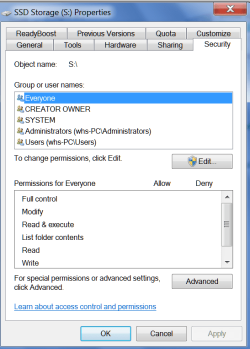
Are you saying that there is no security tab in the properties of those drives - like this ??
 

Attachments

  • 2015-02-09_1643.png
    2015-02-09_1643.png
    23.4 KB · Views: 0

My Computer

Computer Manufacturer/Model Number
HP, Dell, Gateway, Toshiba - 4 laptops and 2 desktops
OS
Vista, Windows7, Mint Mate, Zorin, Windows 8
CPU
from 1.6GHz Duo to i7
Monitor(s) Displays
2x HP w2207
Hard Drives
5x HDD, 7x SSD, 12x Externals
Keyboard
with trackball - no mices
Mouse
Trackball mice
Internet Speed
DSL 6000
Yup, that's exactly it: no security tab. The tabs shown under 'properties' are: General; Tools; Hardware; Sharing; ReadyBoost; Customize. Despite its name, 'Sharing' offers no joy (that I can work out anyway).
 

My Computer

Computer type
PC/Desktop
Computer Manufacturer/Model Number
HP ProDesk 400 G1 SFF
OS
Windows 7 Professional 64 bit
CPU
i5
Memory
4 GB
Antivirus
AVG free
Browser
Chrome
Among other things I get the message that 'You have been denied permission to access this folder' as if denied by the administrator - but that's me! I know many business computers in offices have their usb ports locked to prevent users breaching security by using stick drives - is that what's happening here? Presumably if so I can override it as administrator, and get on with my work.....and life.
 

My Computer

Computer type
PC/Desktop
Computer Manufacturer/Model Number
HP ProDesk 400 G1 SFF
OS
Windows 7 Professional 64 bit
CPU
i5
Memory
4 GB
Antivirus
AVG free
Browser
Chrome

My Computer

Computer Manufacturer/Model Number
HP, Dell, Gateway, Toshiba - 4 laptops and 2 desktops
OS
Vista, Windows7, Mint Mate, Zorin, Windows 8
CPU
from 1.6GHz Duo to i7
Monitor(s) Displays
2x HP w2207
Hard Drives
5x HDD, 7x SSD, 12x Externals
Keyboard
with trackball - no mices
Mouse
Trackball mice
Internet Speed
DSL 6000
In an effort to fix it I downloaded the 'Take Ownership' context menu option (saw it on another thread) before coming on here but that doesn't work in this instance - yes, it goes through the motions of doing something, but it doesn't give me access to the drives!
I've not tried changing the permissions on the old XP machine - but I've never had this problem before and can quite happily use those same EHD and stick drives on my laptop running W7 Home Premium. I'll try that tomorrow...
 

My Computer

Computer type
PC/Desktop
Computer Manufacturer/Model Number
HP ProDesk 400 G1 SFF
OS
Windows 7 Professional 64 bit
CPU
i5
Memory
4 GB
Antivirus
AVG free
Browser
Chrome

My Computer

Computer type
PC/Desktop
Computer Manufacturer/Model Number
Home made Desktop
OS
Windows 10 Pro. 64/ version 1709 Windows 7 Pro/64
CPU
Intel i7-6800K @ 4.3
Motherboard
ASUS X-99 Deluxe II
Memory
Corsair Platinum 16 gig @2400
Graphics Card(s)
EVGA GTX 1070 OC
Monitor(s) Displays
Asus 27" LED LCD/VE278Q
Screen Resolution
1920-1080 or 1280-720 HDMI
Hard Drives
INTEL SSD 730-240 Gb Sata 3.0/
PSU
EVGA Platium 1200W
Case
Phanteks Luxe Tempered Glass 8 fans/ one radiator
Cooling
XSPC/ Water Cooled CPU
Keyboard
Das 4 Professional
Mouse
Logitech M705/MX Anywhere 2-S
Internet Speed
100 mbits
Antivirus
Microsoft Security Essentials/ Malwarebytes Premium 3.0/ SAS
Browser
I.E. 11 default/Firefox/ ISP Time Warner Cable/Spectrum
Other Info
LG BluRay Burner/
Sound system-KLipsch-THX/
Icy Dock ssd Hot Swap bays.
Here's the screen shot (with just a stick drive "MOV" plugged in). Meanwhile I'm off to explore HP for a solution - there may be something in that 'HP tools' in the E: drive....
 

Attachments

  • Capture 1.PNG
    Capture 1.PNG
    14.6 KB · Views: 1

My Computer

Computer type
PC/Desktop
Computer Manufacturer/Model Number
HP ProDesk 400 G1 SFF
OS
Windows 7 Professional 64 bit
CPU
i5
Memory
4 GB
Antivirus
AVG free
Browser
Chrome
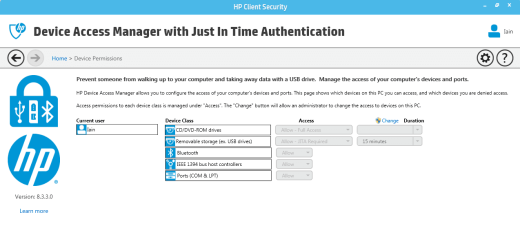
Got it! It was the HP Thought Police denying access to USB ports for removable storage devices. Searching through the HP Help and Support programme in 'All Programs' I came across this screen, and I changed the settings to allow full access - Bingo! Thanks for the hand-holding to get me there!
 

Attachments

  • HP security 1.PNG
    HP security 1.PNG
    25.1 KB · Views: 2

My Computer

Computer type
PC/Desktop
Computer Manufacturer/Model Number
HP ProDesk 400 G1 SFF
OS
Windows 7 Professional 64 bit
CPU
i5
Memory
4 GB
Antivirus
AVG free
Browser
Chrome
Thank you for posting back how you fixed the problem.
That information just might help another H.P. user.
 

My Computer

Computer type
PC/Desktop
Computer Manufacturer/Model Number
Home made Desktop
OS
Windows 10 Pro. 64/ version 1709 Windows 7 Pro/64
CPU
Intel i7-6800K @ 4.3
Motherboard
ASUS X-99 Deluxe II
Memory
Corsair Platinum 16 gig @2400
Graphics Card(s)
EVGA GTX 1070 OC
Monitor(s) Displays
Asus 27" LED LCD/VE278Q
Screen Resolution
1920-1080 or 1280-720 HDMI
Hard Drives
INTEL SSD 730-240 Gb Sata 3.0/
PSU
EVGA Platium 1200W
Case
Phanteks Luxe Tempered Glass 8 fans/ one radiator
Cooling
XSPC/ Water Cooled CPU
Keyboard
Das 4 Professional
Mouse
Logitech M705/MX Anywhere 2-S
Internet Speed
100 mbits
Antivirus
Microsoft Security Essentials/ Malwarebytes Premium 3.0/ SAS
Browser
I.E. 11 default/Firefox/ ISP Time Warner Cable/Spectrum
Other Info
LG BluRay Burner/
Sound system-KLipsch-THX/
Icy Dock ssd Hot Swap bays.
It just did. I had almost the identical problem, and fixed it with this thread.

Thank you!!!
 

My Computer

Computer type
PC/Desktop
OS
Windows 7 Pro, SP-1 64 bit
Welcome to the forum Islandtyme.
Good to hear that Heroformosa post helped you.
 

My Computer

Computer type
PC/Desktop
Computer Manufacturer/Model Number
Home made Desktop
OS
Windows 10 Pro. 64/ version 1709 Windows 7 Pro/64
CPU
Intel i7-6800K @ 4.3
Motherboard
ASUS X-99 Deluxe II
Memory
Corsair Platinum 16 gig @2400
Graphics Card(s)
EVGA GTX 1070 OC
Monitor(s) Displays
Asus 27" LED LCD/VE278Q
Screen Resolution
1920-1080 or 1280-720 HDMI
Hard Drives
INTEL SSD 730-240 Gb Sata 3.0/
PSU
EVGA Platium 1200W
Case
Phanteks Luxe Tempered Glass 8 fans/ one radiator
Cooling
XSPC/ Water Cooled CPU
Keyboard
Das 4 Professional
Mouse
Logitech M705/MX Anywhere 2-S
Internet Speed
100 mbits
Antivirus
Microsoft Security Essentials/ Malwarebytes Premium 3.0/ SAS
Browser
I.E. 11 default/Firefox/ ISP Time Warner Cable/Spectrum
Other Info
LG BluRay Burner/
Sound system-KLipsch-THX/
Icy Dock ssd Hot Swap bays.
Back
Top