Solved I can't change my desktop background

clud7

New member
Local time
12:32 PM
Messages
3
Location
Athens
Hello guys this is my first post in this forum.

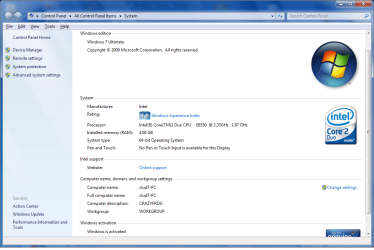
my problem start yesterday when i upgrade my vista x64 to windows 7 x64 ultimate

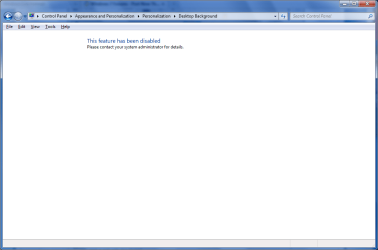
all was perfect but when i try to change my desktop background i cant...

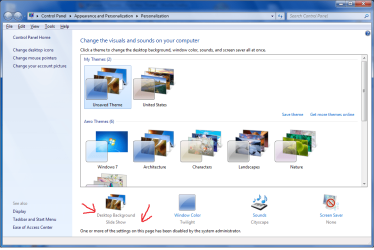
first i try from personalize but...


after i try from control panel and again i cant do anything :/


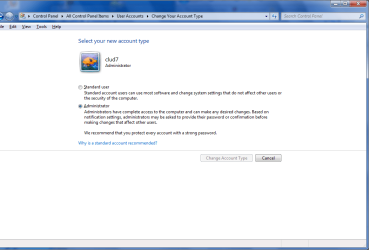
pliz can you help me? i am administrator in my computer
 

Attachments
  • Untitled.png
    Untitled.png
    89.4 KB · Views: 4,463
  • Untitled3.png
    Untitled3.png
    24.5 KB · Views: 2,856
  • Untitled4.png
    Untitled4.png
    33.8 KB · Views: 2,502
  • Untitled5.png
    Untitled5.png
    61.5 KB · Views: 2,392

My Computer My Computer

OS
Windows 7 x64 Bit
CPU
Intel(R) Core(TM) 2 Duo E6550 @ 2.33Ghz
Motherboard
Gigabyte 946GMX-S2
Memory
DDR2 4096MB
Graphics Card(s)
GeForce 9800GT
The quick answer is to back up your data using Easy Transfer and do a clean install. I will leave it to the others to find a way to correct that specific problem.
 

My Computer My Computer

Computer Manufacturer/Model Number
Custom
OS
Windows 7 Professional x64
CPU
Intel i7 2600K OC'd @ 4620 MHz
Motherboard
Asus P8Z68-V Pro
Memory
16GB GSkill Sniper 2133 Mhz (4x4GB)
Graphics Card(s)
EVGA GeForce GTX 480 SuperClocked+
Sound Card
Realtek High Definition Audio
Monitor(s) Displays
2x Acer S273HLbmii 27"
Screen Resolution
2 x 1920x1080
Hard Drives
64GB Crucial M4 SSD

Storage: Hitachi 1TB 5400RPM, Samsung 1.5TB 5400RPM
PSU
Corsair HW Series 750w (modular)
Case
Cooler Master HAF 932 Advanced Blue Edition
Cooling
CM Hyper 212+ CPU cooler, 3x 230mm + 1x 140mm case fans
Keyboard
Logitech MK320 (wireless)
Mouse
Logitech MK320 (wireless)
Internet Speed
30 Mb/s : 2 Mb/s
Open a command prompt as admin and run "sfc" to make sure nothing got corrupted during the upgrade.
 

My Computer My Computer

Computer Manufacturer/Model Number
Custom Build
OS
Windows 7 Ultimate x64 SP1
CPU
AMD Phenom II 1090 3.2 six core
Motherboard
MSI 890FXA-GD65
Memory
16 gig DDR3
Graphics Card(s)
MSI R6950 2gig
Sound Card
on board
Monitor(s) Displays
Acer 23inch led
Screen Resolution
1900x1080 widescreen
Hard Drives
Seagate 1tb SATA6
2x 1tb HITACHI Deskstar
PSU
CORSAIR Enthusiast Series TX750 V2 750W
Case
CoolMaster HAF 922
Cooling
Box AMD Heatsink/Fan
Internet Speed
Cable 12Mbps/3Mbps
Open a command prompt as admin and run "sfc" to make sure nothing got corrupted during the upgrade.

I run the command: "sfc /scannow"

"Windows Resource Protection did not find any integrity violations"

any idea?
 

My Computer My Computer

OS
Windows 7 x64 Bit
CPU
Intel(R) Core(TM) 2 Duo E6550 @ 2.33Ghz
Motherboard
Gigabyte 946GMX-S2
Memory
DDR2 4096MB
Graphics Card(s)
GeForce 9800GT
Great! Thanks for posting the solution for us.
 

My Computer My Computer

Computer Manufacturer/Model Number
Custom
OS
Windows 7 Professional x64
CPU
Intel i7 2600K OC'd @ 4620 MHz
Motherboard
Asus P8Z68-V Pro
Memory
16GB GSkill Sniper 2133 Mhz (4x4GB)
Graphics Card(s)
EVGA GeForce GTX 480 SuperClocked+
Sound Card
Realtek High Definition Audio
Monitor(s) Displays
2x Acer S273HLbmii 27"
Screen Resolution
2 x 1920x1080
Hard Drives
64GB Crucial M4 SSD

Storage: Hitachi 1TB 5400RPM, Samsung 1.5TB 5400RPM
PSU
Corsair HW Series 750w (modular)
Case
Cooler Master HAF 932 Advanced Blue Edition
Cooling
CM Hyper 212+ CPU cooler, 3x 230mm + 1x 140mm case fans
Keyboard
Logitech MK320 (wireless)
Mouse
Logitech MK320 (wireless)
Internet Speed
30 Mb/s : 2 Mb/s
That is the same problem as me and I fixed it by going to search gpedit.msc then useraccounts, adminstrative templates, control pannel, personlation, if you see anything that is enabled then change it to not configuued.

I hope this helps because it helped me.

Ps there is another setting that can stop you from changing it called Desktop wallpaper,
 

My Computer My Computer

OS
Windows 7 32bit
cant change ur window 7 background

heys guys i was having the same problem when i upgraded my window 7 starter to window 7 ultimate ..i tried many tricks o=available on the net,even went to microsoft site nothing worked...but surprisinly i found the trick: just try this trick it may help u

just type gpedit.msc in the search box,click on the item and go to the user configuration then select administartive templet and then desktop..again select desktop and then check there if all the items are set to not configured....if any item is set to enabled or disabled set it to "not configured"...it 100% worked for me..similarly u can edit their by selecting other options also gpedit is the place where u can switch on or off ur personalisation section or other things...i know it will sure help u sure for any more quiries jst mail me...
 

My Computer My Computer

OS
window 7 ultimate x 64
That is the same problem as me and I fixed it by going to search gpedit.msc then useraccounts, adminstrative templates, control pannel, personlation, if you see anything that is enabled then change it to not configuued.

I hope this helps because it helped me.

Ps there is another setting that can stop you from changing it called Desktop wallpaper,

thnk u so much for ur precious help...
 

My Computer My Computer

OS
window 7 ultimate x 64
Back
Top