I cant enable direct draw acceleration

For my two cents worth I would drop in 2GB more RAM a new drive and an OEM 7, then use the old rive for whatever and retrieve data from it.
If you don't realize, all of the memory upgrades are already exhausted for this computer. It can only hold a maximum of 2 gigabytes. This computer already started out with 2 GB of RAM.

You also can't fit another hard drive to your computer, unless you make an external enclosure for it.
The specs perhaps I am not looking in the right place but are pretty vague - DDR 1/2/3 ?what
Perhaps you did miss it by that much -- PC2-5300

It is DDR2 SDRAM rated at 667 MHz. However the IGD eats some of the preinstalled memory already.
 

My Computer My Computer

Computer type
PC/Desktop
Computer Manufacturer/Model Number
Custom
OS
Microsoft Windows 7 Home Premium 64-bit Service Pack 1
CPU
AMD A10-6800K APU with Radeon(tm)™ HD Graphics 4100
Motherboard
ASRock FM2A85X Extreme4-M
Memory
(2) G.Skill F3-12800CL10-8GBXL
Graphics Card(s)
ASUS R7 250 Series (0x6610)
Sound Card
Realtek High Definition Audio
Monitor(s) Displays
Acer X213H LCD monitor, 21"
Screen Resolution
1920 x 1080 x 32 bits @ 60 Hz
Hard Drives
WD Black, 1.0TB, WDC WD1002FAEX-00Z3A0
PSU
Rosewill Quark-650
Case
Raidmax Comet SECC Steel ATX Mid Tower Computer Case
Cooling
1 x 80mm + 2 x 120mm + Stock cooler
Mouse
Gear Head Wireless Optical 5-button mouse
Internet Speed
FTTx 6000 / 1000
Antivirus
Avast! Free Antivirus 2015.10.0.2208
Browser
Google Chrome Version 40.0.2214.115
Other Info
*AMD Dual-Graphics
*Uses OpenDNS
*Uses Folding@Home
*HP 16x Super-Multi DVD Writer
*Superspeed 74-in-1 Card Reader
*Maximum overclock has not been determined.
So any ideals how I can turn on directdraw acceleration and the other two options so I can play sims 2 double deluxe?
 

My Computer My Computer

Computer type
PC/Desktop
OS
Microsoft Windows 7 Home Premium 32-bit 7601 Multiprocessor Free Service Pack 1
CPU
Intel(R) Core(TM)2 CPU T7200 @ 2.00GHz
Motherboard
Sony Corporation VAIO
Memory
2.00 GB
Graphics Card(s)
Standard VGA Graphics Adapter
Sound Card
High Definition Audio Device
Monitor(s) Displays
1280x1024 display
Screen Resolution
0 x 0 x 0 bits (0 colors) @ 0 Hz
Hard Drives
WDC WD3200AAJS-00VWA0 ATA Device
For my two cents worth I would drop in 2GB more RAM a new drive and an OEM 7, then use the old rive for whatever and retrieve data from it.
If you don't realize, all of the memory upgrades are already exhausted for this computer. It can only hold a maximum of 2 gigabytes. This computer already started out with 2 GB of RAM.

You also can't fit another hard drive to your computer, unless you make an external enclosure for it.
The specs perhaps I am not looking in the right place but are pretty vague - DDR 1/2/3 ?what
Perhaps you did miss it by that much -- PC2-5300

It is DDR2 SDRAM rated at 667 MHz. However the IGD eats some of the preinstalled memory already.

Yep mate I do know what DDR2 means and yes I did did miss it along the way.

Well to be honest in this case then trying to run anything more than a verybasic OS with that much RAM is beyond this machine if indeed that is all the RAM that board will support. As for gaming.....:huh:
 

My Computer My Computer

Computer type
PC/Desktop
Computer Manufacturer/Model Number
Own build (new) Desk1 / Asus ROG Win 7 / Desk2 1st build
OS
Desk1 7 Home Prem / Desk2 10 Pro / Main lap Asus ROG 10 Pro 2 laptop Toshiba 7 Pro Asus P2520 7 & 10
CPU
Desk1 i5 3750K / Laptop i7 GTX 860M / Desk2 i5 2500
Motherboard
Desk1 Asus P877-V / Desk2 Gigabyte H67 UD3H / Laptop ?
Memory
Desk1 8GB (1866) / Desk2 16GB (1333) / Laptop 8Gb DDR3
Graphics Card(s)
Desk 1& 2NVidia GTX 650 & Laptops on board Intel
Sound Card
Desk 1 & 2 -XONAR DG Realtek High Def audio Laptop
Monitor(s) Displays
Desk 1 Benq HD 2450 / Desk2 Philips 24" / Laptop 17.5"
Screen Resolution
1920x1080 D1 & D2 & Laptop 1
Hard Drives
Desk1 Samsung 120GB 830 SSD
Asus ROG 256GB 850 Pro SSD
Desk2 Samsung 840 256 SSD
Toshiba 120GB EVO
PSU
Desk 1 Corsair HX 1050/ Laptop ? / Desk 2 Corsair HX 650
Case
Desk 1 Cooler HAF XM ? Toshiba laptop / Desk2 Coolermaster
Cooling
Fans on all Desk1 -2 Desk2 - all Coolermasters 5 Laptop ?
Keyboard
Desk 1 MS Sidewinder X6 Desk 2 MS Sidewinder X 4
Mouse
Desk 1&2 - Gigabyte MS 900 gamer - laptop - Logitec wireless
Internet Speed
ADSL2+
Other Info
One other Desktop (tester) and spare Toshba laptop both with SSD's
Running Kaspersky 2016 ISS on all machines config'd identically
Logitec audio stereo systems on each machine (x3)
Canon MG5250MFC
Router/modem TP-Link running WPA2SK
so i cant play it then? your lingo is over my head lol :)
 

My Computer My Computer

Computer type
PC/Desktop
OS
Microsoft Windows 7 Home Premium 32-bit 7601 Multiprocessor Free Service Pack 1
CPU
Intel(R) Core(TM)2 CPU T7200 @ 2.00GHz
Motherboard
Sony Corporation VAIO
Memory
2.00 GB
Graphics Card(s)
Standard VGA Graphics Adapter
Sound Card
High Definition Audio Device
Monitor(s) Displays
1280x1024 display
Screen Resolution
0 x 0 x 0 bits (0 colors) @ 0 Hz
Hard Drives
WDC WD3200AAJS-00VWA0 ATA Device
so i cant play it then? your lingo is over my head lol :)
Not saying you cannot play anything Sam just that with such little memory it might not play well at all. You can only try it if it does all well and good but 2GB of DDR2 my friend is not a real lot of memory to play with once the OS and the security etc take their chunk of it.
If there was some way of installing another 2GB RAM then it might be a different story.
But as I do not game that much I am not really in a position to say don't ry to game.

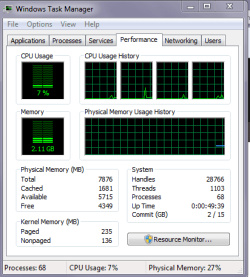
if you want to see how much memory is being used at any one time right click anywhere on the taskbar and open Task Manager > click on the Performance tab as in pic of my machine and I am just emailing at the moment and it will tell and show you how much RAM is being used and what total you have left as in my set up :)
 

Attachments

  • TM.PNG
    TM.PNG
    12.3 KB · Views: 2

My Computer My Computer

Computer type
PC/Desktop
Computer Manufacturer/Model Number
Own build (new) Desk1 / Asus ROG Win 7 / Desk2 1st build
OS
Desk1 7 Home Prem / Desk2 10 Pro / Main lap Asus ROG 10 Pro 2 laptop Toshiba 7 Pro Asus P2520 7 & 10
CPU
Desk1 i5 3750K / Laptop i7 GTX 860M / Desk2 i5 2500
Motherboard
Desk1 Asus P877-V / Desk2 Gigabyte H67 UD3H / Laptop ?
Memory
Desk1 8GB (1866) / Desk2 16GB (1333) / Laptop 8Gb DDR3
Graphics Card(s)
Desk 1& 2NVidia GTX 650 & Laptops on board Intel
Sound Card
Desk 1 & 2 -XONAR DG Realtek High Def audio Laptop
Monitor(s) Displays
Desk 1 Benq HD 2450 / Desk2 Philips 24" / Laptop 17.5"
Screen Resolution
1920x1080 D1 & D2 & Laptop 1
Hard Drives
Desk1 Samsung 120GB 830 SSD
Asus ROG 256GB 850 Pro SSD
Desk2 Samsung 840 256 SSD
Toshiba 120GB EVO
PSU
Desk 1 Corsair HX 1050/ Laptop ? / Desk 2 Corsair HX 650
Case
Desk 1 Cooler HAF XM ? Toshiba laptop / Desk2 Coolermaster
Cooling
Fans on all Desk1 -2 Desk2 - all Coolermasters 5 Laptop ?
Keyboard
Desk 1 MS Sidewinder X6 Desk 2 MS Sidewinder X 4
Mouse
Desk 1&2 - Gigabyte MS 900 gamer - laptop - Logitec wireless
Internet Speed
ADSL2+
Other Info
One other Desktop (tester) and spare Toshba laptop both with SSD's
Running Kaspersky 2016 ISS on all machines config'd identically
Logitec audio stereo systems on each machine (x3)
Canon MG5250MFC
Router/modem TP-Link running WPA2SK
so i cant play it then? your lingo is over my head lol :)
Not saying you cannot play anything Sam just that with such little memory it might not play well at all....
I think that ssamantha0724 has the game installed, but cannot run it without DirectDraw acceleration enabled... hence the original post asking what to do about that.

In my opinion, ssamantha0724 should ask the owner of the computer to read thru this thread and see if the owner wants to risk installing new video drivers per post #12 or post #19. Then spend the time to stop useless stuff from running to save RAM/CPU.

That said, if this is the game/requirements in question...
The Sims 2 System Requirements
...most any computer should play that.
 

My Computer My Computer

Computer type
Laptop
Computer Manufacturer/Model Number
Employer provided Dell Latitude
OS
W7 Pro SP1 64bit
CPU
i7
Memory
8GB
Graphics Card(s)
Intel HD Graphics
Hard Drives
crappy SSD
Antivirus
Employer mandated Symantec Endpoint Protection
Browser
Pale Moon 64bit, IE11 64bit & Chrome 64bit
Ok didn't know it would be that small like I said I don't game that much but I guess it would still be interesting to see how much memory is used up eh?
 

My Computer My Computer

Computer type
PC/Desktop
Computer Manufacturer/Model Number
Own build (new) Desk1 / Asus ROG Win 7 / Desk2 1st build
OS
Desk1 7 Home Prem / Desk2 10 Pro / Main lap Asus ROG 10 Pro 2 laptop Toshiba 7 Pro Asus P2520 7 & 10
CPU
Desk1 i5 3750K / Laptop i7 GTX 860M / Desk2 i5 2500
Motherboard
Desk1 Asus P877-V / Desk2 Gigabyte H67 UD3H / Laptop ?
Memory
Desk1 8GB (1866) / Desk2 16GB (1333) / Laptop 8Gb DDR3
Graphics Card(s)
Desk 1& 2NVidia GTX 650 & Laptops on board Intel
Sound Card
Desk 1 & 2 -XONAR DG Realtek High Def audio Laptop
Monitor(s) Displays
Desk 1 Benq HD 2450 / Desk2 Philips 24" / Laptop 17.5"
Screen Resolution
1920x1080 D1 & D2 & Laptop 1
Hard Drives
Desk1 Samsung 120GB 830 SSD
Asus ROG 256GB 850 Pro SSD
Desk2 Samsung 840 256 SSD
Toshiba 120GB EVO
PSU
Desk 1 Corsair HX 1050/ Laptop ? / Desk 2 Corsair HX 650
Case
Desk 1 Cooler HAF XM ? Toshiba laptop / Desk2 Coolermaster
Cooling
Fans on all Desk1 -2 Desk2 - all Coolermasters 5 Laptop ?
Keyboard
Desk 1 MS Sidewinder X6 Desk 2 MS Sidewinder X 4
Mouse
Desk 1&2 - Gigabyte MS 900 gamer - laptop - Logitec wireless
Internet Speed
ADSL2+
Other Info
One other Desktop (tester) and spare Toshba laptop both with SSD's
Running Kaspersky 2016 ISS on all machines config'd identically
Logitec audio stereo systems on each machine (x3)
Canon MG5250MFC
Router/modem TP-Link running WPA2SK
UsernameIssues : Yes that is the main problem im assuming.. I still and getting the same error code about directx 9.0 graphics... blah blah blah.. Ill have the owner take a look thanks.
 

My Computer My Computer

Computer type
PC/Desktop
OS
Microsoft Windows 7 Home Premium 32-bit 7601 Multiprocessor Free Service Pack 1
CPU
Intel(R) Core(TM)2 CPU T7200 @ 2.00GHz
Motherboard
Sony Corporation VAIO
Memory
2.00 GB
Graphics Card(s)
Standard VGA Graphics Adapter
Sound Card
High Definition Audio Device
Monitor(s) Displays
1280x1024 display
Screen Resolution
0 x 0 x 0 bits (0 colors) @ 0 Hz
Hard Drives
WDC WD3200AAJS-00VWA0 ATA Device

My Computer My Computer

Computer type
PC/Desktop
Computer Manufacturer/Model Number
Custom Build
OS
W7 Pro x64 SP1 | W10 Pro IP x64 | W8.1 Pro x64 VM | Linux Mint VM
CPU
i7-4790k @ 4GHz (4.4GHz Boost)
Motherboard
ASUS Sabertooth Z87 (BIOS Rev 2004)
Memory
16GB DDR3 Kingston HyperX Fury @ 1600MHz CL 9-9-9-27
Graphics Card(s)
EVGA GTX 980 Classified
Sound Card
Realtek Onboard
Monitor(s) Displays
Samsung S27D390
Screen Resolution
1920 x 1080
Hard Drives
240GB Intel 520 Series SSD |
Samsung 850 EVO 120GB SSD |
2TB WD Caviar Black |
2TB WD Caviar Green
PSU
Corsair HX850-80 Gold Modular
Case
Cooler Master Silencio 650
Cooling
Corsair H80i w/2 x Corsair SP120 | 2 x 120mm Noctua NF-S12B
Keyboard
Microsoft Sidewinder X4
Mouse
Gigabyte M6900 optical
Internet Speed
152mb
Antivirus
F-Secure
Browser
Firefox 38.0
Other Info
Backup Rig: Win 7 Pro 64-bit | AMD A10-5800k | ASUS F2A85-V Pro | 8GB Samsung DDR3 @1600MHz | 120GB Toshiba SDD | 2TB Seagate HDD | Cooler Master Silencio 550
Back
Top