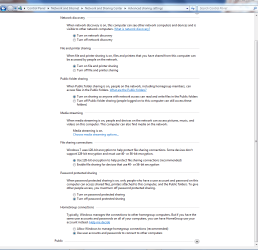
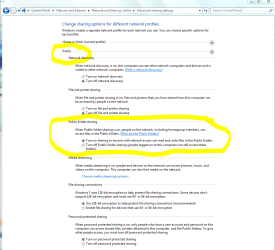
I cant Enable my public folder

andy8992

New member
Local time
4:59 PM
Messages
11
When i go into the sharing settings and i click on turn on sharing so that anyone with network acsess it selects, i save it then when i come back it isnt selected and i cant see my computer on my other machine. Please help.(im trying to get files from my xp machine)
 

My Computer

Computer Manufacturer/Model Number
HP
OS
windows 7
CPU
2.6 ghz something
Motherboard
nvidia uh...
Memory
3 bg
Graphics Card(s)
nvidia 9500 gt
Screen Resolution
1024x768
Internet Speed
wifi
go to Admin tools > Local security policy and enable the "Guest account status" and change Network access: Sharing and Security model to "Guest Only".

disable password protected sharing in Network and Sharing center

If you right-click on a folder and go to sharing it will tell you whether or not the share is password protected.
 

My Computer

Computer Manufacturer/Model Number
Too many to list.
OS
XP, Seven, 2008R2
CPU
AMD, Intel, VIA
Motherboard
Various
Memory
Corsair, Kingston, etc.
Graphics Card(s)
ATI, NVIDIA
Monitor(s) Displays
Samsung
Hard Drives
Maxtor, Western Digital
Keyboard
qwerty
Internet Speed
22 Mb/s @ home, 1 Gb/s @ server
Other Info
All of my systems still run fastest on XP 32-bit for the most part. Win7 is fun to play with, but I still prefer XP for raw speed, security, and functionality.
i dont see guest account status
 

My Computer

Computer Manufacturer/Model Number
HP
OS
windows 7
CPU
2.6 ghz something
Motherboard
nvidia uh...
Memory
3 bg
Graphics Card(s)
nvidia 9500 gt
Screen Resolution
1024x768
Internet Speed
wifi
Accounts: Guest account status

This security setting determines if the Guest account is enabled or disabled.

Default: Disabled.

Note:
If the Guest account is disabled and the security option Network Access: Sharing and Security Model for local accounts is set to Guest Only, network logons, such as those performed by the Microsoft Network Server (SMB Service), will fail.
 

My Computer

Computer Manufacturer/Model Number
Too many to list.
OS
XP, Seven, 2008R2
CPU
AMD, Intel, VIA
Motherboard
Various
Memory
Corsair, Kingston, etc.
Graphics Card(s)
ATI, NVIDIA
Monitor(s) Displays
Samsung
Hard Drives
Maxtor, Western Digital
Keyboard
qwerty
Internet Speed
22 Mb/s @ home, 1 Gb/s @ server
Other Info
All of my systems still run fastest on XP 32-bit for the most part. Win7 is fun to play with, but I still prefer XP for raw speed, security, and functionality.
BTW, I am assuming you are changing these settings on the Win7 box. I've already tested it on my network and it works. I can access the Public folder from my XP computer and upload files to the Win7 machine.
 

My Computer

Computer Manufacturer/Model Number
Too many to list.
OS
XP, Seven, 2008R2
CPU
AMD, Intel, VIA
Motherboard
Various
Memory
Corsair, Kingston, etc.
Graphics Card(s)
ATI, NVIDIA
Monitor(s) Displays
Samsung
Hard Drives
Maxtor, Western Digital
Keyboard
qwerty
Internet Speed
22 Mb/s @ home, 1 Gb/s @ server
Other Info
All of my systems still run fastest on XP 32-bit for the most part. Win7 is fun to play with, but I still prefer XP for raw speed, security, and functionality.
Untitled.png

I cant find any of that at all.im so confused ha
 

My Computer

Computer Manufacturer/Model Number
HP
OS
windows 7
CPU
2.6 ghz something
Motherboard
nvidia uh...
Memory
3 bg
Graphics Card(s)
nvidia 9500 gt
Screen Resolution
1024x768
Internet Speed
wifi
it's under local policies, security settings.
 

My Computer

Computer Manufacturer/Model Number
Too many to list.
OS
XP, Seven, 2008R2
CPU
AMD, Intel, VIA
Motherboard
Various
Memory
Corsair, Kingston, etc.
Graphics Card(s)
ATI, NVIDIA
Monitor(s) Displays
Samsung
Hard Drives
Maxtor, Western Digital
Keyboard
qwerty
Internet Speed
22 Mb/s @ home, 1 Gb/s @ server
Other Info
All of my systems still run fastest on XP 32-bit for the most part. Win7 is fun to play with, but I still prefer XP for raw speed, security, and functionality.
There is a bunch of stuff under security settings,there are a bunch of different folders and i dont see anything in anyone of these folders that says anything about guest or sharing.Sorry about needing step by step instructions
 

My Computer

Computer Manufacturer/Model Number
HP
OS
windows 7
CPU
2.6 ghz something
Motherboard
nvidia uh...
Memory
3 bg
Graphics Card(s)
nvidia 9500 gt
Screen Resolution
1024x768
Internet Speed
wifi
fire up Teamviewer, PM me your ID and I'll show you.
 

My Computer

Computer Manufacturer/Model Number
Too many to list.
OS
XP, Seven, 2008R2
CPU
AMD, Intel, VIA
Motherboard
Various
Memory
Corsair, Kingston, etc.
Graphics Card(s)
ATI, NVIDIA
Monitor(s) Displays
Samsung
Hard Drives
Maxtor, Western Digital
Keyboard
qwerty
Internet Speed
22 Mb/s @ home, 1 Gb/s @ server
Other Info
All of my systems still run fastest on XP 32-bit for the most part. Win7 is fun to play with, but I still prefer XP for raw speed, security, and functionality.
sent
 

My Computer

Computer Manufacturer/Model Number
HP
OS
windows 7
CPU
2.6 ghz something
Motherboard
nvidia uh...
Memory
3 bg
Graphics Card(s)
nvidia 9500 gt
Screen Resolution
1024x768
Internet Speed
wifi
I know you were anxious to get to sleep, so let us know tomorrow whether or not the changes I made worked for you.

I didn't get the chance to check everything, but if you need some more help just holler.

In case I'm not in the forum. The next thing I was going to do was right-click on C:\Users\Public (the public shared folder) and view sharing properties to make sure that Windows says "People without a user account and password for this computer can access folders shared with Everyone". If it does, then chances are you can now connect to that share with your XP computer and upload files.
 

My Computer

Computer Manufacturer/Model Number
Too many to list.
OS
XP, Seven, 2008R2
CPU
AMD, Intel, VIA
Motherboard
Various
Memory
Corsair, Kingston, etc.
Graphics Card(s)
ATI, NVIDIA
Monitor(s) Displays
Samsung
Hard Drives
Maxtor, Western Digital
Keyboard
qwerty
Internet Speed
22 Mb/s @ home, 1 Gb/s @ server
Other Info
All of my systems still run fastest on XP 32-bit for the most part. Win7 is fun to play with, but I still prefer XP for raw speed, security, and functionality.
When i go into the sharing settings and i click on turn on sharing so that anyone with network acsess it selects, i save it then when i come back it isnt selected and i cant see my computer on my other machine. Please help.(im trying to get files from my xp machine)

I only needed to do this and everything works. There is no need to mess with the guest account. Been sharing files between my XP machine and Win7 since build 7000 without issues. You will need to enable file sharing on the XP machine also.
 

Attachments

  • network sharing enabled.PNG
    network sharing enabled.PNG
    39 KB · Views: 60
  • network sharing public.PNG
    network sharing public.PNG
    38 KB · Views: 42

My Computer

Computer type
PC/Desktop
Computer Manufacturer/Model Number
Home built
OS
Windows 7 Ult, Windows 8.1 Pro,
CPU
Q9650-4.275GHz, E8600 4.5GHz, E6750-3.8GHz
Motherboard
Evga 780i FTW
Memory
G.Skill PC2 9600 1200Mhz 5 5 5 15 2T
Graphics Card(s)
GTX480
Sound Card
Asus Xonar D2
Monitor(s) Displays
HannsG
Screen Resolution
1680X1050
Hard Drives
GSkill Phoenix Pro 120GB SSD
PSU
ThermalTake Toughpower 1000Watt modular
Case
ThermalTake XaserV
Cooling
Xigmatek S1283
Keyboard
Logitech G15
Mouse
Logitech G9
Internet Speed
T1
Something was wrong on Andy's system. It wouldn't remember the setting for "public folder sharing". Neither one of the options were selected when I first went to it :/

Also, a computer on the home network should be configure to use the "Home" profile rather than the "Public" profile. "Public" is for public places like coffee shops or hotspots.
 

My Computer

Computer Manufacturer/Model Number
Too many to list.
OS
XP, Seven, 2008R2
CPU
AMD, Intel, VIA
Motherboard
Various
Memory
Corsair, Kingston, etc.
Graphics Card(s)
ATI, NVIDIA
Monitor(s) Displays
Samsung
Hard Drives
Maxtor, Western Digital
Keyboard
qwerty
Internet Speed
22 Mb/s @ home, 1 Gb/s @ server
Other Info
All of my systems still run fastest on XP 32-bit for the most part. Win7 is fun to play with, but I still prefer XP for raw speed, security, and functionality.
Something was wrong on Andy's system. It wouldn't remember the setting for "public folder sharing". Neither one of the options were selected when I first went to it :/

Also, a computer on the home network should be configure to use the "Home" profile rather than the "Public" profile. "Public" is for public places like coffee shops or hotspots.

I'm using the home network profile, public folder sharing is part of it. You can enable public file sharing from both public and home networks.
 

Attachments

  • public sharing on home network outlined.jpg
    public sharing on home network outlined.jpg
    107.7 KB · Views: 37
  • public folder sharing on.PNG
    public folder sharing on.PNG
    41.4 KB · Views: 40
Last edited:

My Computer

Computer type
PC/Desktop
Computer Manufacturer/Model Number
Home built
OS
Windows 7 Ult, Windows 8.1 Pro,
CPU
Q9650-4.275GHz, E8600 4.5GHz, E6750-3.8GHz
Motherboard
Evga 780i FTW
Memory
G.Skill PC2 9600 1200Mhz 5 5 5 15 2T
Graphics Card(s)
GTX480
Sound Card
Asus Xonar D2
Monitor(s) Displays
HannsG
Screen Resolution
1680X1050
Hard Drives
GSkill Phoenix Pro 120GB SSD
PSU
ThermalTake Toughpower 1000Watt modular
Case
ThermalTake XaserV
Cooling
Xigmatek S1283
Keyboard
Logitech G15
Mouse
Logitech G9
Internet Speed
T1
Yes that is correct, and I do realize that thanks. But since I already changed Andy's profile to "Home", enabling Public folder sharing for the "Public" profile is not going to make any difference.

The bottom line is that there seems to be a bug in his version of Windows because neither option was selected or selectable.
 
Last edited:

My Computer

Computer Manufacturer/Model Number
Too many to list.
OS
XP, Seven, 2008R2
CPU
AMD, Intel, VIA
Motherboard
Various
Memory
Corsair, Kingston, etc.
Graphics Card(s)
ATI, NVIDIA
Monitor(s) Displays
Samsung
Hard Drives
Maxtor, Western Digital
Keyboard
qwerty
Internet Speed
22 Mb/s @ home, 1 Gb/s @ server
Other Info
All of my systems still run fastest on XP 32-bit for the most part. Win7 is fun to play with, but I still prefer XP for raw speed, security, and functionality.
For people that this didn't work for, I went to my network and sharing options. I went down to the bottom and clicked "enable file sharing for devices that use 40- or 56-bit encryption" and turned off the password protected sharing option. clicked save, and I checked back that it enabled and it worked.
 

My Computer

OS
Windows Home Premium 32bit
Back
Top