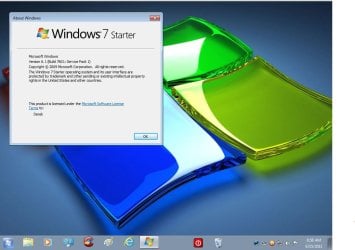
I can't find Destop Background!

LUCK

New member
Local time
8:04 AM
Messages
41
Hi, all!

I am LUCK. I have got a Laptop Dell Inspiron Mini 1012 with Intel(R)Atom (TM) CPU N450 1.66GHz Ram 1GB 32-bit Operating System and windows 7 starter.

I would like to use my own picture as Destop background, but I can't figure it out because I can find only Screen Saver Background which will be used as a slight show.

Everyone experienced this. Please help me to solve.

I am looking forward to hearing from all of you.


My Best Regards,

LUCK
 

My Computer My Computer

OS
Windows 7

My Computer My Computer

Computer type
PC/Desktop
Computer Manufacturer/Model Number
Self Built
OS
Win 10 Pro x64
CPU
Intel I5-2500K @3.3GHz
Motherboard
Asrock P67 Extreme4
Memory
16GB G.Skill Ripjaws X (4x4GB)
Graphics Card(s)
EVGA GeForce 750 Ti SC 2GB
Sound Card
ASUS Xonar DG 5.1 Channels 24-bit 96KHz PCI Interface Sound
Monitor(s) Displays
auria eq2367
Screen Resolution
1920 x 1080
Hard Drives
250GB Samsung 850 EVO SSD
1TB WD Blue
1TB Hitachi
PSU
SeaSonic X 650W 80 Plus Gold
Case
Corsair Obsidian 750D
Cooling
Corsair H60, Three 140mm case fans
Keyboard
Logitech Wireless Keyboard K520
Mouse
Logitech Wireless Mouse M310
Internet Speed
Wave Broadband ~ 100 dn 5 up
Antivirus
Windows Defender, Malwarebytes Premium
Browser
Edge, IE11, Chrome
Other Info
Laptop specs: HP g7-1365dx /
CPU: AMD A6-3420M APU with Radeon(tm) HD Graphics /
RAM: Crucial 8Gb (2x4Gb) /
SSD: Crucial M4-CT128M4SSD2 ATA Device/ FW 000F /
GFX: AMD Radeon HD 6520G /
OS: Windows 10 Pro x64
Dear all!

Please help to send me the Screenshots if possible.

Thanks a lot and best wishes!

My Kindest Regards,


LUCK
 

My Computer My Computer

OS
Windows 7
Sorry!

What you sent to me gave me two methods of changing Destop Background. Right? 1.Using the "Oceanis Change Background Windows 7" Program and 2. Using the "Personalization Panel" Program. If the first doesn't work, I must try the second. So I must download 2 methods and install one of them to my Laptop. Right? Sorry for being unaware of knowledge here.

Thanks a lot for your prompt and great answer.

My best regards,


LUCK
 

My Computer My Computer

OS
Windows 7
Did you click the link derekimo gave you? It has screenshots and step by step instructions. Windows 7 Starter doesn't allow you to change the wallpaper the same way other versions do. You'll need to use third-party software, which is shown and discussed in the tutorial.

The link gives you two methods, so either one should work.
 

My Computer My Computer

OS
Windows 7 Ultimate x64 SP1
CPU
Intel Core i7-2600
Motherboard
Gigabyte GA-P67A-UD3P-B3
Memory
12 GB Patriot Extreme DDR3-1333
Graphics Card(s)
Nvidia GTX 470
Monitor(s) Displays
Dell UltraSharp 2209WA
Hard Drives
OCZ Agility3 240 GB, WD5001AALS, WD7501AALS
PSU
OCZ ModStream 700W
Case
CoolerMaster HAF 912 Advanced
Cooling
CoolerMaster Hyper 212 Plus
OK! I finished reading the link given to me. I am very sure one of them will work. Now I can't try it because the Laptop is left with my brother. I will let you know by tomorrow if that works. I am very sure one must work because the screenshots are bringing my steps to what I wanted. Thanks a lot for all and that was really very kind.

May God be with all of you!

My best regards,


LUCK
 

My Computer My Computer

OS
Windows 7
OK! I finished reading the link given to me. I am very sure one of them will work. Now I can't try it because the Laptop is left with my brother. I will let you know by tomorrow if that works. I am very sure one must work because the screenshots are bringing my steps to what I wanted. Thanks a lot for all and that was really very kind.

May God be with all of you!

My best regards,


LUCK

You shouldn't have any problem, works great on mine.
 

Attachments

  • Capture.JPG
    Capture.JPG
    82.3 KB · Views: 9

My Computer My Computer

Computer type
PC/Desktop
Computer Manufacturer/Model Number
Self Built
OS
Win 10 Pro x64
CPU
Intel I5-2500K @3.3GHz
Motherboard
Asrock P67 Extreme4
Memory
16GB G.Skill Ripjaws X (4x4GB)
Graphics Card(s)
EVGA GeForce 750 Ti SC 2GB
Sound Card
ASUS Xonar DG 5.1 Channels 24-bit 96KHz PCI Interface Sound
Monitor(s) Displays
auria eq2367
Screen Resolution
1920 x 1080
Hard Drives
250GB Samsung 850 EVO SSD
1TB WD Blue
1TB Hitachi
PSU
SeaSonic X 650W 80 Plus Gold
Case
Corsair Obsidian 750D
Cooling
Corsair H60, Three 140mm case fans
Keyboard
Logitech Wireless Keyboard K520
Mouse
Logitech Wireless Mouse M310
Internet Speed
Wave Broadband ~ 100 dn 5 up
Antivirus
Windows Defender, Malwarebytes Premium
Browser
Edge, IE11, Chrome
Other Info
Laptop specs: HP g7-1365dx /
CPU: AMD A6-3420M APU with Radeon(tm) HD Graphics /
RAM: Crucial 8Gb (2x4Gb) /
SSD: Crucial M4-CT128M4SSD2 ATA Device/ FW 000F /
GFX: AMD Radeon HD 6520G /
OS: Windows 10 Pro x64
Dear derekimo!

I was trying to download "Personalization Panel" as in Method 2, but I couldn't get successful because I couldn't see the downloading page. I went to Google Search, I still couldn't find the needed one. Would you mind giving me another address so that I can download it?

Thanks a lot and I am looking forward to hearing from you.

My Best Regards,


LUCK
 

My Computer My Computer

OS
Windows 7
I was clicking the downloading sign with the down arrow symbol in front, but I didn't get the downloaded file showing up. Please help to copy the link sent to you.

Personalization Panel -

Thanks a lot and best wishes!


LUCK
 

My Computer My Computer

OS
Windows 7
Dear derekimo!

I was trying to download "Personalization Panel" as in Method 2, but I couldn't get successful because I couldn't see the downloading page. I went to Google Search, I still couldn't find the needed one. Would you mind giving me another address so that I can download it?

Thanks a lot and I am looking forward to hearing from you.

My Best Regards,


LUCK

I was clicking the downloading sign with the down arrow symbol in front, but I didn't get the downloaded file showing up. Please help to copy the link sent to you.

Personalization Panel -

Thanks a lot and best wishes!


LUCK

I can't seem to get it to download either, I'm using the Oceanis one on mine and that download works.
 

My Computer My Computer

Computer type
PC/Desktop
Computer Manufacturer/Model Number
Self Built
OS
Win 10 Pro x64
CPU
Intel I5-2500K @3.3GHz
Motherboard
Asrock P67 Extreme4
Memory
16GB G.Skill Ripjaws X (4x4GB)
Graphics Card(s)
EVGA GeForce 750 Ti SC 2GB
Sound Card
ASUS Xonar DG 5.1 Channels 24-bit 96KHz PCI Interface Sound
Monitor(s) Displays
auria eq2367
Screen Resolution
1920 x 1080
Hard Drives
250GB Samsung 850 EVO SSD
1TB WD Blue
1TB Hitachi
PSU
SeaSonic X 650W 80 Plus Gold
Case
Corsair Obsidian 750D
Cooling
Corsair H60, Three 140mm case fans
Keyboard
Logitech Wireless Keyboard K520
Mouse
Logitech Wireless Mouse M310
Internet Speed
Wave Broadband ~ 100 dn 5 up
Antivirus
Windows Defender, Malwarebytes Premium
Browser
Edge, IE11, Chrome
Other Info
Laptop specs: HP g7-1365dx /
CPU: AMD A6-3420M APU with Radeon(tm) HD Graphics /
RAM: Crucial 8Gb (2x4Gb) /
SSD: Crucial M4-CT128M4SSD2 ATA Device/ FW 000F /
GFX: AMD Radeon HD 6520G /
OS: Windows 10 Pro x64

My Computer My Computer

OS
Windows 7
Dear derekimo!

Thanks a lot for your prompt reply to me. I am very grateful to you and all here who always help. Now I can download "Personalization Panel" from a different website but I am not sure whether it works or not. I will try it and let you know if it helps.

Download Personalization Panel 1.2.0.0 Free - Customize the appearance of your Windows 7 Home Basic or Starter - Softpedia

Best wishes to you and everyone visiting the forum.

My Best Regards,


LUCK

Good work finding that, I just tried it on mine and it works to change the background and adds the "Personalize" option in the context menu.

Can't really do much else with Starter.
 

My Computer My Computer

Computer type
PC/Desktop
Computer Manufacturer/Model Number
Self Built
OS
Win 10 Pro x64
CPU
Intel I5-2500K @3.3GHz
Motherboard
Asrock P67 Extreme4
Memory
16GB G.Skill Ripjaws X (4x4GB)
Graphics Card(s)
EVGA GeForce 750 Ti SC 2GB
Sound Card
ASUS Xonar DG 5.1 Channels 24-bit 96KHz PCI Interface Sound
Monitor(s) Displays
auria eq2367
Screen Resolution
1920 x 1080
Hard Drives
250GB Samsung 850 EVO SSD
1TB WD Blue
1TB Hitachi
PSU
SeaSonic X 650W 80 Plus Gold
Case
Corsair Obsidian 750D
Cooling
Corsair H60, Three 140mm case fans
Keyboard
Logitech Wireless Keyboard K520
Mouse
Logitech Wireless Mouse M310
Internet Speed
Wave Broadband ~ 100 dn 5 up
Antivirus
Windows Defender, Malwarebytes Premium
Browser
Edge, IE11, Chrome
Other Info
Laptop specs: HP g7-1365dx /
CPU: AMD A6-3420M APU with Radeon(tm) HD Graphics /
RAM: Crucial 8Gb (2x4Gb) /
SSD: Crucial M4-CT128M4SSD2 ATA Device/ FW 000F /
GFX: AMD Radeon HD 6520G /
OS: Windows 10 Pro x64
Back
Top