
Solved I can't find the 7 desktop in Explorer when in XP on my dual boot

Tinsby

New member
Member
VIP
Local time
3:01 AM
Messages
176
When I'm in 7 I can easily access the XP desktop using Windows Explorer. But I haven't found a way to be in XP and access the 7 desktop from File Explorer or whatever they call in in 7.

Sometimes I find it necessary to drag files from one OS to the other, I can get it to go one way but not the other!

Am I looking in the wrong place or isn't it accessible from XP?
 

My Computer My Computer

At a glance

Dual boot Win7 Pro 64 & Linux Mint 18.3Intel Core 2 Quad Core8GBNvidia GeForce GTX 750 Ti
Computer type
PC/Desktop
Computer Manufacturer/Model Number
Home/Custom built
OS
Dual boot Win7 Pro 64 & Linux Mint 18.3
CPU
Intel Core 2 Quad Core
Motherboard
Asus Rampage Extreme
Memory
8GB
Graphics Card(s)
Nvidia GeForce GTX 750 Ti
Sound Card
PCIe Supreme FX X-fi
Monitor(s) Displays
Viewsonic VX2450WM LED
Screen Resolution
1920x1080
Hard Drives
Intel SSD 240GB
WD 500GB HDD
PSU
Corsair 850 watt
Case
Lian Li
Cooling
Zalman
Keyboard
MS natural/ergonomic
Mouse
Intellimouse
Internet Speed
240 Mbps +/- Dnld, 12Mbps Upld via Xfinity Blast
Antivirus
Norton Security Suite by Xfinity
Browser
Firefox & Chrome
Other Info
4 slot memory card reader
Floppy drive
2 DVD burners
Brother MFCJ450dw AIO Printer/Scanner/Fax
eSATA connections
Where are you looking.

It will under \User\yourusername\Desktop on the Windows 7 partition.
 

My Computer My Computer

At a glance

Windows 10 Pro X64Intel Quad Core i7-4770 @ 3.4Ghz16.0GB PC3-12800 DDR3 SDRAM 1600 MHzIntel Integrated HD Graphics
Computer type
PC/Desktop
Computer Manufacturer/Model Number
Lenovo IdeaCenter 450
OS
Windows 10 Pro X64
CPU
Intel Quad Core i7-4770 @ 3.4Ghz
Memory
16.0GB PC3-12800 DDR3 SDRAM 1600 MHz
Graphics Card(s)
Intel Integrated HD Graphics
Sound Card
Realtek HD Audio
Monitor(s) Displays
HP 22" LCD
Screen Resolution
1680 x 1050
Hard Drives
250GB Samsung EVO SATA-3 SSD
2TB Seagate ST2000DM001 SATA-2
1.5TB Seagate ST3150041AS SATA
Keyboard
Dell USB
Mouse
Lenovo USB
Internet Speed
Cable via Road Runner 3MB Upload, 30MB Download
Antivirus
Windows Defender, MBAM Pro, MBAE
Browser
Seamonkey
Other Info
UEFI/GPT
PLDS DVD-RW DH16AERSH
Where are you looking.

It will under \User\yourusername\Desktop on the Windows 7 partition.

Hi Ztruker,

I agree that where it "should' be.

But that folder only exists when I am in Win 7. If I look there from XP the desktop folder is missing and doesn't show up anywhere for other users either.

Thanks
 

Attachments

  • Photo001.jpg
    Photo001.jpg
    18.4 KB · Views: 33

My Computer My Computer

At a glance

Dual boot Win7 Pro 64 & Linux Mint 18.3Intel Core 2 Quad Core8GBNvidia GeForce GTX 750 Ti
Computer type
PC/Desktop
Computer Manufacturer/Model Number
Home/Custom built
OS
Dual boot Win7 Pro 64 & Linux Mint 18.3
CPU
Intel Core 2 Quad Core
Motherboard
Asus Rampage Extreme
Memory
8GB
Graphics Card(s)
Nvidia GeForce GTX 750 Ti
Sound Card
PCIe Supreme FX X-fi
Monitor(s) Displays
Viewsonic VX2450WM LED
Screen Resolution
1920x1080
Hard Drives
Intel SSD 240GB
WD 500GB HDD
PSU
Corsair 850 watt
Case
Lian Li
Cooling
Zalman
Keyboard
MS natural/ergonomic
Mouse
Intellimouse
Internet Speed
240 Mbps +/- Dnld, 12Mbps Upld via Xfinity Blast
Antivirus
Norton Security Suite by Xfinity
Browser
Firefox & Chrome
Other Info
4 slot memory card reader
Floppy drive
2 DVD burners
Brother MFCJ450dw AIO Printer/Scanner/Fax
eSATA connections
Boot to Windows 7 and right click a folder on your desktop and select properties. Look at the location. That's where your desktop has been moved to. It may also be under administrator in C:/users.
 

My Computers My Computers

  • At a glance

    Windows 11 ProRyzen 9 5900X32GB G Skill DDR4-3600EVGA RTX 3080 FTW 3 Ultra
    Computer type
    PC/Desktop
    Computer Manufacturer/Model Number
    ALWAYS UNDER CONSTRUCTION
    OS
    Windows 11 Pro
    CPU
    Ryzen 9 5900X
    Motherboard
    Asus X570 Crosshair Viii Hero
    Memory
    32GB G Skill DDR4-3600
    Graphics Card(s)
    EVGA RTX 3080 FTW 3 Ultra
    Sound Card
    On Board/Sennheiser PC37X Headset
    Monitor(s) Displays
    3 X Asus 27"
    Screen Resolution
    2560x1440
    Hard Drives
    2 X 1 TB NVME drives
    PSU
    EVGA 850
    Case
    Phanteks Eclipse P400A
    Cooling
    EVGA 280 AIO
    Keyboard
    Logitech G510s/ Logitech G13
    Mouse
    Logitech G502
    Internet Speed
    24/1
    Antivirus
    ESET/MBAM Pro/SAS Pro
    Browser
    Chrome/ Firefox/ Edge
  • At a glance

    Windows 11 ProIntel Ultra 9 288V32 GB LPDDR5X 8533
    Computer type
    Laptop
    System Manufacturer/Model Number
    Dell 16 Plus
    OS
    Windows 11 Pro
    CPU
    Intel Ultra 9 288V
    Memory
    32 GB LPDDR5X 8533
    Monitor(s) Displays
    16" Mini-LED HDR600 Touch 90 Hz
    Screen Resolution
    2560X1600
    Hard Drives
    1 TB NVME
Boot to Windows 7 and right click a folder on your desktop and select properties. Look at the location. That's where your desktop has been moved to. It may also be under administrator in C:/users.

All the folders say C:\Users\Tinsby\Desktop The Admin Desktop folder is empty when I look there.

Makes no sense to me, that location is clearly there when I am booted to 7 but it's gone when I am in XP.

Not the end of the world but it does make me wonder why it works one way and not the other.

J T
 

My Computer My Computer

At a glance

Dual boot Win7 Pro 64 & Linux Mint 18.3Intel Core 2 Quad Core8GBNvidia GeForce GTX 750 Ti
Computer type
PC/Desktop
Computer Manufacturer/Model Number
Home/Custom built
OS
Dual boot Win7 Pro 64 & Linux Mint 18.3
CPU
Intel Core 2 Quad Core
Motherboard
Asus Rampage Extreme
Memory
8GB
Graphics Card(s)
Nvidia GeForce GTX 750 Ti
Sound Card
PCIe Supreme FX X-fi
Monitor(s) Displays
Viewsonic VX2450WM LED
Screen Resolution
1920x1080
Hard Drives
Intel SSD 240GB
WD 500GB HDD
PSU
Corsair 850 watt
Case
Lian Li
Cooling
Zalman
Keyboard
MS natural/ergonomic
Mouse
Intellimouse
Internet Speed
240 Mbps +/- Dnld, 12Mbps Upld via Xfinity Blast
Antivirus
Norton Security Suite by Xfinity
Browser
Firefox & Chrome
Other Info
4 slot memory card reader
Floppy drive
2 DVD burners
Brother MFCJ450dw AIO Printer/Scanner/Fax
eSATA connections
Post the same screenshot from Windows 7 that you posted from XP.
 

My Computer My Computer

At a glance

Windows 10 Pro X64Intel Quad Core i7-4770 @ 3.4Ghz16.0GB PC3-12800 DDR3 SDRAM 1600 MHzIntel Integrated HD Graphics
Computer type
PC/Desktop
Computer Manufacturer/Model Number
Lenovo IdeaCenter 450
OS
Windows 10 Pro X64
CPU
Intel Quad Core i7-4770 @ 3.4Ghz
Memory
16.0GB PC3-12800 DDR3 SDRAM 1600 MHz
Graphics Card(s)
Intel Integrated HD Graphics
Sound Card
Realtek HD Audio
Monitor(s) Displays
HP 22" LCD
Screen Resolution
1680 x 1050
Hard Drives
250GB Samsung EVO SATA-3 SSD
2TB Seagate ST2000DM001 SATA-2
1.5TB Seagate ST3150041AS SATA
Keyboard
Dell USB
Mouse
Lenovo USB
Internet Speed
Cable via Road Runner 3MB Upload, 30MB Download
Antivirus
Windows Defender, MBAM Pro, MBAE
Browser
Seamonkey
Other Info
UEFI/GPT
PLDS DVD-RW DH16AERSH
Here you go!
 

Attachments

  • Capture Win 7.JPG
    Capture Win 7.JPG
    19.7 KB · Views: 17

My Computer My Computer

At a glance

Dual boot Win7 Pro 64 & Linux Mint 18.3Intel Core 2 Quad Core8GBNvidia GeForce GTX 750 Ti
Computer type
PC/Desktop
Computer Manufacturer/Model Number
Home/Custom built
OS
Dual boot Win7 Pro 64 & Linux Mint 18.3
CPU
Intel Core 2 Quad Core
Motherboard
Asus Rampage Extreme
Memory
8GB
Graphics Card(s)
Nvidia GeForce GTX 750 Ti
Sound Card
PCIe Supreme FX X-fi
Monitor(s) Displays
Viewsonic VX2450WM LED
Screen Resolution
1920x1080
Hard Drives
Intel SSD 240GB
WD 500GB HDD
PSU
Corsair 850 watt
Case
Lian Li
Cooling
Zalman
Keyboard
MS natural/ergonomic
Mouse
Intellimouse
Internet Speed
240 Mbps +/- Dnld, 12Mbps Upld via Xfinity Blast
Antivirus
Norton Security Suite by Xfinity
Browser
Firefox & Chrome
Other Info
4 slot memory card reader
Floppy drive
2 DVD burners
Brother MFCJ450dw AIO Printer/Scanner/Fax
eSATA connections
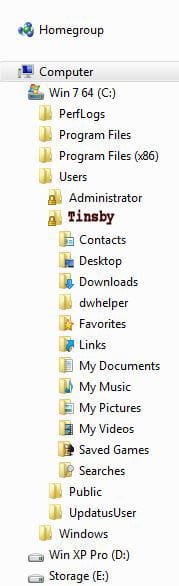
That is very strange.

All I can think of is do you have XP setup to show hidden files and folders?
 

My Computer My Computer

At a glance

Windows 10 Pro X64Intel Quad Core i7-4770 @ 3.4Ghz16.0GB PC3-12800 DDR3 SDRAM 1600 MHzIntel Integrated HD Graphics
Computer type
PC/Desktop
Computer Manufacturer/Model Number
Lenovo IdeaCenter 450
OS
Windows 10 Pro X64
CPU
Intel Quad Core i7-4770 @ 3.4Ghz
Memory
16.0GB PC3-12800 DDR3 SDRAM 1600 MHz
Graphics Card(s)
Intel Integrated HD Graphics
Sound Card
Realtek HD Audio
Monitor(s) Displays
HP 22" LCD
Screen Resolution
1680 x 1050
Hard Drives
250GB Samsung EVO SATA-3 SSD
2TB Seagate ST2000DM001 SATA-2
1.5TB Seagate ST3150041AS SATA
Keyboard
Dell USB
Mouse
Lenovo USB
Internet Speed
Cable via Road Runner 3MB Upload, 30MB Download
Antivirus
Windows Defender, MBAM Pro, MBAE
Browser
Seamonkey
Other Info
UEFI/GPT
PLDS DVD-RW DH16AERSH
Does user TINSBY have "administrator" rights on the XP machine?

I see that you have both an ADMINISTRATOR and TINSBY user on your Win7 setup, suggesting TINSBY is just a "standard user" on Win7. Have you done the same thing in your XP setup?

Probably have to be an "administrator" on XP do have rights to view the Win7 desktop for a user on the Win7 system's system drive.
 

My Computer My Computer

At a glance

Windows 7 Pro x64 (1), Win7 Pro X64 (2)i5-3350p 3.1Ghz/6MB-cache (1); E8400 3.0Ghz/6...8GB PC3-12800 DDR3 (1); 4GB PC3-10600 DDR3 (2)ATI HD7750 (1), (see TV cards); ATI R7 250 (2)
Computer type
PC/Desktop
Computer Manufacturer/Model Number
Home-built, two systems (1) and (2)
OS
Windows 7 Pro x64 (1), Win7 Pro X64 (2)
CPU
i5-3350p 3.1Ghz/6MB-cache (1); E8400 3.0Ghz/6MB-cache (2)
Motherboard
ASUS P8Z77-V Pro (1); ASUS P5Q3 (2)
Memory
8GB PC3-12800 DDR3 (1); 4GB PC3-10600 DDR3 (2)
Graphics Card(s)
ATI HD7750 (1), (see TV cards); ATI R7 250 (2)
Sound Card
Realtek ALC892 HD Audio (1); Realtek ALC1200 HD Audio (2)
Monitor(s) Displays
Eizo HD2441W LCD, Eizo S2433W (1); Eizo 24" S2433W (2)
Screen Resolution
1920x1200, 1920x1200 (1); 1920x1200 (2)
Hard Drives
(1) 1TB SATA-II (7200RPM), 2x2TB SATA-III (7200RPM), 250GB SATA-III (10000RPM) for OS; 2x2TB external USB 3.0

(2) 320GB SATA-II (7200RPM), 750GB SATA-II (7200RPM), 150GB SATA-II (10000RPM) for OS; 2TB external USB 3.0
PSU
Nesteq ECS-6001 600W (1); Nesteq ECS-5001 500W (2)
Case
Acousti-Case 360 (1) and (2)
Cooling
Noctua NH-U12P SE2 for CPU, 2x120mm case fans (1) and (2)
Keyboard
IBM PS/2 (1) and (2)
Mouse
Logitech MX Revolution wireless (1); Microsoft wired (2)
Internet Speed
100mbps down / 10mbps up
Antivirus
Microsoft Security Essentials; Malwarebyte Anti-Malware Pro
Browser
Firefox
Other Info
Ceton InfiniTV 4-tuner cablecard-enabled TV card as well as Hauppauge HVR-2250 OTA/ATSC 2-tuner TV card in (1), running under Win7 WMC
I think dsperber may be right, except that none of the other folders should show up. Failing that, while in Windows 7, go to users/tinsby and right click desktop, select include in library and create new library. Then see if it shows up while in XP.
 

My Computers My Computers

  • At a glance

    Windows 11 ProRyzen 9 5900X32GB G Skill DDR4-3600EVGA RTX 3080 FTW 3 Ultra
    Computer type
    PC/Desktop
    Computer Manufacturer/Model Number
    ALWAYS UNDER CONSTRUCTION
    OS
    Windows 11 Pro
    CPU
    Ryzen 9 5900X
    Motherboard
    Asus X570 Crosshair Viii Hero
    Memory
    32GB G Skill DDR4-3600
    Graphics Card(s)
    EVGA RTX 3080 FTW 3 Ultra
    Sound Card
    On Board/Sennheiser PC37X Headset
    Monitor(s) Displays
    3 X Asus 27"
    Screen Resolution
    2560x1440
    Hard Drives
    2 X 1 TB NVME drives
    PSU
    EVGA 850
    Case
    Phanteks Eclipse P400A
    Cooling
    EVGA 280 AIO
    Keyboard
    Logitech G510s/ Logitech G13
    Mouse
    Logitech G502
    Internet Speed
    24/1
    Antivirus
    ESET/MBAM Pro/SAS Pro
    Browser
    Chrome/ Firefox/ Edge
  • At a glance

    Windows 11 ProIntel Ultra 9 288V32 GB LPDDR5X 8533
    Computer type
    Laptop
    System Manufacturer/Model Number
    Dell 16 Plus
    OS
    Windows 11 Pro
    CPU
    Intel Ultra 9 288V
    Memory
    32 GB LPDDR5X 8533
    Monitor(s) Displays
    16" Mini-LED HDR600 Touch 90 Hz
    Screen Resolution
    2560X1600
    Hard Drives
    1 TB NVME
I think dsperber may be right, except that none of the other folders should show up. Failing that, while in Windows 7, go to users/tinsby and right click desktop, select include in library and create new library. Then see if it shows up while in XP.

What I discovered is that if I am in XP and search the D:\ (Win 7) drive I can find all the files on the 7 desktop and it shows the path as D:\Users\Tinsby\Desktop. Plus if I choose to ' Open containing folder it shows the 7 desktop in a window in XP.

Don't ask me why but this works, haven't a clue why the 7 desktop is hidden from view in XP but as long as this works I am happy.

Thanks to all who provided ideas and help!

J T
 

My Computer My Computer

At a glance

Dual boot Win7 Pro 64 & Linux Mint 18.3Intel Core 2 Quad Core8GBNvidia GeForce GTX 750 Ti
Computer type
PC/Desktop
Computer Manufacturer/Model Number
Home/Custom built
OS
Dual boot Win7 Pro 64 & Linux Mint 18.3
CPU
Intel Core 2 Quad Core
Motherboard
Asus Rampage Extreme
Memory
8GB
Graphics Card(s)
Nvidia GeForce GTX 750 Ti
Sound Card
PCIe Supreme FX X-fi
Monitor(s) Displays
Viewsonic VX2450WM LED
Screen Resolution
1920x1080
Hard Drives
Intel SSD 240GB
WD 500GB HDD
PSU
Corsair 850 watt
Case
Lian Li
Cooling
Zalman
Keyboard
MS natural/ergonomic
Mouse
Intellimouse
Internet Speed
240 Mbps +/- Dnld, 12Mbps Upld via Xfinity Blast
Antivirus
Norton Security Suite by Xfinity
Browser
Firefox & Chrome
Other Info
4 slot memory card reader
Floppy drive
2 DVD burners
Brother MFCJ450dw AIO Printer/Scanner/Fax
eSATA connections
Back
Top