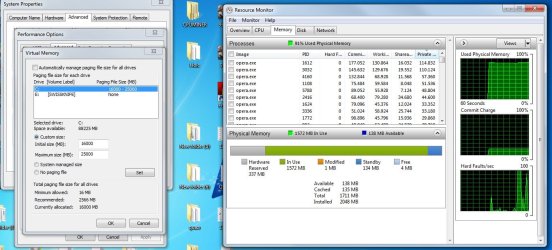
i cant increase virtual memory

namco

New member
Local time
5:54 PM
Messages
4
Hello, i used to have 16gb system installed on my system yesterday i sold them and installed my old 2gb stick .Now i try to set any virtual memory size to my ssd, it doesnt work.I check task manager i still see 1711mb of ram .What should i do?
 

My Computer

Computer type
PC/Desktop
OS
windows 7 64 bit

My Computer

Computer type
PC/Desktop
Computer Manufacturer/Model Number
Home made Desktop
OS
Windows 10 Pro. 64/ version 1709 Windows 7 Pro/64
CPU
Intel i7-6800K @ 4.3
Motherboard
ASUS X-99 Deluxe II
Memory
Corsair Platinum 16 gig @2400
Graphics Card(s)
EVGA GTX 1070 OC
Monitor(s) Displays
Asus 27" LED LCD/VE278Q
Screen Resolution
1920-1080 or 1280-720 HDMI
Hard Drives
INTEL SSD 730-240 Gb Sata 3.0/
PSU
EVGA Platium 1200W
Case
Phanteks Luxe Tempered Glass 8 fans/ one radiator
Cooling
XSPC/ Water Cooled CPU
Keyboard
Das 4 Professional
Mouse
Logitech M705/MX Anywhere 2-S
Internet Speed
100 mbits
Antivirus
Microsoft Security Essentials/ Malwarebytes Premium 3.0/ SAS
Browser
I.E. 11 default/Firefox/ ISP Time Warner Cable/Spectrum
Other Info
LG BluRay Burner/
Sound system-KLipsch-THX/
Icy Dock ssd Hot Swap bays.
here:
 

My Computer

Computer type
PC/Desktop
OS
windows 7 64 bit

My Computer

Computer type
PC/Desktop
Computer Manufacturer/Model Number
Home made Desktop
OS
Windows 10 Pro. 64/ version 1709 Windows 7 Pro/64
CPU
Intel i7-6800K @ 4.3
Motherboard
ASUS X-99 Deluxe II
Memory
Corsair Platinum 16 gig @2400
Graphics Card(s)
EVGA GTX 1070 OC
Monitor(s) Displays
Asus 27" LED LCD/VE278Q
Screen Resolution
1920-1080 or 1280-720 HDMI
Hard Drives
INTEL SSD 730-240 Gb Sata 3.0/
PSU
EVGA Platium 1200W
Case
Phanteks Luxe Tempered Glass 8 fans/ one radiator
Cooling
XSPC/ Water Cooled CPU
Keyboard
Das 4 Professional
Mouse
Logitech M705/MX Anywhere 2-S
Internet Speed
100 mbits
Antivirus
Microsoft Security Essentials/ Malwarebytes Premium 3.0/ SAS
Browser
I.E. 11 default/Firefox/ ISP Time Warner Cable/Spectrum
Other Info
LG BluRay Burner/
Sound system-KLipsch-THX/
Icy Dock ssd Hot Swap bays.
1711MB RAM is not out of line when having 2048MB [2GB] physical RAM installed, part of it is assigned to video on computers with onboard/built-in video adapter. Beginning with Windows XP the recommended size was decreased to 1.5 times the physical RAM from the earlier 2.5 times the RAM.

Change the size of virtual memory - Windows Help
Learn Best Practices for Optimizing the Virtual Memory Configuration

My Win7 has 8GB RAM and I set the paging file to 12GB on a second HDD of 500GB before any other use of the HDD occurred. By setting the max and min as the same it does not get fragmented. Putting the paging file on a second HDD has always shown a performance benefit.

 

My Computer

Computer type
PC/Desktop
Computer Manufacturer/Model Number
Customs, Dell, Gateway, HP, Toshiba, Acer, ASUS
OS
Windows 7 Ultimate 64-bit, Windows 8.1 64-bit, Mac OS X 10.10, Linux Mint 17, Windows 10 Pro TP
Keyboard
Microsoft
Mouse
Microsoft
ok now?
 

Attachments

  • sse.jpg
    sse.jpg
    279.7 KB · Views: 6

My Computer

Computer type
PC/Desktop
OS
windows 7 64 bit
1711MB RAM is not out of line when having 2048MB [2GB] physical RAM installed, part of it is assigned to video on computers with onboard/built-in video adapter. Beginning with Windows XP the recommended size was decreased to 1.5 times the physical RAM from the earlier 2.5 times the RAM.

Change the size of virtual memory - Windows Help
Learn Best Practices for Optimizing the Virtual Memory Configuration

My Win7 has 8GB RAM and I set the paging file to 12GB on a second HDD of 500GB before any other use of the HDD occurred. By setting the max and min as the same it does not get fragmented. Putting the paging file on a second HDD has always shown a performance benefit.
my memory stays 1711mb even i set virtual memory to 2048-503323242...
 

My Computer

Computer type
PC/Desktop
OS
windows 7 64 bit
You should really consider adding more memory to your pc. What is the maximum amount your board will support ? (but you sold it so.... nevermind)

All windows thinks you have is 1711 MB, and you barely have any free.

Let windows manage your virtual memory. Then reboot the pc.
 
Last edited:

My Computer

Computer type
PC/Desktop
Computer Manufacturer/Model Number
Skylake Special #666
OS
Windows 10 Pro x64
CPU
Intel Core i7 6700K
Motherboard
Asus Sabertooth Z170 Mark 1
Memory
GSkill TridentZ RGB 16GB 3600 16-16-16-36
Graphics Card(s)
EVGA GTX 980 Ti SC x2
Sound Card
Realtek High Definition
Monitor(s) Displays
AOC G2460PG
Screen Resolution
1920 x 1080 144Hz
Hard Drives
Samsung 860 Pro 256GB, Seagate Barracuda 4TB x2
PSU
EVGA 1000 P2, EVGA White Custom Braided Cables
Case
Corsair Vengeance C70 Gunmetal Black
Cooling
Corsair H100i v2, Corsair ML120 x2, Thermal Grizzly Kryonaut
Keyboard
Logitech G910 Orion Spectrum
Mouse
Logitech G700s
Internet Speed
Verizon Fios Quantum Gateway 75/75
Antivirus
Windows Defender, Malwarebytes Free 3.8.3
Browser
Chrome
Other Info
Corsair SP120 x4, LG Blu-ray Drive, Durabrand HT-395 100 Watt Dolby Digital Amp, Corsair H2100 Wireless 7.1 Headset
my memory stays 1711mb even i set virtual memory to 2048-503323242..
Right, the physical RAM doesn't change unless there's a hardware issue affecting the memory modules or the amount allocated to onboard video is changed, sometimes a setting in the BIOS.
 

My Computer

Computer type
PC/Desktop
Computer Manufacturer/Model Number
Customs, Dell, Gateway, HP, Toshiba, Acer, ASUS
OS
Windows 7 Ultimate 64-bit, Windows 8.1 64-bit, Mac OS X 10.10, Linux Mint 17, Windows 10 Pro TP
Keyboard
Microsoft
Mouse
Microsoft
I do agree with AddRAM set your page file to auto. Windows 7 will handle the memory just fine.
Adding more ram is another great option if you can.

Filling in your system specs completely would help us help you.
Look at AddRAM, Berton and my specs; it will give you a idea of what can be added.
 

My Computer

Computer type
PC/Desktop
Computer Manufacturer/Model Number
Home made Desktop
OS
Windows 10 Pro. 64/ version 1709 Windows 7 Pro/64
CPU
Intel i7-6800K @ 4.3
Motherboard
ASUS X-99 Deluxe II
Memory
Corsair Platinum 16 gig @2400
Graphics Card(s)
EVGA GTX 1070 OC
Monitor(s) Displays
Asus 27" LED LCD/VE278Q
Screen Resolution
1920-1080 or 1280-720 HDMI
Hard Drives
INTEL SSD 730-240 Gb Sata 3.0/
PSU
EVGA Platium 1200W
Case
Phanteks Luxe Tempered Glass 8 fans/ one radiator
Cooling
XSPC/ Water Cooled CPU
Keyboard
Das 4 Professional
Mouse
Logitech M705/MX Anywhere 2-S
Internet Speed
100 mbits
Antivirus
Microsoft Security Essentials/ Malwarebytes Premium 3.0/ SAS
Browser
I.E. 11 default/Firefox/ ISP Time Warner Cable/Spectrum
Other Info
LG BluRay Burner/
Sound system-KLipsch-THX/
Icy Dock ssd Hot Swap bays.
Back
Top