
Solved I can't install Microsoft Security Essentials

KCav

New member
Member
VIP
Local time
3:36 PM
Messages
98
Downloaded mseinstall.exe, MSEInstall Package version 4.1.522.0 to PC running Windows 7; ran installation wizard and it could not complete the Security Essentials installation. Error code 0x80070643 :(

Clicked link to "Get help on this issue." It said either some other security programs are running or you're missing some prerequisites. Perform the following steps:
Step 1 - remove other anti virus programs
Step 2 - Completely uninstall Windows Live OneCare

I ran appwiz.cpl, removed Malwarebytes and SuperAntiSpyware and manually deleted folders and files left behind. Also downloaded OneCareCleanup.exe, Self-Extracting Cabinet, version 6.1.22.0; ran As Administrator, it said, "Windows Live Cleanup tool is shutting down;" went to How Do I Uninstall Anti-Virus software; clicked on a link to Microsoft Virus and Malware Forum; found hundreds of posts about problems installing MSE and directions on where to find cleanup tools. I ran several clean-up tools, no change, I still can not install Microsoft Security Essentials. :(

I would like to create a log file and determine the exact cause for the failure of mseinstall.exe, MSEInstall Package version 4.1.522.0 to install correctly on my real-time, anti-virus free PC . Can someone help me?
 

My Computer

Computer type
Laptop
Computer Manufacturer/Model Number
Dell, Latitude E6400
OS
Windows 7 Professional 64-bit SP1
CPU
Intel Mobile Core 2 Duo P8400 P8400
Motherboard
Dell, Model 0G868N (Microprocessor)
Memory
DDR2, 4096 MBytes
Graphics Card(s)
NVIDIA Quadro NVS 160M
Sound Card
IDT High Definition Audio CODEC
Monitor(s) Displays
Generic PnP Monitor
Screen Resolution
1440x900
Hard Drives
WDC WD1600BJKT-75F4T0 ATA Device
Keyboard
Standard
Mouse
Touchpad
Internet Speed
Dell Wireless 1510 Wireless-N WLAN Mini-Card
I'm running Malwarebytes along with MSE and they do not conflict. Something else you have (or had) could be interferring.

After you uninstalled, whatever you did, you must first restart the PC before attempting to install MSE. If you try without restarting the original problem can still be there.
 

My Computer

Computer type
PC/Desktop
Computer Manufacturer/Model Number
My Own Build
OS
Windows 10 64 bit
CPU
Intel i7 6700K
Motherboard
ASUS ROG Maximus VIII Hero
Memory
16GB Corsair Dominator
Graphics Card(s)
Intel CPU Graphics
Sound Card
RealTek
Monitor(s) Displays
27" Dell S2719dgf
Screen Resolution
2560X1440
Hard Drives
1 TB Samsung 850 EVO SSD for Win 10 Pro
500GB Samsung 850 EVO SSD for Win 10 Insider
2 TB drive for backup
PSU
EVGA Supernova 750G2
Case
BeQuiet Silent Base 600
Cooling
Deepcool Captain 120EX
Keyboard
Microsoft Wireless 2000
Mouse
Microsoft wireless
Internet Speed
100 MB/sec (Cable)
Antivirus
Microsoft Defender and Malwarebytes
Browser
Edge/Firefox
Other Info
Cakewalk (Sonar) by BandLab and Studio One 4.1 Pro recording studio software. MOTU 896Mk3 Hybrid recording interface, Frontier Tranzport wireless control unit, Behringer X-Touch Control Surface.
Five USB connected optical drives for CD Audio production using Nero BurningROM
I'm running Malwarebytes along with MSE and they do not conflict.
I too have been running Microsoft Security Essentials on my PC along side Malwarebytes. I usually leave continous protection turned on, and once a week run a Full scan. I have the free versions of Malwarebytes and SuperAntiSpyware installed. I run them once a month. I have had no conflicts even when I run them simultaneously.

I decided to temporarily uninstall MSE because I was installing a new hard disk and wanted to change its location from the primary to seondary disk. I would like to know what programs are causing the MES installation Wizard to shut down.

KC
 

My Computer

Computer type
Laptop
Computer Manufacturer/Model Number
Dell, Latitude E6400
OS
Windows 7 Professional 64-bit SP1
CPU
Intel Mobile Core 2 Duo P8400 P8400
Motherboard
Dell, Model 0G868N (Microprocessor)
Memory
DDR2, 4096 MBytes
Graphics Card(s)
NVIDIA Quadro NVS 160M
Sound Card
IDT High Definition Audio CODEC
Monitor(s) Displays
Generic PnP Monitor
Screen Resolution
1440x900
Hard Drives
WDC WD1600BJKT-75F4T0 ATA Device
Keyboard
Standard
Mouse
Touchpad
Internet Speed
Dell Wireless 1510 Wireless-N WLAN Mini-Card
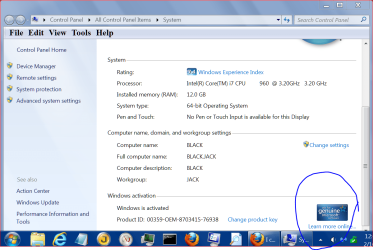
To the best of my knowledge MSE must be installed on the disk and partition Windows 7 is installed on. Windows 7 must also be genuine.
windows genuine.PNG
 

My Computer

Computer type
PC/Desktop
Computer Manufacturer/Model Number
Home made Desktop
OS
Windows 10 Pro. 64/ version 1709 Windows 7 Pro/64
CPU
Intel i7-6800K @ 4.3
Motherboard
ASUS X-99 Deluxe II
Memory
Corsair Platinum 16 gig @2400
Graphics Card(s)
EVGA GTX 1070 OC
Monitor(s) Displays
Asus 27" LED LCD/VE278Q
Screen Resolution
1920-1080 or 1280-720 HDMI
Hard Drives
INTEL SSD 730-240 Gb Sata 3.0/
PSU
EVGA Platium 1200W
Case
Phanteks Luxe Tempered Glass 8 fans/ one radiator
Cooling
XSPC/ Water Cooled CPU
Keyboard
Das 4 Professional
Mouse
Logitech M705/MX Anywhere 2-S
Internet Speed
100 mbits
Antivirus
Microsoft Security Essentials/ Malwarebytes Premium 3.0/ SAS
Browser
I.E. 11 default/Firefox/ ISP Time Warner Cable/Spectrum
Other Info
LG BluRay Burner/
Sound system-KLipsch-THX/
Icy Dock ssd Hot Swap bays.

My Computer

Computer type
Laptop
Computer Manufacturer/Model Number
Dell, Latitude E6400
OS
Windows 7 Professional 64-bit SP1
CPU
Intel Mobile Core 2 Duo P8400 P8400
Motherboard
Dell, Model 0G868N (Microprocessor)
Memory
DDR2, 4096 MBytes
Graphics Card(s)
NVIDIA Quadro NVS 160M
Sound Card
IDT High Definition Audio CODEC
Monitor(s) Displays
Generic PnP Monitor
Screen Resolution
1440x900
Hard Drives
WDC WD1600BJKT-75F4T0 ATA Device
Keyboard
Standard
Mouse
Touchpad
Internet Speed
Dell Wireless 1510 Wireless-N WLAN Mini-Card
Microsoft Securities

This is what my Registry contains for Windows Defender.

HEY_LOCAL_MACHINE > SOFTWARE > MICROSOFT > Windows Defender > Real-Time-Protection
DisableOnAccessProtection Data 0X00000000 (0)
DisableRealTimeMonitoring Data 0X00000000 (0)

I have Windows Defender Real Time prtection turned On. Most recent scan about 1 hour ago, No harmful or unwanted software detected.

Do you think that in my case Windows Defender is interferring with the installation of Microsoft Securities Essential?
 

My Computer

Computer type
Laptop
Computer Manufacturer/Model Number
Dell, Latitude E6400
OS
Windows 7 Professional 64-bit SP1
CPU
Intel Mobile Core 2 Duo P8400 P8400
Motherboard
Dell, Model 0G868N (Microprocessor)
Memory
DDR2, 4096 MBytes
Graphics Card(s)
NVIDIA Quadro NVS 160M
Sound Card
IDT High Definition Audio CODEC
Monitor(s) Displays
Generic PnP Monitor
Screen Resolution
1440x900
Hard Drives
WDC WD1600BJKT-75F4T0 ATA Device
Keyboard
Standard
Mouse
Touchpad
Internet Speed
Dell Wireless 1510 Wireless-N WLAN Mini-Card
The msmpeng.exe process is used by the Microsoft Windows Defender to perform spyware scanning procedure

The conflict between the MSE Installation Wizard and my system might be caused by a real time application such as spyware scanning. Therefore I installed Autorun - either it didn't find any conflict or I don't understand how to use the information it provides.

KC
 

My Computer

Computer type
Laptop
Computer Manufacturer/Model Number
Dell, Latitude E6400
OS
Windows 7 Professional 64-bit SP1
CPU
Intel Mobile Core 2 Duo P8400 P8400
Motherboard
Dell, Model 0G868N (Microprocessor)
Memory
DDR2, 4096 MBytes
Graphics Card(s)
NVIDIA Quadro NVS 160M
Sound Card
IDT High Definition Audio CODEC
Monitor(s) Displays
Generic PnP Monitor
Screen Resolution
1440x900
Hard Drives
WDC WD1600BJKT-75F4T0 ATA Device
Keyboard
Standard
Mouse
Touchpad
Internet Speed
Dell Wireless 1510 Wireless-N WLAN Mini-Card
Your right about it reverting back to Defender. But no it doesn't use the memory hogging process, (MsMpEng.exe).
I use Microsoft Security Essentials because it is noinntrusive. I have no way of knowing how effective it is in combatting virus attacks, malware, spyware, the whole catastrophy, so from time-to-time I like to run other protection software.

KC
 

My Computer

Computer type
Laptop
Computer Manufacturer/Model Number
Dell, Latitude E6400
OS
Windows 7 Professional 64-bit SP1
CPU
Intel Mobile Core 2 Duo P8400 P8400
Motherboard
Dell, Model 0G868N (Microprocessor)
Memory
DDR2, 4096 MBytes
Graphics Card(s)
NVIDIA Quadro NVS 160M
Sound Card
IDT High Definition Audio CODEC
Monitor(s) Displays
Generic PnP Monitor
Screen Resolution
1440x900
Hard Drives
WDC WD1600BJKT-75F4T0 ATA Device
Keyboard
Standard
Mouse
Touchpad
Internet Speed
Dell Wireless 1510 Wireless-N WLAN Mini-Card
Defender and MSE is the SAME thing. If you have Defender, you cannot install MSE because it is the same MsMpEng.exe process.
 

My Computer

Computer Manufacturer/Model Number
HP, Dell, Gateway, Toshiba - 4 laptops and 2 desktops
OS
Vista, Windows7, Mint Mate, Zorin, Windows 8
CPU
from 1.6GHz Duo to i7
Monitor(s) Displays
2x HP w2207
Hard Drives
5x HDD, 7x SSD, 12x Externals
Keyboard
with trackball - no mices
Mouse
Trackball mice
Internet Speed
DSL 6000
Let us know how things go for you.
 

My Computer

Computer type
PC/Desktop
Computer Manufacturer/Model Number
Home made Desktop
OS
Windows 10 Pro. 64/ version 1709 Windows 7 Pro/64
CPU
Intel i7-6800K @ 4.3
Motherboard
ASUS X-99 Deluxe II
Memory
Corsair Platinum 16 gig @2400
Graphics Card(s)
EVGA GTX 1070 OC
Monitor(s) Displays
Asus 27" LED LCD/VE278Q
Screen Resolution
1920-1080 or 1280-720 HDMI
Hard Drives
INTEL SSD 730-240 Gb Sata 3.0/
PSU
EVGA Platium 1200W
Case
Phanteks Luxe Tempered Glass 8 fans/ one radiator
Cooling
XSPC/ Water Cooled CPU
Keyboard
Das 4 Professional
Mouse
Logitech M705/MX Anywhere 2-S
Internet Speed
100 mbits
Antivirus
Microsoft Security Essentials/ Malwarebytes Premium 3.0/ SAS
Browser
I.E. 11 default/Firefox/ ISP Time Warner Cable/Spectrum
Other Info
LG BluRay Burner/
Sound system-KLipsch-THX/
Icy Dock ssd Hot Swap bays.
Defender and MSE is the SAME thing. If you have Defender, you cannot install MSE because it is the same MsMpEng.exe process.

They are the same in Windows 8. In Windows 7 MSE is a combination of Windows Defender and an Anti-Virus program and MSE will disable Windows Defender when it is installed as it replaces its function.

Jim :cool:
 

My Computer

Computer type
PC/Desktop
Computer Manufacturer/Model Number
Home Built
OS
Windows 8.1 Pro w/Media Center 64bit, Windows 7 HP 64bit
CPU
Phenom II X6 1100T
Motherboard
ASUS M5A99X EVO
Memory
Crucial Balistic 8gb DDR3-1866 CL9
Graphics Card(s)
MSI R6850 Cyclone IGD5 PE
Sound Card
On Board
Monitor(s) Displays
ASUS VE258Q 25" LED with DVI-HDMI-DisplayPort
Screen Resolution
1920 x 1080
Hard Drives
Two WD Cavier Black 2TB Sata III, WD My Book Essential 2TB USB 3.0
PSU
Seasonic X650 80 Plus GOLD Modular
Case
Corsair 400R
Cooling
Antec Kuhler H2O 620, Two 120mm and four 140mm
Keyboard
Logitech K120
Mouse
Logitech Marble Mouse USB, Logitech Precision Game Pad
Internet Speed
15MB
Antivirus
Norton IS 2013, Malwarebytes Pro Beta 2
Browser
IE-11, FF-27
Other Info
APC UPS ES 750, Netgear WNR3500L Gigabit & Wireless N Router with SamKnows Test Program, Motorola SB6120 Gigabit Cable Modem. Brother HL-2170W Laser Printer, Epson V300 Scanner
0x80070643 occurs when there are problems with either the .msi installer or any of the versions of .NET Framework: Error codes “0x80070643” or “0x643”

If you don't feel it is a .msi or .NET problem have you seen this?
Installation Error 0x80070643 - when installing Microsoft Security Essentials. - Microsoft Community

You wanted to create an install log to see what was stopping the MSE install process, you may find your answer here, msseInstall.log, find it here:
(Vista/W7) - \ProgramData\Microsoft\Microsoft Security Essentials\Support\msseInstall.log
Make sure to unhide: http://www.sevenforums.com/tutorials/394-hidden-files-folders-show-hide.html first.

Or you can use ProcessExplorer


You may still have left over bits of MSE in its original spot on HDD #1, and the mse installer is seeing them when trying to install to HDD #2. You can try running these fixit's to clean them out.

There is a fixit for version 1 here: How to manually uninstall Microsoft Security Essentials 1.0.1963 if you cannot uninstall it by using the Add or Remove Programs item

Version 2 here: How to manually uninstall Microsoft Security Essentials 2.0.1963 if you cannot uninstall it by using the Add or Remove Programs item

If you want to make sure onecare is gone try: OneCare install cleanup tool
Its good for XP/Vista so it should work for 7, but it is up to you to try it.

And, as Layback stated:
To the best of my knowledge MSE must be installed on the disk and partition Windows 7 is installed on.
I'm still looking to see if it can be done.
 

My Computer

Computer type
PC/Desktop
Computer Manufacturer/Model Number
Gateway DX4831-01e (Mid-Tower Desktop)
OS
Originally Win 7 Hm Prem x64 Ver 6.1.7600 Build 7601-SP1 | Upgraded to Windows 10 December 14, 2019
CPU
Intel i3 530 2.93GHz, 2933MHz 2 Cores 4 Logical Processors
Motherboard
Gateway H57M01 133 megahertz
Memory
6GB of 1,333MHz DDR3 SDRAM
Graphics Card(s)
32MB Intel Graphics Media Accelerator HD IGChip
Sound Card
Realtek High Definition Audio
Monitor(s) Displays
Gateway HX2000 20inch TFT active matrix TN
Screen Resolution
1600 x 900 x 59 hertz
Hard Drives
WDC WD10EADS-00M2B0 [HDD] (1000.20 GB) -- drive 0,
HL-DT-ST DVDRAM GH41N [CD-ROM dr]
Four card readers, and Four USB 2.0
PSU
300watts.
Case
Mid-Tower Desktop
Cooling
Stock from Gateway
Keyboard
Natural Ergonomic Keyboard 4000, see Other Info
Mouse
Orig. Gateway wore out now using Insignia USB wired optical
Internet Speed
Vz FIOS 10ms png 57.64Mbps down 65.53Mbps up Speedtest.org
Antivirus
Zamana Anti-logger with Anti-malware, MSE, Windows Firewall,
Browser
IE11.0.9600.19399-Upd ver11.0.135, Firefox 68.0.1 x64
Other Info
System Specs by Belarc.

BIOS: American Megatrends Inc. P01-A0 11/17/2009

Replaced the MS 'Natural' Standard PS/2 Enhanced 101-102 Keyboard with a new Natural Ergonomic Keyboard 4000 on August 1st 2014.

Canon Pixma MG3222 Printer.

Updated to IE11 on 12102015 | Fios Quantum Router g1100

Additional AV: SpywareBlaster, manual Mbam, SAS
Hi KCav .... Let's look at a couple of things.

Download Security Check by screen317 from here http://screen317.spywareinfoforum.org/SecurityCheck.exe or here http://screen317.spywareinfoforum.org/
Save it to your Desktop.
Double click SecurityCheck.exe and follow the onscreen instructions inside of the black box.
A Notepad document should open automatically called checkup.txt.
Please post the contents of that document.

Next, download DDS from one of these links:
DDS.com
DDS.pif
  • Disable any script blocking protection
  • Double click the dds icon to run the tool.
  • When done, DDS will open two (2) logs:
    1. DDS.txt
    2. Attach.txt <--- will be minimized in the task tray
  • Save both reports to your desktop.
Include the contents of both logs in your next post.
The scan will instruct you to post Attach.txt as an attachment.
 

My Computer

Computer type
PC/Desktop
Computer Manufacturer/Model Number
Bruce ... somewhere in his 40's
OS
Windows 7 Ultimate 32bit SP1
CPU
Intel(R) Core(TM)2 Quad CPU @ 2.40GHz, 2400 MHz
Motherboard
INTEL/D975XBX2
Memory
4 GB
Graphics Card(s)
ATI Radeon HD 2600 Pro
Monitor(s) Displays
Samsung SyncMaster 914v
Screen Resolution
1280 x 1024
Hard Drives
2/500GB each ... ST3500630AS ATA Device.
One is not connected
PSU
Rocketfish 700 W
Case
G.Skill Gigabyte Chassis
Keyboard
Standard PS/2 Keyboard
Mouse
Microsoft PS/2 Mouse
Internet Speed
DSL
Antivirus
Avira Internet Security
Browser
IE 11
Other Info
ATI HDMI Audio
Let us know how things go for you.

I have uninstalled everyting but Windows and Microsoft Office; run clearner after cleaner, down loaded MSE from the MS website, and when I run the installation procedure it fails to complete the installation. It shuts down. The only thing I haven't done is log what is happening. Can someone tell me how to create a log file that records what files are being opened and where the failure occurs.

KC
 

My Computer

Computer type
Laptop
Computer Manufacturer/Model Number
Dell, Latitude E6400
OS
Windows 7 Professional 64-bit SP1
CPU
Intel Mobile Core 2 Duo P8400 P8400
Motherboard
Dell, Model 0G868N (Microprocessor)
Memory
DDR2, 4096 MBytes
Graphics Card(s)
NVIDIA Quadro NVS 160M
Sound Card
IDT High Definition Audio CODEC
Monitor(s) Displays
Generic PnP Monitor
Screen Resolution
1440x900
Hard Drives
WDC WD1600BJKT-75F4T0 ATA Device
Keyboard
Standard
Mouse
Touchpad
Internet Speed
Dell Wireless 1510 Wireless-N WLAN Mini-Card
KC,

Try this Fix-it: Fix problems with programs that can't be installed or uninstalled It is the replacement for the old Windows Installer Cleanup Utility (MSICUU2.EXE) that sometimes lead to more problems. I was having trouble uninstalling java on my nieces machine and it worked.

It found a couple of bad registry keys and patched another.

   Information
2684263.jpg
Important The Windows Installer Cleanup utility (MSICUU2.exe) that was previously referred to in this article was discontinued. Although the Windows Installer Cleanup utility resolved some installation problems, it sometimes damaged other components that were installed on the computer. Because of this, the tool was removed from the Microsoft Download Center. The Program Install and Uninstall troubleshooter is a replacement for that utility.

Source: How to troubleshoot problems when you install or uninstall programs on a Windows-based computer


EDIT:
I realized I didn't answer your question about creating a log file, would this help?
Creating an Error Log File for a Software Installation.

Here's a list of error codes: List of Error Codes and Error Messages for Windows Installer Processes
 
Last edited:

My Computer

Computer type
PC/Desktop
Computer Manufacturer/Model Number
Gateway DX4831-01e (Mid-Tower Desktop)
OS
Originally Win 7 Hm Prem x64 Ver 6.1.7600 Build 7601-SP1 | Upgraded to Windows 10 December 14, 2019
CPU
Intel i3 530 2.93GHz, 2933MHz 2 Cores 4 Logical Processors
Motherboard
Gateway H57M01 133 megahertz
Memory
6GB of 1,333MHz DDR3 SDRAM
Graphics Card(s)
32MB Intel Graphics Media Accelerator HD IGChip
Sound Card
Realtek High Definition Audio
Monitor(s) Displays
Gateway HX2000 20inch TFT active matrix TN
Screen Resolution
1600 x 900 x 59 hertz
Hard Drives
WDC WD10EADS-00M2B0 [HDD] (1000.20 GB) -- drive 0,
HL-DT-ST DVDRAM GH41N [CD-ROM dr]
Four card readers, and Four USB 2.0
PSU
300watts.
Case
Mid-Tower Desktop
Cooling
Stock from Gateway
Keyboard
Natural Ergonomic Keyboard 4000, see Other Info
Mouse
Orig. Gateway wore out now using Insignia USB wired optical
Internet Speed
Vz FIOS 10ms png 57.64Mbps down 65.53Mbps up Speedtest.org
Antivirus
Zamana Anti-logger with Anti-malware, MSE, Windows Firewall,
Browser
IE11.0.9600.19399-Upd ver11.0.135, Firefox 68.0.1 x64
Other Info
System Specs by Belarc.

BIOS: American Megatrends Inc. P01-A0 11/17/2009

Replaced the MS 'Natural' Standard PS/2 Enhanced 101-102 Keyboard with a new Natural Ergonomic Keyboard 4000 on August 1st 2014.

Canon Pixma MG3222 Printer.

Updated to IE11 on 12102015 | Fios Quantum Router g1100

Additional AV: SpywareBlaster, manual Mbam, SAS
Can you post one of these from your computer.

255574d1361036910t-i-cant-install-microsoft-security-essentials-windows-genuine.png
 

My Computer

Computer type
PC/Desktop
Computer Manufacturer/Model Number
Home made Desktop
OS
Windows 10 Pro. 64/ version 1709 Windows 7 Pro/64
CPU
Intel i7-6800K @ 4.3
Motherboard
ASUS X-99 Deluxe II
Memory
Corsair Platinum 16 gig @2400
Graphics Card(s)
EVGA GTX 1070 OC
Monitor(s) Displays
Asus 27" LED LCD/VE278Q
Screen Resolution
1920-1080 or 1280-720 HDMI
Hard Drives
INTEL SSD 730-240 Gb Sata 3.0/
PSU
EVGA Platium 1200W
Case
Phanteks Luxe Tempered Glass 8 fans/ one radiator
Cooling
XSPC/ Water Cooled CPU
Keyboard
Das 4 Professional
Mouse
Logitech M705/MX Anywhere 2-S
Internet Speed
100 mbits
Antivirus
Microsoft Security Essentials/ Malwarebytes Premium 3.0/ SAS
Browser
I.E. 11 default/Firefox/ ISP Time Warner Cable/Spectrum
Other Info
LG BluRay Burner/
Sound system-KLipsch-THX/
Icy Dock ssd Hot Swap bays.
Let us know how things go for you.

I have uninstalled everyting but Windows and Microsoft Office; run clearner after cleaner, down loaded MSE from the MS website, and when I run the installation procedure it fails to complete the installation. It shuts down. The only thing I haven't done is log what is happening. Can someone tell me how to create a log file that records what files are being opened and where the failure occurs.

KC
Yes, if you follow my above instuctions.;)
 

My Computer

Computer type
PC/Desktop
Computer Manufacturer/Model Number
Bruce ... somewhere in his 40's
OS
Windows 7 Ultimate 32bit SP1
CPU
Intel(R) Core(TM)2 Quad CPU @ 2.40GHz, 2400 MHz
Motherboard
INTEL/D975XBX2
Memory
4 GB
Graphics Card(s)
ATI Radeon HD 2600 Pro
Monitor(s) Displays
Samsung SyncMaster 914v
Screen Resolution
1280 x 1024
Hard Drives
2/500GB each ... ST3500630AS ATA Device.
One is not connected
PSU
Rocketfish 700 W
Case
G.Skill Gigabyte Chassis
Keyboard
Standard PS/2 Keyboard
Mouse
Microsoft PS/2 Mouse
Internet Speed
DSL
Antivirus
Avira Internet Security
Browser
IE 11
Other Info
ATI HDMI Audio
Back
Top