Solved I disabled my bluetooth headphones by accident & can't get it back!

Shelly1972

New member
Local time
1:04 PM
Messages
15
I disabled my bluetooth headphones by accident & can't get it back!

I am ready to scream! Everything was working fine, I was listening to a video with my bluetooth headphones, when I noticed I couldn't operate the sound through my computer. Controlling the volume was doing nothing, but my headphones were working. I clicked on the volume icon and saw that no matter how loud I turned it, the volume remained the same. I had never had this problem before. I noticed there was a bluetooth headset icon on top of the sound meter thing so I clicked on it. I for some reason clicked "disable" thinking maybe it would let me control the sound through the computer like usual. but instead it disabled the sound from coming through my headphones! Now I could control the volume again, but it was only coming from my laptop speakers.

I tried turning my headset on and off about 5 times, I tried to find that little headset icon again but I couldln't find it. I went to the devices section and found the headset thing, clicked on it, it said it was connected and working fine, yet there was still no sound. I uninstalled the headset and reinstalled it, still the same issue.

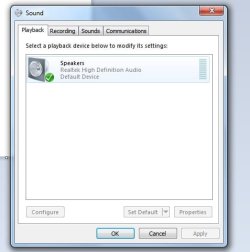
I went to the Sound section under control panel, under Playback, but it's only showing my speakers.

I dont know what else to try, i've been trying to fix this for the last hour and I can't figure out how to enable my headset again! i've clicked on everything I could find related to my headphones and the sound of the computer itself and nothing is bringing me back to the headset icon so I can enable it again! HELP!
 

My Computer My Computer

At a glance

Windows 7 Home Premium4.00 GB
Computer type
PC/Desktop
Computer Manufacturer/Model Number
Lenovo
OS
Windows 7 Home Premium
Memory
4.00 GB
Mouse
Logitech
Internet Speed
varies
Browser
Chrome
Hi and welcome to 7F. would be helpful if you complete your System Specs so it's easier to try and find a solution
 

My Computer My Computer

At a glance

Windows 7 Ultimate x64Q6600 3.1ghzKingston DDR2 6400 8GBGigabyte Radeon HD 6850 1GB 256-Bit
Computer type
PC/Desktop
Computer Manufacturer/Model Number
Home Made
OS
Windows 7 Ultimate x64
CPU
Q6600 3.1ghz
Motherboard
Gigabyte GA-P35-DS3L
Memory
Kingston DDR2 6400 8GB
Graphics Card(s)
Gigabyte Radeon HD 6850 1GB 256-Bit
Sound Card
On board
Monitor(s) Displays
Acer X243H
Screen Resolution
1920x1080
Hard Drives
Intel 330 120GB SSD
WD 2TB 7200
PSU
Thermaltake Toughpower 750W Semi Modular
Case
Modified Alienware
Keyboard
A4Tech
Mouse
Gigabyte ECO600
Antivirus
Comodo
Browser
Cyberfox
I filled in as much as I know, I dont even know what most of those are let alone how to find them! Isn't this a basic thing? If I remember right, there was a step in there that made the bluetooth headset show up in the audio devices, but when I uninstalled and reinstalled them, that didn't bring it back.
 

My Computer My Computer

At a glance

Windows 7 Home Premium4.00 GB
Computer type
PC/Desktop
Computer Manufacturer/Model Number
Lenovo
OS
Windows 7 Home Premium
Memory
4.00 GB
Mouse
Logitech
Internet Speed
varies
Browser
Chrome
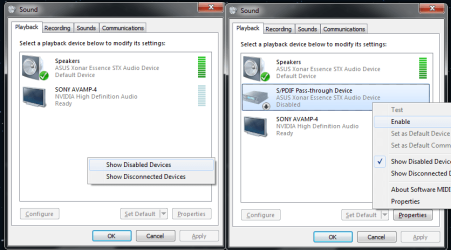
In playback devices if you right click empty space is show disabled devices checked?
 

My Computer My Computer

At a glance

10 Pro x64Ryzen 9 3900X64GB(4x16GB) DDR4EVGA 1080ti FTW3
Computer type
PC/Desktop
Computer Manufacturer/Model Number
Custom
OS
10 Pro x64
CPU
Ryzen 9 3900X
Motherboard
Asrock x370 Tachi
Memory
64GB(4x16GB) DDR4
Graphics Card(s)
EVGA 1080ti FTW3
Sound Card
ASUS Xonar Essence STX (V4 Bursons), ODAC rev B, NFB-11, O2
Monitor(s) Displays
3xASUS PB278Q/R, Optoma HD142X
Screen Resolution
3x1440p, 1080p
Hard Drives
512GB 850 EVO(OS, Programs)
4TB (Movies)
3TB (Downloads)
3TB (Programs)
1TB HDD (Games)
2x6TB R1 (videos)
PSU
AX760
Case
Fractal Define R5
Cooling
NH-D15S
Keyboard
Massdrop Ctrl with Box Navy's
Mouse
G903, Alioth XXL Mat
Internet Speed
280/40
Antivirus
MBAM, ESET
Browser
Canary 64 Bit
Other Info
I also own a Thinkpad P50 Xeon 4K, X220T, X1C5
Yes, both options are checked and still my headset is not showing up! :(
 

My Computer My Computer

At a glance

Windows 7 Home Premium4.00 GB
Computer type
PC/Desktop
Computer Manufacturer/Model Number
Lenovo
OS
Windows 7 Home Premium
Memory
4.00 GB
Mouse
Logitech
Internet Speed
varies
Browser
Chrome
Is your Bluetooth just off? If you hit the start orb and just type Bluetooth and then click on Bluetooth devices does it say it's off? Or show anything in there?
 

My Computer My Computer

At a glance

10 Pro x64Ryzen 9 3900X64GB(4x16GB) DDR4EVGA 1080ti FTW3
Computer type
PC/Desktop
Computer Manufacturer/Model Number
Custom
OS
10 Pro x64
CPU
Ryzen 9 3900X
Motherboard
Asrock x370 Tachi
Memory
64GB(4x16GB) DDR4
Graphics Card(s)
EVGA 1080ti FTW3
Sound Card
ASUS Xonar Essence STX (V4 Bursons), ODAC rev B, NFB-11, O2
Monitor(s) Displays
3xASUS PB278Q/R, Optoma HD142X
Screen Resolution
3x1440p, 1080p
Hard Drives
512GB 850 EVO(OS, Programs)
4TB (Movies)
3TB (Downloads)
3TB (Programs)
1TB HDD (Games)
2x6TB R1 (videos)
PSU
AX760
Case
Fractal Define R5
Cooling
NH-D15S
Keyboard
Massdrop Ctrl with Box Navy's
Mouse
G903, Alioth XXL Mat
Internet Speed
280/40
Antivirus
MBAM, ESET
Browser
Canary 64 Bit
Other Info
I also own a Thinkpad P50 Xeon 4K, X220T, X1C5
I'm sure it's on, I see nothing that says it's off. My dongle is plugged in and lit up blue, and my headset is on and the blue light is on meaning it's working...ugh I'm ready to buy a new pair, I know there is nothing wrong with these though, they were working just fine until I disabled them. But I thought I could just go back to it and enable it again, I didnt think it would completely erase it from showing up in the playback device section. It's everywhere else but there! Grrrrr
 

My Computer My Computer

At a glance

Windows 7 Home Premium4.00 GB
Computer type
PC/Desktop
Computer Manufacturer/Model Number
Lenovo
OS
Windows 7 Home Premium
Memory
4.00 GB
Mouse
Logitech
Internet Speed
varies
Browser
Chrome
What company makes them and what model are they, sounds like you just need to find your program it used to interface with and open it back up, also have you rebooted the computer since disabling it?
 

My Computer My Computer

At a glance

10 Pro x64Ryzen 9 3900X64GB(4x16GB) DDR4EVGA 1080ti FTW3
Computer type
PC/Desktop
Computer Manufacturer/Model Number
Custom
OS
10 Pro x64
CPU
Ryzen 9 3900X
Motherboard
Asrock x370 Tachi
Memory
64GB(4x16GB) DDR4
Graphics Card(s)
EVGA 1080ti FTW3
Sound Card
ASUS Xonar Essence STX (V4 Bursons), ODAC rev B, NFB-11, O2
Monitor(s) Displays
3xASUS PB278Q/R, Optoma HD142X
Screen Resolution
3x1440p, 1080p
Hard Drives
512GB 850 EVO(OS, Programs)
4TB (Movies)
3TB (Downloads)
3TB (Programs)
1TB HDD (Games)
2x6TB R1 (videos)
PSU
AX760
Case
Fractal Define R5
Cooling
NH-D15S
Keyboard
Massdrop Ctrl with Box Navy's
Mouse
G903, Alioth XXL Mat
Internet Speed
280/40
Antivirus
MBAM, ESET
Browser
Canary 64 Bit
Other Info
I also own a Thinkpad P50 Xeon 4K, X220T, X1C5
My headphones are Air-Fi Venture AF52. I have also emailed their support, haven't heard back yet. I have the users manual right here and I followed the instructions exactly how I did it the first time, it's really only one step. You click "add a device" then turn the headset on and it pairs up and connects. There are no other steps.

Yes I rebooted my computer twice, that was one of the first things I tried.
 

My Computer My Computer

At a glance

Windows 7 Home Premium4.00 GB
Computer type
PC/Desktop
Computer Manufacturer/Model Number
Lenovo
OS
Windows 7 Home Premium
Memory
4.00 GB
Mouse
Logitech
Internet Speed
varies
Browser
Chrome
Does it show up in devices and printers or in device manger under the sound category? Post a screenshot of those two areas please as that would make it easier to see if it is disabled somewhere in the system sense.
 

My Computer My Computer

At a glance

10 Pro x64Ryzen 9 3900X64GB(4x16GB) DDR4EVGA 1080ti FTW3
Computer type
PC/Desktop
Computer Manufacturer/Model Number
Custom
OS
10 Pro x64
CPU
Ryzen 9 3900X
Motherboard
Asrock x370 Tachi
Memory
64GB(4x16GB) DDR4
Graphics Card(s)
EVGA 1080ti FTW3
Sound Card
ASUS Xonar Essence STX (V4 Bursons), ODAC rev B, NFB-11, O2
Monitor(s) Displays
3xASUS PB278Q/R, Optoma HD142X
Screen Resolution
3x1440p, 1080p
Hard Drives
512GB 850 EVO(OS, Programs)
4TB (Movies)
3TB (Downloads)
3TB (Programs)
1TB HDD (Games)
2x6TB R1 (videos)
PSU
AX760
Case
Fractal Define R5
Cooling
NH-D15S
Keyboard
Massdrop Ctrl with Box Navy's
Mouse
G903, Alioth XXL Mat
Internet Speed
280/40
Antivirus
MBAM, ESET
Browser
Canary 64 Bit
Other Info
I also own a Thinkpad P50 Xeon 4K, X220T, X1C5
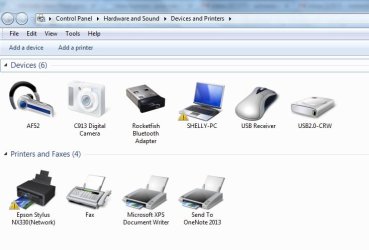
Here's my devices:

and the 2nd one is my Sound section showing playback devices.
 

Attachments

  • devices.jpg
    devices.jpg
    34.6 KB · Views: 0
  • sound.jpg
    sound.jpg
    21.6 KB · Views: 7

My Computer My Computer

At a glance

Windows 7 Home Premium4.00 GB
Computer type
PC/Desktop
Computer Manufacturer/Model Number
Lenovo
OS
Windows 7 Home Premium
Memory
4.00 GB
Mouse
Logitech
Internet Speed
varies
Browser
Chrome
What happens if you click on your af52, nothing? also your sound window is showing disabled devices for sure? Whats in the recording tab?
 

My Computer My Computer

At a glance

10 Pro x64Ryzen 9 3900X64GB(4x16GB) DDR4EVGA 1080ti FTW3
Computer type
PC/Desktop
Computer Manufacturer/Model Number
Custom
OS
10 Pro x64
CPU
Ryzen 9 3900X
Motherboard
Asrock x370 Tachi
Memory
64GB(4x16GB) DDR4
Graphics Card(s)
EVGA 1080ti FTW3
Sound Card
ASUS Xonar Essence STX (V4 Bursons), ODAC rev B, NFB-11, O2
Monitor(s) Displays
3xASUS PB278Q/R, Optoma HD142X
Screen Resolution
3x1440p, 1080p
Hard Drives
512GB 850 EVO(OS, Programs)
4TB (Movies)
3TB (Downloads)
3TB (Programs)
1TB HDD (Games)
2x6TB R1 (videos)
PSU
AX760
Case
Fractal Define R5
Cooling
NH-D15S
Keyboard
Massdrop Ctrl with Box Navy's
Mouse
G903, Alioth XXL Mat
Internet Speed
280/40
Antivirus
MBAM, ESET
Browser
Canary 64 Bit
Other Info
I also own a Thinkpad P50 Xeon 4K, X220T, X1C5
When I click on the AF52 icon, it just brings up the settings, but none of the options give me the choice to enable it. If you right click on the speaker icon to get properties, there is an option that says "device usage" then you click on enable to disable. That's not showing up in my AF52 properties, it WAS there when I disabled it, but that option completely disappeared so now I can't enable it, that's the entire problem.

WHOA!! It's showing up now!! I didn't even do anything, all I did was clicked again on Sound, the exact screenshot I just showed you, and this time my headset is showing up!! :D I dont know why after 2 days it suddenly decided to show up again! Whew...so ok, I just enabled it, and now it's working again. I have NO idea why it wasn't showing up until now, I didn't change a thing, i've just been going over and over the same thing and suddenly it is showing up now.
Well I guess I can close this thread, although if anyone ever reads this with the same problem, they won't know what to do, lol

Thanks for all your help Rvcjew!! I'm sorry the "fix" was nothing we could figure out, apparently my computer just felt like being a jerk, lol'

although I still have no idea why the volume control wasn't working in the first place, that's the entire reason I messed with it. But it's all working normal now, I hope it stays that way.
 

My Computer My Computer

At a glance

Windows 7 Home Premium4.00 GB
Computer type
PC/Desktop
Computer Manufacturer/Model Number
Lenovo
OS
Windows 7 Home Premium
Memory
4.00 GB
Mouse
Logitech
Internet Speed
varies
Browser
Chrome
Technology keeps you on your toes that way lol glad you got it fixed but yeah I was meaning this menu btw as it would have shown it grayed out. For reference:
 

Attachments

  • sound.png
    sound.png
    24.1 KB · Views: 0

My Computer My Computer

At a glance

10 Pro x64Ryzen 9 3900X64GB(4x16GB) DDR4EVGA 1080ti FTW3
Computer type
PC/Desktop
Computer Manufacturer/Model Number
Custom
OS
10 Pro x64
CPU
Ryzen 9 3900X
Motherboard
Asrock x370 Tachi
Memory
64GB(4x16GB) DDR4
Graphics Card(s)
EVGA 1080ti FTW3
Sound Card
ASUS Xonar Essence STX (V4 Bursons), ODAC rev B, NFB-11, O2
Monitor(s) Displays
3xASUS PB278Q/R, Optoma HD142X
Screen Resolution
3x1440p, 1080p
Hard Drives
512GB 850 EVO(OS, Programs)
4TB (Movies)
3TB (Downloads)
3TB (Programs)
1TB HDD (Games)
2x6TB R1 (videos)
PSU
AX760
Case
Fractal Define R5
Cooling
NH-D15S
Keyboard
Massdrop Ctrl with Box Navy's
Mouse
G903, Alioth XXL Mat
Internet Speed
280/40
Antivirus
MBAM, ESET
Browser
Canary 64 Bit
Other Info
I also own a Thinkpad P50 Xeon 4K, X220T, X1C5
Oh yeah I did right click on the empty space and then clicked on "show disabled devices" but it still didn't show up when I clicked that. I really wish I knew what made it suddenly show up though, I didn't change anything, all I was doing was going back to the same things I've already clicked on about 20 times, lol
 

My Computer My Computer

At a glance

Windows 7 Home Premium4.00 GB
Computer type
PC/Desktop
Computer Manufacturer/Model Number
Lenovo
OS
Windows 7 Home Premium
Memory
4.00 GB
Mouse
Logitech
Internet Speed
varies
Browser
Chrome
Back
Top