
You are using an out of date browser. It may not display this or other websites correctly.
You should upgrade or use an alternative browser.
You should upgrade or use an alternative browser.
I don't have install display language
- Thread starter BuKarrar
- Start date
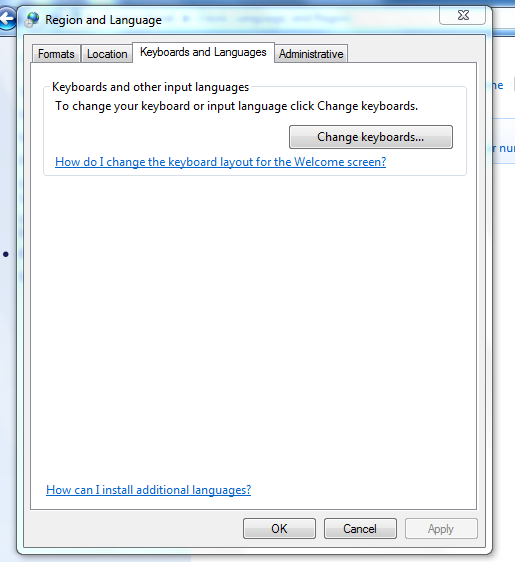

A quote from Microsoft's website,
If you have a Language Pack already or have it ready to be installed try this..
Click start and type cmd (into the search bar)When Command Prompt opens up type this Lpksetup
Here is a link to Microsoft's website (TechNet) about Language Packs.
Hope this Helps..
The Display language section will only be visible if you have already installed an LIP or if your edition of Windows supports an MUI. MUIs are only available in Windows 7 Ultimate and Windows 7 Enterprise.
If you have a Language Pack already or have it ready to be installed try this..
Click start and type cmd (into the search bar)When Command Prompt opens up type this Lpksetup
Here is a link to Microsoft's website (TechNet) about Language Packs.
Hope this Helps..
My Computer
- Computer Manufacturer/Model Number
- HP Pavilion dv5 Notebook PC
- OS
- Windows Seven x64
- CPU
- 2.2 GHz Dual Core
- Motherboard
- Quanta 3600
- Memory
- 4GB
- Graphics Card(s)
- ATI Mobility RADEON HD 3470
- Sound Card
- ATI
- Monitor(s) Displays
- Laptop
- Hard Drives
- ATA Hitachi HTS543215 (5400RPM)
- Case
- Laptop
- Cooling
- Fan
- Internet Speed
- Basic DSL 1.5 up and Down
I thought that is only for business and ultimate... not basic and home edition
My Computer
- Computer Manufacturer/Model Number
- HP Pavilion Elite HPE-410f
- OS
- Windows 7 Ultimate x64
- CPU
- AMD Phenom x6 1045t
- Motherboard
- N/A
- Memory
- 8 GB
- Graphics Card(s)
- ATI Radeon HD 5570
- Sound Card
- Realtek Highdefinition Audio / 5.1 Dolby Setup
- Monitor(s) Displays
- HP w2207h Widescreen
- Screen Resolution
- 1680*1050
- Hard Drives
- 1 TB (fixed), 320 Portable maxtor, Server Hard drives
- PSU
- 350 Watt
- Case
- HP CASE
- Cooling
- Bass
- Keyboard
- Logitech MX 5500
- Mouse
- Logitech MX 5500
- Internet Speed
- ROAD RUNNER 16MB D/512 U
I thought that is only for business and ultimate... not basic and home edition
I think you can install Language Interface Pack (LIP) on any Windows 7 version..(I think):huh:
acurasd, I believe you are talking about the Multilingual User Interface Pack (MUI) and that is only available in Windows 7 Ultimate and Windows 7 Enterprise.
I found another link explaining the differences. And this link will bring you to the Local Language Program
To what I saw these are the only Languages Packs that support Windows 7...

Hope this Helps..
My Computer
- Computer Manufacturer/Model Number
- HP Pavilion dv5 Notebook PC
- OS
- Windows Seven x64
- CPU
- 2.2 GHz Dual Core
- Motherboard
- Quanta 3600
- Memory
- 4GB
- Graphics Card(s)
- ATI Mobility RADEON HD 3470
- Sound Card
- ATI
- Monitor(s) Displays
- Laptop
- Hard Drives
- ATA Hitachi HTS543215 (5400RPM)
- Case
- Laptop
- Cooling
- Fan
- Internet Speed
- Basic DSL 1.5 up and Down

Using Language Packs to change the complete Windows language is possible in both Vista and 7. To be able to use this feature, you need an Ultimate or Enterprise edition.
In Ultimate (or Enterprise) you then have the option to change display language. This changes your OS completely to chosen language; everything from Paint and WordPad to IE through Windows Explorer and Help files is then in your chosen language:
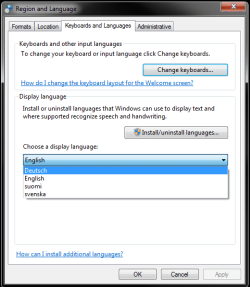
(Deutsch = German, Suomi = Finnish, Svenska = Swedish)
Language pack changes the language of chosen user account, making it possible to have different user accounts in different languages. The change of language is complete on chosen user account. The change must be applied when being logged in to that account. You can not change the language of user account A when logged in to account B. Language is changed next time user logs out and back in.
I've sometimes read on these forums about how updates or some drivers do not work when using a language pack. This is simply not true; language packs work perfectly. I've been using language packs since it was made possible, early 2006 in Vista Beta, and I've never encountered a problem. For me and my complicated situation (From Finland, living in Germany, working in English and Swedish) language packs are essential for me to be able to use computer as I want.
The language packs are available as optional updates in Windows Update (when you have Ultimate or Enterprise). Currently you can download and install 35 different languages:
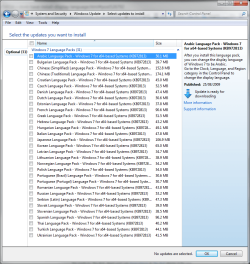
(The screenshot only shows 31 because I'm already using English, Finnish, German and Swedish.)
There are some unofficial methods allowing language packs also in Home and Business editions. Because these methods are all against EULA, and because of multiple problems these hacks are causing, I'm not going to advice on how to use them.
Kari
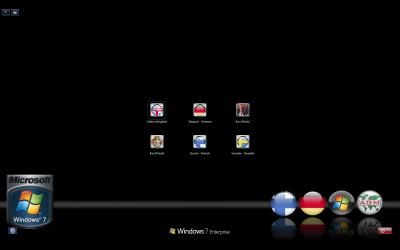
P.S. My logon screen showing my language options:
In Ultimate (or Enterprise) you then have the option to change display language. This changes your OS completely to chosen language; everything from Paint and WordPad to IE through Windows Explorer and Help files is then in your chosen language:
(Deutsch = German, Suomi = Finnish, Svenska = Swedish)
Language pack changes the language of chosen user account, making it possible to have different user accounts in different languages. The change of language is complete on chosen user account. The change must be applied when being logged in to that account. You can not change the language of user account A when logged in to account B. Language is changed next time user logs out and back in.
I've sometimes read on these forums about how updates or some drivers do not work when using a language pack. This is simply not true; language packs work perfectly. I've been using language packs since it was made possible, early 2006 in Vista Beta, and I've never encountered a problem. For me and my complicated situation (From Finland, living in Germany, working in English and Swedish) language packs are essential for me to be able to use computer as I want.
The language packs are available as optional updates in Windows Update (when you have Ultimate or Enterprise). Currently you can download and install 35 different languages:
(The screenshot only shows 31 because I'm already using English, Finnish, German and Swedish.)
There are some unofficial methods allowing language packs also in Home and Business editions. Because these methods are all against EULA, and because of multiple problems these hacks are causing, I'm not going to advice on how to use them.
Kari
P.S. My logon screen showing my language options:
Last edited by a moderator:
My Computer
- Computer type
- Laptop
- Computer Manufacturer/Model Number
- HP ENVY 17-1150eg
- OS
- Windows 10 Pro x64 EN-GB
- CPU
- 1.6 GHz Intel Core i7-720QM Processor
- Memory
- 6 GB
- Graphics Card(s)
- ATI Mobility Radeon HD 5850 Graphics
- Sound Card
- Beats sound system with integrated subwoofer
- Monitor(s) Displays
- 17" laptop display, 22" LED and 32" Full HD TV through HDMI
- Screen Resolution
- 1600*900 (1), 1920*1080 (2&3)
- Hard Drives
- Internal: 2 x 500 GB SATA Hard Disk Drive 7200 rpm
External: 2TB for backups, 3TB USB3 network drive for media
- Cooling
- As Envy runs a bit warm, I have it on a Cooler Master pad
- Keyboard
- Logitech diNovo Media Desktop Laser (bluetooth)
- Mouse
- Logitech Performance Mouse MX
- Internet Speed
- 50/10 Mbps VDSL
- Antivirus
- Windows Defender 4.3.9431.0
- Browser
- Maxthon 3.5.2., IE11