
JinRaziel123
New member
- Local time
- 11:06 PM
- Messages
- 3
Answer As soon as possible please.
Here is a screenshot.
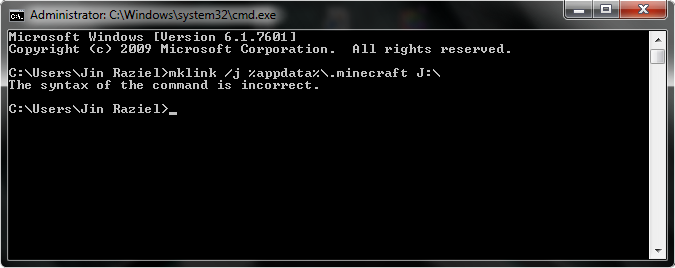
I am trying to follow an insane boost up method of Minecraft.
So, i follow what the YT Vid tells, i do it but nothing happens.
Why did that error show up?
Did i do something wrong?
Here is the command line that the Vid gave:
mklink /j %appdata%\.minecraft (partition letter):\
And here is the video i am trying to follow:
Tutorial: Optimizing Minecraft To get the best possible FPS (RamDisk) - YouTube
NOTE: Skip to 4:05 or watch the whole vid to know what i am trying to do.
No solution?, maybe you have a different method of making Junctions.
I have a 64-Bit W7Professional
PS. Sorry if i didn't follow the Attachment rule.
It was slow for me.
Here is a screenshot.
I am trying to follow an insane boost up method of Minecraft.
So, i follow what the YT Vid tells, i do it but nothing happens.
Why did that error show up?
Did i do something wrong?
Here is the command line that the Vid gave:
mklink /j %appdata%\.minecraft (partition letter):\
And here is the video i am trying to follow:
Tutorial: Optimizing Minecraft To get the best possible FPS (RamDisk) - YouTube
NOTE: Skip to 4:05 or watch the whole vid to know what i am trying to do.
No solution?, maybe you have a different method of making Junctions.
I have a 64-Bit W7Professional
PS. Sorry if i didn't follow the Attachment rule.
It was slow for me.
My Computer
- OS
- Windows 7 Professional 64bit/x64
- Graphics Card(s)
- AMD Turion x64/Sempron
- Screen Resolution
- 1280x800
- Keyboard
- Logitech Internet Navigator™
- Mouse
- Logitech Click!™ Optical Mouse

