
I get error codes 800B0100 and 8024200D

pegil

New member
Local time
4:03 AM
Messages
5
I get error codes 800B0100 and 8024200D every time I try to install updates

Security Update for Windows 7 for x64-based Systems (KB2654428)

Error details: Code 8024200D

Security Update for Windows 7 for x64-based Systems (KB2511455)

Error details: Code 800B0100

I ran csf a few times and it says that it found corrupted files that it could not fix.SFC.jpg
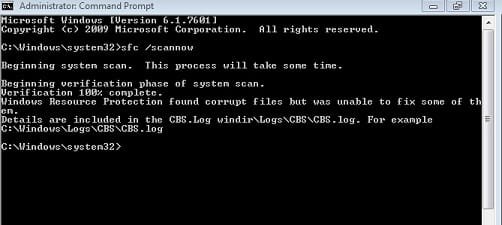
I also ran the SURT without any luck.. Here is the CBS log. View attachment 362601
 

My Computer My Computer

Computer type
PC/Desktop
Computer Manufacturer/Model Number
Custom
OS
Windows 7 Professional x64
CPU
Intel Core2 Quad Q9300 @ 2.5 GHz
Motherboard
Intel
Memory
4GB
Graphics Card(s)
on board
Antivirus
Mcaffe
Browser
chrome
We also need the CheckSUR/SURT tool results.

Pleasefollow the WindowsUpdate Posting Instructions and postthe requested data


If thefile is too large (8MB compressed), remove the older CBSPersist cab files untilthe final file is below the limit - you can always post them separately afterzipping them. (the forum doesn't allow the upload of bare CAB files, for anumber of reasons)


Pleasealso post the C:\Windows\windowsudpate.log file


My Computer My Computer

Computer type
Laptop
Computer Manufacturer/Model Number
Asus K52F or Lenovo B51-80
OS
Win 7 x64 Home Premium (and x86 VirtualBox VM)/Win10
CPU
i3 370M/i7 6500U
Motherboard
Asus/Lenovo
Memory
8GB - finally :)/8GB
Graphics Card(s)
it's an i3, dude!/dual Intel&nVidia
Sound Card
onboard
Monitor(s) Displays
15.6" built-in
Screen Resolution
1366x768/1920x1080
Hard Drives
750GB Seagate internal
Sundry external drives attached to other computers on the local network
1TB SSD on the Lenovo
PSU
n/a
Internet Speed
as much as I can get - usually on a dongle/phone, so <1MB/s
Antivirus
MSE/Defender
Browser
IE11/12/Edge/Chrome/FF(if I must)
I tried uploading the zipped files it always gives me a server error
 

My Computer My Computer

Computer type
PC/Desktop
Computer Manufacturer/Model Number
Custom
OS
Windows 7 Professional x64
CPU
Intel Core2 Quad Q9300 @ 2.5 GHz
Motherboard
Intel
Memory
4GB
Graphics Card(s)
on board
Antivirus
Mcaffe
Browser
chrome
Here are the rest of the files!! I uploaded them individually

[/attach][/attach][/attach]
 

Attachments

My Computer My Computer

Computer type
PC/Desktop
Computer Manufacturer/Model Number
Custom
OS
Windows 7 Professional x64
CPU
Intel Core2 Quad Q9300 @ 2.5 GHz
Motherboard
Intel
Memory
4GB
Graphics Card(s)
on board
Antivirus
Mcaffe
Browser
chrome
I suspect McAfee has something to do with your problems - have you ever had ANY other anti-virus installed? which one(s)?
Surprisingly, the CheckSUR log is clear.

This probably means that the corruption is in the SoftwareDistribution folder - but let's try a couple of things before we try to fix that.

Please attempt to install both fixes - in this order- from their respective standalone installers...
Download Security Update for Windows 7 for x64-based Systems (KB2511455) from Official Microsoft Download Center
Download Security Update for Windows 7 for x64-based Systems (KB2654428) from Official Microsoft Download Center
 

My Computer My Computer

Computer type
Laptop
Computer Manufacturer/Model Number
Asus K52F or Lenovo B51-80
OS
Win 7 x64 Home Premium (and x86 VirtualBox VM)/Win10
CPU
i3 370M/i7 6500U
Motherboard
Asus/Lenovo
Memory
8GB - finally :)/8GB
Graphics Card(s)
it's an i3, dude!/dual Intel&nVidia
Sound Card
onboard
Monitor(s) Displays
15.6" built-in
Screen Resolution
1366x768/1920x1080
Hard Drives
750GB Seagate internal
Sundry external drives attached to other computers on the local network
1TB SSD on the Lenovo
PSU
n/a
Internet Speed
as much as I can get - usually on a dongle/phone, so <1MB/s
Antivirus
MSE/Defender
Browser
IE11/12/Edge/Chrome/FF(if I must)
I had Norton for a little while because it came with the PC, but it expired and I had AVG and then Mcaffe lately.
 

My Computer My Computer

Computer type
PC/Desktop
Computer Manufacturer/Model Number
Custom
OS
Windows 7 Professional x64
CPU
Intel Core2 Quad Q9300 @ 2.5 GHz
Motherboard
Intel
Memory
4GB
Graphics Card(s)
on board
Antivirus
Mcaffe
Browser
chrome
You need to run the Norton and AVG removal tools, in that case...

Download theNorton Removal Tool from here https://www-secure.symantec.com/norton-support/jsp/help-solutions.jsp?lg=english&ct=united+states&docid=20080710133834EN&product=home&version=1&pvid=f-home


Close all otherprograms, then run the tool. When it's complete, reboot the machine whether it asks for it or not.

Download the AVG Remover 2015 ( I usually run both 32-bit and 64-bit on a 64-bit machine) from here... AVG | Download tools and utilities

once it's completed (it may reboot itself a couple of times!), reboot once more, then...


Afterthe reboot, open an Elevated Command Prompt, and run the following command


NETSH WINSOCK RESET


You'llbe advised to reboot - do so.


My Computer My Computer

Computer type
Laptop
Computer Manufacturer/Model Number
Asus K52F or Lenovo B51-80
OS
Win 7 x64 Home Premium (and x86 VirtualBox VM)/Win10
CPU
i3 370M/i7 6500U
Motherboard
Asus/Lenovo
Memory
8GB - finally :)/8GB
Graphics Card(s)
it's an i3, dude!/dual Intel&nVidia
Sound Card
onboard
Monitor(s) Displays
15.6" built-in
Screen Resolution
1366x768/1920x1080
Hard Drives
750GB Seagate internal
Sundry external drives attached to other computers on the local network
1TB SSD on the Lenovo
PSU
n/a
Internet Speed
as much as I can get - usually on a dongle/phone, so <1MB/s
Antivirus
MSE/Defender
Browser
IE11/12/Edge/Chrome/FF(if I must)
Thanks so much!!! Everything seems to be fine now!

I installed the updates individually from the links you provided and they installed without issues.
Do you think I should still download and run the antivirus software removal tools?
Should I run the sfc scannow again?
 

My Computer My Computer

Computer type
PC/Desktop
Computer Manufacturer/Model Number
Custom
OS
Windows 7 Professional x64
CPU
Intel Core2 Quad Q9300 @ 2.5 GHz
Motherboard
Intel
Memory
4GB
Graphics Card(s)
on board
Antivirus
Mcaffe
Browser
chrome
You should definitely run the removal tools - Norton tends to leave a lot of rubbish behind which can cause all sorts of problems, even years later.
 

My Computer My Computer

Computer type
Laptop
Computer Manufacturer/Model Number
Asus K52F or Lenovo B51-80
OS
Win 7 x64 Home Premium (and x86 VirtualBox VM)/Win10
CPU
i3 370M/i7 6500U
Motherboard
Asus/Lenovo
Memory
8GB - finally :)/8GB
Graphics Card(s)
it's an i3, dude!/dual Intel&nVidia
Sound Card
onboard
Monitor(s) Displays
15.6" built-in
Screen Resolution
1366x768/1920x1080
Hard Drives
750GB Seagate internal
Sundry external drives attached to other computers on the local network
1TB SSD on the Lenovo
PSU
n/a
Internet Speed
as much as I can get - usually on a dongle/phone, so <1MB/s
Antivirus
MSE/Defender
Browser
IE11/12/Edge/Chrome/FF(if I must)
Back
Top