I had vista, then ubuntu 11.04, and cant activate windows 7

coneill659

New member
Local time
6:31 PM
Messages
10
Hey guys,

I decided to try linux so I replaced windows vista, which origionally came with my computer, with ubuntu 11.04.

I have now given up on ubuntu and purchased a windows 7 upgrade disk. However, the activation code will not work as I removed vista from my computer and my version of w7 does not allow a full installation.

Any contact phone numbers to a windows help line in the uk or other help would be really appreciated.

Thanks
 

My Computer My Computer

At a glance

Windows 7
OS
Windows 7
Do you have a disk with Vista on it or did recovery come on a hard drive partition? If on a partition, do you still have it there? If you still have it on a partion you could use the recovery to get it back and then use the upgrade disk to make it Win 7. If you don't have it perhaps you can get recovery disks from the manufacturer. It will cost a few bucks. Also there is a windows sticker on your computer with the activation key on it. Maybe you could borrow a Vista disk of the same version you had and use the key on your computer to activate it and then upgrade.
 

My Computer My Computer

At a glance

Windows 7 Home Premium 64 bite 84004 gigs 800 hzEVGA 250sc
Computer Manufacturer/Model Number
Home Made
OS
Windows 7 Home Premium 64 bit
CPU
e 8400
Motherboard
EVGA 650i
Memory
4 gigs 800 hz
Graphics Card(s)
EVGA 250sc
Sound Card
built in
Monitor(s) Displays
24" Phillips lcd and 19" Hanns-g lcd
Hard Drives
1 160 gig partitioned in two
PSU
550 watt
Case
Medium tower off the street
Cooling
cpu fan, video fan and extraction fan
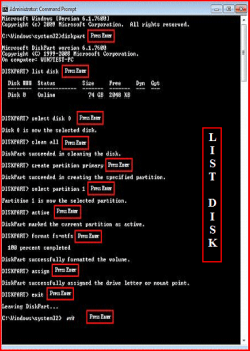
All Linux code must be deleted using the CLEAN ALL command.As you have had linux on the HD you need do a Clean all & full format.

Do a full clean & full format in command prompt.
1) Boot DVD & Press Shift+F10 (for command prompt)
http://www.sevenforums.com/tutorials/119713-diskpart-pc-startup.html
2) Boot DVD, & http://www.sevenforums.com/tutorials/682-command-prompt-startup.html
(for command prompt)

Type in command line
DISKPART
LIST DISK
SELECT DISK # (win HD)
CLEAN ALL
CREATE PARTITION PRIMARY
SELECT PARTITION 1
ACTIVE
FORMAT fs=NTFS
ASSIGN
EXIT
EXIT

List Disk.PNG


http://www.sevenforums.com/tutorials/91339-ssd-hdd-optimize-windows-reinstallation.html

http://www.sevenforums.com/tutorials/31402-clean-install-upgrade-windows-7-version.html?ltr=C
 

My Computer My Computer

At a glance

ME/XP/Vista/Win7
OS
ME/XP/Vista/Win7
I don't think I have a vista disk but I may get one, thanks!
 

My Computer My Computer

At a glance

Windows 7
OS
Windows 7

My Computer My Computer

At a glance

Windows 7 Pro X64 SP1Intel Core I7-3930k16 GB Gskill DDR3-2133eVGA GTX680
Computer Manufacturer/Model Number
homegrown
OS
Windows 7 Pro X64 SP1
CPU
Intel Core I7-3930k
Motherboard
Asus P9X79 Pro
Memory
16 GB Gskill DDR3-2133
Graphics Card(s)
eVGA GTX680
Sound Card
Creative X-Fi Titanium
Monitor(s) Displays
As PA246Q
Screen Resolution
1920 X 1200
Hard Drives
Corsair Force GT, 120 GB
WDC 1.5TB Caviar Black
PSU
PCP&C Silencer 750 Crossfire
Case
Silverstone FT02
Cooling
Noctua NH-D14
Keyboard
cheap Logitech USB
Mouse
Microsoft Intellimouse Explorer (old optical) USB
Internet Speed
6Mb cable
Other Info
Pioneer BDR-205
Samsung SH-203B
Monsoon 5.1 speakers
Back
Top