Solved I have a few questions about clean install

FloAmi

New member
Local time
3:54 AM
Messages
17
Hello I have a few questions. I need to perform a clean reinstall, but this is my first time and I'm a little nervous. I read through the whole tutorial but it is a lot to take in. I'd say I'm not a newbie user, but I'm not advanced either so bear with me here.

1. Should I locate all of the drivers needed for my HP computer before the reinstall and back them up on my external hard drive? If so how would I go about doing so, especially when it comes to figuring out what drivers are needed and which are not? (I read the Bloatware thread but I am still a little worried about this..)
Or will my computer install all the drivers needed via Windows Updates?

2. I only have one flashdrive to boot from (unless you can boot from an external harddrive, and doing so won't delete the files that are already on it). My flashdrive is older, and was I believe advertised as 4GB at the time, but is only 3.79 GB (or somewhere around there). Is that large enough to boot from for a x64 Windows 7 Home Premium OS?

3. My OS came preinstalled, but I found the COA sticker with the windows product key. Is that enough for activation, or should I back up the OEM activation keys and such?

EDIT: Also my computer is a touch screen, but I never used this feature since I found it more of a pain than anything (especially if a small bug or something ended up flying into the screen and exited out all of my stuff). Does this change anything when it comes to the drivers?
 
Last edited:

My Computer My Computer

At a glance

Windows 7 Home Premium x64AMD A4-3400 APU4GB RAMRadeaon HD 6410D 2.70 GHz
Computer type
PC/Desktop
Computer Manufacturer/Model Number
HP
OS
Windows 7 Home Premium x64
CPU
AMD A4-3400 APU
Memory
4GB RAM
Graphics Card(s)
Radeaon HD 6410D 2.70 GHz
Hard Drives
Hitachi HDS721010CLA632 SATA (1TB)

External - Toshiba (1TB)
Antivirus
Bitdefender Antivirus Free Edition
Browser
Chrome
1) The only driver you really need is the network driver, it can be found at HP. It should fit on your flash drive even after you create your Home Premium installer.

You can use Rufus to create your usb installer.

Rufus - Create bootable USB drives the easy way

or my favorite WiNToBootic bootable usb drive windows vista/7/8 - Bootable USB | Bootable USB

2) 3.79 should be fine, the Home Premium Iso file is 3.09 GB

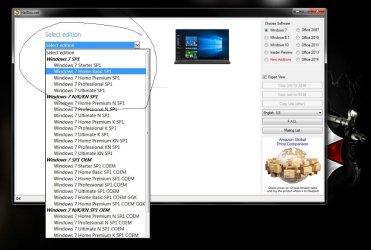
Did you download the Iso file yet, if not get it from here.

Microsoft Windows and Office ISO Download Tool

Just download and run the Windows ISO Downloader.exe, and it will pop up a window where you can choose to download the W7 Home Premium Iso file.

3) If you can read the key on the COA, that`s all you need to activate W7, you can`t use the key the factory used.


Any more questions, just ask.
 

Attachments

  • Capture.JPG
    Capture.JPG
    85.3 KB · Views: 0
Last edited:

My Computer My Computer

At a glance

Windows 10 Pro x64Intel Core i7 6700KGSkill TridentZ RGB 16GB 3600 16-16-16-36EVGA GTX 980 Ti SC x2
Computer type
PC/Desktop
Computer Manufacturer/Model Number
Skylake Special #666
OS
Windows 10 Pro x64
CPU
Intel Core i7 6700K
Motherboard
Asus Sabertooth Z170 Mark 1
Memory
GSkill TridentZ RGB 16GB 3600 16-16-16-36
Graphics Card(s)
EVGA GTX 980 Ti SC x2
Sound Card
Realtek High Definition
Monitor(s) Displays
AOC G2460PG
Screen Resolution
1920 x 1080 144Hz
Hard Drives
Samsung 860 Pro 256GB, Seagate Barracuda 4TB x2
PSU
EVGA 1000 P2, EVGA White Custom Braided Cables
Case
Corsair Vengeance C70 Gunmetal Black
Cooling
Corsair H100i v2, Corsair ML120 x2, Thermal Grizzly Kryonaut
Keyboard
Logitech G910 Orion Spectrum
Mouse
Logitech G700s
Internet Speed
Verizon Fios Quantum Gateway 75/75
Antivirus
Windows Defender, Malwarebytes Free 3.8.3
Browser
Chrome
Other Info
Corsair SP120 x4, LG Blu-ray Drive, Durabrand HT-395 100 Watt Dolby Digital Amp, Corsair H2100 Wireless 7.1 Headset
Your plan sounds good.

I did a search on HP Touchscreen A4-3400 and got one hit - the hp touchsmart. If that's your machine, here is your network driver:

http://ftp.hp.com/pub/softpaq/sp54001-54500/sp54333.exe

and here is HP Support Assistant.

HP Support Assistant | HP® Official Site

Just install windows, then run the network driver program, then run HP support assistant which will automatically download the rest of your drivers. Its also possible that the windows installation will correctly determine your network driver and install it before you even have to.

Meanwhile, here are all your drivers if you want to just download them now instead. Again, this assumes you have a Touchsmart machine.

HP Software and Driver Downloads for HP Printers, Laptops, Desktops and More | HP® Customer Support
 

My Computer My Computer

At a glance

Win7 pro x64stock i7 7700kCorsair Vengeance LPX 16GB (2x8GB) DDR4 @ 320...integrated Intel HD 630
Computer type
PC/Desktop
Computer Manufacturer/Model Number
diy
OS
Win7 pro x64
CPU
stock i7 7700k
Motherboard
Gigabyte Z270N-WIFI mini-ITX
Memory
Corsair Vengeance LPX 16GB (2x8GB) DDR4 @ 3200MHz
Graphics Card(s)
integrated Intel HD 630
Sound Card
onboard Realtek ALC1220
Monitor(s) Displays
two vertically mounted samsung 55" 4k un55mu8000
Screen Resolution
1920x1280
Hard Drives
256GB Samsung EVO 960 M.2 pci-e NVMe SSD
PSU
SilverStone Nightjar ST45NF 450Watt Fanless
Case
No case. Motherboard is mounted directly onto power supply
Cooling
Evercool low profile 815EP with Panaflow 12L fan at 7v
Keyboard
Ortek MCK-86 mini
Mouse
Belkin 5-button USB
Internet Speed
spectrum 400mbps

My Computers My Computers

  • At a glance

    Windows 7 HP 64i5 6600K - 800MHz to 4200MHz4+4G GSkill DDR4 3000IG - Intel 530
    Computer type
    PC/Desktop
    Computer Manufacturer/Model Number
    custom build
    OS
    Windows 7 HP 64
    CPU
    i5 6600K - 800MHz to 4200MHz
    Motherboard
    GA-Z170-HD3P
    Memory
    4+4G GSkill DDR4 3000
    Graphics Card(s)
    IG - Intel 530
    Monitor(s) Displays
    Samsung 226BW
    Screen Resolution
    1680x1050
    Hard Drives
    (1) -1 SM951 – 128GB M.2 AHCI PCIe SSD drive for Windows 7 and Lubuntu
    (2) -1 WD SATA 3 - 1T for Data
    (3) -1 WD SATA 3 - 1T for backup
    PSU
    Thermaltake 450W TR2 gold
    Keyboard
    Old and good Chicony mechanical keyboard
    Mouse
    Logitech mX performance - 9 buttons (had to disable some)
    Internet Speed
    500Mb/s
    Browser
    Firefox 64
    Other Info
    TinyWall firewall
  • At a glance

    Windows 7 Proi7-4500U 800MHz to 3.0GHz(4+4)G DDR3 1600IG intel 4400 + NVIDIA GeForce GT 745M
    Computer type
    Laptop
    System Manufacturer/Model Number
    Asus Q550LF
    OS
    Windows 7 Pro
    CPU
    i7-4500U 800MHz to 3.0GHz
    Motherboard
    Asus Q550LF
    Memory
    (4+4)G DDR3 1600
    Graphics Card(s)
    IG intel 4400 + NVIDIA GeForce GT 745M
    Sound Card
    Realtek
    Monitor(s) Displays
    LG Display LP156WF4-SPH1
    Screen Resolution
    1920 x 1080
    Hard Drives
    BX500 120G SSD for Windows and programs +
    1T HDD for data
    Internet Speed
    500 Mb/s
    Browser
    Firefox
    Other Info
    TinyWall firewall
Would the Factory Recover fix corrupted metadata files? Factory Recover seems easier to me, so I'd rather go with that if it would.

Regardless I'll set up the USB in case something happens later on. Thanks everyone for the replies and help!

EDIT: For the record, the metadata file corrupted was one responsible for system security.
 

My Computer My Computer

At a glance

Windows 7 Home Premium x64AMD A4-3400 APU4GB RAMRadeaon HD 6410D 2.70 GHz
Computer type
PC/Desktop
Computer Manufacturer/Model Number
HP
OS
Windows 7 Home Premium x64
CPU
AMD A4-3400 APU
Memory
4GB RAM
Graphics Card(s)
Radeaon HD 6410D 2.70 GHz
Hard Drives
Hitachi HDS721010CLA632 SATA (1TB)

External - Toshiba (1TB)
Antivirus
Bitdefender Antivirus Free Edition
Browser
Chrome

My Computers My Computers

  • At a glance

    Windows 7 HP 64i5 6600K - 800MHz to 4200MHz4+4G GSkill DDR4 3000IG - Intel 530
    Computer type
    PC/Desktop
    Computer Manufacturer/Model Number
    custom build
    OS
    Windows 7 HP 64
    CPU
    i5 6600K - 800MHz to 4200MHz
    Motherboard
    GA-Z170-HD3P
    Memory
    4+4G GSkill DDR4 3000
    Graphics Card(s)
    IG - Intel 530
    Monitor(s) Displays
    Samsung 226BW
    Screen Resolution
    1680x1050
    Hard Drives
    (1) -1 SM951 – 128GB M.2 AHCI PCIe SSD drive for Windows 7 and Lubuntu
    (2) -1 WD SATA 3 - 1T for Data
    (3) -1 WD SATA 3 - 1T for backup
    PSU
    Thermaltake 450W TR2 gold
    Keyboard
    Old and good Chicony mechanical keyboard
    Mouse
    Logitech mX performance - 9 buttons (had to disable some)
    Internet Speed
    500Mb/s
    Browser
    Firefox 64
    Other Info
    TinyWall firewall
  • At a glance

    Windows 7 Proi7-4500U 800MHz to 3.0GHz(4+4)G DDR3 1600IG intel 4400 + NVIDIA GeForce GT 745M
    Computer type
    Laptop
    System Manufacturer/Model Number
    Asus Q550LF
    OS
    Windows 7 Pro
    CPU
    i7-4500U 800MHz to 3.0GHz
    Motherboard
    Asus Q550LF
    Memory
    (4+4)G DDR3 1600
    Graphics Card(s)
    IG intel 4400 + NVIDIA GeForce GT 745M
    Sound Card
    Realtek
    Monitor(s) Displays
    LG Display LP156WF4-SPH1
    Screen Resolution
    1920 x 1080
    Hard Drives
    BX500 120G SSD for Windows and programs +
    1T HDD for data
    Internet Speed
    500 Mb/s
    Browser
    Firefox
    Other Info
    TinyWall firewall
A clean install is very simple, but as you said you are a bit nervous, if you can just do a factory restore then try that 1st, it will save you a lot of time and grief. Look at the screen when you 1st turn on the PC, it should show you which key to press to start the process, or you may be able to start it from within windows.

Excellent advice by Luiz :)
 

My Computer My Computer

At a glance

Windows 10 Pro x64Intel Core i7 6700KGSkill TridentZ RGB 16GB 3600 16-16-16-36EVGA GTX 980 Ti SC x2
Computer type
PC/Desktop
Computer Manufacturer/Model Number
Skylake Special #666
OS
Windows 10 Pro x64
CPU
Intel Core i7 6700K
Motherboard
Asus Sabertooth Z170 Mark 1
Memory
GSkill TridentZ RGB 16GB 3600 16-16-16-36
Graphics Card(s)
EVGA GTX 980 Ti SC x2
Sound Card
Realtek High Definition
Monitor(s) Displays
AOC G2460PG
Screen Resolution
1920 x 1080 144Hz
Hard Drives
Samsung 860 Pro 256GB, Seagate Barracuda 4TB x2
PSU
EVGA 1000 P2, EVGA White Custom Braided Cables
Case
Corsair Vengeance C70 Gunmetal Black
Cooling
Corsair H100i v2, Corsair ML120 x2, Thermal Grizzly Kryonaut
Keyboard
Logitech G910 Orion Spectrum
Mouse
Logitech G700s
Internet Speed
Verizon Fios Quantum Gateway 75/75
Antivirus
Windows Defender, Malwarebytes Free 3.8.3
Browser
Chrome
Other Info
Corsair SP120 x4, LG Blu-ray Drive, Durabrand HT-395 100 Watt Dolby Digital Amp, Corsair H2100 Wireless 7.1 Headset
Thanks everyone! I made the windows 7 flash drive for a later use in case, but managed to perform a factory reset and that seemed to have fixed the issue. Everything seems alright now, so I'm going to mark this thread as solved. Thanks for the advice and help!
 

My Computer My Computer

At a glance

Windows 7 Home Premium x64AMD A4-3400 APU4GB RAMRadeaon HD 6410D 2.70 GHz
Computer type
PC/Desktop
Computer Manufacturer/Model Number
HP
OS
Windows 7 Home Premium x64
CPU
AMD A4-3400 APU
Memory
4GB RAM
Graphics Card(s)
Radeaon HD 6410D 2.70 GHz
Hard Drives
Hitachi HDS721010CLA632 SATA (1TB)

External - Toshiba (1TB)
Antivirus
Bitdefender Antivirus Free Edition
Browser
Chrome
That`s great news :D

Another great idea to research and think about in the mean time is creating a disk image, after you get windows back to how you like it.

Right now you should install any security updates, then go through each important/optional update 1 at a time to see if you actually need it.

Highlite the update then on the right side of the page it will say More Information, just click on that and it will give a description of the update, take your time there`s no reason to rush it.

Windows only gets corrupted and slow because people download and install garbage, be careful and you should never have an issue.

After you re install all your programs and the updates, and windows is working great, then you should consider making a disk image, that is if you have a place to store it. (your external would be ideal)

There`s nothing worse then having windows working perfectly, then have an issue and have to start at square 1 again.

Any questions, just ask.

Backup Complete Computer - Create an Image Backup - Windows 7 Help Forums

Macrium Reflect is free :)

Macrium Reflect Free | Macrium Software
 

My Computer My Computer

At a glance

Windows 10 Pro x64Intel Core i7 6700KGSkill TridentZ RGB 16GB 3600 16-16-16-36EVGA GTX 980 Ti SC x2
Computer type
PC/Desktop
Computer Manufacturer/Model Number
Skylake Special #666
OS
Windows 10 Pro x64
CPU
Intel Core i7 6700K
Motherboard
Asus Sabertooth Z170 Mark 1
Memory
GSkill TridentZ RGB 16GB 3600 16-16-16-36
Graphics Card(s)
EVGA GTX 980 Ti SC x2
Sound Card
Realtek High Definition
Monitor(s) Displays
AOC G2460PG
Screen Resolution
1920 x 1080 144Hz
Hard Drives
Samsung 860 Pro 256GB, Seagate Barracuda 4TB x2
PSU
EVGA 1000 P2, EVGA White Custom Braided Cables
Case
Corsair Vengeance C70 Gunmetal Black
Cooling
Corsair H100i v2, Corsair ML120 x2, Thermal Grizzly Kryonaut
Keyboard
Logitech G910 Orion Spectrum
Mouse
Logitech G700s
Internet Speed
Verizon Fios Quantum Gateway 75/75
Antivirus
Windows Defender, Malwarebytes Free 3.8.3
Browser
Chrome
Other Info
Corsair SP120 x4, LG Blu-ray Drive, Durabrand HT-395 100 Watt Dolby Digital Amp, Corsair H2100 Wireless 7.1 Headset
Back
Top