I have a problem installing program

Terminator89

New member
Local time
2:02 PM
Messages
2
hello everybody

i have a problem installing ( learn to speak french 9 ) on windows 7 .

the installer runs normally in all steps and finally this message appears

attachment.php


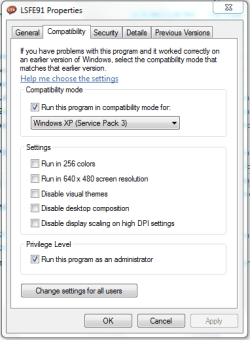
i think there's a problem in windows 7 protection system . i tried ( run as administrator , compatibility as xp mode ) but nothing works !!

please anyone has solution ?
 

Attachments
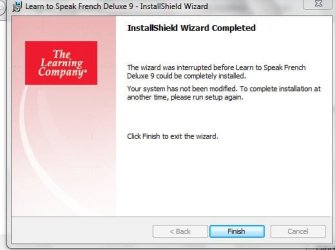
  • Capture.JPG
    Capture.JPG
    35.8 KB · Views: 937

My Computer

OS
windows 7
hello everybody

i have a problem installing ( learn to speak french 9 ) on windows 7 .

the installer runs normally in all steps and finally this message appears

attachment.php


i think there's a problem in windows 7 protection system . i tried ( run as administrator , compatibility as xp mode ) but nothing works !!

please anyone has solution ?


Have you checked with them to be sure it is compatible with win 7 (especially 64 bit win 7)?
 

My Computer

Computer Manufacturer/Model Number
HP Pavillion dv-7 1005 Tx
OS
Win 8 Release candidate 8400
CPU
[email protected]
Memory
4 gigs
Graphics Card(s)
Nvidia 9600M
Sound Card
HD built-in
Monitor(s) Displays
17" Wxga
Screen Resolution
1440x900
Cooling
none
Internet Speed
45Mb down 5Mb up
hello everybody

i have a problem installing ( learn to speak french 9 ) on windows 7 .

the installer runs normally in all steps and finally this message appears

attachment.php


i think there's a problem in windows 7 protection system . i tried ( run as administrator , compatibility as xp mode ) but nothing works !!

please anyone has solution ?


Have you checked with them to be sure it is compatible with win 7 (especially 64 bit win 7)?

Looks really old: Google Found "Supports Windows 98/Windows ME and Now Windows XP!!" :)
 

My Computer

Computer type
PC/Desktop
Computer Manufacturer/Model Number
Dell OP7010
OS
Windows 7 Enterprise (x64); Windows Server 2008 R2 (x64)
Memory
16GB
Monitor(s) Displays
4 Dell 24" LCD
Screen Resolution
1280x1024
Keyboard
Dell
Mouse
Dell Optical
Internet Speed
40meg
Have you checked with them to be sure it is compatible with win 7 (especially 64 bit win 7)?


Looks really old: Google Found "Supports Windows 98/Windows ME and Now Windows XP!!" :)[/QUOTE]


thanks for replying

but i think there's no compatibility problem cause the installer runs normally then i have a message ( user account control ) and i choose yes to allow program to make changes , but finally appears the message i've attached
 

My Computer

OS
windows 7
I see that "Learn to speak French" 9 is a relatively new version - it supports XP.

Have you tried to install it in Compatibility Mode (say, for XP)?

I'd refer you to their tech support, but I'm not sure that it still exists. "The Learning Company" has been sold several times, most recently to Mattel. The Mattel web page doesn't seem to have any links to software support.
 

My Computer

Computer Manufacturer/Model Number
homegrown
OS
Windows 7 Pro X64 SP1
CPU
Intel Core I7-3930k
Motherboard
Asus P9X79 Pro
Memory
16 GB Gskill DDR3-2133
Graphics Card(s)
eVGA GTX680
Sound Card
Creative X-Fi Titanium
Monitor(s) Displays
As PA246Q
Screen Resolution
1920 X 1200
Hard Drives
Corsair Force GT, 120 GB
WDC 1.5TB Caviar Black
PSU
PCP&C Silencer 750 Crossfire
Case
Silverstone FT02
Cooling
Noctua NH-D14
Keyboard
cheap Logitech USB
Mouse
Microsoft Intellimouse Explorer (old optical) USB
Internet Speed
6Mb cable
Other Info
Pioneer BDR-205
Samsung SH-203B
Monsoon 5.1 speakers
I tried it with compatibility mode xp service pack 3 and it didnt work, then i tried other way which is try it install custom and cancel installing quicktime and direct x. only install cd 1,2,3,4 . it worked for me. i have win7 x32.
 

My Computer

OS
windows 7 ultimate x32
Hi Reddeck,


I've spent some time so far but didn't think to try this way.
I've registered here just to thank you for the tip. It was working for me as well.
 

My Computer

OS
Windows 7 ultimate x32
I managed to get it installed but I had to recompile the MSI file using packaging software, it was a bit of trouble but at least it worked.. The software looks seriously ancient but it looks like it would have been pretty good in its time. the MSI file it created was quite large though but if anyone wants it then PM me
 

My Computer

OS
Windows 7 Ultimate 64 Bit
Hey, I'm not able to send you a pm, I don't know why, but please help, I have the same problem with Learn to Speak French Deluxe v9. Thank you
 

My Computer

OS
windows xp
hi Iorirom, I have now made a RAR file of the LTS program folder, you can dowload it from here :
LTS.rar

basically just do this:

1. download the rar file and extract it into c:\program\files it will create the LTS directory
2. if you dont have quicktime or itunes installed, then run find the quicktimeinstall.exe, this will install the old version 6.0 of quicktime which this program needs
if you already have itunes or quicktime installed then you might not need to/be able to do the above step but it might be ok, although the videos might not play, and the graphics wont be as good.
3. launch the program lsfe91.exe < you may need to run in compatibility mode for Windows XP
4. Create a user, and start the course and it should all hopefully work :)
 

My Computer

OS
Windows 7 Ultimate 64 Bit
thank you! I have no words to thank you enough...
 

My Computer

OS
windows xp
thank you! I have no words to thank you enough....
 

My Computer

OS
windows xp
LTS. rar

Thank you. But your link LTS. rar cannot be executed. It says that there is no server. Can you plz show me how?
 

My Computer

Computer type
PC/Desktop
OS
32 bit

My Computer

Computer type
Laptop
Computer Manufacturer/Model Number
Fujitsu
OS
Windows 7 Ultimate 32bit
hi Iorirom, I have now made a RAR file of the LTS program folder, you can dowload it from here :
LTS.rar

basically just do this:

1. download the rar file and extract it into c:\program\files it will create the LTS directory
2. if you dont have quicktime or itunes installed, then run find the quicktimeinstall.exe, this will install the old version 6.0 of quicktime which this program needs
if you already have itunes or quicktime installed then you might not need to/be able to do the above step but it might be ok, although the videos might not play, and the graphics wont be as good.
3. launch the program lsfe91.exe < you may need to run in compatibility mode for Windows XP
4. Create a user, and start the course and it should all hopefully work :)

Dear ozknightrider,

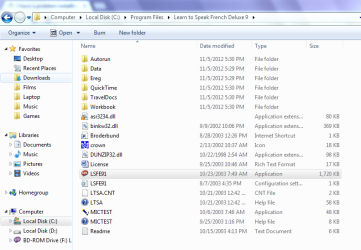
I followed above steps but after extract rar file i tried to open lsfe91.exe but i face nothing no application open and tried to change compatibility Mode also but the same problem no application runs :rolleyes:
please i need your urgent support to solve this problem
-Windows 7 Ultimate 32bit Service Pack 1
Capture.PNG

Capture1.PNG
 
Last edited:

My Computer

Computer type
Laptop
Computer Manufacturer/Model Number
Fujitsu
OS
Windows 7 Ultimate 32bit
My solution:
1. Installed MS Virtual PC 2007 on Win 7.
2. Installed XP with SP3 on Virtual PC.
3. Installed Power ISO on XP.
4. Mounted files and installed Deluxe.
 

My Computer

Computer type
Laptop
Computer Manufacturer/Model Number
Fujitsu
OS
Windows 7 Ultimate 32bit
Back
Top